Social media automation,
from idea to scheduled post.
Social media automation reduces the repetitive work of staying active online—from surfacing post ideas and turning existing material into drafts to scheduling across channels and tracking what performs.
Most small businesses and lean teams don’t struggle with clicking “Publish”—they struggle with finding time to come up with ideas and make posts every week. See what to automate, what to keep in human hands, and how to turn your business, offers, and everyday work into a steady social presence.
Automate the routine. Keep the point of view.
A good automation system removes mechanical busywork—reformatting slides, applying brand styling, and queuing weekday posts—while keeping your ideas, standards, and audience relationships human.
What software automates well
- Suggesting post ideas based on your business and offers, and turning topic briefs, blogs, newsletters, or notes into first-draft carousels, videos, and captions.
- Applying your saved logo, colors, fonts, and layout preferences across formats automatically.
- Slotting reviewed posts into recurring channel queues and publishing them at set times across platforms.
- Gathering cross-channel post metrics into one view so you can see what resonated.
Where people make the difference
- Choosing the source ideas, opinions, and real examples worth sharing with your audience.
- Reviewing drafts for factual accuracy, tone, and visual polish before they enter the publishing queue.
- Adjusting the schedule when product launches, client news, or real-world events call for a change.
- Replying to comments, messages, and sensitive customer questions that deserve a direct human response.
Five jobs people call “social media automation.”
Scheduling is only one piece of the puzzle. Separate these five jobs before choosing software so you solve the step that actually slows you down.
01
AI content ideation & creation
Brainstorming ideas based on your business and offers, and turning a topic brief or post idea into finished carousels, short videos, quote graphics, and captions.
Useful for: Staying consistent when you don’t have time to create new content from scratch—starting from post ideas grounded in and inspired by your business and offers, or a quick topic brief.
Your judgment: Pick the angle worth sharing, verify that specific claims match your business, and tighten slide hooks or visuals in the editor before queuing.
Before choosing a tool: Does the tool generate complete, editable visual posts (carousels, slideshows, and short videos) in your Brand Kit, or only generic text captions?
Explore AI social content creation →02
Content repurposing & feed triggers
Turning existing articles, newsletters, PDFs, YouTube videos, transcripts, or ongoing blog/RSS feeds into new post ideas and channel-ready social drafts.
Useful for: Getting a full week of multi-platform posts from long-form material you already publish—with feed triggers that surface fresh post ideas automatically whenever a new article or newsletter goes live.
Your judgment: Make sure each adapted post stands on its own in the feed with a real takeaway and source-grounded visuals, rather than auto-posting a bare headline and URL.
Before choosing a tool: Does the workflow reshape your source into native carousels, short videos, and platform-specific captions, or simply drop a link preview?
Explore AI content repurposing →03
Content calendar, queues & scheduled publishing
Mapping out your publishing calendar, slotting approved posts into recurring weekday queues, and auto-publishing across connected channels.
Useful for: Batching your social publishing in one weekly sitting instead of logging into each platform every day to upload files by hand.
Your judgment: Confirm destination accounts, time zones, and platform-specific formats, and drag scheduled posts on the calendar when priorities change.
Before choosing a tool: Can it publish native multi-slide formats—like LinkedIn PDF carousels, Instagram carousels and Stories, TikTok slideshows, and Pinterest pins—directly to your channels?
Explore scheduling & publishing →04
Cross-channel analytics & reporting
Automatically gathering published post visibility, engagements, engagement rate, follower growth, and top-performing posts into one dashboard.
Useful for: Seeing which topics, hooks, and formats actually earn attention across LinkedIn, Instagram, TikTok, Facebook, YouTube, and Pinterest without switching between six native apps.
Your judgment: Use your top-performing posts and engagement rates to decide which topics and formats to double down on in next week’s queue.
Before choosing a tool: Does the analytics view rank your top posts alongside the actual creative so you can see why a post worked, and keep unsupported platform metrics clearly marked rather than counting them as zero?
Explore cross-channel analytics →05
Inbox, DM routing & social listening
Triggering keyword DM replies, routing customer support messages, and monitoring public brand mentions or industry trends across social feeds.
Useful for: Managing high inbound comment/DM volume (such as comment-to-DM lead magnets) or tracking untagged brand mentions and competitor keywords across public networks.
Your judgment: Keep automated replies transparent and step in personally whenever a customer question or public conversation needs nuance.
Before choosing a tool: Do you actually need a heavy enterprise inbox and listening suite, or—like most small businesses and lean teams—is your real bottleneck creating, scheduling, and measuring consistent content?
Compare Hootsuite alternatives →How to choose social media automation software.
A calendar tool alone will not fix an empty queue. Evaluate software on the complete path from source idea to published post.
Solve the empty-queue problem
Traditional schedulers wait for you to upload finished graphics and copy. If coming up with ideas and creating posts is what slows you down, choose a tool that combines source-grounded drafting, visual editing, and scheduling in one place.
Connect repurposing and feed triggers
If you already publish blogs, newsletters, or videos, check whether the tool can turn those sources—and new RSS or blog updates—into multi-slide carousels, short videos, and platform-specific captions instead of dropping bare link previews.
Check native format support
Look beyond plain text and single images. Confirm the platform can generate and directly publish LinkedIn document PDFs, Instagram carousels and Stories, TikTok photo slideshows, and Pinterest pins without manual workarounds.
Keep editing and brand controls close
Automation should never lock you into generic templates. Test whether you can apply your saved Brand Kit automatically and still edit individual slides, headlines, and images before a post enters the queue.
Balance recurring queues with calendar control
Recurring weekday slots let you add approved posts to the next open time in one click. A visual calendar lets you see the whole month across channels and drag posts when timing changes.
Track cross-channel performance in one view
Choose a workflow that brings post impressions, engagement rates, follower growth, and top-performing creatives into one dashboard so you know which topics and formats to repeat next week.
Using a free plan? Check how many social accounts you can connect, whether recurring queues are included, and whether you can publish multi-slide posts directly rather than only drafting them.
Ready to compare specific tools?
Explore our buyer guides across AI social workflows, content calendars, and scheduling software.
From a business website to a weekly publishing routine.
Here is how WaveGen sets up a repeatable social workflow for Anchor Dental, a San Francisco dental practice—starting from their website and moving through draft review, recurring channel schedules, and next-post ideas.
INPUT / BUSINESS SOURCE
Anchor Dental’s website (anchordentalsf.com)—covering the clinic’s doctors, reasons patients choose the practice, cosmetic and family dentistry services, first-visit expectations, and dental insurance.
Setup: WaveGen reads the website to pull the clinic’s logo, navy color palette, typography, and photos into a reusable Brand Kit, then generates a first batch of five posts.
OUTPUT
Three parts of a repeatable weekly loop.
Instead of starting from an empty calendar every Monday, the workflow pairs source-grounded drafts with a recurring channel queue and ongoing topic suggestions.
01 / DRAFT BATCH
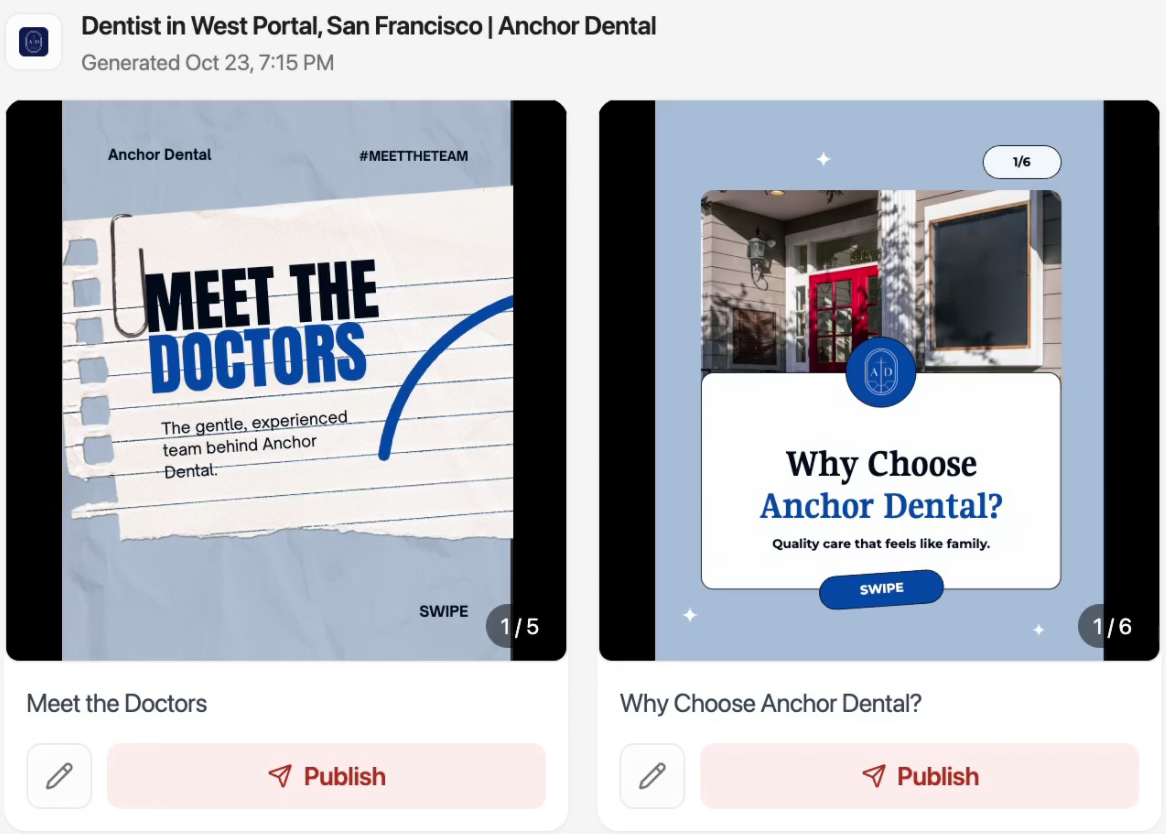
Start with editable drafts.
WaveGen turns the clinic’s core pages into five multi-slide carousels—including Meet the Doctors and Why Choose Anchor Dental?—ready to review, edit, or publish.
02 / RECURRING QUEUE
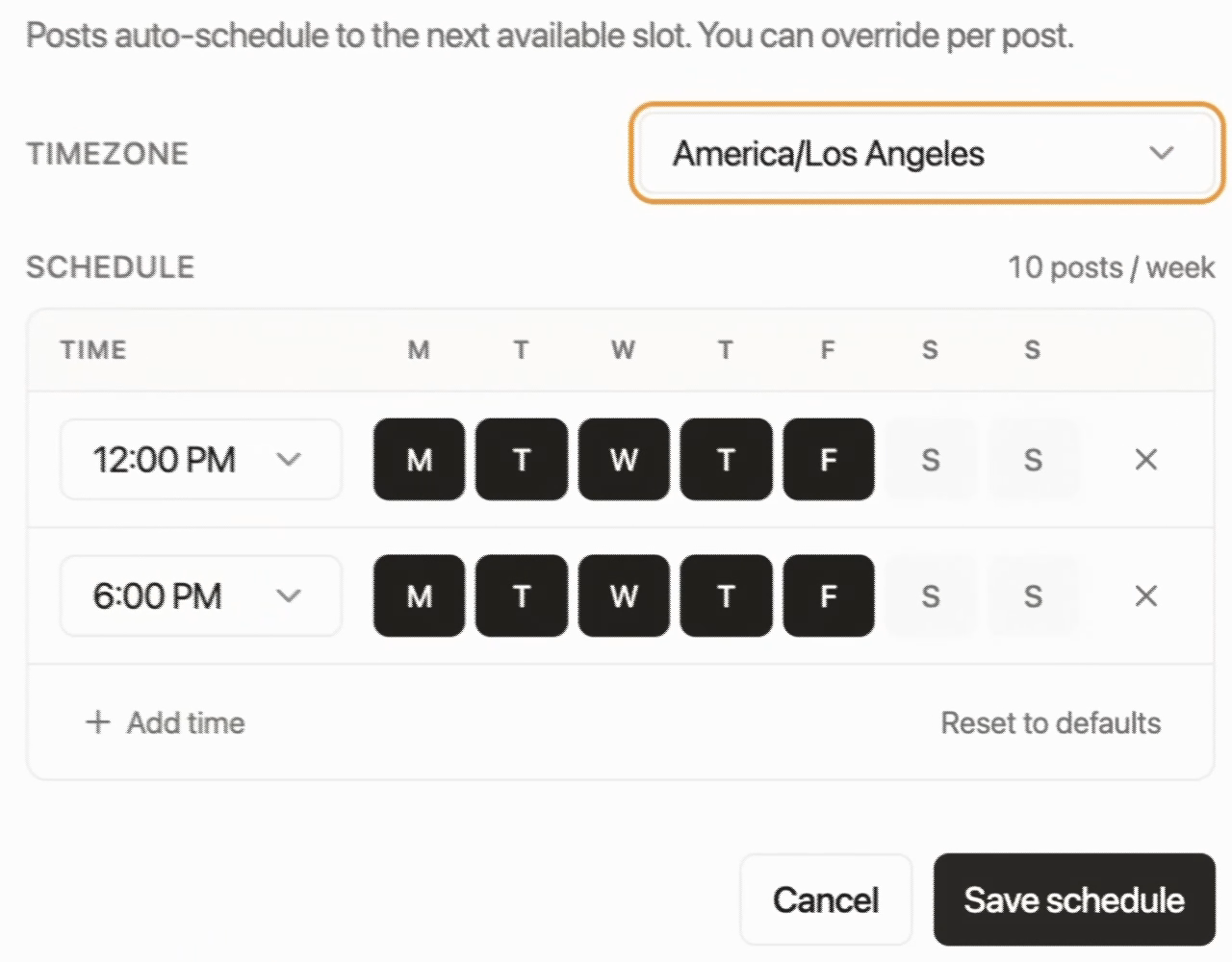
Set the schedule once.
Define your time zone and preferred weekday slots per channel. Approved posts automatically take the next available slot, with the option to override timing for any individual post.
03 / ONGOING IDEAS
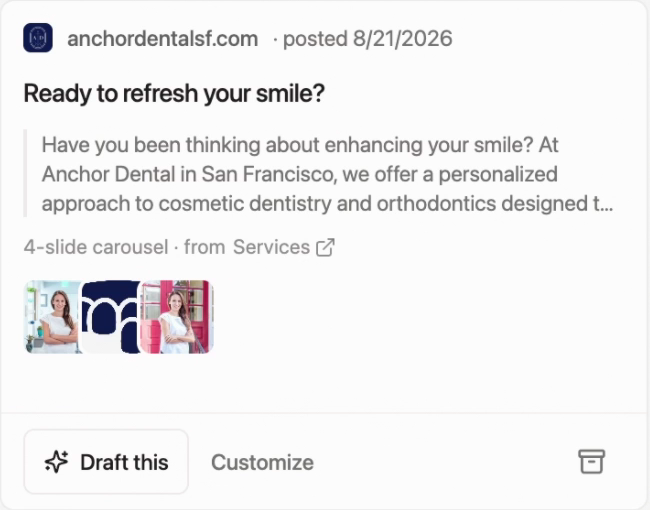
Refill the queue from your site.
When it is time for the next batch, WaveGen suggests fresh ideas grounded in specific pages—like a four-slide carousel from the Services page—so you can draft or customize with one click.
Watch the full workflow.
Follow the five-minute walkthrough from website import and Brand Kit setup to reviewing drafts and queuing the schedule.
WaveGen tutorial · 5:22
See the whole calendar at a glance.
Once posts are queued or scheduled, manage them across LinkedIn, Instagram, TikTok, Facebook, YouTube, and Pinterest in calendar or list view—and drag any scheduled post to a new date when plans change.
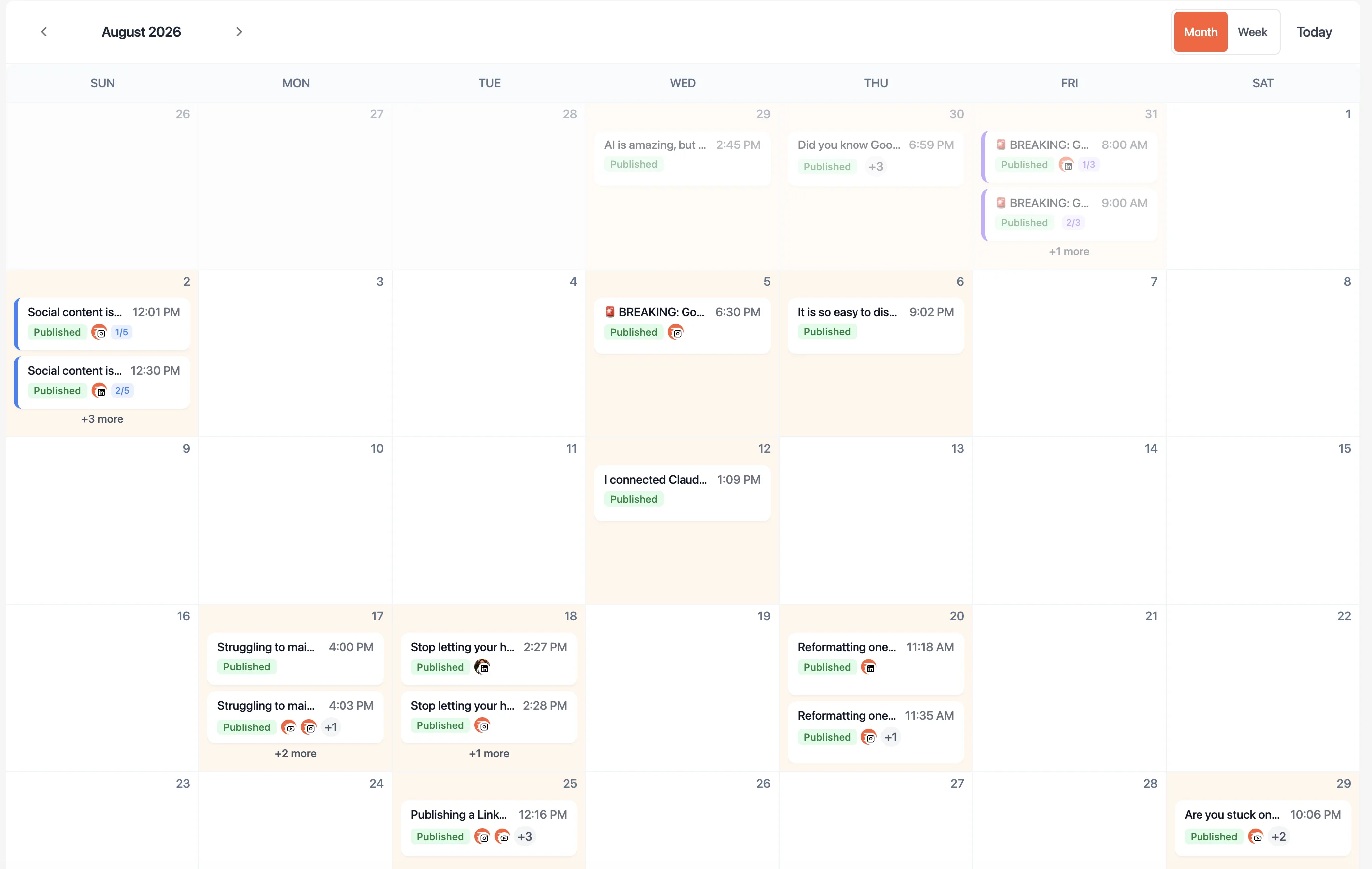
WaveGen’s cross-channel publishing calendar.
Build a repeatable weekly queue from your website.
Import your site, review a first batch of source-grounded drafts, and set your recurring weekday posting slots across channels.
Follow a step-by-step automation playbook.
Pick the setup guide that matches how your business produces content each week.
Weekly routine · no blog required
Automate social media from your weekly work
Turn meeting notes, client questions, or approved website pages into a week of platform-native carousels, slideshows, and captions in one 15-minute review session.
Follow the weekly social workflow →Long-form + social loop
Automate content marketing from blog or newsletter to social
Publish one strong article or newsletter each week, then automatically adapt its key points into scheduled social posts across LinkedIn, Instagram, TikTok, YouTube, Facebook, and Pinterest.
Follow the blog-to-social workflow →Industry-specific automation workflows
See how service businesses turn approved pages and expert interviews into a steady weekly queue:
Platform automation & cadence rules
Each network supports different native formats and posting rhythms. Use these guides to configure your channel queues:
4:5 feed carousels, single-image posts, 9:16 Stories & Reels
Direct publishing requires a connected Instagram Business or Creator account. Automate recurring feed carousels and Stories while keeping DM conversations human.
TikTok
9:16 photo slideshows & captioned vertical videos
TikTok rewards steady cadence (3–5 posts per week). Turn articles, notes, or website pages into swipeable photo slideshows and short videos queued to your target audience’s time zone.
Multi-slide PDF document posts, quote cards & text posts
LinkedIn document carousels and point-of-view posts perform best on Tuesday–Thursday mornings. Draft from real client questions or articles and review the hook before queuing.
Common questions about social media automation.
What is the difference between social media scheduling and social media automation?
Scheduling is one step of automation: picking a date and time for a finished post to go live. Full social media automation covers the broader loop—surfacing post ideas from your website or feeds, drafting and styling channel-ready posts, slotting approved drafts into recurring queues, and pulling cross-channel analytics into one dashboard.
Can AI create and automatically post to social media?
Yes, when connected to a publishing workflow—though most businesses get better results with a quick review gate. In WaveGen, AI learns your business from your website, suggests ongoing post ideas, and generates finished carousels, short videos, and captions in your Brand Kit. Once you approve a draft, it drops straight into your recurring channel queue to publish automatically.
Does automating or scheduling social media posts hurt reach?
No—major platforms (Instagram, LinkedIn, TikTok, Facebook, YouTube, and Pinterest) support official publishing APIs, and scheduling through approved connections does not penalize reach. Engagement drops only when teams auto-publish unreviewed, generic filler or ignore comments after a post goes live.
How do I automate Instagram, TikTok, and LinkedIn posts at once without posting identical files?
Instead of cross-posting the exact same square graphic everywhere, start from one source (an article, newsletter, or topic brief) and let your workflow generate platform-native versions—a PDF document carousel for LinkedIn, a 4:5 carousel or 9:16 Story for Instagram, and a vertical slideshow or short video for TikTok—then queue each version on its own channel schedule.
Connect the next steps.
Start with content you already have →
Turn articles, newsletters, PDFs, and transcripts into platform-native social posts.
Create social content from a brief →
Explore AI formats, editable carousels, and slideshows when starting from a new idea.
Keep automated posts on brand →
Carry your voice, colors, fonts, and visual identity into every generated draft.
Go deeper into social media automation
Start with a guide, try a tool, or compare your options.
Plan and build your workflow
Schedule and distribute
Compare schedulers and suites
Browse all 62 guides, tools and comparisons in this topic
- Content Marketing Automation: Weekly Blog + Social
- How to Automate Social Media Marketing: Weekly Posts Ready to Approve
- 8 Best Hootsuite Alternatives in 2026 (Free & Paid)
- Best Time to Post on Social Media in 2026 — Instagram, TikTok, LinkedIn & More
- Best Time to Post on Facebook in 2026 (Data-Backed Guide)
- Best Time to Post on Instagram in 2026 (by Day)
- Best Time to Post on LinkedIn in 2026 (by Day)
- Best Time to Post on Pinterest in 2026 (by Day)
- Best Time to Post on TikTok in 2026 — Hour-by-Hour Heatmap
- 10 Best AI Tools for Social Media Managers in 2026
- How to Automate Social Media Without Losing Your Voice
- How to Create an Automated Instagram Post Workflow
- My first attempt at automating content marketing failed. You're reading the second.
- B2B Content Distribution: A 2026 Guide
- 10 Best Free Social Media Schedulers for 2026
- Best Social Media Scheduler for Small Business: 10 Picks
- Best Social Media Scheduling Tools for 2026 Compared
- 8 Cadence Examples for Consistent Social Content
- Can You Schedule Posts on Instagram? a Complete Guide
- Master Your Content Approval Workflow
- Content Automation Platform: A Practical Buyer's Guide
- Best Content Calendar Software Guide 2026
- Content Creation Automation Your 2026 Guide
- Content Distribution Channels That Drive Real Reach
- Content Distribution Platform: A 2026 Guide for Marketers
- Content Distribution Strategy Blueprint for 2026
- Content Marketing Platform: A Complete Guide for 2026
- Do Hashtags Work on LinkedIn in 2026? a Data-Backed Guide
- 10 Best Editorial Calendar Templates for 2026
- How to Plan Social Media Content: A Practical Framework
- How to Schedule a LinkedIn Post Without Missing Timing
- How to Schedule Social Media Posts Efficiently
- Impressions on Linkedin
- Multi Channel Content Management for Modern Teams
- Multi Channel Meaning: A Practical Guide for 2026
- Multi Platform Publishing: A Step-by-Step Workflow Guide
- How to Build My Social Calendar for Steady Growth
- Master Your Omnichannel Content Strategy
- Posting on All Social Media at Once Without Losing Quality
- RSS Feed to Social Media: Step-by-Step Automation Guide 2026
- Scaling Content Production Without Losing Your Voice
- 10 Best Scheduling Apps for Social Media in 2026
- Social Media Content Distribution: A 2026 Guide
- Social Media Cross Posting Strategy Guide
- 10 Social Media Engagement Strategies That Work in 2026
- Social Media Trend Analysis: A Guide to Finding What's Next
- Tik Tok Automation: Safe Workflows for Scalable Content
- What Is a Content Calendar and How to Build One
- What Is Content Scheduling and Why It Matters
- Best Buffer Alternative in 2026 — WaveGen
- Cross-Channel Social Media Analytics
- Social Media Scheduling & Publishing
- Free Hootsuite Alternative (2026) That Creates Your Content — WaveGen
- Best Later Alternative in 2026 — WaveGen
- Best Loomly Alternative in 2026 — WaveGen
- Best Metricool Alternative in 2026 — WaveGen
- Pinterest Scheduler — Plan & Auto-Publish Pins
- Pinterest SEO: Keywords, Titles & Descriptions
- Best Publer Alternative in 2026 — WaveGen
- Social Media Management Cost in 2026: Agency vs Tool
- Best SocialBee Alternative in 2026 — WaveGen
- Best Sprout Social Alternative in 2026 — WaveGen
Stay active on social media without the weekly scramble.
Connect your website or content sources, review a batch of on-brand drafts, and let your recurring channel schedule handle publishing across LinkedIn, Instagram, TikTok, Facebook, YouTube, and Pinterest.