September 2, 2026
13 min read
Posting on All Social Media at Once Without Losing Quality
Learn how to handle posting on all social media at once with a practical workflow, platform-specific tweaks, and timing strategies that keep engagement high.
You've just finished a strong campaign post. The Instagram version is approved, the creative is exported, and the team wants it on LinkedIn, Facebook, X, Threads, Pinterest, TikTok, and YouTube Shorts before lunch. The obvious move is to select every connected account and press publish.
That shortcut saves clicks, but it can also create the same caption, crop, hook, and timing problem across every channel. Posting on all social media at once works best when “at once” means one coordinated campaign, not one identical upload at one identical moment.
Table of Contents
- Why Posting Everywhere at Once Is a Real Problem in 2026
- Choosing the Right Cross-Posting Approach for Your Workflow
- Preparing Assets and Captions for Each Platform
- Staggered Scheduling Beats True Simultaneous Posting
- Pre-Publish Checks That Catch the Embarrassing Mistakes
- When Automation Quietly Hurts Your Reach
- A Repeatable Weekly Cadence for Multi-Platform Publishing
Why Posting Everywhere at Once Is a Real Problem in 2026
A campaign can be ready for Instagram while the LinkedIn caption still needs a rewrite. Publishing to every connected account at that moment may save clicks, yet it also sends the same crop, hook, and call to action into feeds with different audience habits. Posting on all social media at once works best when “at once” means one coordinated campaign, not one identical upload at one identical moment.
Multi-platform publishing is established practice. A peer-reviewed study found that professional users had a median of 114 cross-posts on Facebook and 85 on Twitter. Cross-posts represented 26.42% of Facebook posts and 3.34% of tweets in its sample (cross-platform posting statistics). The challenge now is coordinating more formats, expectations, and publishing controls.
One source idea may become a visual feed post, short-form video, professional update, text-led conversation, or searchable pin. Broad distribution is useful when each version preserves the message while adapting its proof, opening, format, and call to action.
Working rule: Publish everywhere you have a real audience, then adjust the evidence, opening, format, and call to action for each network.
Platform volume adds scheduling pressure. A 2025 analysis of 9,332,840 social posts across 10 networks found Facebook represented 44.5%, X 14.8%, Instagram 12.8%, and LinkedIn 11.6% of the dataset. The top four networks made up more than 80% of posting volume (SocialBee's social media report).
Three terms clarify the work:
- Adaptation gap: The distance between a master asset and a version that feels native.
- Blast radius: How widely one mistake spreads across connected accounts.
- Peak window: When a platform's audience is most active for your account or segment.
Use a scheduler for repetition, not judgment. A practical content distribution strategy starts with one core idea, builds channel-specific versions, and releases them in a planned sequence.
Choosing the Right Cross-Posting Approach for Your Workflow
The right setup depends on how much variation your team needs to create before publication. Native tools are convenient when the content is simple. A scheduler is more useful when one campaign needs several captions, crops, approval steps, or timing rules.
Three workable architectures
Native publishing inside Meta Business Suite or LinkedIn keeps the workflow close to the platform. It's suitable for a small team that mainly publishes to Meta properties and LinkedIn, with limited approval complexity. The trade-off is manual repetition when your campaign expands to TikTok, X, Pinterest, or YouTube Shorts.
All-in-one schedulers such as Buffer, Hootsuite, and Later centralize calendars, account access, and queue management. They're practical for teams that want one planning surface and can handle some platform editing themselves. Check whether the composer lets you edit each destination separately rather than copying the first caption everywhere.
API-driven stacks such as WaveGen.ai or Make.com suit teams with branching workflows. They can connect source content, asset generation, scheduling, approvals, and other business systems. That flexibility helps when a blog article becomes a LinkedIn post, a short video, a carousel, and a sequence of scheduled updates, but it also requires clearer ownership and stronger quality controls.
| Approach | Best for team size | Native API limits | Per-platform adaptation | Approval workflow | Typical monthly cost |
|---|---|---|---|---|---|
| Native platform tools | Solo creators and small teams | Limited to the platform's own ecosystem | Manual and usually basic | Basic | Platform-dependent |
| All-in-one scheduler | Small to mid-sized teams | Varies by network and account type | Manual or partial automation | Moderate on selected plans | Plan-dependent |
| API-driven stack | Teams with complex operations | More setup and maintenance | Strong when branching is configured | Customizable | Usage and tool dependent |
Before choosing, map the actual workflow: who creates the master asset, who writes variants, who checks compliance, and who approves the queue. Guidance on how to boost sales with multi-channel strategies is useful here because distribution only supports revenue when each channel has a defined role.
Decision rule: If you need more than one caption variation per post, you've outgrown native cross-posting.
A central calendar can reduce account switching, but it shouldn't hide platform differences. Your multi-channel content management process should make variations visible, assign review responsibility, and preserve the original asset alongside every adapted version.
Preparing Assets and Captions for Each Platform
Start with a master asset folder, not a scheduler. Keep the original video, clean exports, logos, thumbnail options, caption source, destination links, and accessibility notes together. Name files by campaign and platform so nobody accidentally uploads a TikTok export with a competing platform's watermark to Instagram Reels.
Build the asset branches first
The master creative should be treated as a source, not a final upload. Prepare the following branches:
- Instagram feed: Use a 4:5 composition when the design benefits from vertical feed space.
- Reels and TikTok: Export in 9:16, with text and faces kept away from interface overlays.
- LinkedIn: A 1:1 still is a safe starting point for many professional updates.
- YouTube: Long-form content generally needs 16:9, while Shorts need their vertical treatment.
- Pinterest: Pins work with a 2:3 layout, with readable text and a clear visual subject.
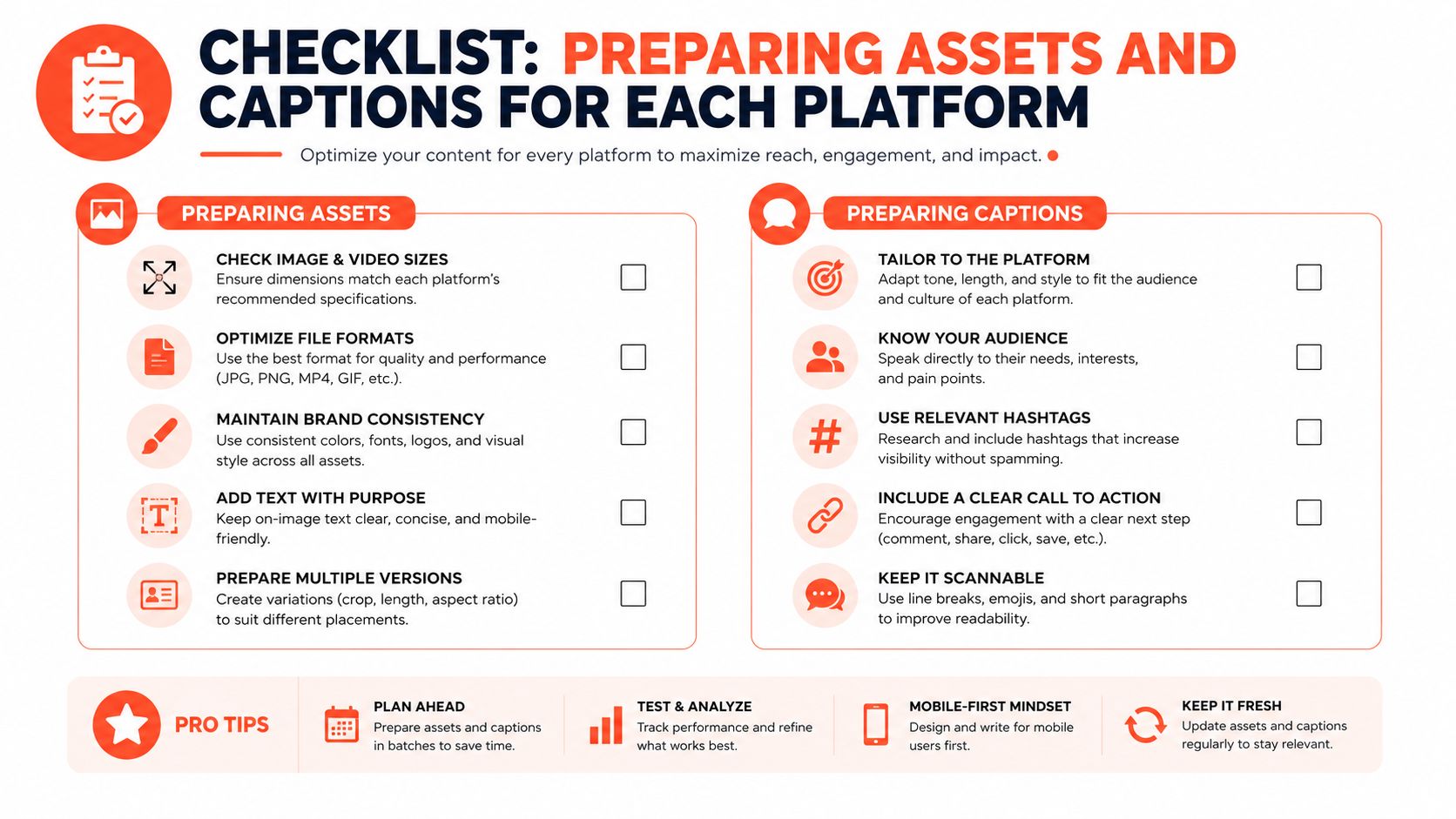
Don't force one design into every frame. A quote card may need larger type on Pinterest, less text on a short video thumbnail, and a more restrained treatment on LinkedIn. If a person appears in the creative, review the crop manually. Automated resizing can cut off the expression that makes the hook work.
Rewrite the first line, not the core idea
The promise can stay consistent while the opening changes:
- LinkedIn: Remove the hashtag-heavy opener and lead with a business observation or practical question.
- Instagram: Use a sharper question hook, then place supporting context below the first lines.
- X: Compress the idea into a short, direct statement, then use a reply or thread for additional context.
- TikTok: Put the spoken or on-screen hook early, because the viewer may decide whether to continue before reading the description.
- Pinterest: Describe the outcome clearly so the pin remains useful when discovered through search.
Small punctuation changes can affect preview rhythm. If LinkedIn's preview truncates a sentence awkwardly, replace a colon with an em dash in the copy source, but never use em dashes in this article's prose. More important than the specific mark is the preview test. Read the first visible lines as a stranger would.
Accessibility belongs in the preparation pass. Add alt text where the platform supports it, caption spoken audio, and check that the opening visual still makes sense during silent autoplay. A clean profile image also matters when a campaign depends on recognizable people, so teams sometimes use professional AI headshots online for consistent staff or advisor portraits.
A caption assistant can speed up variations, but a manager should still check claims, tone, handles, and calls to action. Tools such as an AI caption generator are most useful when they produce a draft that the team can edit, not when they replace the platform review.
Staggered Scheduling Beats True Simultaneous Posting
A campaign can launch at one moment and still reach audiences at different times. People move between networks according to their routines, so one shared timestamp rarely serves every channel well. As noted earlier, users visit multiple social platforms each month. That creates several useful publishing opportunities instead of one mandatory launch second.
Timing analysis found different activity peaks by platform, including morning activity on Facebook, 9 a.m. and 6 p.m. windows on Instagram, mid-afternoon activity on LinkedIn, evening activity on TikTok, Friday and Saturday afternoon activity for YouTube Shorts, and Sunday through Tuesday evening activity for long-form YouTube (platform timing analysis).
| Platform | Primary peak window (ET) | Secondary window | Recommended publish offset | Timezone handling |
|---|---|---|---|---|
| Morning | Account-specific | Schedule after the initial peak begins | Use audience location data | |
| 9 a.m. or 6 p.m. | Account-specific | Test a later queue slot | Override by audience timezone | |
| Mid-afternoon | Account-specific | Use a separate professional-feed slot | Use the account's main business timezone | |
| TikTok | Evening | Account-specific | Queue for the evening audience | Localize for the dominant audience |
| YouTube Shorts | Friday or Saturday afternoon | Account-specific | Schedule around the selected day's window | Apply channel timezone settings |
Set a coordinated campaign day, then give each network its own send time, queue slot, and timezone override. A 9:00 a.m. Eastern Instagram post is not a universal launch point when the target audience is active locally in the evening.
For a five-network campaign, a manager might schedule Facebook in the morning, LinkedIn during its afternoon window, Instagram later in the day, TikTok during evening activity, and YouTube Shorts in its stronger weekend window. The exact sequence should come from account analytics rather than a universal calendar. Leave enough time between slots to review early reactions and adjust the next caption or creative treatment if the first post exposes a problem.
That gap is the adaptation step. Rework the opening line, crop, call to action, or supporting context before the next network publishes. The campaign stays recognizable, while each post earns a format suited to its feed.
Cross-posting guidance supports evaluating adapted versions separately. Adapted cross-posts typically perform within 10–15% of fully native content, while a 30% or larger drop can signal poor formatting, reused captions, or an incorrect aspect ratio (cross-posting performance guidance). Compare engagement rates by platform before and after changing the workflow. The goal is one campaign moving through a deliberate cascade, not five identical posts colliding at the same minute.
Pre-Publish Checks That Catch the Embarrassing Mistakes
The most damaging errors are often mundane. A wrong handle sends people to another account, a cropped logo makes the brand look careless, and a link that isn't tappable turns a conversion post into a dead end.
Run a short preflight check before approving the queue:
- Aspect ratio: Confirm that each destination has the intended vertical, square, or horizontal export.
- Safe zones: Check that text and faces aren't hidden behind Story, Reel, or TikTok interface elements.
- Preview text: Open the native preview and inspect the first visible lines.
- Caption structure: Make sure line breaks, bullets, and paragraph spacing survived the scheduler.
- Hashtag placement: Confirm that hashtags belong in the caption, a comment, or nowhere for that network.
- Link routing: Test the profile link, landing page, or destination path on a mobile device.
- Alt text: Add a useful description instead of repeating the caption.
- Audio and subtitles: Check that spoken information remains understandable with sound off.
- Policy triggers: Review language that could trigger moderation, ad restrictions, or unwanted direct-message automation.
- UTM integrity: Confirm that campaign parameters identify the platform and campaign correctly.
- Brand handles: Click every @mention and verify that it reaches the intended account.
- Native preview: Inspect the final version inside each target platform before approval.
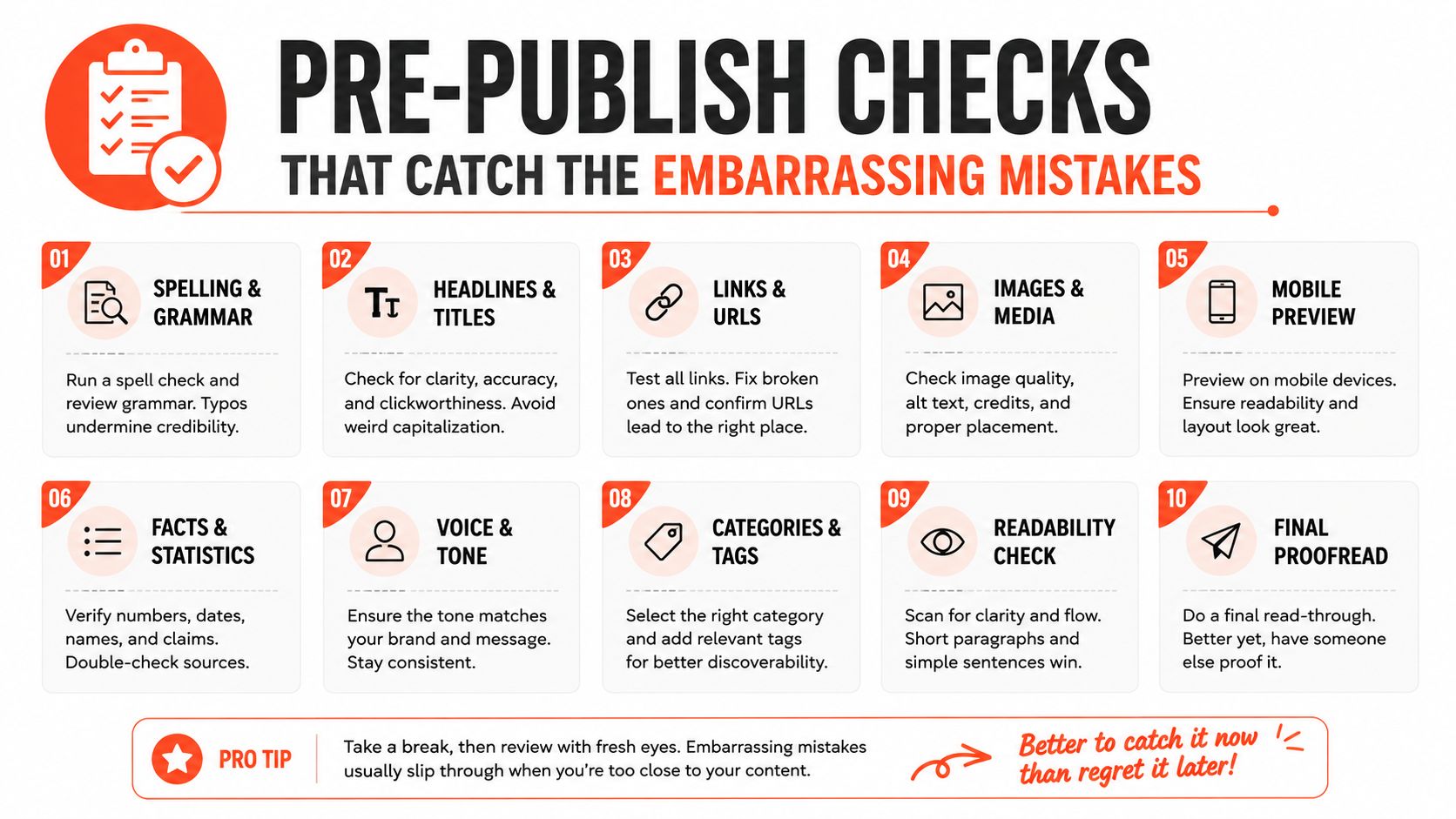
Each check prevents a different failure. The aspect-ratio review catches distorted video. The handle audit prevents accidental promotion of the wrong account. The UTM check keeps reporting usable. The native preview catches problems that a shared composer may not display accurately.
Approval standard: Never approve a multi-platform post you haven't opened in the native preview pane of every target network.
Make the checklist visible beside the publishing calendar. After a few campaigns, the sequence becomes muscle memory, but the preview step should remain mandatory because platform interfaces and rendering rules change.
When Automation Quietly Hurts Your Reach
A scheduler isn't neutral infrastructure. It changes how quickly content moves, how much control the team has over variations, and whether a platform receives a post that looks native or mechanically copied.
The clearest warning signs are visible in the content itself:
- Identical captions across networks: Instagram hashtags and phrasing can look misplaced on LinkedIn.
- Foreign watermarks: A TikTok watermark on an Instagram Reel signals that the file wasn't prepared for the destination.
- Wrong mentions: A handle that exists on one platform may point nowhere on another.
- One-size-fits-all links: A link-first post may work differently from an in-app prompt or profile route.
The performance evidence is nuanced. One cross-platform activity study reported about a 30% engagement lift for professional users on Facebook and Twitter in cross-post scenarios (the 2017 study). That finding doesn't make duplication safe. It supports a more precise conclusion: coordinated distribution can work when the content and audience context align.
Use a hybrid model. Let the tool deliver the asset and hold the schedule, while a person adds at least two meaningful touches per platform, such as a rewritten opener and a native crop. Then compare the reach and engagement of natively scheduled posts with automated posts by network and content type.
Diagnostic test: Don't ask whether automation is good or bad. Ask which platform, format, and campaign type can absorb it without a measurable quality decline.
For operational guidance, how to automate social posting can help teams map the repetitive parts of a publishing system. Keep the parts that need editorial judgment in human hands, especially hooks, claims, visual framing, and destination-specific calls to action.
A Repeatable Weekly Cadence for Multi-Platform Publishing
A sustainable calendar separates creation from release. One person can batch the source material, prepare variations, schedule the campaign, and still leave room for real-time conversation if each activity has a defined place in the week.
Monday builds the queue
Use the first working block to choose the source material and create the master assets. Store clean exports, platform crops, caption variants, accessibility notes, and destination links together. Use the next block for approvals and the pre-publish checklist, then queue the approved versions with platform-specific send times.
Tuesday through Thursday releases the campaign
Let the scheduler handle planned delivery, but keep a daily review window for comments, mentions, and failed posts. A manager should have a buffer for reactive content, because scheduled campaigns can't respond to a product update, customer question, or unexpected news without human intervention.
Friday captures the response
Run an engagement sweep, answer useful comments, save recurring questions for future content, and reshare strong community responses where appropriate. Don't judge the campaign from one combined total. Compare each platform's engagement rate, watch behavior, saves, replies, and clicks against its own prior work.
Sunday keeps the system learning
Use a light analytics review to identify which hooks, formats, and timing windows deserve another test. Feed those observations into Monday's asset preparation rather than rebuilding the entire strategy each week.
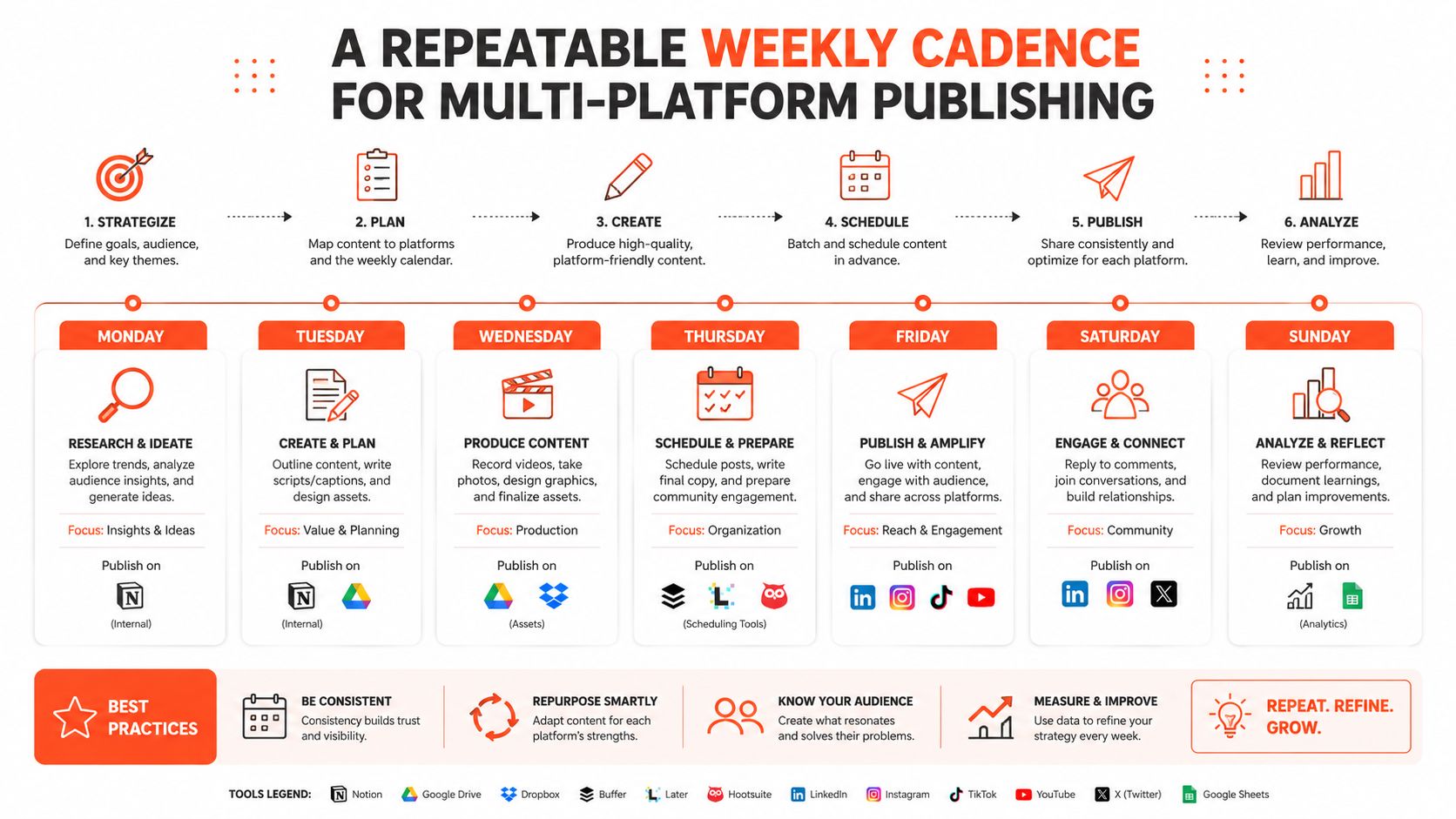
The workload stays manageable because each stage has one job: prepare, adapt, approve, stagger, engage, review. The operating mantra is simple: adapted, staggered, reviewed.
WaveGen.ai turns a single article, newsletter, podcast script, or YouTube transcript into platform-specific social assets, including captions, carousels, short videos, and quote cards, then lets teams edit, schedule, and publish from one workflow. Visit WaveGen.ai to see how it can help you coordinate multi-platform distribution without sending the same unfinished post everywhere.
social media automation
cross-posting strategy
content scheduling
multi-platform publishing
WaveGen.ai
Turn this kind of writing into a week of social content.
Paste a blog post, newsletter, or rough draft — WaveGen turns it into publish-ready carousels, captions, and slideshows for every channel.
No credit card · First posts in 2min