July 13, 2026
16 min read
Master Your Content Approval Workflow
Build a content approval workflow to cut delays & end chaos. Our guide covers roles, stages, tools, and templates for teams. Ship better content faster.
You publish a strong piece on Monday. By Wednesday, the topic is already moving. Your writer is waiting on comments from a product lead, legal wants a newer draft, the client replied in email instead of the doc, and someone in Slack says they “thought it was already approved.”
That's review limbo. Teams often don't have a content problem. They have a decision problem. Content gets written, designed, and queued, but nobody has built a clear path from draft to sign-off.
For high-cadence teams, that problem gets worse fast. One blog post turns into a newsletter, a LinkedIn carousel, short captions, and follow-up social posts. If every asset moves through the same slow chain of approvals, your publishing cadence collapses under its own process.
Table of Contents
- Why Your Content Is Stuck in Review Limbo
- Designing Your Workflow from the Ground Up
- Choosing Your Review Model Parallel vs Sequential
- Sample Workflows for Different Team Sizes
- Common Workflow Pitfalls and How to Sidestep Them
- Measuring Success and Optimizing Your Workflow
Why Your Content Is Stuck in Review Limbo
A familiar failure looks like this. The draft is done. The designer has exported the assets. Captions are ready. Then the content disappears into a chain of “quick reviews” that aren't quick at all. One reviewer asks for tone changes, another rewrites the offer, a third comments on an older version, and nobody knows who can approve the final asset.
That delay isn't minor. The average content approval process takes eight days to complete, according to Agility PR's breakdown of approval bottlenecks. For anything tied to news, campaigns, launches, or social trends, eight days is enough to make good content late and late content irrelevant.
The real cost of waiting
The wasted time usually doesn't come from writing or design. It comes from handoffs.
You can spot a broken content approval workflow when these symptoms show up together:
- Feedback lives everywhere: Comments arrive in Google Docs, Slack, email, and meeting notes.
- Deadlines feel optional: Review windows slip because nobody owns the clock.
- Too many people edit, too few approve: Stakeholders keep suggesting changes, but no single person closes the loop.
- Versions get messy: The team asks which file is final because the answer isn't obvious.
- Time-sensitive assets miss the moment: Social posts and launch content wait in queues built for slower work.
Practical rule: If your team can't answer “who gives feedback?” and “who gives final approval?” in one sentence, the workflow is the bottleneck.
What a workflow actually does
A content approval workflow isn't red tape. It's a decision system. It tells the team what has to be true before work moves forward, who reviews it, who signs it off, and where comments belong.
When that system is missing, teams compensate with constant follow-up. Writers chase reviewers. Account managers mediate contradictory comments. Social managers hold posts because they don't want to publish something that might get pulled back later.
The fix starts by treating approval as an operational design problem, not a people problem. Most delays aren't caused by lazy reviewers. They're caused by unclear stages, weak handoffs, and no deadline structure.
Designing Your Workflow from the Ground Up
Many groups try to fix approval chaos with a new tool. That rarely works by itself. First define the path. Then put software around it.
One reason this matters so much is scale. In 2020, HubSpot reported that 70 percent of marketers had an active content marketing program, as cited in Jotform's summary of content approval workflow needs. If most marketing teams are producing content continuously, approvals can't stay informal. Informal processes break the moment volume rises.
Start with roles before tools
Before you map stages, define four role types:
- Creator: Produces the asset from the brief.
- Reviewer: Gives feedback on quality, clarity, accuracy, or brand fit.
- Approver: Makes the go or no-go decision.
- Publisher: Schedules or publishes the approved asset.
These roles can sit with one person on a small team or across several people in an agency. What matters is separation of responsibility. Reviewers comment. Approvers decide.
A good workflow tool should reflect that distinction with role-based access. If you're designing an AI workflow approval process, that same principle matters even more because generated assets can multiply quickly and confuse ownership if approval rights are loose.
Build the four stages
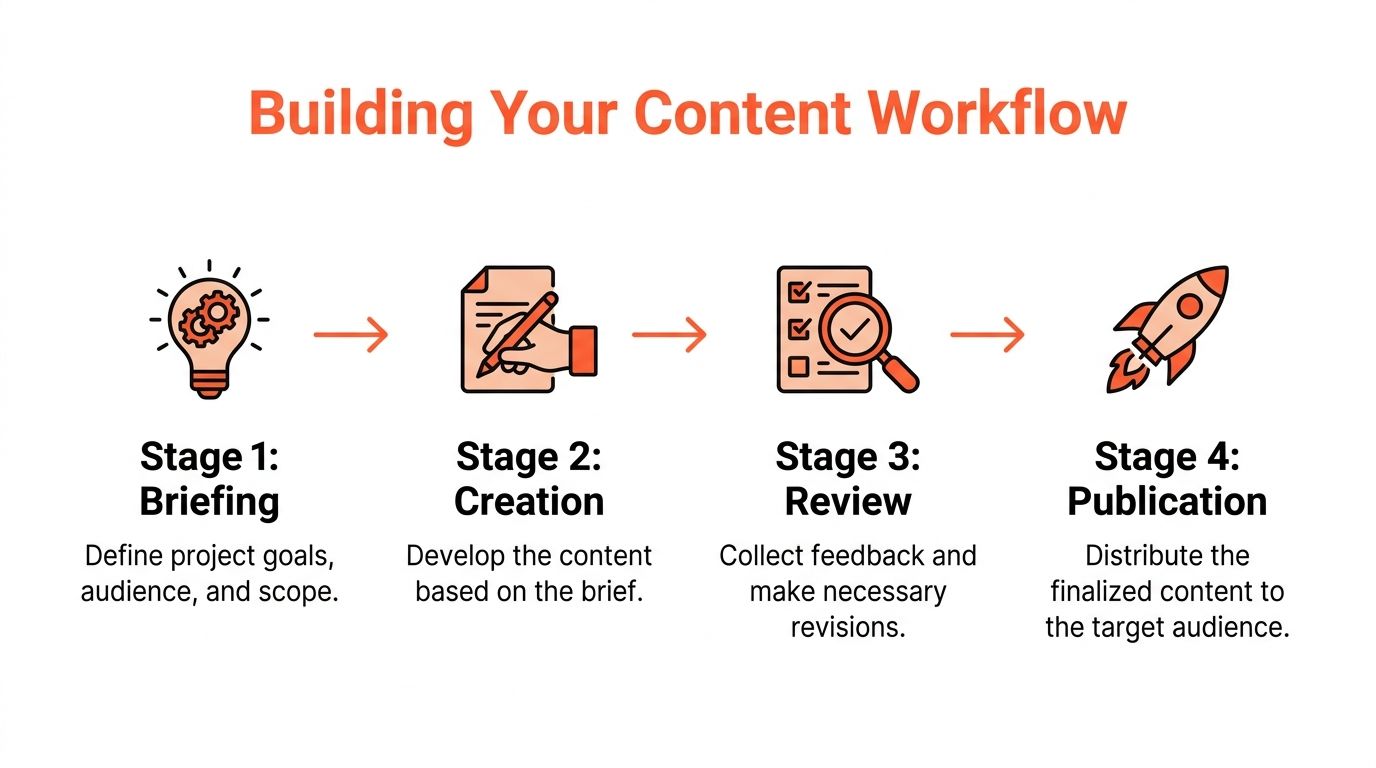
A structured content approval workflow follows four core stages, based on the framework outlined in Screendragon's workflow model.
1. Briefing
At this point, speed is won or lost early.
The brief should define audience, goal, format, tone, source material, owner, due date, and any compliance considerations. If repurposed content is involved, say that up front. A post adapted from a webinar transcript needs different review criteria than a net-new thought leadership article.
Done looks like this: the creator can start without chasing missing context.
2. Creation
The creator builds the draft to the brief, not to scattered stakeholder preferences.
This stage often fails when teams allow mid-draft input from too many people. Keep creation focused. If brand, legal, or client review starts too early, the team ends up reviewing unfinished work and reopening basic decisions later.
A related operational win is reducing manual asset production after the source content is done. Teams using repurposing systems often pair the workflow with guides on content creation automation so one approved source can generate multiple downstream assets without rebuilding everything from scratch.
Here's a visual walkthrough of workflow structure in action:
3. Review
This stage is for feedback, not final authority.
Editors, subject-matter experts, and channel owners should review within a defined window. The key is centralized comments. If your team uses email for one stakeholder, chat for another, and inline comments somewhere else, revisions become a reconciliation exercise instead of an editing pass.
Keep one source of truth for comments. The minute feedback splits across channels, the writer becomes a project manager.
4. Final approval and publication
Approvals should happen in a defined order when risk is high, or in a simpler path when risk is low. Once approved, the content should move directly to publishing or scheduling.
The last stage should also include a feedback loop. Save what was approved, when it was approved, and what changed. That record matters later when someone asks why a claim was edited, why a campaign launched late, or which version went live.
Set rules that keep work moving
The workflow needs operating rules, not just boxes on a diagram.
Use these:
- Entry criteria: Don't send content to review until the brief is complete and the asset is ready for that stage.
- Exit criteria: Don't move forward while must-fix comments remain unresolved.
- Review windows: Standard content should have short review windows. Reserve longer turnaround only for legal or compliance-heavy work.
- Routing logic: Assets should move based on type, risk, or channel, not manual guesswork.
- Audit trail: Keep timestamps, comments, versions, and final decisions in one place.
The goal isn't more process. It's fewer avoidable loops.
Choosing Your Review Model Parallel vs Sequential
This is the workflow decision often underthought.
They build one review path and force every asset through it. A thought leadership article, a compliance-sensitive email, and five social captions derived from the same source all get treated like they carry the same risk. They don't.
When sequential review is the right call
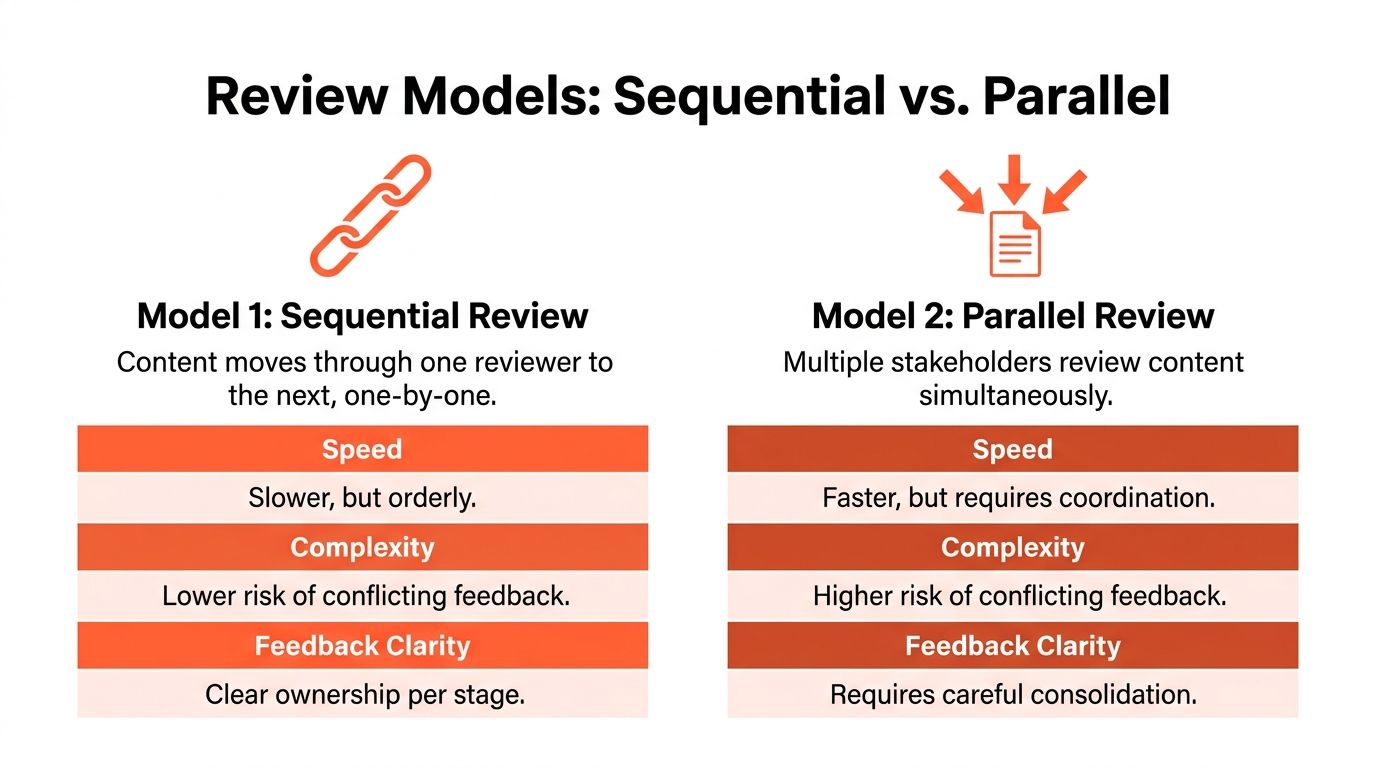
Sequential review means one person reviews, then the next, then the next. It's slower, but it creates a clear chain of accountability.
Use it when the order matters. Legal may need the final edited version, not a rough draft. A brand director may want product accuracy cleared before reviewing messaging. Regulated industries usually need this structure because one reviewer's approval depends on another reviewer's changes being complete first.
Sequential review also works for complex assets where conflicting feedback would create more rework than delay.
When parallel review wins
Parallel review means multiple stakeholders review the same asset at the same time. For low-risk, high-volume content, it's often the better operating choice.
That's where the data is useful. Industry data shows sequential review causes 40–60% longer approval times for low-risk content, according to Contentoo's analysis of approval process delays. If your team is pushing out social posts, repurposed clips, quote cards, and channel-specific captions, one-by-one review creates a bottleneck that doesn't match the work.
This matters most for teams managing a steady cadence. If you publish from a structured schedule, your approval model should support that schedule. A tool built around planning and visibility, such as a shared calendar or dedicated content calendar software, makes it easier to run parallel review without losing track of who has responded.
Parallel review works when the content is low risk, the brief is tight, and one person still owns final consolidation.
A simple decision rule
Use this quick framework:
| Content type | Better review model | Why |
|---|---|---|
| Compliance-heavy email | Sequential | Order matters and sign-off risk is higher |
| Executive thought leadership article | Sequential | Messaging changes can affect factual or legal review |
| Standard blog post | Mixed | Parallel internal feedback, then one final approver |
| Social posts from approved source content | Parallel | Speed matters and risk is usually lower |
| Repurposed assets across channels | Parallel | Multiple reviewers can check fit at once |
The trade-off is straightforward. Sequential review gives clarity. Parallel review gives speed. The mistake is using clarity where you need cadence, or speed where you need controlled oversight.
Sample Workflows for Different Team Sizes
A good content approval workflow should fit the team you have, not the org chart you wish you had. A solo consultant doesn't need a formal legal queue. A multi-client agency can't survive on “just send me your thoughts.”
What changes as teams grow
The core stages stay familiar. The difference is how many people sit inside each stage and how much structure you need around handoffs.
Here's a practical starting point.
| Team Size | Key Roles | Typical Stages | Review Model | Tool Recommendation |
|---|---|---|---|---|
| Solo creator or consultant | Creator, editor, approver, publisher all handled by one person | Brief, draft, self-review, publish | Sequential, but compressed into a checklist | Notion, Google Docs, spreadsheet tracker |
| Small in-house team | Content marketer, editor, subject-matter reviewer, marketing lead | Brief, creation, internal review, approval, scheduling | Mixed | Asana, Trello, ClickUp, Google Docs |
| Agency with multiple clients | Strategist, writer, designer, account manager, client reviewer, final approver, publisher | Brief, production, internal QA, client review, final approval, scheduling | Parallel for low-risk assets, sequential for client or compliance sign-off | Monday.com, Airtable, Asana, dedicated approval platform |
A few patterns tend to work well in each setup.
Solo creator
Keep the workflow lean, but don't skip the checkpoints. The risk in solo work isn't committee delay. It's publishing without a real review pass.
Use a simple pre-publish checklist:
- Message fit: Does the asset match the original goal and offer?
- Channel fit: Is the caption, format, or visual appropriate for the platform?
- Accuracy check: Are names, links, claims, and dates correct?
- Final decision: Is this ready now, or are you publishing because the queue feels urgent?
Small in-house team
Blurred roles can lead to trouble: someone writes, someone “takes a quick look,” and suddenly five people have opinions but nobody owns approval.
The cleanest setup usually looks like this:
- The content marketer owns the brief and draft.
- An editor or marketing peer reviews for structure and brand fit.
- A subject-matter expert checks factual accuracy where needed.
- One marketing lead approves.
- A coordinator or social manager publishes.
That single-approver model prevents approval by committee. It also stops senior stakeholders from reopening closed edits after the asset is already clean.
Agency with multiple clients
Agencies need more guardrails because every extra client introduces another approval culture. One client responds in the platform, another by email, another through voice notes. If you don't standardize your internal process, the client's habits start running your operations.
For agency teams, I'd document these rules early:
- Client review scope: What the client is reviewing, and what they are not.
- Revision limits: How many rounds are included before changes become out of scope.
- Approval method: Which channel counts as official sign-off.
- Scheduling trigger: Whether content publishes automatically after approval or waits for manual release.
If your team repurposes one long-form source into many assets, tools can reduce manual steps between approval and distribution. One example is WaveGen.ai, which turns a source asset into platform-specific social content and includes review states and signoff routing for approvers. That kind of setup is most useful when agencies need one source of truth across many derivative assets.
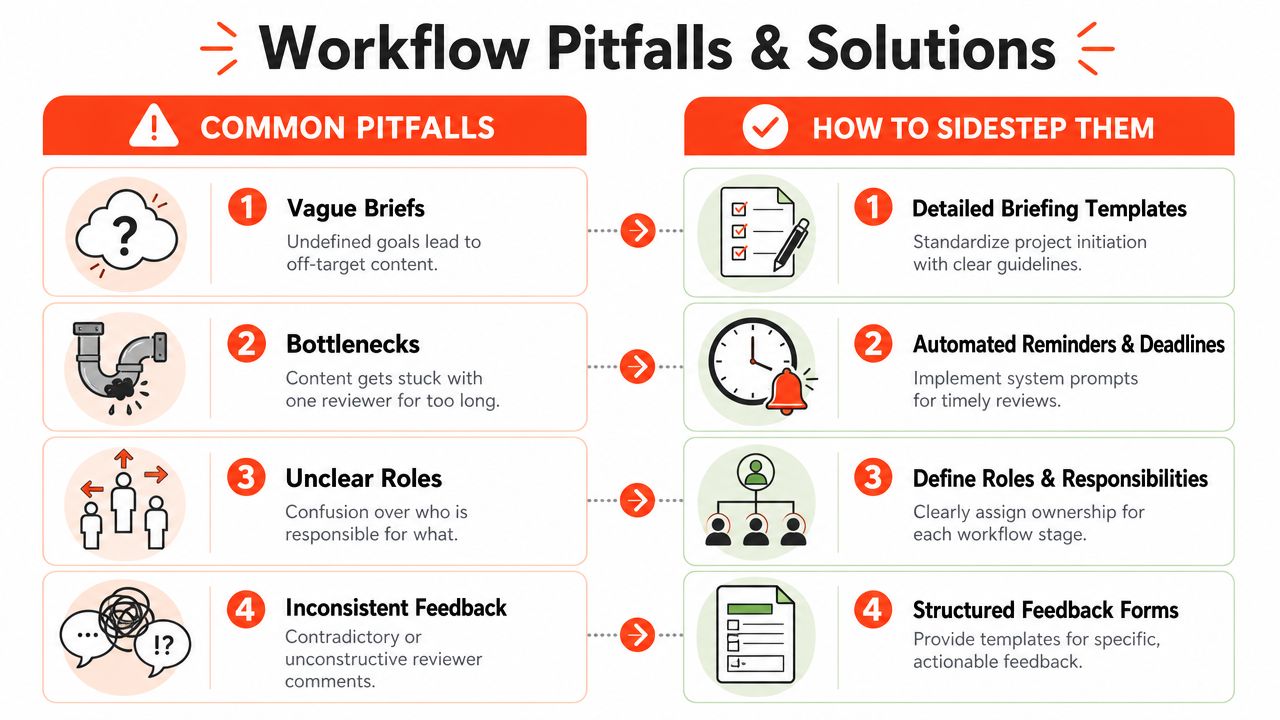
Common Workflow Pitfalls and How to Sidestep Them
Many approval issues don't look serious at first. They show up as small delays, vague edits, or one-off exceptions. Then they stack up and the team starts planning around friction instead of fixing it.
A common example is reviewing the wrong version in the wrong format. Another is letting revision scope expand halfway through a campaign because nobody defined what “review” meant at the start.
The mistakes that create hidden delays
Some workflow failures are predictable. Monica Obogeanu's analysis of agency workflow gaps points to several that show up repeatedly: missing pixel-perfect previews, undefined revision scope, and no auto-schedule on approval, which creates human error and breaks cadence.
Here's what those problems look like in practice:
- Reviewing approximations instead of final context: A stakeholder approves a doc or mockup, then dislikes the live-looking version because spacing, truncation, or layout changed.
- Letting revision scope drift: The client is supposed to review messaging, then starts requesting strategic rewrites after design is complete.
- Manual publishing after approval: The asset gets approved but sits unscheduled because someone assumed another teammate would queue it.
- Weak briefing inputs: The team starts work without clear deliverables, deadlines, or compliance notes.
- Missing archives: Nobody can trace which version was approved, what changed, or why a decision was made.
Review the asset in the form it will actually appear. Approval on an approximation often creates another round later.
What to put in place instead
The fix isn't complicated, but it does need discipline.
Use pixel-perfect previews
For emails, landing pages, social carousels, and ad creatives, reviewers should see the asset as it will be published. Not a loose document approximation. Not a half-rendered draft. Final context avoids “I didn't realize it would look like that” feedback.
Define revision scope at onboarding
Agencies should set this with clients before the first campaign starts. In-house teams should set it at the brief stage. Clarify whether review covers factual accuracy, messaging, compliance, formatting, or all of the above.
That one conversation prevents late-stage opinion creep.
Automate the post-approval step
If approval is complete, the next system action should be obvious. Schedule it automatically where possible, or assign publishing to one named owner. Don't leave approved content in a queue that depends on memory.
Standardize the brief
A good briefing template should capture:
- Deliverables: What's being created from the source material
- Deadlines: When draft, review, approval, and publication happen
- Stakeholders: Who comments and who approves
- Risk notes: Legal, compliance, or brand-sensitive elements
- Success criteria: What “ready for review” means
Keep the approval record
Archive the approved version with comments, timestamps, decisions, and forwarded actions. This matters for compliance-sensitive teams, but it also matters for ordinary operations. Without history, every dispute becomes a memory contest.
Measuring Success and Optimizing Your Workflow
A workflow that looked efficient at 10 assets a month often breaks at 50. The failure usually shows up in review speed first, especially when a team starts repurposing one source asset into social posts, email variants, clips, and paid creative.
That is why optimization needs to focus on throughput, not just approval hygiene. The question is not only whether content gets approved. The question is whether the review model fits the asset type. For high-cadence work, the biggest gain often comes from choosing parallel or sequential review more deliberately, then checking the results every month.
What to measure
Track the points where work slows down:
- Time to approval: The span between ready-for-review and final sign-off
- Review wait time by approver: Which role holds assets the longest
- Revision rounds per asset type: Whether blogs, social posts, video scripts, or ads trigger extra rework
- Reopen rate after approval: How often approved work gets pulled back in
- Publish lag: How long approved assets wait before they go live
- Review model performance: Whether parallel or sequential review clears faster for each content type
That last metric gets missed a lot.
If the team treats every asset the same, the workflow starts serving the exception case instead of the normal one. Social repurposing usually benefits from parallel review because brand, channel, and campaign stakeholders can comment at the same time. Regulated content, executive bylines, and sensitive launch assets often still need sequential review because order matters and comments need tighter control.
How to optimize without rebuilding the whole process
Start with one content stream. Social is usually the cleanest place to test changes because volume is high and risk is lower than legal-reviewed content.
If social approvals are dragging, compare the current path against a parallel model for two or three weeks. Measure total approval time, number of conflicting comments, and reopen rate after sign-off. If speed improves without creating rework, keep the change. If comment collisions increase, assign one final approver and keep everyone else in reviewer status.
I have seen teams cut review delays by making smaller changes than they expected. One team kept sequential review for blog posts but moved repurposed LinkedIn and X assets into parallel review. Approval got faster because the team stopped forcing low-risk channel assets through the same path as long-form content.
Optimization also needs to extend past sign-off. If publication and repurposing still depend on manual handoffs, approved work sits idle. A better distribution setup, like the one outlined in this guide to content distribution platforms, helps teams turn approvals into scheduled output instead of another queue.
For teams reviewing process issues beyond content, outside perspectives on solutions for business efficiency can help identify whether the bottleneck sits in approvals, ownership, or tooling.
The best workflow is not the one with the most control points. It is the one that applies strict review where risk is real and removes extra sequencing where speed matters more. That balance is what keeps a modern content team publishing at a steady pace.
If your team already has strong source content but keeps getting slowed down by turning it into channel-ready assets, WaveGen.ai is worth a look. It helps teams repurpose one article, newsletter, transcript, or script into on-brand social content, then move those assets through review states and signoff routing so approval doesn't become a separate bottleneck.
content approval workflow
content operations
marketing workflow
content marketing
team collaboration
Turn this kind of writing into a week of social content.
Paste a blog post, newsletter, or rough draft — WaveGen turns it into publish-ready carousels, captions, and slideshows for every channel.
No credit card · First posts in 2min