AI social media
content creation.
From a caption to a complete carousel, AI can help you turn an idea into a draft. The useful question is what kind of content you need—and what you want to control before it goes live.
Explore the formats, weigh the benefits and limitations, and find tools that fit the way you create.
AI’s role in social content creation
You bring the original idea, your experience and what you want your audience to take away. AI helps develop options and assemble the content. You shape the message and check that the result is accurate, distinctive and worth sharing.
What AI is good at
- Getting past the blank page with hooks, outlines and draft captions.
- Offering variations of an idea for different formats and audiences.
- Assembling text and visuals into a starting layout you can refine.
Where people make the difference
- Bringing the original idea, audience insight and purpose: what you want to say, who it is for and why it matters.
- Checking facts and context: AI can invent details or miss qualifications.
- Adding experience and taste: fluent copy can still feel generic or miss your audience.
- Approving the final message and design: consistency, visual accuracy and publish-readiness need review.
Choose what you want to create.
“AI content creation” covers several different outputs. Start here before choosing a tool.
01
Text posts & captions
Words you can copy, edit and publish.
Useful for: Drafting hooks, explaining an idea, adapting tone or writing a caption for an existing visual.
Your judgment: Add a point of view, verify claims and remove generic phrasing. A plausible sentence is not evidence.
Before choosing a tool: Can it use your source material and preserve your voice?
Try the AI caption generator →02
AI images & posters
A generated image, or an image with a designed message.
Useful for: Creating an illustration, a visual concept or a promotional graphic.
Your judgment: Check spelling and visual details. If the image shows your product, make sure its appearance and features match the real thing.
Before choosing a tool: Does it reproduce your information accurately, with no typos or garbled text? Is the design uncluttered, and does its visual style fit your brand?
Explore AI social post generation →03
Editable posts & carousels
A complete layout with text and visual elements you can revise.
Useful for: Turning an explanation into several slides, or making a branded post without starting from a blank canvas.
Your judgment: Check the story, slide order, text density and readability on a phone. Editing should not require regenerating the whole post.
Before choosing a tool: Can you change individual words, images, colors and layouts before export? How much editing does a typical draft need before you are happy to publish it?
Explore the carousel maker →04
Video & slideshows
Moving visuals, sequenced slides or clips with text and audio.
Useful for: Explaining a short idea in motion or presenting a sequence of visuals.
Your judgment: Watch the entire result. Check pacing, captions, sound and whether each visual supports the message.
Before choosing a tool: Does the tool generate footage, assemble slides or edit existing clips? These are different jobs.
Explore the AI slideshow maker →Find the right tools for your output.
Test a tool on a post you actually need to publish. A successful first generation is only part of the decision.
Start with the output
A writing assistant may be enough for captions. A finished carousel also needs layout, slide editing and a suitable export. Choose for the result you need.
Test the last edit
Try changing a headline, replacing an image and shortening a slide. Look at what remains editable after generation, not just how impressive the first preview looks.
Check the source and brand controls
Use a real brief or source document. Check whether the tool follows it, and whether you can reuse your fonts, colors and writing preferences.
Follow it through to export
Check dimensions, file types and image quality. If you also need scheduling, confirm the platforms and publishing formats supported.
Using a free plan? Check that it lets you finish the job you need—for example, edit the slides and download the carousel, rather than only preview it.
Ready to compare specific tools?
Use the dedicated comparisons for the shortlist, strengths and tradeoffs.
One short brief. Three ways to share it.
We gave WaveGen a short announcement for Bloom & Clay, a fictional pottery studio. Here is the brief, the edited outputs, and what we changed before calling them finished.
INPUT / OUR BRIEF
Bloom & Clay is running a beginner hand-building workshop on Saturday, 10 am–12 pm. No experience is needed. Make and decorate one small bowl. Clay, tools, glazing and firing are included. Collect your finished bowl two weeks later. There are 12 places. Message CLAY to reserve a place.
Direction: a warm, welcoming tone; cream, terracotta and dark brown; no invented prices, addresses or benefits.
OUTPUT
Three formats, with a different job to do.
The single post makes the announcement. The carousel explains the details. The video animates that same carousel.
01 / SINGLE POST
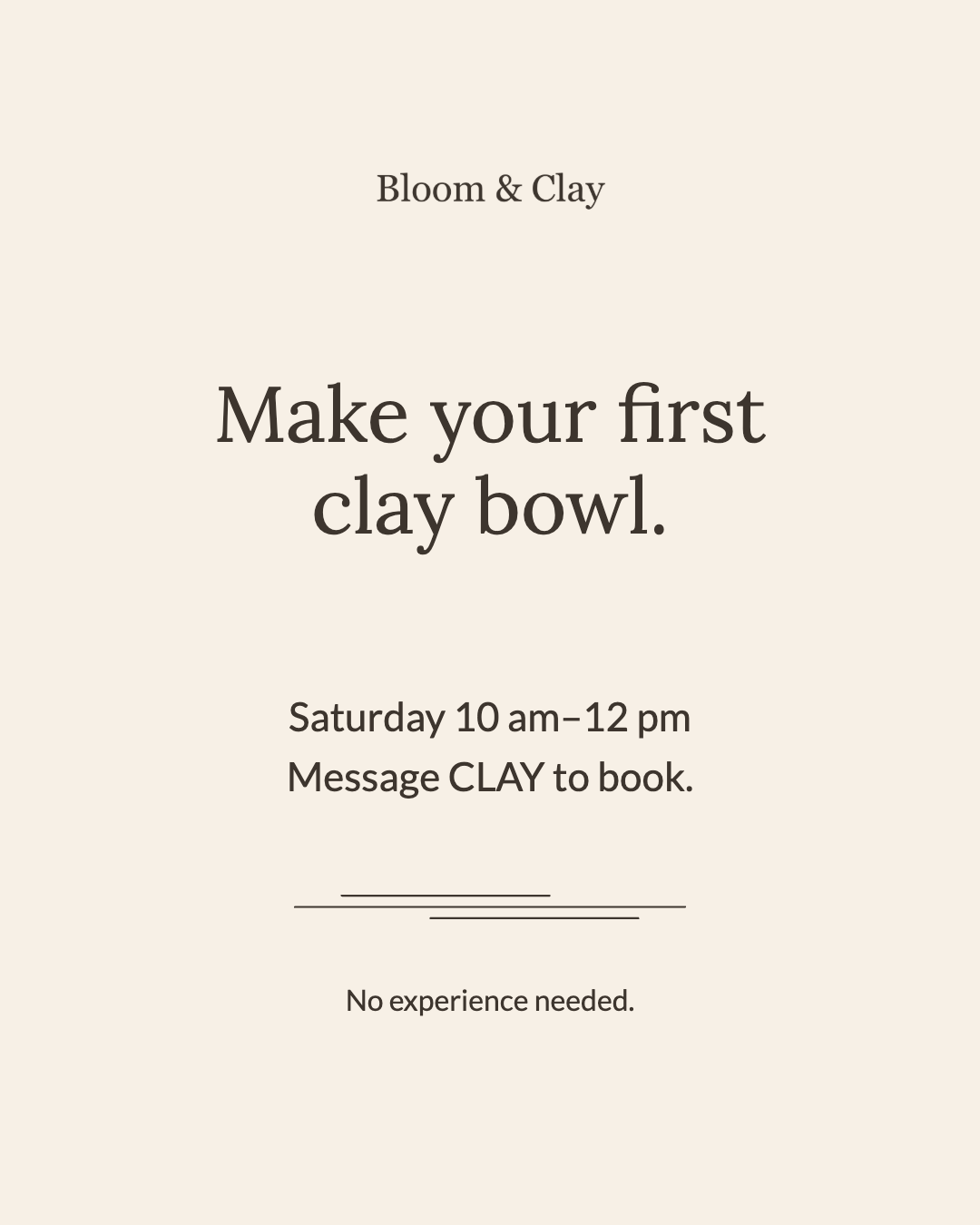
Make the invitation clear.
A short headline, the time and one action.
02 / CAROUSEL
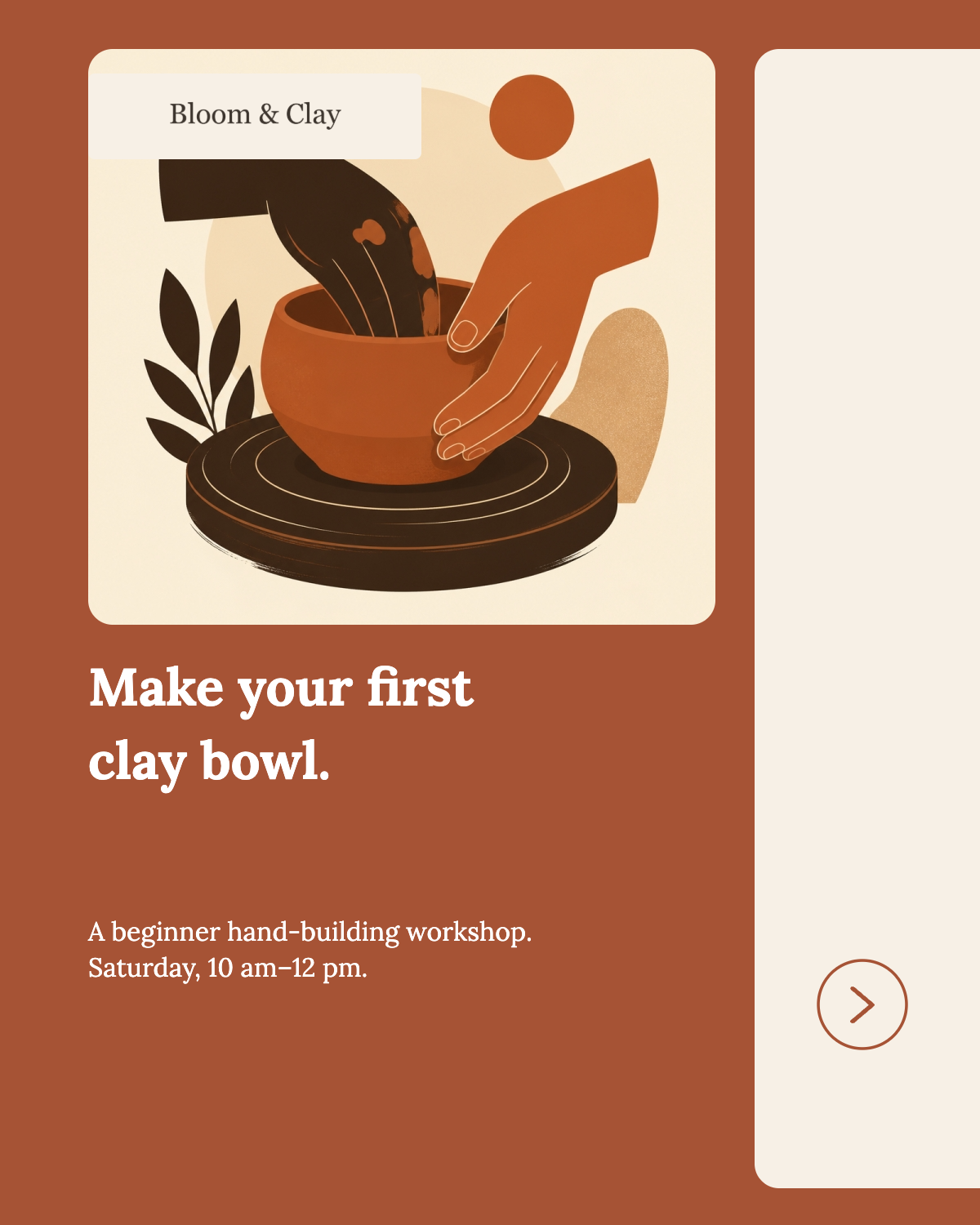
Slide 1 of 6
Give the details room.
Six slides explain what to make, what is included, collection timing and booking.
03 / ANIMATED VIDEO
Present the idea in motion.
The edited carousel becomes an animated slideshow with text entrances and slide transitions.
Generated does not mean locked.
WaveGen’s editable posts and carousels let you change text, images, shapes and logos independently. Rewrite copy, replace or reposition visuals, and adjust colors and layouts without starting over.
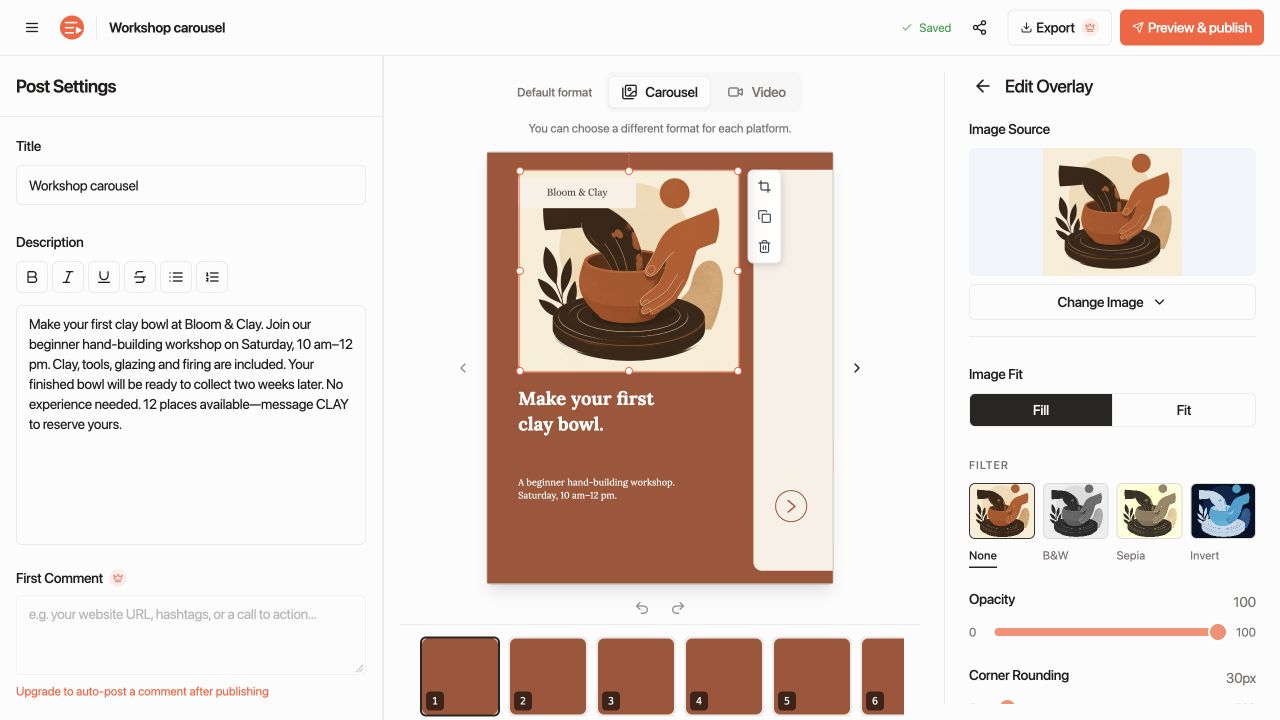
What AI supplied
Draft copy, a carousel sequence, illustrations and layouts. WaveGen also created the animation instructions for the video version.
What we reviewed and edited
We shortened the headline and adjusted the single-post layout. We checked the day and time, inclusions and booking instruction against the brief.
Turn your next brief into editable posts and carousels.
Generate a single graphic, a multi-slide carousel, or an animated slideshow—and refine every headline, image, and slide layout in the editor before you publish.
Explore by platform.
The same idea can need a different format, opening or amount of detail. Explore the options for the channel where you publish.
Common questions about AI social media content creation.
What is AI social media content creation?
AI social media content creation uses generative tools to turn ideas, briefs, or existing sources into channel-ready posts—from captions and single graphics to multi-slide carousels and short videos. The goal is to remove repetitive drafting and layout work while keeping human editorial review over the message, visuals, and final export.
How do you create social media posts and carousels with AI?
Start with a clear idea, prompt, or source URL and choose the output format you need, such as a single visual post or a multi-slide carousel. In WaveGen, the AI drafts the slide outline, writes the copy, selects or generates visuals, and applies your Brand Kit so you can review, edit individual slides, and publish or export.
Can you edit AI-generated social media posts and carousels before publishing?
It depends on the tool. Basic image generators bake text into a flat graphic that cannot be edited without regenerating. Dedicated social creation platforms like WaveGen generate structured, editable layouts where you can rewrite headlines, swap images, reorder slides, and adjust colors or fonts before exporting or scheduling.
How is WaveGen different from using ChatGPT or an image generator for social posts?
ChatGPT writes text but leaves you to design slides manually in another tool, while standalone image generators struggle with multi-slide storytelling and editable typography. WaveGen combines source-grounded writing, editable carousel and post layout, saved Brand Kits, and direct multi-platform scheduling in one workflow.
What are the pros and cons of AI-generated social media content?
AI speeds up first drafts, turns rough notes into structured slides, and helps small teams stay consistent across channels. However, unedited AI output can sound generic or miss product-specific nuance—which is why the strongest workflow pairs AI layout and drafting with your own sources, Brand Kit, and final editorial check.
Can AI create posts for LinkedIn, Instagram, and TikTok from the same idea?
Yes. Instead of cross-posting the exact same file everywhere, you can adapt one core idea into platform-specific formats—such as a document carousel for LinkedIn, a visual carousel for Instagram, and a vertical slideshow or short video for TikTok—each with tailored hooks, dimensions, and captions.
Connect the next steps.
Keep AI content on brand →
Bring your voice, colors and design choices into the content you generate.
Start with content you already have →
Explore ways to turn an article, PDF or other source into social content.
Build a repeatable publishing process →
Connect content creation to review, scheduling and ongoing ideas.
Go deeper into AI social media content creation
Start with a guide, try a tool, or compare your options.
Plan the content
Browse all 78 guides, tools and comparisons in this topic
- Free AI Caption Generator for Social Media
- Free AI Carousel Generator | LinkedIn & Instagram
- Free AI Slide Generator for Social — Carousel & Story Slides
- Free AI Slideshow Maker — Animated Video for Reels, TikTok & Shorts
- Free AI Social Media Post Generator
- Best aiCarousels Alternative in 2026 — WaveGen
- Best AI Carousel Generators 2026 (Tested & Compared)
- AI Caption Generator: How to Scale On-Brand Social Content
- The 10 Best AI Content Creation Tools for 2026
- AI Content Generator for YouTube: A Creator's Guide
- AI for Content Marketing: A Practical Playbook
- Best Video Editor for Social Media: Top Picks for 2026
- Blogging on LinkedIn: A Complete Step-by-Step Guide
- 7 Carousel Ads Examples to Inspire Your 2026 Campaigns
- Carousel for Photos: How to Build One People Actually Swipe
- Content Creation Software: A Practical Buyer's Guide
- Copywriting for Social Media: Hooks, Formats & CTAs
- Creating Short Videos for Social Media: Step-by-Step Guide
- Facebook Caption Generator: A Guide to High Engagement
- How to Create Quote Graphics That Actually Convert
- How to Create Social Media Content: Your 2026 Guide
- How to Edit a TikTok Video: A 2026 Engagement Guide
- Instagram Carousel Examples: 7 Swipe-Ready Formats
- 10 Instagram Carousel Post Ideas for Creators
- 10 Smart LinkedIn Post Ideas to Grow Your Brand
- 7 Quote Cards for Social Media Tools and Ideas
- Social Media Carousel Guide: Create, Publish, and Convert
- 10 Top Social Media Content Ideas for 2026
- Social Media Content Pillars: A Guide to Smarter Strategy
- 10 Social Media Content Types to Master in 2026
- Master Thought Leadership Content Strategy
- Thought Leadership Positioning: Strategy Guide for 2026
- A Practical Guide to Video Content Strategy in 2026
- Video Editing for Social Media: Pro Tips for 2026
- Visual Content Creation: Master Visuals in 2026
- What to Post on LinkedIn: 10 Ideas for 2026
- YouTube Shorts Generator: Build a Scalable System
- 10 YouTube Thumbnail Best Practices for More Clicks
- Free AI Carousel Maker — No Signup Required
- Free Facebook Post Creator — AI-Powered
- Free AI Facebook Post Generator | 3 Post Variants in Seconds
- Facebook Post Size 2026: Image & Video Dimensions Guide
- Free Facebook Post Templates — Browse & Customize
- Platform-Ready Social Media Formats
- Editable AI Social Content & Visual Editor
- Best Gamma Alternative for Social Posts in 2026 — WaveGen
- Free AI Hashtag Generator for Instagram, TikTok & LinkedIn
- Free Instagram Bio Generator — AI Bios for Your Goal (with Audit)
- Free AI Instagram Caption Generator (Text + Image)
- Instagram Carousels 2026 — Sizes, Examples & Free Templates
- Free Instagram Carousel Maker — AI, No Signup
- Instagram Carousel Size 2026: 1080×1350px + Free Maker
- Free Instagram Carousel Templates — No Signup
- 𝐅𝐚𝐧𝐜𝐲 Instagram Font Generator — Copy & Paste 30+ 𝓢𝓽𝔂𝓵𝓮𝓼 (Free)
- Free AI Instagram Hashtag Generator — Best Hashtags for Posts & Reels
- Free AI Instagram Post Generator | Create Posts Fast
- Instagram Post Size 2026: Dimensions, Safe Zones & Grid Tips
- Free Instagram Post Templates — Browse & Customize
- Instagram Reel Size 2026: 1080x1920 + Cover Photo Safe Zone
- Instagram Story Size 2026: 1080x1920 + Safe Zone Template
- LinkedIn Banner Size 2026: 1584x396 & 1128x191 Pixels
- LinkedIn Carousels 2026 — Sizes, Examples & Free Templates
- Free LinkedIn Carousel Generator — AI PDF Maker
- LinkedIn Carousel Size 2026: 1080×1350 PDF + Free Maker
- Free LinkedIn Carousel Templates | Professional Designs
- LinkedIn Cover Photo Sizes: Events, Newsletters & Pages
- Free LinkedIn Headline Generator — Professional Headline & Tagline Ideas
- Free AI LinkedIn Post Generator | 3 Formatted Posts Fast
- LinkedIn Post Size 2026: 1200x1200, 1080x1350 & Video Specs
- Free LinkedIn Post Templates — Professional Designs
- Free LinkedIn Text Formatter 2026 — Bold, Italic & Bullet Points
- Free Pinterest Pin Maker & Templates
- Pinterest Pin Size 2026: 1000×1500 Image Dimensions
- Social Media Image Sizes 2026 — Instagram, LinkedIn, TikTok & Pinterest
- Best Taplio Alternative in 2026 — WaveGen
- TikTok Slideshow Size 2026: 1080x1920 (Up to 35 Photos)
- Free TikTok Slideshow Maker & Generator 2026 — Templates
- TikTok Video Size 2026: 1080x1920 Resolution + Format Specs
Go from rough idea to editable social posts in minutes.
Draft captions, single visuals, multi-slide carousels, and animated slideshows from a brief or source URL—with full slide-by-slide control over copy, images, and layout before you export or schedule.