August 5, 2026
14 min read
Do Hashtags Work on LinkedIn in 2026? a Data-Backed Guide
Do hashtags work on LinkedIn in 2026? See real engagement data, learn best practices for placement and count, and avoid the mistakes that hurt reach.
On LinkedIn, hashtagged posts can earn 85% more impressions in one large 2026 dataset, yet another 2026 analysis found that performance falls to a median of 15 likes when posts use five hashtags or more. Both can be true at the same time, and that's the part most guides miss, because LinkedIn no longer treats hashtags like a broadcast switch. It uses them more like topic labels now, especially after hashtag following was removed in 2024 and page hashtags were renamed Specialisms.
That shift changes the core question. The useful question isn't whether hashtags work on LinkedIn, it's when a hashtag helps more than the same topic stated plainly in the post body, especially in the opening lines where LinkedIn reads the full text for semantic context. If you're building a B2B content system, that tradeoff matters more than any blanket yes or no.
Table of Contents
- The Core Question Behind "Do Hashtags Work on LinkedIn"
- How LinkedIn's Algorithm Treats a Hashtag Today
- What the 2026 Data Shows
- How Many Hashtags to Use and Where to Put Them
- Choosing Hashtags for Consultants, Marketers, and Creators
- Testing and Measuring Hashtag Performance
- Fitting Hashtag Strategy Into a Repurposing Workflow
- FAQ on LinkedIn Hashtags in 2026
The Core Question Behind "Do Hashtags Work on LinkedIn"
The interesting finding is not that hashtags sometimes help, it is that they help in a narrower way than many creators assume. A large Metricool analysis of 673,658 posts across 63,108 accounts found that posts with at least one hashtag received 85% more impressions than the platform average, while a separate MagicPost dataset of 1.2 million posts found that posts with five hashtags or more dropped to a median of 15 likes (Metricool, MagicPost). The useful reading is not that one study is right and the other is wrong. It is that hashtag value changes fast once you move beyond a small, relevant set.
Why both findings can be true
Hashtags still help LinkedIn classify a post, but classification is not the same thing as amplification. A post can be easier for the system to place into the right topic bucket and still fail to spread if the content does not earn early engagement or match how the viewer behaves.
Practical rule: treat hashtags as a relevance signal first. If the body text already states the topic clearly, the marginal benefit of extra tags gets smaller fast.
The 2024 platform change matters because it changed the mechanics. Hashtag following disappeared, page hashtags became Specialisms, and the platform moved farther away from hashtag feeds as a distribution channel (Grou). Old advice built around “more tags, more reach” comes from a different product.
The question that actually matters
The better test is not “do hashtags work on LinkedIn,” it is whether a hashtag adds more than plain semantic keywords in the first line of the post. That question is more useful for creators, because LinkedIn reads full text, posting history, and early engagement patterns when deciding what to show. The post body now carries more of the load than many hashtag-first workflows admit.
For a consultant, that might mean writing “operating model change” in the opening sentence and then adding one tightly matched hashtag at the end. For a marketer, it might mean using the exact campaign term in the hook, then deciding whether one branded tag or one topical tag adds anything beyond repetition. The broader point is simple. Hashtags still have a role, but they work best when they reinforce wording the algorithm already sees in the post itself.
How LinkedIn's Algorithm Treats a Hashtag Today
A LinkedIn hashtag now behaves like a library subject sticker. It signals what the post covers, but it does not function like a subscription button that pushes the post into a live follower feed. That difference matters because LinkedIn can read the actual post text, not just the tags added at the end.
Hashtags are topic labels, not megaphones
The cleanest way to frame it is straightforward. A keyword in the post body gives LinkedIn one signal, a hashtag gives it a second, cleaner signal, and both feed into topic relevance. If your first sentence already says “B2B demand generation,” the tag #b2bmarketing reinforces that topic, but it does not create a separate distribution channel on its own.
That is why the same tag can help one post and do little for another. A strong opening line, clear subject matter, and early engagement often matter more than the tag itself. A useful companion to this topic is the breakdown of how LinkedIn ranks content.
Full text and hashtag text compete for the same job
LinkedIn now relies more on semantic understanding. The words in the first lines of a post can partly do the same work as a hashtag when they are specific enough, because the algorithm is already reading full text and engagement patterns.
A better writing pattern is to front-load the core topic in plain language, then use hashtags sparingly as a confirmation layer. That keeps the hook readable for humans and still gives LinkedIn a topical breadcrumb trail.
A hashtag is strongest when it adds clarity the body text does not already provide.
What the 2026 Data Shows
2026-era measurements point to a modest but real hashtag effect, and that effect weakens as tag count climbs. Analysts at Metricool found that hashtagged posts averaged 6,319 impressions on Company Pages and 5,449 impressions on Personal Profiles, and that those posts generated about 88% more interactions on Company Pages and 85% more on Personal Profiles than posts without hashtags. That pattern suggests hashtags still support discoverability and engagement, but only when they stay tightly tied to the topic.
The more cautious read comes from a larger post-level analysis at MagicPost. In its 1.2 million-post dataset, a post with no hashtag earned a median of 32 likes, a post with exactly one hashtag reached 35 likes, and performance fell to 15 likes once posts used five hashtags or more. In a separate dataset of 566,957 posts, median reach fell from 874 people with no hashtag to 492 people with five hashtags.
What the datasets agree on
Both datasets point in the same direction on the core issue. Hashtags still help as narrow topical signals, and they do not reward volume for its own sake. One well-chosen hashtag can outperform none, but once a post starts carrying too many tags, the signal becomes diluted rather than clearer.
That is the practical takeaway for B2B content teams. A hashtag can still help LinkedIn classify a post, but it works best when the body copy already carries the main subject in plain language. If you manage post language with a tool to track keywords, the useful habit is to keep the post text and the hashtag set aligned around the same topic, not to keep adding more terms.
What the divergence means
The Metricool results point to a lift in discoverability and interaction when hashtags are used with restraint. The MagicPost analysis points to a much narrower ceiling, where the benefit is visible at low tag counts and then fades as the post gets noisier. Those two readings are not contradictory. They are measuring different outcomes, and they show why broad hashtag advice often misses the underlying tradeoff.
| Metric | Metricool (673,658 posts) | MagicPost (1.2M posts) |
|---|---|---|
| Impression effect | 85% more impressions for posts with at least one hashtag | Median reach fell from 874 with no hashtag to 492 with five hashtags |
| Interaction effect | About 88% more interactions on Company Pages, 85% more on Personal Profiles | Median likes peaked at 35 with exactly one hashtag, then fell to 15 at five or more |
| Usage pattern | 64% of Company Pages and 54% of Personal Profiles used at least one hashtag | Hashtag usage dropped from 67.9% of posts in 2022 to 23.2% in 2026 |
A third analysis sharpens the interpretation further. Ordinal found that hashtagged posts had a higher median engagement rate, 2.56% vs. 1.75%, while also having lower average impressions, 2,269 vs. 6,632. That is a strong sign that hashtags help classify content more than they expand raw reach, which is why the best use case is precision, not volume.
How Many Hashtags to Use and Where to Put Them
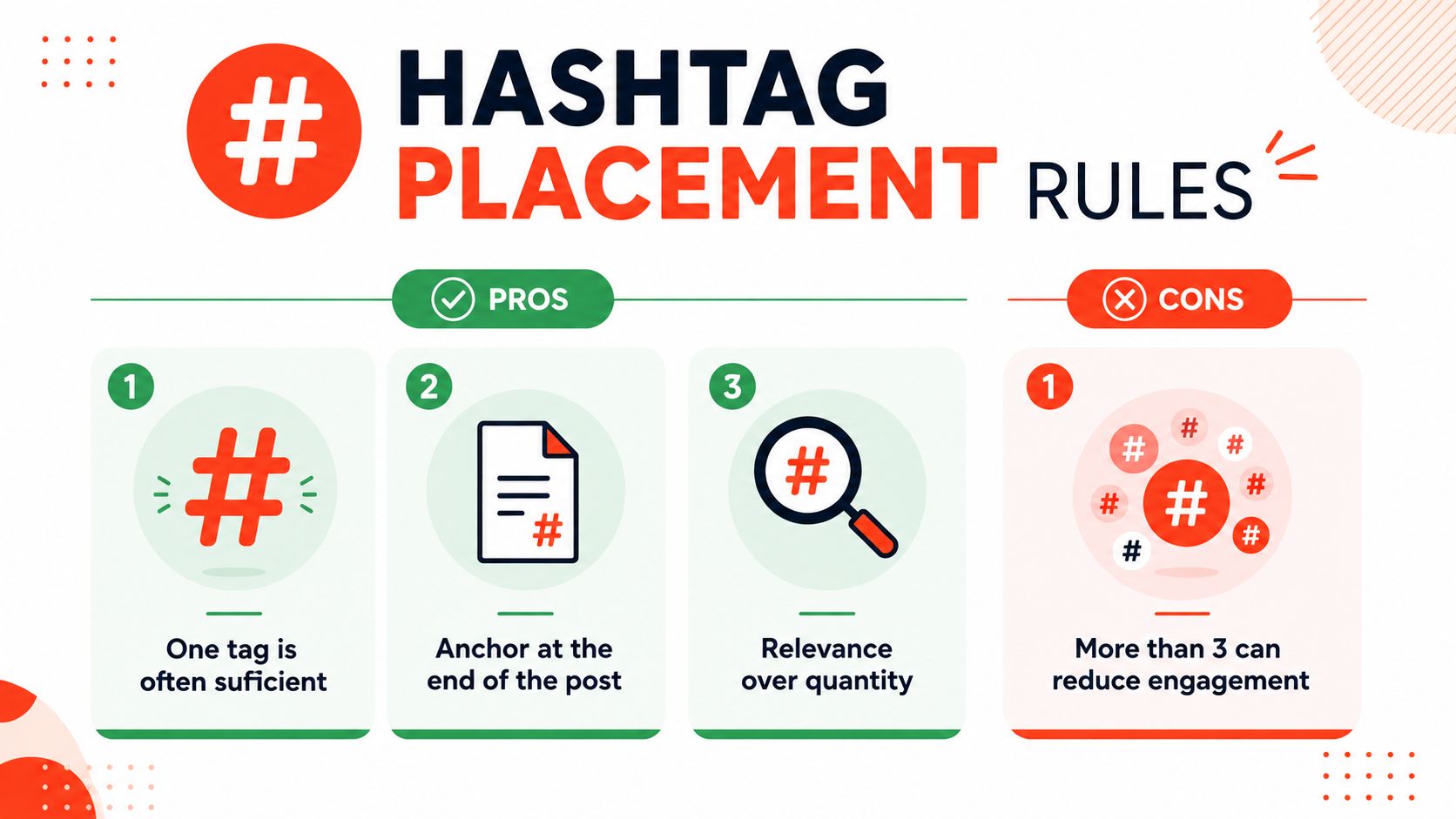
A good default is one to three highly relevant hashtags. That range fits the pattern seen in the available LinkedIn post analyses, where a small tag set performs better than a crowded one. A single strong tag can help classification. Piling on extra tags usually adds noise faster than it adds reach.
Put the topic first, the tags later
Place hashtags at the end of the post whenever the format allows it. That keeps the opening lines focused on plain-text keywords, which LinkedIn still reads, and it avoids turning the hook into a string of labels. The first sentence should carry the topic in normal language before the tags do any supporting work.
If you manage keyword lists for posts, a tool like track keywords can help keep the body copy and hashtag set aligned. The point is to make the post body and the tags point to the same topic, not to cram more terms into the same update. For consultants building a repeatable posting system, WaveGen's guide to LinkedIn personal branding is a useful companion because it ties topic choice to the way your profile and content reinforce each other.
What to avoid
- More than three tags by default: the available evidence does not support a volume-first approach, and performance tends to weaken as tag count rises.
- Broad tags with weak intent: a generic hashtag rarely adds meaning that is not already clear in the post body.
- Random trend tags: if the audience would not search for it, it usually does not deserve a place in the post.
Useful shorthand: one strong tag is often enough, two is usually safe, and more than three needs a clear reason.
Choosing Hashtags for Consultants, Marketers, and Creators
Hashtag choice changes with the job to be done. A solo consultant needs topic precision, a B2B marketer needs distribution consistency, and a creator needs audience alignment. One list won't serve all three, because the same tag can signal expertise, campaign structure, or community identity depending on who's posting.
Consultants need niche expertise signals
A management consultant posting about organizational change should lean toward narrowly defined topic tags, such as #change management or #operating model. Those tags work because they match how buyers search for expertise, and they keep the post anchored to a clearly defined problem space.
The mistake consultants make is chasing broader visibility when they really need credibility. A broad hashtag may feel larger, but it can dilute the association between the person and the specialty.
Marketers need a repeatable tag stack
B2B marketers usually benefit from a mix of one branded tag and one or two topical tags, such as #b2bmarketing and #demandgen. That structure gives the account a stable topic pattern without forcing the same generic label on every post.
For teams working on social selling, the social selling on LinkedIn guide is a useful adjacent resource because it aligns content, outreach, and topic positioning around the same buyer journey. The point is to make the hashtag set support the sales motion, not sit beside it as an afterthought.
Creators need audience-language tags
Creators and newsletter authors often do better with audience tags like #solopreneur or #creatoreconomy. Those tags help the post sit inside an existing conversation, which matters when the goal is to attract people who already identify with that audience.
If you're building a personal brand, the broader content system matters as much as the tag list, which is why this personal brand framework can be a helpful companion. The hashtag should fit the identity you're trying to reinforce, not just the topic of a single post.

A quick test helps here. If a tag is so small that it has almost no recognizable community, it may not be worth using. If it's so broad that it gets swallowed by global news cycles, it's probably too noisy to help.
Testing and Measuring Hashtag Performance
Hashtag testing should be dull by design. Change one variable at a time, keep the rest steady, and look for a pattern that repeats across posts instead of trusting a single spike. If you change count, placement, and topic all at once, the result cannot tell you which choice mattered.
Log the right metrics
Start with impressions and engagement rate, then layer in comments, saves, and profile visits once you have enough posts to compare. Raw likes are easy to chase and easy to misread, especially when one post gets a temporary lift from the network.
A simple baseline works better than a crowded dashboard:
- Post topic: the subject of the post
- Hashtag count: one, two, or three
- Hashtag set: the exact tags used
- Placement: end of post or first comment
- Impressions and engagement rate: the two numbers that matter most
- Notes: audience response, comments, or unusual timing
Decide when to retire a tag
Use the same hashtag across a small batch of posts, then compare it to your account baseline. If it underperforms for two posts in a row, move it out of the active set and test a different topic signal.
The benchmark is your own past performance on similar posts, not someone else's best case. That matters because hashtag use can lift engagement while still producing lower average impressions, so the right call depends on which result you care about before you label a tag successful. For a clearer read on visibility, the LinkedIn impressions guide helps separate reach from engagement.
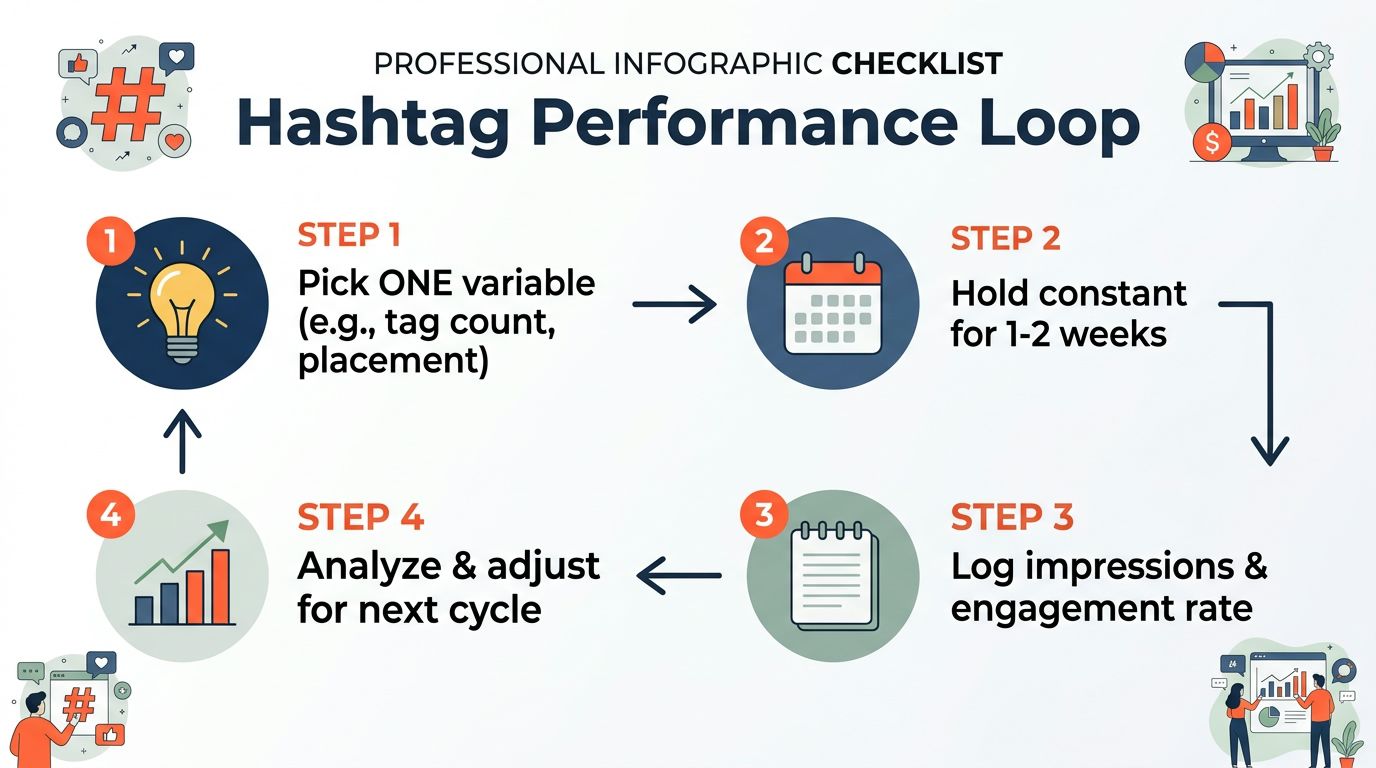
Keep the same tag set for 10 to 15 posts before making a firm call. That gives you enough repetition to see whether a tag is helping the post body, the audience fit, or neither.
Fitting Hashtag Strategy Into a Repurposing Workflow
Hashtag work compounds when it sits inside the repurposing process, not inside each individual post. A newsletter, podcast transcript, or blog post can become a LinkedIn post, and the hashtag set can come from a pre-built topical bank instead of fresh brainstorming every time.
A clean workflow starts with one source asset, then adapts it into a LinkedIn post, pulls tags from a small approved list, and carries the same topic logic into derivative content for other channels. That reduces repetition and keeps positioning stable across formats. It also makes content creation automation more practical, because the same source idea can feed multiple posts without forcing a new hashtag decision at each step.
WaveGen.ai fits here as one option for teams that want to turn a long-form source into social assets while keeping brand kits, formatting, and hashtag choices aligned in one pipeline. Its role is operational, not tactical. The hashtag itself matters less than the fact that the selection gets reused instead of rebuilt every time. For teams that already plan repurposing at the source level, content creation automation workflows keep that process consistent across drafts, formats, and distribution.
Once that process is in place, hashtags stop being a post-by-post chore. They become part of a repeatable content system that begins with the source idea and ends with consistent distribution.
FAQ on LinkedIn Hashtags in 2026
Do hashtags in the first comment work the same as hashtags in the post body? The post body usually gives LinkedIn more direct topic context because the platform reads the full text of the post as a signal. A hashtag in the first comment can still support discoverability, but it does less to clarify the topic at the moment LinkedIn evaluates the post itself.
Should company pages and personal profiles use the same hashtag strategy? The core principle stays the same, but the execution should differ. Company pages and personal profiles often produce different engagement patterns, so the right hashtag mix should be judged against each account's own results rather than copied across both without testing.
Does LinkedIn Premium change hashtag behavior? There is no clear evidence that Premium changes how hashtags are processed. Hashtag performance still depends on relevance to the post topic and how well the surrounding copy supports that topic.
How often should I refresh my hashtag bank? A quarterly review is a practical default. It gives you enough time to see whether a tag still matches the topic cluster you want to build, while avoiding constant changes that blur performance patterns.
WaveGen.ai helps teams turn one long-form asset into a week of on-brand social content, including LinkedIn posts with hashtags that stay consistent across formats. If you want a tighter repurposing workflow and less time rebuilding tag sets from scratch, visit WaveGen.ai and see how a single source can become a repeatable LinkedIn distribution system.
linkedin hashtags
linkedin engagement
social media strategy
linkedin algorithm
content marketing
Turn this kind of writing into a week of social content.
Paste a blog post, newsletter, or rough draft — WaveGen turns it into publish-ready carousels, captions, and slideshows for every channel.
No credit card · First posts in 2min