August 25, 2026
14 min read
How to Build My Social Calendar for Steady Growth
Learn how to build my social calendar with templates, automation, and repurposing workflows that keep your brand visible without daily content stress.

Monday morning arrives, and your social queue is empty. You have a podcast transcript, a half-finished newsletter, three useful client insights, and no clear idea what should go live first. By lunch, you've posted something rushed, promised yourself you'll plan ahead next week, and moved on to client work.
Your social calendar should prevent that cycle. A useful calendar isn't a list of dates and captions. It's a flexible operating system that connects goals, content pillars, source material, platform formats, approvals, publishing, and performance review. It gives you a reliable baseline without forcing you to ignore a timely conversation.
The scale of social media makes this operational discipline necessary. By the start of April 2026, 5.79 billion social media user identities existed worldwide, with more than two in three people using social media each month, according to DataReportal's global social media user data. The typical user actively uses 6.5 platforms and spends 18 hours and 36 minutes per week on social media, so your audience is distributed across networks, formats, and daily attention windows.
Table of Contents
- What a Social Calendar Actually Does in 2026
- Set Goals and Content Pillars Before You Schedule Anything
- Weekly and Monthly Templates That Keep You Consistent
- Turn One Source Into a Week of On-Brand Posts
- Schedule, Automate, and Throttle Without Going Robotic
- Roles, Approvals, and Workflows for Solo Creators to Agencies
- Measure, Review, and Improve Your Calendar Every 30 Days
What a Social Calendar Actually Does in 2026
A posting schedule answers one question: what goes live and when? My social calendar needs to answer more: why the post exists, which audience problem it addresses, who owns it, where the source asset lives, what approval it needs, and how you'll judge its performance.
That distinction matters on a chaotic Monday. Without a system, you decide on a topic, write from scratch, resize an asset, search for a link, ask someone for approval, and try to remember whether the post belongs on LinkedIn, Instagram, or TikTok. A calendar removes those decisions from publishing day.
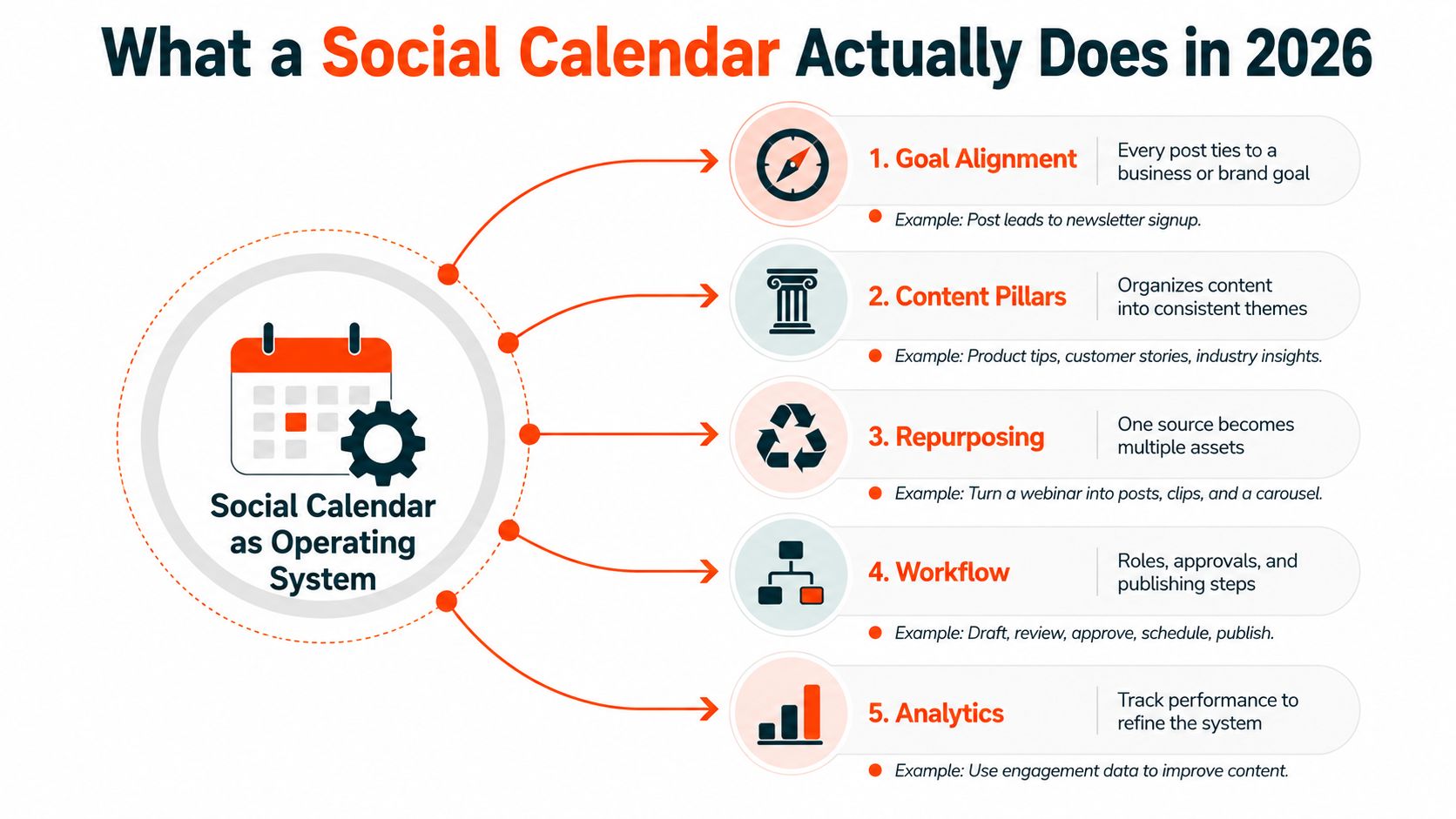
Build the calendar around six moving parts
Start with content pillars, which give every post a recognizable strategic home. Add templates for recurring formats, a repurposing workflow for turning one source into several native assets, automation for repetitive production tasks, named roles for creation and approval, and a review process that turns performance into the next month's decisions.
Use an 80/20 capacity split. Plan roughly 80% of your output from source content, evergreen ideas, campaigns, and recurring formats. Keep about 20% open for timely posts, replies, experiments, and platform-specific opportunities, following the dynamic-calendar approach described by Overvisual's 2026 guidance on adaptive social planning.
That open capacity is not wasted space. It protects your voice from becoming stale and gives you room to respond when your audience asks a useful question or a relevant conversation emerges. A full queue looks productive, but it can leave no room for judgment.
Practical rule: Schedule the dependable work. Leave enough space to stay human.
A strong system also needs a throttle. One practical benchmark places social cadence at 6 to 7 posts per week, while publishing above that range was associated with reduced engagement and positive brand mentions in the cited study on social media posting frequency and audience response. Treat that as a ceiling to test, not a target to exceed.
Your calendar's real job is to protect creative capacity. Predictable cadence beats daily heroics, and a flexible operating system makes consistency easier without turning every post into an emergency.
Set Goals and Content Pillars Before You Schedule Anything
Don't open a scheduling tool until you can state the primary business outcome in one sentence. Choose one priority, such as qualified leads, authority, community participation, or product sales. Multiple secondary outcomes can exist, but one must decide what earns space when the calendar gets crowded.
Consider a fractional CMO consultant serving early-stage founders. If the primary goal is qualified inquiries, the calendar shouldn't distribute attention evenly across random topics. It should favor posts that demonstrate strategic judgment, show practical outcomes, and create a clear path to a conversation.
Turn the goal into useful content categories
Choose three or four pillars that reflect both audience pain and the primary goal. The consultant might use:
- Teardowns: Analyze a landing page, onboarding flow, or positioning statement, then invite readers to share the problem they're facing.
- Contrarian frameworks: Challenge a common growth belief and offer a more useful decision model.
- Client wins: Explain the business situation, the strategic choice, and the result without exposing confidential details.
- Behind-the-scenes process: Show how the consultant audits a funnel, prepares a board meeting, or prioritizes experiments.
Each pillar needs a preferred format and action. A teardown might become a LinkedIn document or Instagram carousel with a question at the end. A framework could become a short video with a newsletter invitation. A client win can point to a consultation page, while a process post can ask for replies from founders dealing with the same issue.
For a more detailed way to organize themes for video-led publishing, use this guide to content pillars for short-form video. It's particularly useful when a broad pillar needs to become a repeatable set of visual formats rather than a vague topic label.
Use pillars as a publishing filter
Pillars stop the template from becoming a content vending machine. If a prompt produces a post that doesn't support the goal or belong to a pillar, reject it, rewrite it, or move it to the idea backlog.
A consultant who wants leads shouldn't fill the week with motivational quotes because they're easy to produce. The calendar should make the desired positioning visible through repetition. For teams managing multiple clients, Oviond's guide to planning a content calendar for agencies offers useful context on coordinating themes, channels, and approvals across accounts.
Create a simple row for every planned asset with the pillar, format, platform, owner, status, source link, and call to action. Then compare that structure with WaveGen's guide to social media content pillars, which can help you refine the themes before you build templates around them.
Weekly and Monthly Templates That Keep You Consistent
A monthly grid gives your team direction. A weekly template gives everyone a repeatable production rhythm. Use both, but don't confuse them. The monthly view answers what the content system is trying to accomplish, while the weekly view answers what someone needs to create today.
Build a four-week cycle around one source asset:
- Week one: Publish the long-form source and extract the main argument, examples, and call to action.
- Week two: Release clips, carousels, short posts, and visual summaries derived from that source.
- Week three: Use community-led content, replies, audience questions, and objections raised by the earlier posts.
- Week four: Test a new format, promote a strong asset, or develop the next source topic.
A practical weekly pattern could look like this:
| Day | Slot | Format | Purpose |
|---|---|---|---|
| Monday | Contrarian take | Text post or short video | Establish a point of view |
| Tuesday | Teardown | Carousel | Teach through a specific example |
| Wednesday | Source derivative | Podcast or video clip | Expand reach through motion |
| Thursday | Founder or consultant story | Narrative post | Build trust and context |
| Friday | Offer or product post | Demo, case study, or invitation | Create a clear next action |
| Saturday | Flexible slot | Trend response or reply-led post | Use the reserved capacity |
| Sunday | Light engagement or rest | Comments and community replies | Maintain presence without forcing output |
The weekly layout should reflect platform-native behavior, not a universal copy-paste routine. Use the table below as a starting point, then adjust it according to your production capacity and actual response.
Weekly content cadence by platform
| Platform | Posts per Week | Primary Format | Best Daypart |
|---|---|---|---|
| 4 to 5 | Text posts, documents, short video | Morning for organic posts | |
| 4 to 5, plus daily Stories | Reels, carousels, Stories | Morning or afternoon, tested by format | |
| TikTok | 3 to 5 | Short vertical video | Test morning and afternoon windows |
| X | 2 to 4, plus threads | Short posts, threads, replies | Morning for organic reach |
| YouTube | 1 long-form post per week or two weeks | Long-form video | Schedule around viewing behavior |
Use a ready-made free 2026 content calendar template if you're starting from a blank spreadsheet, but customize its fields. Add a pillar, source asset, approval status, platform variant, owner, and performance tag. A template should reduce setup time, not dictate your strategy.
Turn One Source Into a Week of On-Brand Posts
Repurposing works when you adapt the idea, not when you duplicate the caption everywhere. Start with one substantial source, such as a 1,200-word blog post, a podcast clip, or a client case study. Extract its central argument, strongest evidence, practical steps, objection, and conclusion before choosing formats.
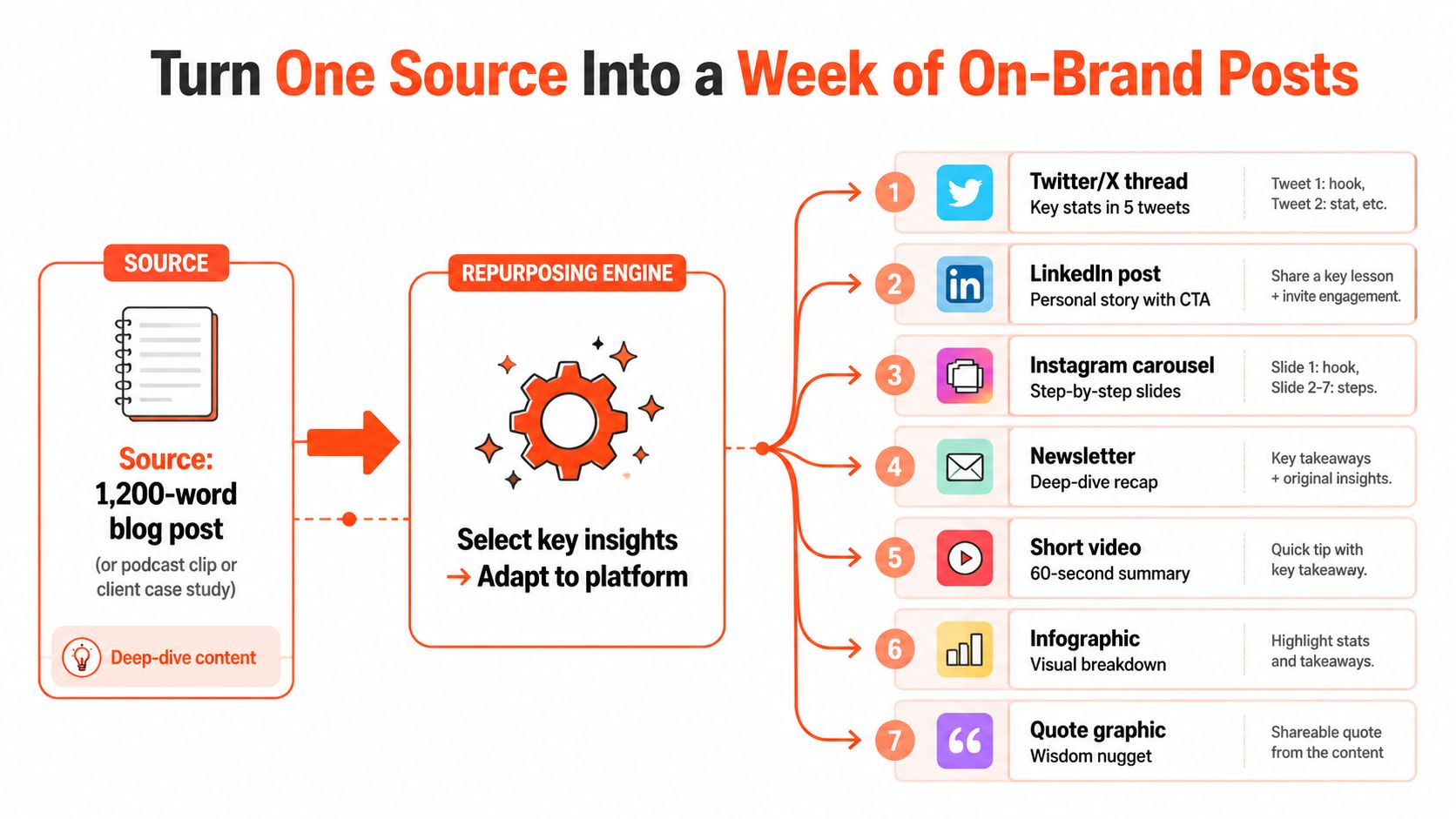
A single source can support this sequence:
- Day one, publish the source: Lead with the main promise and link directly to the article, episode, or case study.
- Day two, create a LinkedIn carousel: Turn the three main arguments into slides, ending with the source link or a consultation invitation.
- Day three, record a vertical video: Summarize the contrarian point in about a minute, using spoken language rather than article prose.
- Day four, write an X thread: Build one thread around the strongest insight and another around a practical objection.
- Day five, send a newsletter excerpt: Expand one section for subscribers and point back to the complete source.
- Day six, build an Instagram carousel: Convert the case study process, lesson, or data into a visual sequence.
- Day seven, publish a quote graphic: Use a concise insight as a visual entry point, then invite discussion.
Don't release every derivative on the same day as the source. Publish derivatives 24 to 48 hours after the source so each asset has room to earn attention and send people back to the original. Tag every derivative with the source title, campaign, pillar, and destination link.
Keep every derivative native
Before approval, run a platform translation check:
- Replace article introductions with direct hooks.
- Remove specialist jargon or define it in plain language.
- Match the visual ratio and pacing to the platform.
- Give every post one action, not a list of competing requests.
- Check that claims, examples, and links match the original source.
- Rewrite the first sentence instead of copying it across channels.
If your source is a newsletter, this repurposing workflow for turning newsletters into social media posts can help you map the original argument into platform-specific drafts.
For teams using WaveGen.ai, a transcript can become a set of ready-to-edit drafts inside the calendar, including carousels, short videos, quote cards, and captions with platform-specific formatting. The human still chooses the hook, removes weak claims, and approves the final voice. That division matters because automation can handle repetition, but it shouldn't decide what your brand believes.
Schedule, Automate, and Throttle Without Going Robotic
A scheduler is useful when it protects publishing time. It becomes harmful when it turns your calendar into an unattended queue. Compare three operating models before you automate.
| Model | Output Control | Engagement Risk | Best For |
|---|---|---|---|
| Pure queue | Every approved post publishes automatically | Gaps between publishing and replies, plus over-posting | Low-touch evergreen content |
| Throttled cadence | Daily output is capped and flexible capacity remains open | Lower risk, provided someone reviews context | Most solo creators and small teams |
| Wave publishing | Related assets release across different time windows | Requires coordination and active monitoring | Multi-platform launches and time-zone coverage |
Use the throttled cadence model as your default. The cited posting-frequency research supports a bounded cadence around 6 to 7 weekly posts, and it also indicates that publishing beyond that range can weaken engagement and positive brand mentions. Your queue should have a stop condition, not just an empty slot waiting to be filled.
Timing needs its own rules. A controlled study found that non-boosted posts performed 8.8% better in the morning, while boosted posts received 21% more clicks in the afternoon. The same research found that high-arousal negative content was 1.6% more effective in the morning, which means organic and paid posts shouldn't share one universal daypart rule. Review the research on emotional responses, likes, comments, and posting frequency when designing tests around timing and creative context.
Automate the repetitive parts
Automation is appropriate for formatting, asset tagging, cross-posting, recurring evergreen content, and reminders for approval. It's a poor fit for auto-DMs, scheduled replies that pretend to be spontaneous, and trend-jacking without human review.
Set guardrails that are easy to enforce:
- Cap trending-topic content at one reserved slot per week.
- Keep repurposed output to no more than two posts per day.
- Require a human review within four hours of any scheduled comment prompt.
- Pause scheduled content when a serious event makes the planned tone inappropriate.
- Mark every automated asset with its source and intended platform.
For practical implementation details, WaveGen's guide to scheduling social media posts can help you structure the calendar without treating automation as a substitute for judgment.
Roles, Approvals, and Workflows for Solo Creators to Agencies
Your calendar should match your team's actual operating mode. A solo creator needs compression. An agency needs visibility across handoffs. Giving both teams the same approval process creates either unnecessary admin or dangerous gaps.
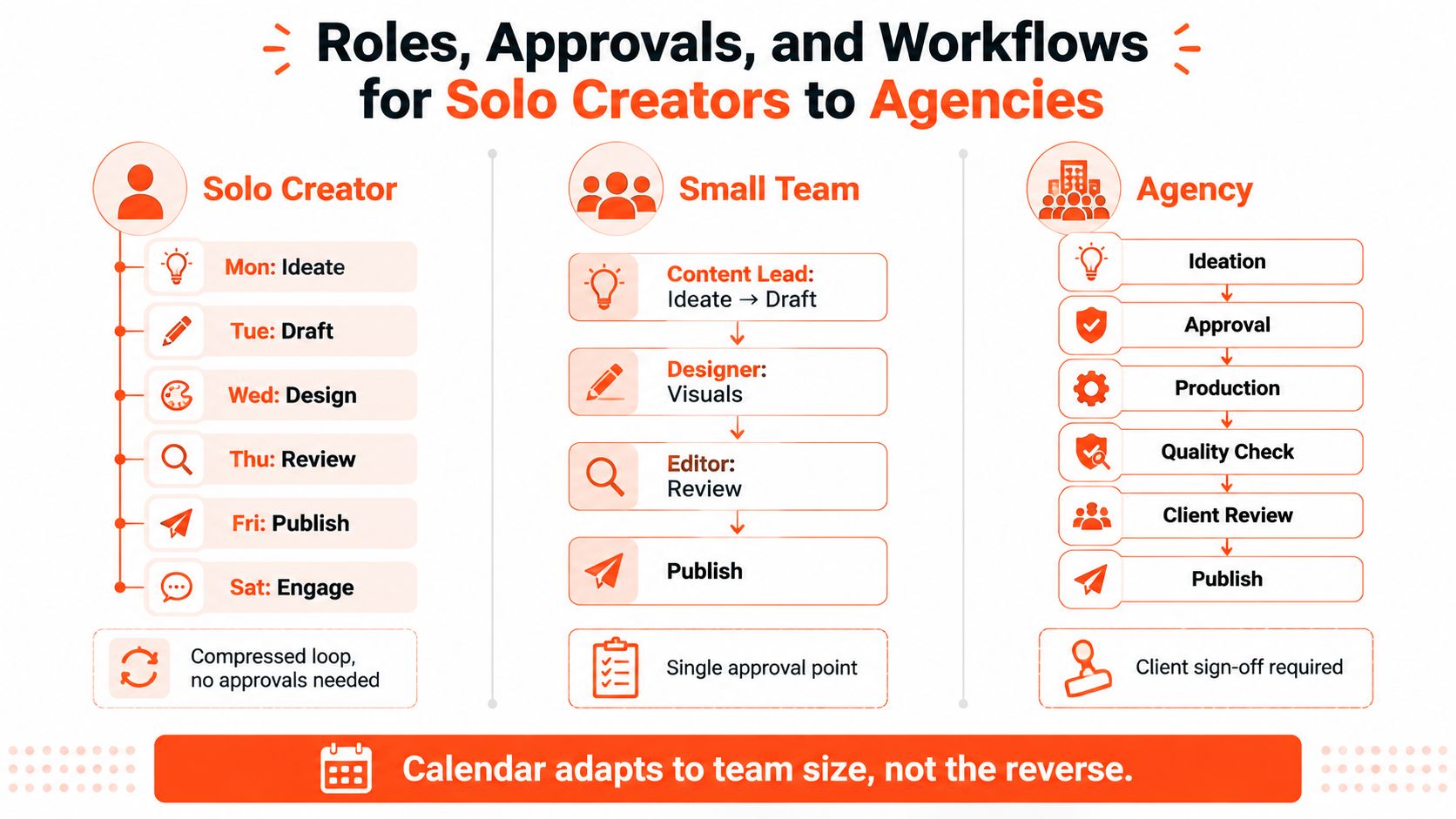
Solo creator
Run one compact loop: ideate on Monday, draft on Tuesday, design and schedule on Wednesday, engage on Thursday and Friday, then review the week on Sunday. You're the creator, editor, approver, and publisher, so the calendar only needs one approval gate. Use clear statuses such as idea, drafting, ready, scheduled, and published.
Small team
A team of two to four people should split creation from review. The content lead can choose the topic and draft the copy, while a designer or editor prepares the visual and checks the final version. Add one review checkpoint before scheduling and keep a shared asset library so nobody works from an outdated file.
Agency
Agencies need named ownership for strategy, creation, design, scheduling, and account leadership. A simple board can move each asset through brief, draft, design, internal review, client review, approved, scheduled, and live. The account lead should own deadlines and escalation, while the scheduler should own the final publishing check.
Ownership rule: Every post needs one person responsible for moving it forward, even when several people contribute.
Most workflow failures come from skipped review, unclear responsibility for replies, and no backup when the scheduler is unavailable. Put the owner, reviewer, backup, status, and deadline in the row itself. Don't rely on memory or a private chat message.
Your minimum viable approval chain is simple. A solo creator approves their own work. A small team uses one internal reviewer. An agency adds client sign-off when the account requires it. More stages aren't automatically more professional. They're useful only when each stage catches a real risk.
Measure, Review, and Improve Your Calendar Every 30 Days
A calendar becomes valuable after publication, when you use performance to decide what deserves another slot. Track leading indicators weekly, then conduct a deeper review every 30 days. Don't judge every post by the same standard because a reach post, a conversation post, and an offer post have different jobs.
Start with three signals:
- Share rate: Shows whether the idea is useful or distinctive enough to pass to another audience.
- Save rate: Indicates practical value, especially for frameworks, checklists, and tutorials.
- Comment depth: Separate thoughtful responses from emoji-only reactions so you can see whether the post created a real conversation.
Then connect the calendar to the outcome that matters. A consultant can tag inquiries by pillar and record which content preceded a booked conversation. A creator can compare subscriber minutes and watch behavior by platform and format. A product team can track clicks and completed actions from offer-led posts.
Run the 30-day review
Export post-level performance from your publishing and analytics tools into one sheet. WaveGen.ai can support this reporting workflow by centralizing scheduled content and its distribution history, while you still need to validate the platform metrics and business outcomes before making decisions.
Use the review to answer five questions:
- Which planned topics earned shares, saves, or substantive comments?
- Which pillars produced inquiries, subscriptions, or other meaningful actions?
- Which formats consumed the most production time without a useful response?
- Which posts performed because of timing, and which performed because of the idea?
- Where should the open capacity go next month?
Move stronger pillars into more prominent slots, revise weak hooks, and remove formats that repeatedly fail to justify their production cost. Don't protect a pillar because it took effort to build. Retire any pillar that underperforms for three consecutive review cycles, then replace it with a topic grounded in audience questions or business priorities.
Monthly decision: Keep what earns attention and action, improve what shows potential, and remove what only fills the calendar.
Your social calendar should get sharper each month. If it still looks identical after repeated reviews, you're maintaining a schedule, not operating a learning system.
WaveGen.ai turns one article, newsletter, podcast script, or YouTube transcript into editable social assets, including carousels, short videos, quote cards, captions, and platform-specific formats, then helps you schedule and distribute them across channels. Visit WaveGen.ai to build your source-to-week workflow and keep your calendar consistent without giving up room for timely content.
my social calendar
content calendar
social media scheduling
content repurposing
social media workflow
Turn this kind of writing into a week of social content.
Paste a blog post, newsletter, or rough draft — WaveGen turns it into publish-ready carousels, captions, and slideshows for every channel.
No credit card · First posts in 2min