September 29, 2026
15 min read
Social Media Cross Posting Strategy Guide
Master social media cross posting with platform-specific rules, engagement tactics, and automation workflows to scale your content distribution effectively.
Your team has a strong article, newsletter, or video transcript ready to distribute. The problem starts after creation. Instagram needs a different caption and crop, LinkedIn allows a much longer post, X forces a tight text budget, and TikTok may require a different media workflow altogether. A single click can save publishing time while creating truncated copy, broken previews, awkward hashtags, or media that looks borrowed from another network.
Social media cross posting works when automation handles repetition and people preserve relevance. The efficient model isn't “publish the same post everywhere.” It's one source idea, transformed into versions that respect each platform's technical rules, audience expectations, and native formats.
Table of Contents
- Defining Social Media Cross Posting and Repurposing
- Weighing the Benefits and Drawbacks of Cross Posting
- Navigating Platform-Specific Rules and Formatting Constraints
- Adapting Content Formats for Maximum Engagement
- Building a Sustainable Cross Posting Workflow
- Choosing the Right Tools and Automation Patterns
- Final Thoughts on Scaling Your Distribution Strategy
Defining Social Media Cross Posting and Repurposing
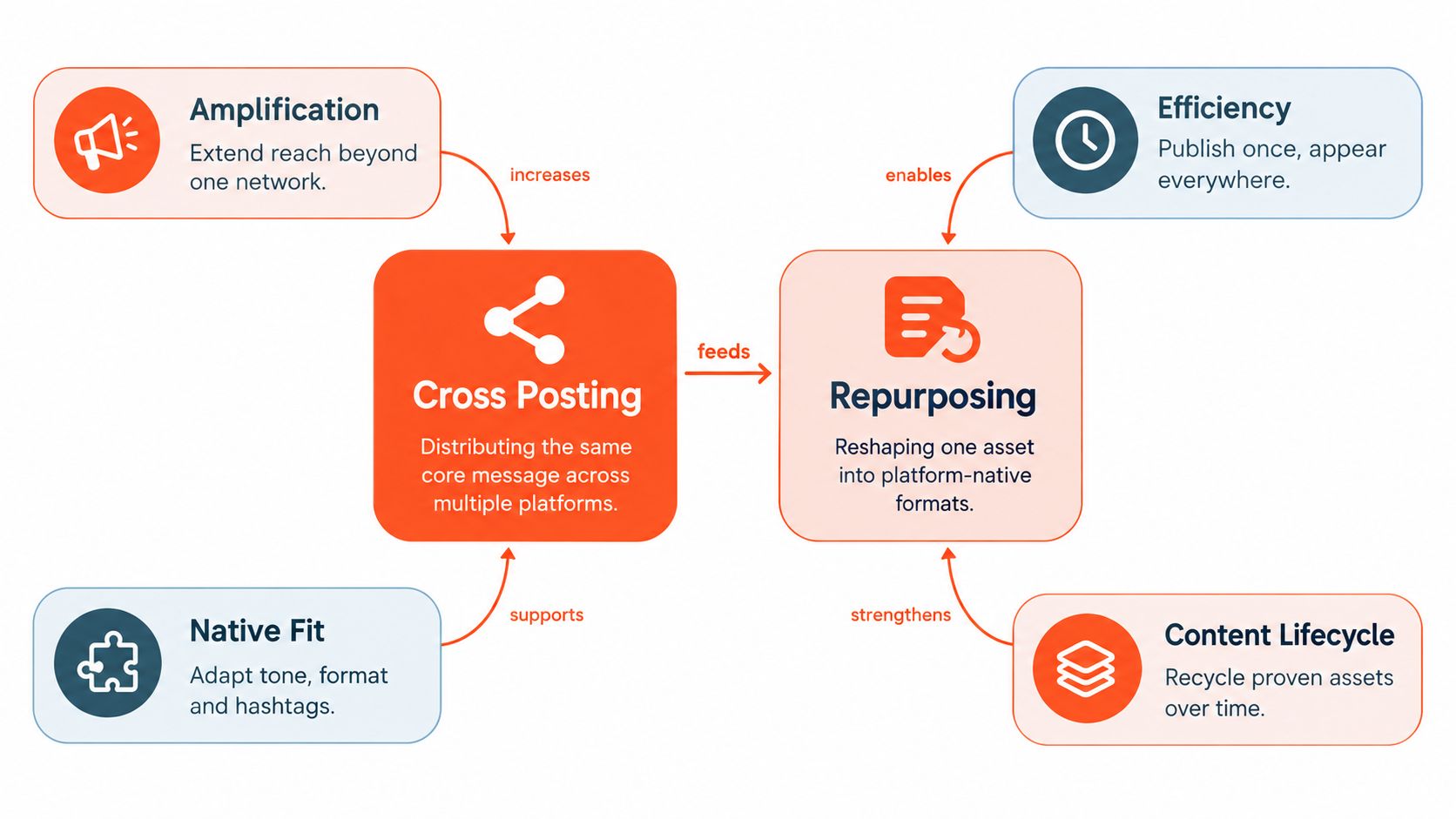
Cross posting means publishing the same core information on two or more social networks. That definition comes from a 2017 academic study of professional users across Facebook, Twitter, and Google+, which examined 616 users and identified 176,000 cross-posts. In median terms, users shared 25% of their Facebook and Google+ posts on other networks, compared with 3% of tweets. The pattern matters because distribution was shaped by platform pairings and audience overlap, not random duplication. The study found 70% of cross-posts concentrated between Facebook and Twitter, while around 15% connected Facebook and Google+.
That traditional definition still helps, but modern workflows need a sharper distinction:
- Blind cross posting sends identical text, media, links, hashtags, and mentions to every destination.
- Strategic cross posting preserves the central message while making small destination-specific changes.
- Content repurposing reshapes the source into a new format, length, angle, or narrative structure for each network.
A blog article might become a concise LinkedIn argument, an Instagram carousel, a short vertical video, and an X post built around one claim. The source remains consistent, but the presentation changes.
Efficiency needs a native layer
Copy and paste feels efficient because it removes repeated writing. It doesn't remove the work required to make a post fit. A LinkedIn audience may respond to context and a structured argument, while TikTok viewers need an immediate visual hook. Instagram captions don't create link previews in the same way Facebook and LinkedIn do. A literal duplicate therefore saves production clicks but transfers the cost to weaker presentation and manual corrections.
A practical way to organize the workflow is to separate the content nucleus from the rendering layer. The nucleus contains the insight, proof, point of view, and call to action. The rendering layer controls the opening line, caption length, media format, crop, hashtags, mentions, and link placement.
For a focused example of turning one text-first idea into platform-ready variations, review this SupaBird repurposing strategy. Teams building a broader editorial system can also use this content repurposing strategy as a planning reference.
Practical rule: Automate the repeatable mechanics, not the editorial judgment. If every destination receives the same payload, you haven't built a distribution system. You've built a duplication button.
Weighing the Benefits and Drawbacks of Cross Posting
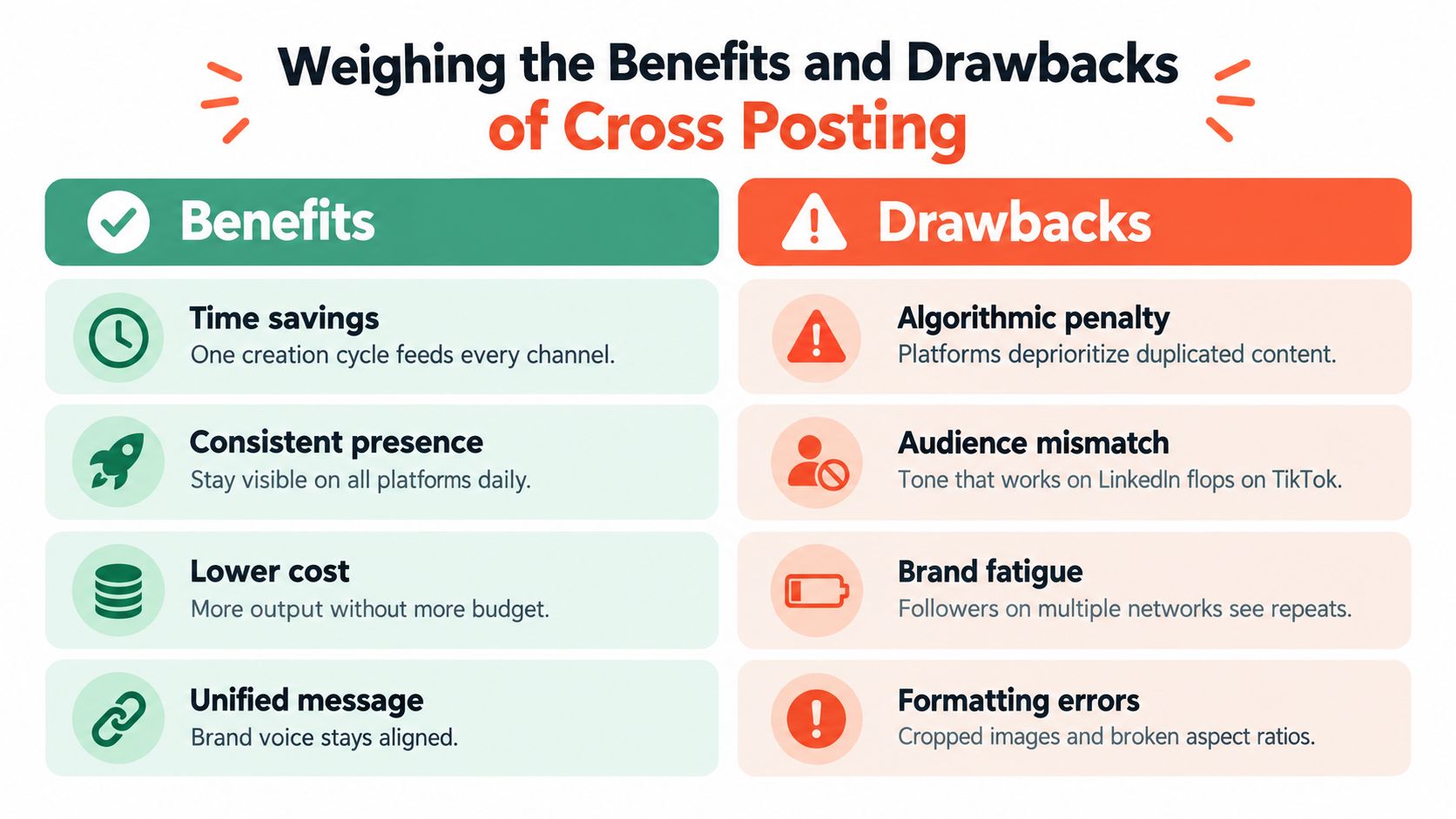
Cross posting has a clear operational advantage: one source asset can support a presence across several networks without requiring a separate creative process for each one. It helps brands keep their message aligned, extend the useful life of strong ideas, and reduce repetitive scheduling work. Those benefits become more important as publishing volume rises.
A 2024 benchmark based on 3 billion messages from 1 million active public profiles reported that brands published an average of 9.5 social posts per day across networks. The same benchmark reported regional averages of 9.5 posts per day in North America, 12 in EMEA, and 20 in APAC. These figures are summarized in industry coverage of the cross-platform posting benchmark. The regional spread shows why multi-network distribution often requires a system rather than a sequence of ad hoc manual uploads.
Where cross posting earns its place
The strongest benefits appear when teams treat distribution as a production operation:
- Time savings: One approved source asset can feed several destination drafts instead of restarting from a blank page.
- Message consistency: Core claims, terminology, and campaign positioning stay aligned across channels.
- Better asset utilization: A useful article or recorded conversation can produce multiple posts over its content lifecycle.
- Operational resilience: A centralized queue reduces the chance that one network gets neglected during a busy launch.
Automation also creates a useful separation between creation and publishing. A strategist can approve the central message once, then review each adapted version for platform fit. That is faster than writing every post independently, but safer than broadcasting one unchanged caption.
Where the shortcuts fail
The drawbacks start when teams measure output rather than presentation. Followers who see the same post on multiple networks may perceive the brand as repetitive. A caption written for Instagram can look unnatural on LinkedIn, and a professional explanation can feel slow on a short-form video platform. Identical hashtag blocks, misplaced mentions, visible watermarks, and wrong image crops make the automation obvious.
The hidden cost is quality control. Every destination needs its own checks for:
- Audience fit, including tone, context, and expected interaction.
- Text fit, including truncation and awkward line breaks.
- Media fit, including dimensions, crop safety, compression, and upload type.
- Link fit, including whether a preview appears and where the URL belongs.
- Timing fit, including whether simultaneous publishing creates an echo for overlapping followers.
The right conclusion isn't that cross posting is harmful. It's that duplicate distribution and native distribution are different operating models. The first maximizes speed. The second balances speed with audience experience.
Publishing everywhere is an output goal. Being useful everywhere is a strategy goal.
Navigating Platform-Specific Rules and Formatting Constraints
Naive automation usually breaks at the destination layer. Each network accepts different text lengths, media types, link behavior, and publishing methods, so a shared content object needs to be validated before it reaches an API or scheduler.
The publicly documented limits summarized by Brandwatch's cross-posting glossary provide a useful reference:
| Platform | Character limit | Link preview behavior |
|---|---|---|
| X | 280 characters for free accounts | The destination handles links differently from preview-first networks |
| 3,000 characters | Link previews can render | |
| 2,200-character captions | Links don't render as previews in captions | |
| 63,206 characters | Link previews can render | |
| TikTok | 4,000-character captions | Link treatment and media publishing require destination-specific handling |
These limits aren't a reason to write one universal caption and trim it mechanically. A character budget should protect the argument's meaning. Cutting a LinkedIn post at an arbitrary point can remove the qualification or call to action that makes the message credible. A good system generates a short version for X, a context-rich version for LinkedIn, and a caption-plus-alternate-link treatment for Instagram.
Build validation before publication
A reliable workflow validates each destination in a predictable order:
- Text budget: Count characters after inserting mentions, hashtags, and links. Reserve space for platform-specific additions.
- Mention mapping: Confirm that a handle exists and is valid on the destination. Never carry an X mention into Instagram or a LinkedIn tag into TikTok without verification.
- Media safety: Check aspect ratio, resolution, file type, duration, audio, and crop boundaries before upload.
- Link handling: Decide whether the URL belongs in the post, a profile destination, a comment, or a native link field.
- Preview rendering: Use a destination preview, not just the source editor, to catch line breaks, missing cards, and cropped text.
- Failure recovery: Store the error returned by the destination and provide a retry or manual-publish path.
The media pipeline deserves special attention. An image that looks balanced in a square preview may lose its headline when rendered in a vertical feed. Video can also require separate exports rather than one master file. For practical guidance on preparing video assets, use these pro tips for Instagram uploads, then test the final file in the actual publishing workflow.
Treat links as content decisions
Link behavior changes the post's structure. Facebook and LinkedIn can generate link previews, while an Instagram caption won't create the same preview. If your automation appends the article URL to every caption, Instagram may receive a dead-weight line that consumes attention without providing an equivalent preview.
Store link placement as a destination field. The same source campaign can use a preview-enabled post on LinkedIn, a concise call to action on X, and a profile or story destination on Instagram. That isn't inconsistency. It's correct implementation of different publishing environments.
Adapting Content Formats for Maximum Engagement
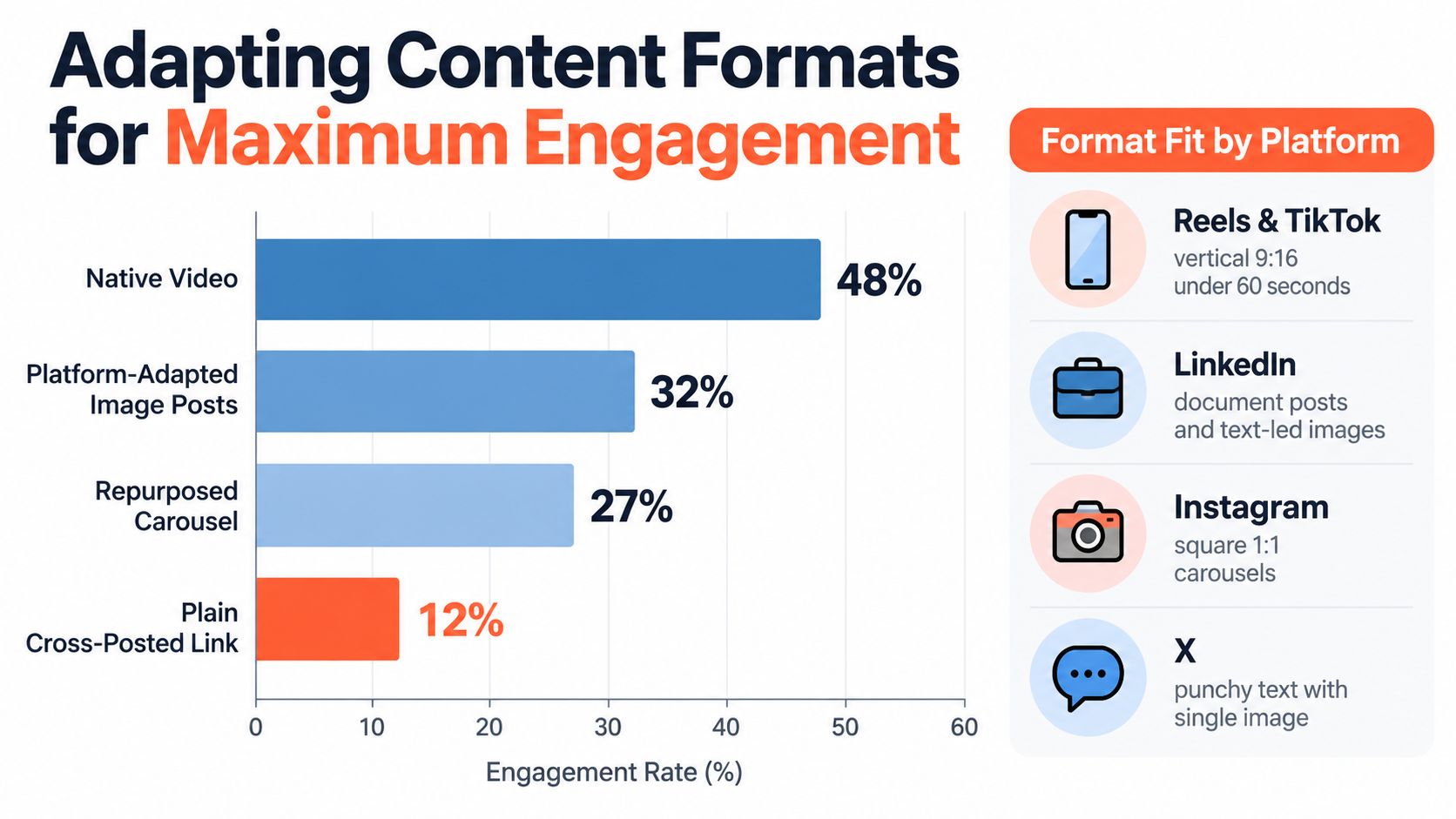
A source asset rarely has one ideal format. The message may be identical, but the user's mode of consumption changes by platform. LinkedIn can support a document-led explanation, Instagram can turn the logic into a swipeable sequence, TikTok can express the central tension through motion and voice, and X can reduce the idea to a sharp text-first observation.
A 2026 analysis of more than 45 million posts reported engagement of 21.77% for LinkedIn carousels, 6.9% for Instagram carousels, 5.20% for Facebook images, 3.39% for TikTok video, and 3.56% for X text. The analysis is documented in Buffer's data on the best content format for each social network. Its comparison shows that format choice can produce more than a sixfold difference between the best and runner-up post types on the same platform, making “publish the same asset everywhere” a poor default.
Start with one message, then change the expression
A practitioner-friendly repurposing pattern looks like this:
- Extract the claim. Identify the single idea the audience should remember.
- Choose the native container. Use a carousel when the idea needs sequence, video when demonstration or emotion matters, and text when the argument can stand without visual explanation.
- Rewrite the hook. The opening should match the platform's reading and viewing behavior.
- Rebuild the close. A comment prompt, save prompt, link visit, or follow request won't work equally well everywhere.
- Export separately. Render each version with its own dimensions, file type, captions, and safe zones.
For example, a long-form article about a technical mistake can become a LinkedIn carousel with one failure per slide, an Instagram carousel with a visual checklist, a TikTok clip showing the mistake and correction, and an X post that states the problem in one sentence before adding context. The editorial source stays unified. The audience experience doesn't.
Native format beats universal formatting. The more visual and platform-specific the channel, the less acceptable a raw duplicate becomes.
Automation should generate variations, but a strategist still needs to inspect the first frame, headline, caption opening, and call to action. AI can produce a technically valid crop that hides the important detail. It can also shorten a nuanced argument into a confident but inaccurate claim. Review isn't a rejection of automation. It's the control that makes automation safe to scale.
The practical operating rule is one core message, multiple renderings. Generate a family of assets from the same source, then judge each version by its destination's behavior, not by how closely it resembles the original.
Building a Sustainable Cross Posting Workflow
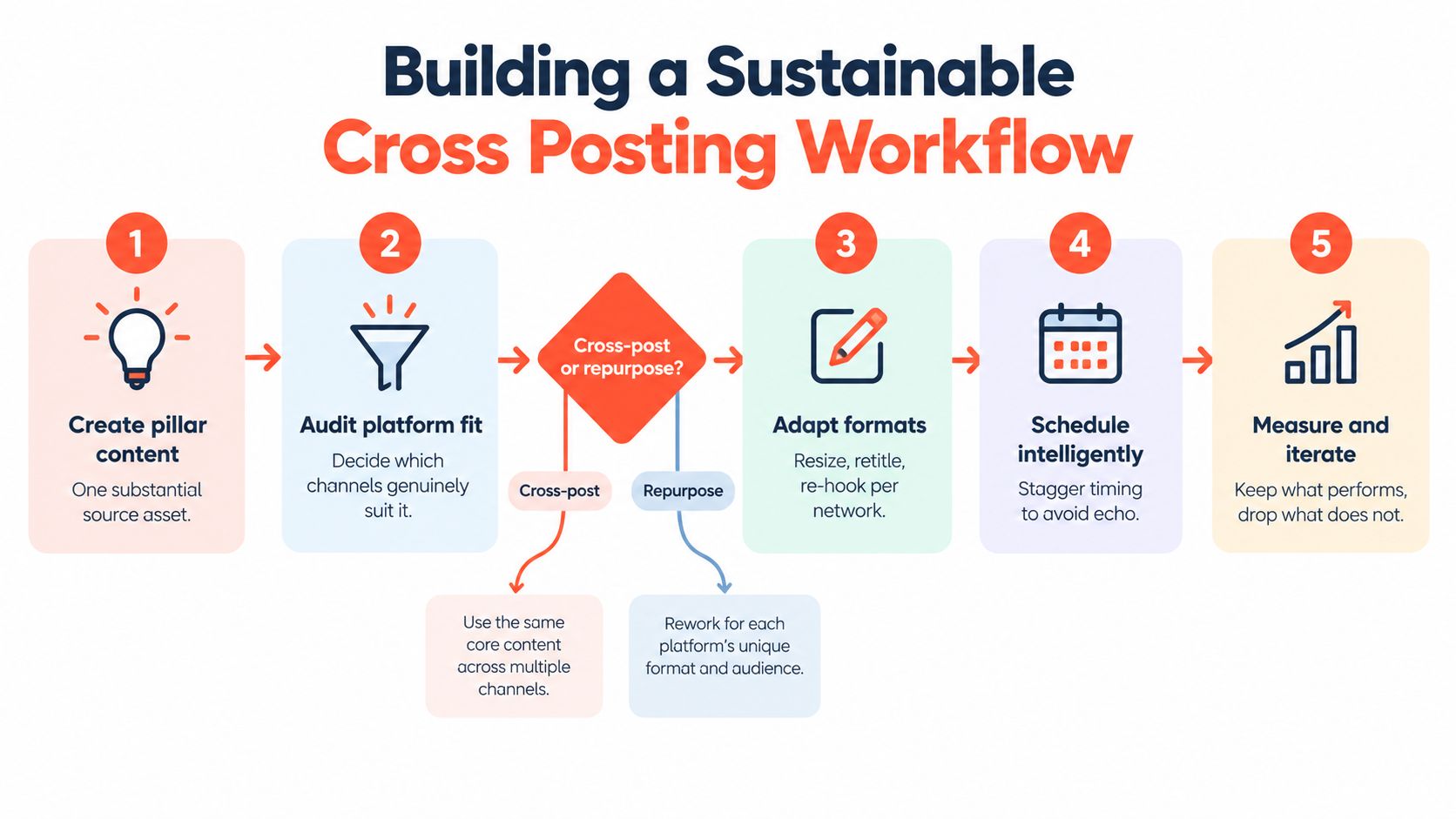
A sustainable workflow gives every post a clear path from source idea to approved destination asset. It also creates a point where someone can decide that a network isn't a fit. Publishing to every connected account isn't automatically efficient if the audience, format, or objective doesn't match.
Use a five-step operating model
1. Create pillar content. Start with an article, newsletter, podcast script, webinar, or video transcript that contains enough substance to support several angles. Capture the source text, key claims, approved terminology, and intended audience in one record.
2. Audit platform fit. Before generating assets, ask whether the topic belongs on each destination. A specialist explanation may suit LinkedIn and YouTube but not justify a TikTok version unless the team can add a visual demonstration or human story.
3. Choose cross posting or repurposing. Cross post when the same media and message remain useful with light edits. Repurpose when the destination needs a different length, structure, hook, or format to make the idea understandable.
4. Adapt and schedule. Change the headline, caption, crop, hashtags, mentions, and link treatment. Stagger publishing when overlapping audiences would otherwise see the same idea at the same time. Keep the source relationship visible internally, but don't force identical public copy.
5. Measure and iterate. Review each destination's engagement, saves, comments, clicks, completion signals, and publishing errors. Retain the formats that create meaningful interaction and retire variants that repeatedly require manual repair.
Put governance around the automation
Brand consistency comes from shared rules, not identical captions. Create a brand kit with approved colors, fonts, logos, voice attributes, prohibited claims, and accessibility requirements. Then define what can change by platform, such as sentence length, humor, hashtag style, link placement, and call-to-action language.
A review gate should catch predictable failures:
- Duplicate captions: Compare destination versions and flag identical text where adaptation is expected.
- Watermarked media: Reject uploads that visibly identify another platform.
- Unsafe crops: Check whether logos, subtitles, and key text remain inside the visible area.
- Stale references: Detect expired offers, old dates, or destination-specific mentions.
- Approval ownership: Assign a clear person for content, brand, legal, and publishing exceptions.
Guidance from Promote's cross-platform repurposing advice makes the central distinction plainly useful: cross posting shares the same content across networks, while repurposing changes the format, length, and framing for the algorithm and audience. It also warns against identical captions, repeated hashtag blocks, and watermarked uploads.
For teams that need to coordinate publishing across accounts, this guide to posting on all social media at once can help turn the workflow into a repeatable queue rather than a collection of disconnected tabs.
Choosing the Right Tools and Automation Patterns
The right tool depends on where the bottleneck sits. Native schedulers can work when one platform dominates and the team wants maximum direct control. A general social media manager can centralize calendars, approvals, and reporting. A repurposing system becomes more useful when the source material is long-form and the repeated task is turning it into different platform assets.
Match automation to the actual constraint
A basic scheduler solves timing. It lets a team prepare posts and publish them later, but the editor may still require manual rewriting for every destination.
A stronger cross-posting workflow solves destination adaptation. It keeps separate caption fields, applies character validation, handles platform-specific media, maps mentions, and provides previews before publication.
An AI-assisted distribution system solves transformation plus scheduling. It can take an article or transcript, identify usable ideas, draft carousel copy, create quote-card concepts, produce short-video scripts, and prepare captions for review. The system is valuable only if the team can edit the output, preserve brand rules, and see exactly what will be published.
Use this evaluation checklist when comparing tools, with additional context in this guide to compare social media automation features:
- Adaptation quality: Does the system rewrite for each destination, or only duplicate the source caption?
- Media handling: Can it create or transform assets without damaging crops, subtitles, or logos?
- Review controls: Can editors modify text and visuals before scheduling?
- Publishing reliability: Does it explain failures and support retries when an API rejects a post?
- Account architecture: Does the pricing and permission model suit solo work, teams, or agencies?
- Data ownership: Can the team retrieve source assets, variants, approvals, and performance information if it changes tools?
WaveGen.ai is one option in this category. It turns articles, newsletters, podcast scripts, and YouTube transcripts into platform-specific social content, including carousels, short videos, quote cards, and captions. It also supports brand kits, visual editing, scheduling, and publishing across connected channels including Instagram, TikTok, LinkedIn, YouTube, and Facebook.
Avoid the single-composer illusion
A unified composer is useful, but only if it exposes the differences between destinations. A preview that shows one generic post can hide a failure that appears after publication. Look for per-platform previews, separate media variants, explicit character counts, and error states that identify the rejected field.
RSS autopilot can also help teams maintain a steady queue from approved source feeds, but it needs guardrails. Feed monitoring should create drafts, not publish sensitive claims without review. Add filters for article type, author, campaign, and publication date, then require approval before the system generates a public post.
For Instagram-specific workflows, a practical automated Instagram post process should still include manual review of the first frame, caption, crop, and destination link. Automation removes repetitive handling. It doesn't remove responsibility for what the audience sees.
Final Thoughts on Scaling Your Distribution Strategy
Effective social media cross posting isn't about reducing every channel to the same post. It's about reducing repeated production work while protecting the details that make each channel useful.
Audit your current pipeline with five questions:
- Source: Does every group of posts begin with an approved, traceable source asset?
- Destination: Does the system validate text, mentions, media, links, and crops separately?
- Format: Does each platform receive the format most likely to make the idea clear?
- Governance: Can someone catch duplicate captions, watermarks, stale claims, and failed uploads?
- Measurement: Do you compare variants by meaningful interaction and publishing reliability, not volume alone?
The best workflows reserve human attention for strategy, judgment, community replies, and creative direction. Software should handle asset transformation, field validation, scheduling, and repeatable publishing steps. When those responsibilities are separated, teams can distribute more consistently without making every network feel like a mirror of the others.
Start with one reliable source asset and two or three priority destinations. Build the validation rules, review the variants, record what fails, and expand only when the workflow remains maintainable.
WaveGen.ai turns articles, newsletters, podcast scripts, and YouTube transcripts into on-brand carousels, short videos, quote cards, and platform-specific captions, then helps your team edit, schedule, and publish them across connected social channels. Visit WaveGen.ai to test a more reliable path from source content to native multi-channel distribution.
social media cross posting
content distribution
social media automation
content repurposing
social media workflow
Turn this kind of writing into a week of social content.
Paste a blog post, newsletter, or rough draft — WaveGen turns it into publish-ready carousels, captions, and slideshows for every channel.
No credit card · First posts in 2min