August 29, 2026
15 min read
How to Automate Social Media Without Losing Your Voice
Learn how to automate social media the right way in 2026. Practical steps for planning, repurposing content, and keeping your brand voice intact across
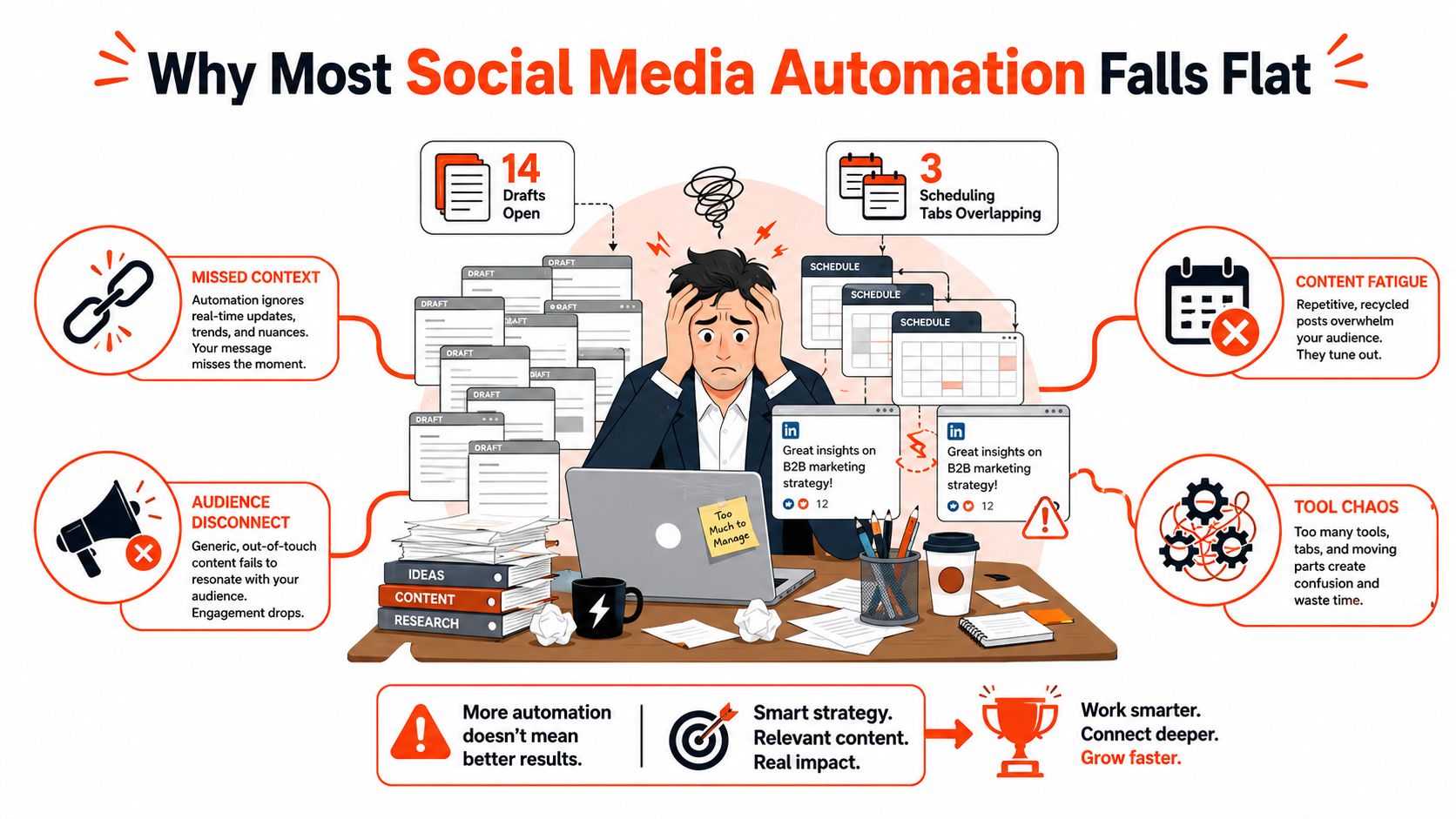
Monday starts with 14 drafts open, three scheduling tabs competing for control, and a LinkedIn post that appeared twice because two automations were connected to the same queue. The consultant behind those tabs isn't short on ideas. They're short on a reliable content operation.
That distinction matters. Social media automation can remove repetitive publishing work, but it can't decide which customer objection deserves a response, whether a joke fits the current news cycle, or whether an AI rewrite still sounds like the person who built the business. The market reflects how widely these workflows have spread. Social media automation tools were estimated at USD 4.5 billion in 2024 and are projected to reach USD 12.8 billion by 2033, according to market and adoption data on social media automation.
The strongest systems don't start with a faster queue. They start with one useful source asset, adapt it for each platform, and leave a human approval point before publication.
Table of Contents
- Why Most Social Media Automation Falls Flat
- Defining Goals, Audience, and a Realistic Cadence
- The Core Tool Stack for Automated Workflows
- Repurposing One Source Into a Week of Content
- Platform Formatting and Compliance Guardrails
- Monitoring, Analytics, and the Human Approval Loop
- Common Pitfalls and Your First 7-Day Automation Plan
Why Most Social Media Automation Falls Flat
A consultant opens Monday's queue and finds three versions of the same post. One repeats last week's idea, another sounds unlike the consultant after an AI rewrite, and a third carries a LinkedIn-style link into an Instagram caption. No tool has crashed, yet the publishing system has already created review work and brand risk.
Three operating failures usually sit underneath this pattern.
Queue-first thinking makes a full calendar look like progress. A week of scheduled posts can still contain weak angles, repeated points, and no connection to current audience questions. Automation distributes decisions. It does not improve the source material behind them. The stronger approach starts with one useful article, webinar, case study, or recording, then adapts that material for each channel.
Tone drift follows when every draft passes through the same AI rewriting step. The prose may become cleaner while the author's judgment disappears. A consultant who normally uses direct examples can end up sounding like a generic software company. Grammar checks will not catch that problem. Reviewers need to compare the draft with approved examples and remove any phrasing the subject-matter expert would not use.
Compliance misses appear when one format is pushed across every network. A link-led LinkedIn update may require a different caption and call to action on Instagram. Sponsored disclosures, creator tags, licensed music, account permissions, and platform rules also need deliberate checks. The overview of social media scheduling dangers identifies risks that a calendar view can hide.
Automation should protect attention, not replace judgment
Businesses spend substantial time managing publishing and engagement manually. One cited report describes 6–10 hours per week per platform spent on those tasks and reports that 83% of marketing departments automate social media posting, while 49% of marketing decision-makers were automating social media in 2024. The figures appear in the social media automation statistics report.
Batching everything creates a different cost. Posts can lose their context, and nobody may be assigned to answer when a conversation begins. Automate drafting, formatting, queueing, reporting, and notifications. Keep strategy, sensitive replies, crisis response, and final approval with people.
Operating rule: Automate predictable production work. Keep interpretation, accountability, and audience care human.
Defining Goals, Audience, and a Realistic Cadence
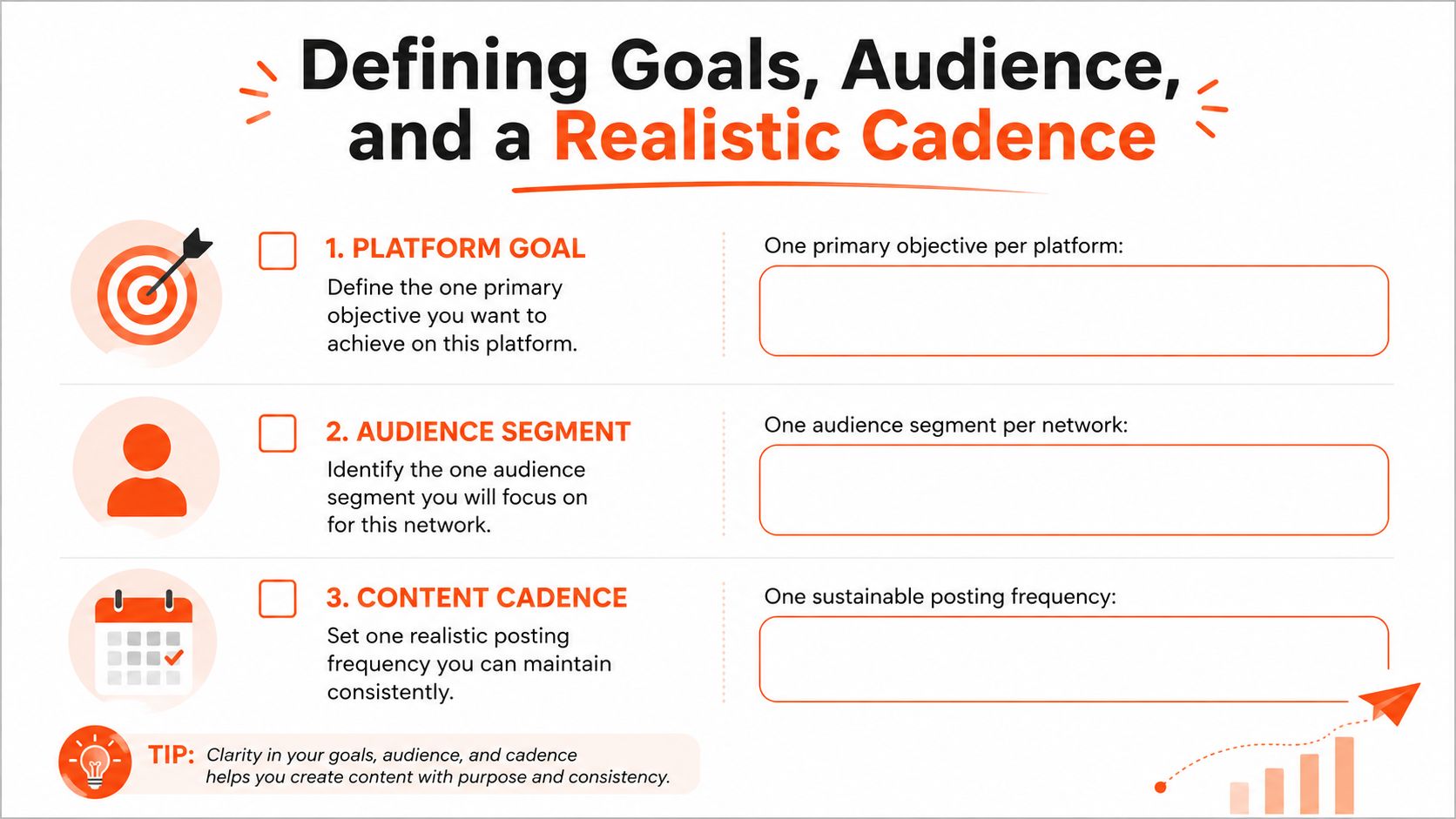
Before choosing a scheduler, complete a short platform worksheet. Give each network one primary job. LinkedIn might support authority and qualified conversations, while Instagram could help people understand a service through visual examples. X or Bluesky may be better suited to ongoing commentary and direct interaction.
Write the outcome in business terms rather than reach alone. A useful outcome might be qualified enquiries, newsletter signups, replies from a defined buyer group, or profile visits from decision-makers. The metric should help you decide what to publish next.
A practical afternoon exercise
For each platform, answer three questions:
- What is this platform for? Choose one primary objective.
- Who is this for? Choose one audience segment rather than addressing everyone.
- What action matters? Select an outcome tied to authority, leads, revenue, or useful conversation.
Then map the source material to the channel. Long-form essays can supply LinkedIn posts and newsletter excerpts. Short clips can feed Reels and Shorts. Threads and conversational posts need a sharper claim, a native opening, and room for replies.
Start with a cadence you can maintain when client work becomes busy. A simple 3-2-1 pattern means three educational posts, two story-led posts, and one direct promotion within your chosen publishing cycle. Treat it as a composition guide, not a quota. If the pattern already feels demanding across three platforms, reduce the number of source assets rather than filling gaps with generic AI copy.
Turn the worksheet into a one-page brief
Keep the brief inside your project tool:
- Platform objective: one sentence describing the network's job.
- Audience segment: the specific people you want to attract or help.
- Content pillars: three to five recurring subjects you can discuss credibly.
- Cadence: the sustainable publishing frequency for that platform.
- Source assets: the articles, podcasts, webinars, or customer questions available for repurposing.
- Approval owner: the person accountable for the final post.
Your voice guide should live beside this brief, not in a forgotten document. A brand voice guidelines template can help you record preferred phrasing, banned expressions, sentence style, and examples of copy that sounds like the brand.
Use the worksheet to make fewer decisions later. A good automation system doesn't remove editorial choices. It makes those choices once, clearly, so the workflow can apply them consistently.
The Core Tool Stack for Automated Workflows
A dependable stack has layers, but it shouldn't become a collection of disconnected dashboards. Choose each tool because it removes a recurring decision or handoff.
| Category | Best For | Price Band | Main Tradeoff |
|---|---|---|---|
| Scheduler with native queues | Publishing approved posts across networks | Free to premium | Platform support and native features vary |
| Repurposing engine | Turning a source asset into platform-specific formats | Free trial to paid workspace | Needs a strong source and voice controls |
| RSS-to-social autopilot | Triggering drafts when new articles or episodes appear | Low to mid-range | Can publish repetitive or context-poor updates |
| AI drafting assistant | Hooks, captions, summaries, and variations | Free to paid | It can flatten distinctive voice |
| Analytics dashboard | Combining performance views and reports | Free to premium | Cross-network comparisons can hide platform context |
What earns a place in practice
A scheduler such as Buffer works well when the core need is a visible queue, predictable publishing, and straightforward collaboration. Hootsuite makes more sense when an agency needs broader inbox, monitoring, and reporting functions. Native platform schedulers remain useful for features third-party tools can't fully reproduce, especially for visual formats and platform-specific controls.
A repurposing engine should begin with a source of truth. WaveGen.ai, for example, turns an article, newsletter, podcast script, or YouTube transcript into platform-specific assets such as carousels, short videos, quote cards, and captions, with brand kits and an editing step before publishing. That model is different from asking an AI tool to invent a new post every morning. For focused LinkedIn workflows, a LinkedIn post scheduler can be a useful specialist option when that network is the main publishing destination.
AI drafting assistants are most valuable before the queue, not after it. Use them to extract claims, suggest openings, compress an explanation, or generate variants. A focused AI caption generator can speed up that mechanical step, but a human should still decide whether the caption has a worthwhile point.
Integration decisions
Use Zapier, Make, or n8n when an event must move between systems, such as a new RSS item creating a draft, an approval notifying Slack, or a published post adding a row to an attribution database. Native integrations are usually better when they already handle the platform permissions and media requirements you need.
A solo creator rarely needs a large paid stack. Start with one scheduler and one repurposing or design tool. A five-client agency may justify a shared workspace with approvals, asset permissions, and client-specific reporting. The decision rule is simple: choose tools that reduce weekly decisions, not tools that add dashboards.
Repurposing One Source Into a Week of Content
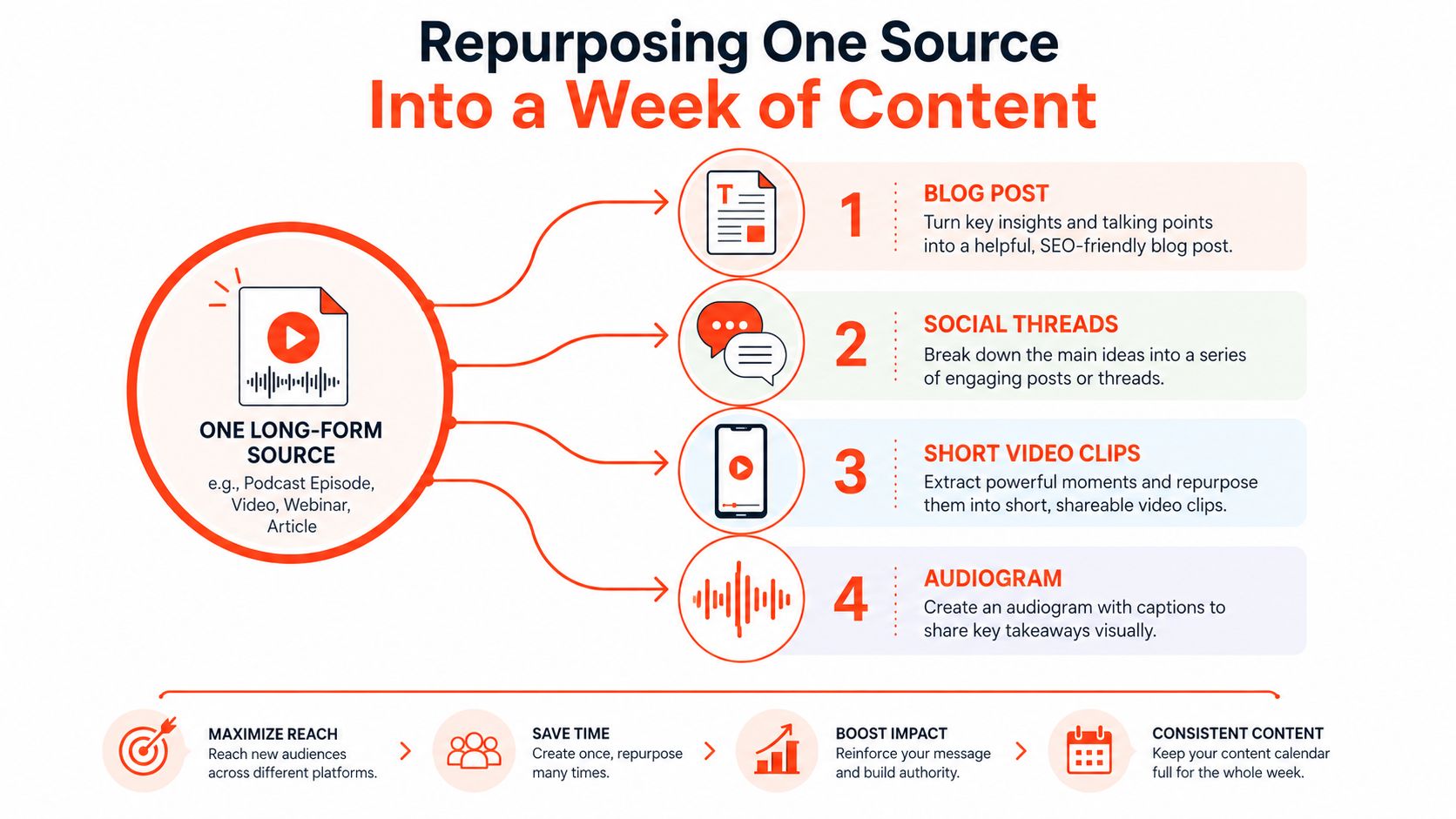
The most productive automation pipeline starts with a source that already contains a point of view. That could be a detailed article, a podcast segment, or a webinar recording. The source doesn't need to become a collection of identical excerpts. Each derivative should make one claim in the format and language native to its destination.
Take a B2B consulting post about pricing objections. The source explains that buyers who say “you're too expensive” may be comparing the fee with a familiar alternative, not rejecting the value outright. That single idea can produce several distinct assets:
- A LinkedIn carousel can show the objection, the hidden comparison, and three diagnostic questions.
- An X thread can turn the argument into a sequence of short observations, ending with a question for consultants.
- A vertical video script can open with the objection and demonstrate a better reply.
- A quote card can feature the central distinction between price resistance and comparison failure.
- A newsletter pull-quote can point readers back to the full explanation.
- A Reddit discussion prompt can ask practitioners how they diagnose price objections without becoming defensive.
- A YouTube Short can deliver the same lesson through one example and one practical response.
Use a fixed extraction formula
For every derivative, follow four moves:
- Pull one claim. Don't carry the whole article into a short format.
- Rebuild the hook. A carousel needs a visual promise, while a thread needs a first-line tension.
- Change the shape. Use a demonstration for video, a sequence for a thread, and a contrast for a quote card.
- Re-voice the closer. Invite a reply, click, save, or discussion according to the platform.
The repurposing template should also contain the brand's fixed opening patterns, banned phrases, preferred examples, and a short tone snippet. That reference prevents the AI from replacing a direct voice with polished generalities.
Keep the feed from sounding syndicated
A useful working split is 80% repurposed material and 20% original commentary. The repurposed portion gives the system a reliable production base. The original commentary keeps the account responsive to customer questions, current conversations, and observations that weren't present in the source asset.
Don't publish every derivative at once. Spread the formats across the cadence, vary the openings, and let comments on one post inform the next adaptation. Repurposing works when it creates multiple entry points into one useful idea, not when it copies the same paragraph into seven boxes.
Platform Formatting and Compliance Guardrails
Automation fails at the edges. A post can be strategically sound and still need manual adjustment because the platform expects a different length, media treatment, link placement, or disclosure.
The limits in the working brief are useful as a preflight reference, but they shouldn't become a substitute for checking the current publishing interface. Platform APIs and account types change, and third-party schedulers don't always expose every native option.
| Platform | Caption/Post Limit | Hashtag Guidance | Key Compliance Note |
|---|---|---|---|
| 3,000 characters, with shorter posts often used for reach | Use only relevant tags | Check link treatment, mentions, and page permissions | |
| X | 25,000 characters for Premium accounts | Keep tags selective | Confirm account tier before scheduling longer posts |
| 2,200-character caption limit | Use relevant, specific tags | Check branded content and music permissions | |
| TikTok | 4,000-character caption, with a 150-character preview | Make the opening work without expansion | Review music, creator disclosure, and preview text |
| YouTube Shorts | 100-character title limit | Tags should support discovery, not replace context | Confirm rights for every visual and audio element |
| Threads | 500-character limit | Use tags sparingly | Check mentions, links, and post context |
Build compliance into the template
A writer or approver should inspect four layers before a post enters the queue:
- Format: Is the hook visible within the platform's preview? Does the media use the right crop and aspect ratio?
- Disclosure: Does sponsored or affiliate content include the required disclosure and the platform's paid partnership setting where applicable?
- Rights: Are music, footage, screenshots, logos, and user-generated content cleared for the intended use?
- Context: Could the post be misunderstood because news, policy, or a customer situation changed after drafting?
Several errors are especially easy to catch. Don't send a link-first LinkedIn update without considering how the post reads before the click. Don't schedule an X post longer than the account's available limit. Don't place watermarked competitor footage into a repurposed Reel. Don't skip the paid partnership toggle because the caption contains a disclosure.
Preflight check: Preview the post as the audience will see it, then verify the platform setting, media rights, disclosure, destination, and approval status.
Keep this checklist inside the scheduler or project template. A compliance check that lives only in someone's memory will disappear when that person is away.
Monitoring, Analytics, and the Human Approval Loop
A queue tells you what will be published. It doesn't tell you whether the source idea travelled well across formats or whether the audience understood the point.
Use three metric tiers, but keep the interpretation connected to the business objective. Reach and profile visits indicate whether the post was discovered and whether it created enough interest to inspect the account. Saves, shares, and comment depth show whether people found the idea useful enough to keep or discuss. Link clicks, direct messages, and qualified leads connect activity to a commercial or relationship outcome.
Run a short weekly review
Set aside a consistent review window. Pull the prior week's posts, tag each one by source asset and format, then record the strongest and weakest result with one hypothesis for each.
A simple database can include:
- Source article, recording, or transcript
- Platform and format
- Hook used
- Publication date
- Primary metric
- Conversion or conversation signal
- What to repeat
- What to change
Native analytics should remain the authority for reach and platform-specific behavior. Buffer or Hootsuite can provide cross-network summaries, while a spreadsheet or Notion database can preserve source-to-post attribution that many publishing tools don't provide out of the box.
The review should change the next repurposing brief. If a demonstration consistently creates deeper comments than a summary, ask for more demonstrations. If a particular opening attracts clicks but no qualified conversations, change the promise or the destination rather than just increasing volume.
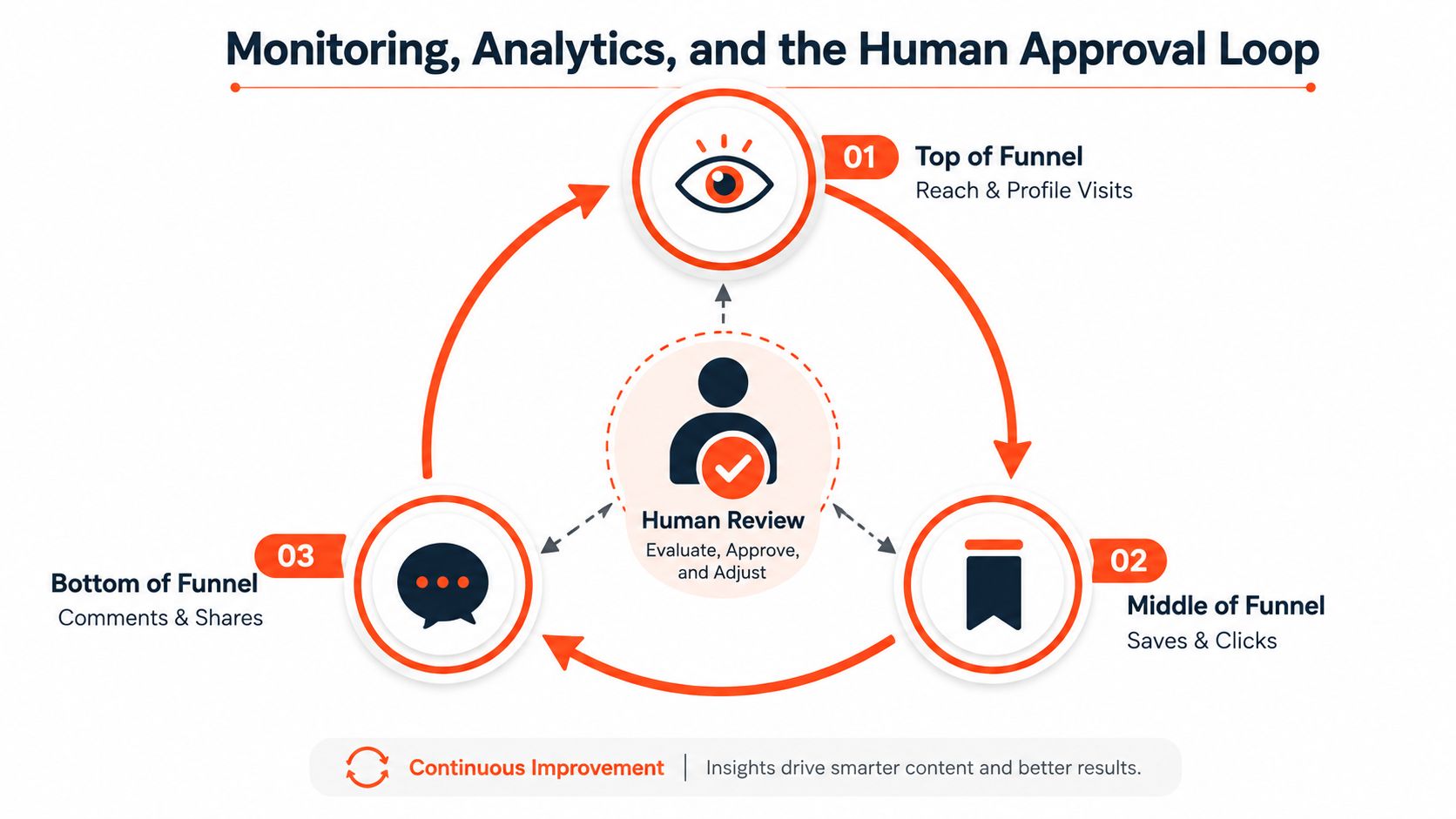
Keep humans at the decision points
Use a two-tier review. AI can place drafts into a queue, while a human approver checks claims, voice, media, audience fit, and context before release. Escalate anything sensitive, promotional, crisis-adjacent, or likely to attract unusual engagement. Give those posts a 24-hour pre-publish review window so the team has time to verify facts and consider how replies will be handled.
The approval process should define who can approve, who can pause the queue, and who owns replies after publication. A practical human-in-the-loop social operations playbook can help teams formalize those responsibilities. For a deeper internal process, document the stages in a content approval workflow that everyone can access.
Automation is doing its job when it creates time for better review and better conversation. If it publishes faster but leaves nobody watching, it has only moved the bottleneck.
Common Pitfalls and Your First 7-Day Automation Plan
Automation isn't a judgment-free publishing machine. It's a set of judgment calls recorded in templates, triggers, queues, and permissions. The first week should expose weak assumptions before the system becomes difficult to unwind.
Five problems to catch early
Identical cross-posts: The same link, opening, image, and closing appear on every network. The signal is a feed that feels copied and receives little platform-native interaction. Fix it by preserving the claim while changing the hook, length, media, and call to action for each destination.
Timezone dead zones: Posts arrive when the intended audience is unlikely to respond. Look for long stretches without early interaction and compare publication timing with the audience's actual activity. Move the slot, then review the result instead of trusting a generic “best time” recommendation.
Compliance drift: A template carries the wrong hashtag style, caption length, link treatment, or disclosure setting. The detection signal is a post that needs editing after it has already entered the queue. Add a platform-specific preflight checklist and require an approver to confirm it.
Template voice erosion: Every post uses the same opening, rhythm, and AI phrasing. Readers stop recognizing the person behind the account. Keep a banned-phrases list, require concrete examples, and reserve part of the feed for fresh commentary.
Approval bypasses: An automation publishes directly because a trigger was connected to the live channel rather than a draft queue. The fix is permission control, a visible approval state, and a pause switch that someone tests before launch.
A seven-day setup plan
Day 1: Audit existing channels, duplicate posts, abandoned drafts, old automations, and inactive triggers.
Day 2: Define the primary objective, audience segment, source assets, and sustainable cadence for each active platform.
Day 3: Build the brand kit. Record colors, fonts, logo use, tone, preferred openings, banned phrases, and examples of strong copy.
Day 4: Connect the scheduler and RSS triggers. Send every trigger to a draft queue first. Test one post without publishing it.
Day 5: Choose one long-form source and create the week's derivatives. Adapt the hook and format rather than copying the source paragraph.
Day 6: Configure approval notifications, escalation rules, native analytics access, and source-to-post tracking.
Day 7: Run the first publishing cycle, monitor replies, record anomalies, and review the results against the original objectives.
Solo creators can use this sequence across three platforms without building a large technical system. Agencies can repeat it during client onboarding, then keep each client's voice, permissions, source library, and approval owner in a separate workspace.
The best automation setup is deliberately boring. It knows where ideas come from, who checks them, how each platform receives them, and what evidence changes the next week's work.
WaveGen.ai turns a single article, newsletter, podcast script, or YouTube transcript into platform-specific social assets, with brand kits, editing controls, scheduling, and publishing across major networks. Visit WaveGen.ai to see whether its source-to-distribution workflow fits the way you want to automate social media without giving up your voice.
automate social media
social media workflow
content repurposing
social media scheduling
brand voice automation
Turn this kind of writing into a week of social content.
Paste a blog post, newsletter, or rough draft — WaveGen turns it into publish-ready carousels, captions, and slideshows for every channel.
No credit card · First posts in 2min