August 27, 2026
15 min read
Content Distribution Strategy Blueprint for 2026
Build a content distribution strategy that actually works. Learn audits, channel mapping, repurposing workflows, scheduling tactics, KPIs, and the right
You publish a carefully researched article on Tuesday. By Friday, it has attracted a few hundred views, most of them from people who already know your brand. Meanwhile, a competitor turns a similar idea into a LinkedIn carousel, a short video, and an email discussion, and the topic appears everywhere your buyers spend time.
The difference usually isn't content quality. It's the operating system around the content. A content distribution strategy determines what happens after publication, including how an asset gets adapted, approved, scheduled, measured, and connected to a business objective.
Social platforms now reach a global audience at an unprecedented scale. In April 2026, social media use reached 5.79 billion user identities, equivalent to 69.9% of the world's population, while the typical user actively used 6.5 platforms each month and spent an average of 18 hours and 36 minutes per week on social platforms, according to Morning Consult's global social media trends report. That environment favors a repeatable distribution operation, not a last-minute request to “share the blog post everywhere.”
Table of Contents
- Why Most Content Distribution Strategies Stall
- Run a Distribution Audit Before You Touch Any Channel
- Map Channels and Formats to Real Audience Behavior
- Build the Repurposing Workflow That Scales
- Schedule, Crosspost, and Protect Your Cadence
- Measure KPIs That Reflect Distribution Health
- Your 30-Day Distribution Rollout and Common Pitfalls
Why Most Content Distribution Strategies Stall
A small marketing team finishes a polished article after several rounds of editing. The writer uploads it, the SEO lead checks the metadata, and someone posts the link once on LinkedIn. Then everyone returns to the next campaign.
The article may be useful, accurate, and aligned with the audience. It still has little chance to travel because nobody converted its ideas into formats people naturally consume in different feeds. The team treated distribution as the final checkbox instead of as part of production.
The three operational bottlenecks
The first bottleneck appears before publication. Content teams often define the article, audience, and keyword, but they don't define the distribution package. Without that package, social, email, video, and community activity become optional work that gets squeezed by deadlines.
The second is equal effort across unequal channels. A team might spend the same amount of time on every network because the calendar looks balanced. Audience behavior rarely is. One platform may generate discussion, another may produce discovery, and an email list may drive the most meaningful action. Equal posting volume can hide unequal business value.
The third bottleneck is a broken timeline. Editorial finishes the source asset on one schedule, design receives incomplete requests later, and social managers work from whatever copy survives the handoff. That creates rushed adaptations, inconsistent messages, and an empty queue after the initial launch.
Operational rule: Distribution starts when you choose the source asset, not when you paste its URL into a social scheduler.
A useful external reference is ContentBuck's distribution strategies, particularly for teams comparing owned, earned, and paid approaches. The practical lesson is simple: treat distribution as a sequence of managed decisions. Audit what already exists, map channels to audience behavior, atomize strong source material, schedule the resulting assets, and review outcomes.
This approach also changes what “more content” means. Instead of asking a small team to produce a new idea for every channel, you give one strong idea several intentional entry points. The source remains coherent, while each derivative asset earns its place through a native format and a clear job.
Run a Distribution Audit Before You Touch Any Channel
Don't start by opening a new social account or buying another scheduling tool. Start with evidence from the content you already publish.
A useful audit can fit into a working week if you limit the scope to recent material and capture decisions rather than every possible data point. Export the last 90 days of CMS and social performance data, then create one row per article, newsletter, video, webinar, or major social asset.
Build the inventory
Tag each asset using three required fields:
- Topic cluster: Group related subjects so you can see which themes have depth and which have only one isolated article.
- Primary intent: Mark the asset as awareness, consideration, or conversion. Choose one primary intent even if the piece supports several stages.
- Distribution footprint: Record where the asset appeared, including your website, email, social networks, communities, events, and sales channels.
Add performance fields that help explain behavior, not just volume. Include traffic source, referrer, audience segment, meaningful engagement, clicks, conversions, and assisted actions where your analytics system supports them. Use consistent campaign tags so an email click isn't confused with an organic social visit.
Look for mismatches. An article with modest traffic but strong conversion behavior may deserve more distribution. A post with impressive reach and no meaningful action may still support awareness, but it shouldn't receive unlimited production time.
Capture three practical outputs
Your audit should end with deliverables the team can use immediately:
- A content inventory spreadsheet with ownership, topic, intent, format, date, status, and reuse permissions.
- A channel-weighted performance table that compares outcomes by channel and intent, rather than ranking posts by impressions alone.
- A recycling shortlist containing assets with a strong idea, clear audience relevance, or evidence of downstream value but an underdeveloped distribution footprint.
| Asset | Topic Cluster | Primary Intent | Distribution Channels Used | Top Engagement Signal |
|---|---|---|---|---|
| Article or guide title | Related subject group | Awareness, consideration, or conversion | Website, email, social, community, events | Clicks, saves, replies, signups, or assisted action |
| Newsletter issue | Topic or audience concern | Consideration or conversion | Email, archive, social excerpts | Replies, clicks, or follow-up action |
| Webinar or video | Educational theme | Awareness or consideration | Video platform, email, social, sales follow-up | Watch behavior, questions, or qualified response |
The audit should drive decisions, not merely produce a prettier spreadsheet. Decide which channels have weak evidence and should be reduced, which assets deserve atomization, who owns approval, and what customer journey stage each distribution activity supports. If nobody can make a decision from a column, remove that column.
Map Channels and Formats to Real Audience Behavior
A channel earns production time when it helps the right audience discover, understand, trust, or act on an idea. It doesn't earn that time because your team has an account there.
B2B benchmark data illustrates the distinction between presence and performance. Organic social is used by 89% of B2B marketers, blogs by 84%, email newsletters by 71%, and email by 63%. Yet in-person events and webinars were reported as the most effective channels, at 52% and 51%, while email and organic social each reached 42%, blogs 41%, and newsletters 37%, according to the Content Marketing Institute's 2025 B2B research.
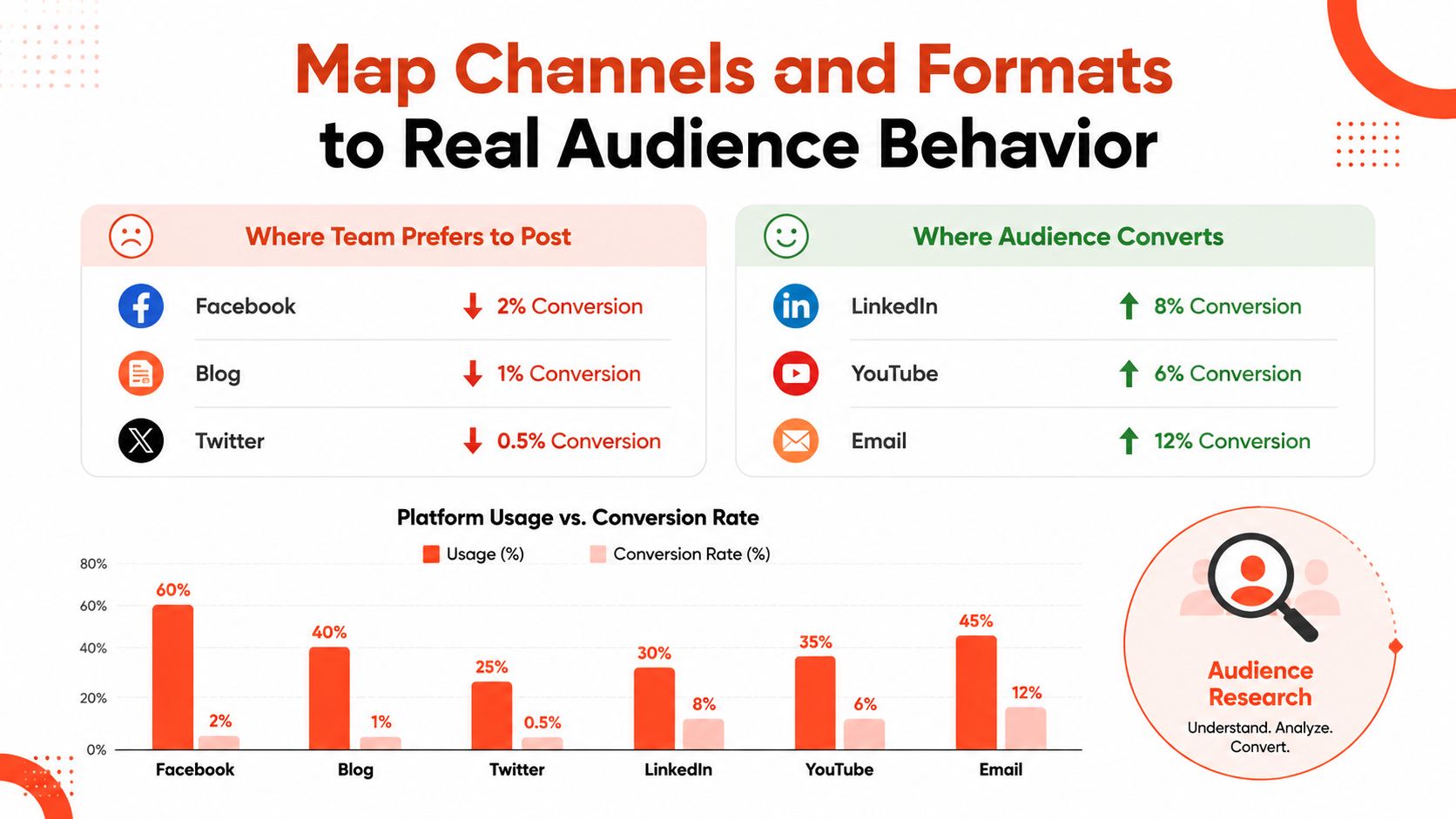
The gap matters. Your most-used channel isn't automatically your most effective channel. A team that measures only posting frequency will protect familiar habits, while a team that measures qualified engagement can shift effort toward formats and environments that help buyers progress.
Match the job to the format
Use channel mapping as a set of hypotheses, then validate them with your own analytics:
- Discovery channels: Short vertical video, searchable video, and concise social posts can introduce a problem or point of view to people who don't know your brand.
- Professional discussion: Text posts, document carousels, and practical diagrams work well when the audience needs a reason to comment, save, or share with colleagues.
- Owned retention: Newsletters and segmented email sequences give you more control over the next step, especially when one send has one clear purpose.
- Consideration spaces: Communities, webinars, events, and direct conversations help people test your expertise through questions and objections.
Threads and Bluesky may be useful for particular audiences, but don't add them because a distribution checklist says every emerging network must be covered. Podcast clips and short-form video can serve discovery, while the full episode or transcript can support deeper consideration. The right mix depends on audience evidence, production capacity, and the action you want next.
For a practical comparison of platforms and workflow choices, see WaveGen's content distribution platform guide. Then calculate engagement per asset, qualified click, reply quality, or assisted conversion by channel. Reallocate hours based on those outcomes, not on the number of posts your calendar contains.
Build the Repurposing Workflow That Scales
Repurposing works when the team designs it before the source asset is published. It fails when someone opens a blank design file and asks how to turn a long article into “some social posts” by the end of the day.
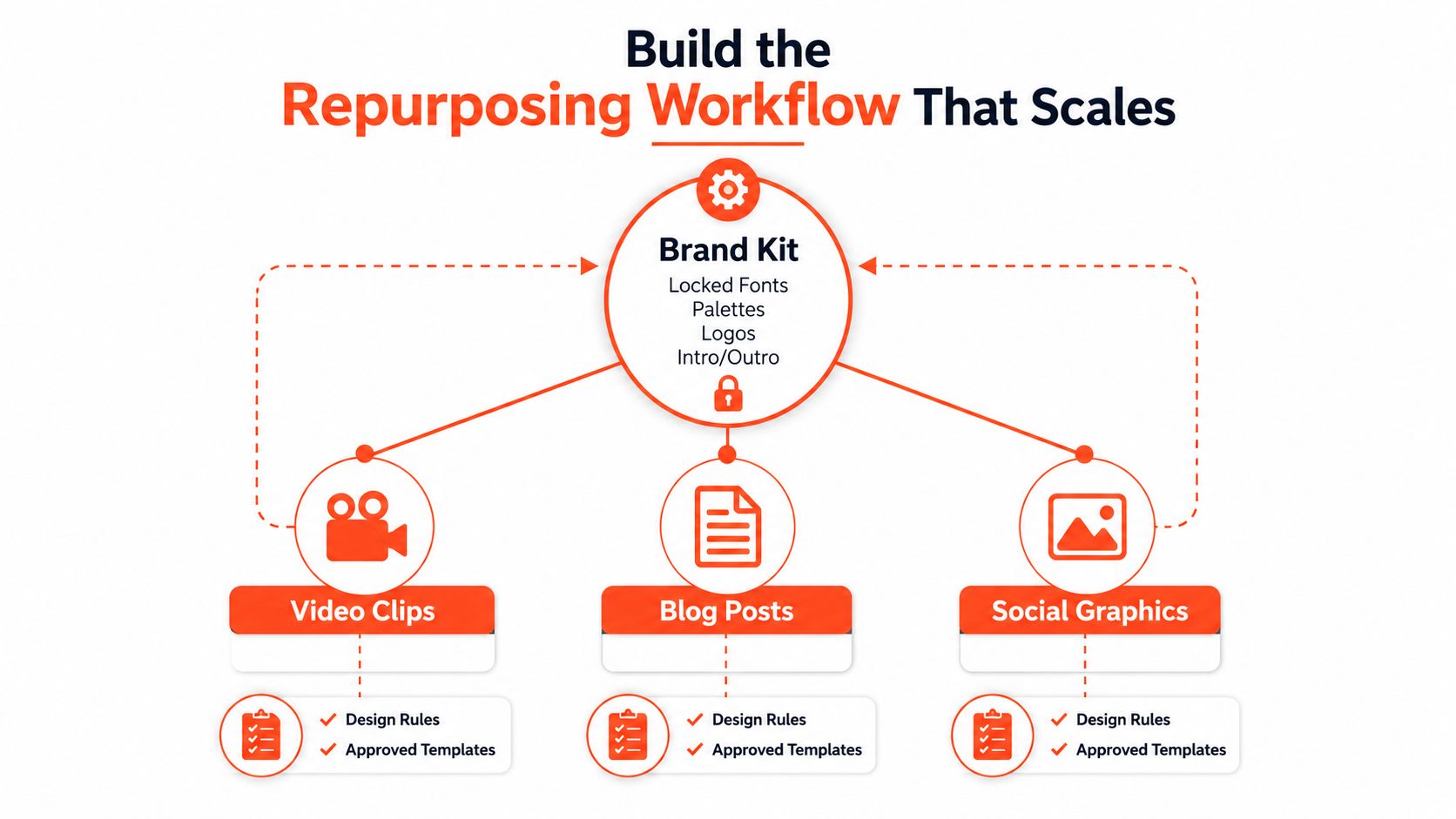
Start with a brand kit inside your repurposing workflow. Lock the fonts, palette, logo treatments, intro and outro templates, image rules, aspect ratios, and caption guidance for each network. Add examples of approved tone and a short list of claims or phrases that require review. The kit should reduce decisions without removing judgment.
Create an asset map
A long-form source can produce a focused distribution set:
- A vertical short video built around one problem, tension, or practical answer.
- Three to five quote cards using distinct ideas, not the same sentence with different backgrounds.
- A carousel that breaks a process into sequential steps.
- An email snippet that gives subscribers a useful takeaway before inviting the click.
- A discussion prompt that asks for an experience, objection, or decision rather than repeating the article headline.
Each derivative needs a platform-native hook. A carousel can teach a sequence, a video can lead with a surprising consequence, and a discussion post can invite a professional judgment. Reusing the idea doesn't mean copying the wording.
Run four controlled stages
Source: Store the original article, transcript, newsletter, or webinar with its approved title, author, date, links, claims, and intended audience.
Atomize: Extract themes, examples, objections, definitions, and calls to action. Keep the source context attached so a short asset doesn't accidentally turn a qualified statement into an absolute claim.
Adapt: Create the visual, video, caption, and link variant required by each destination. WaveGen.ai can serve as one connective layer here by turning a long-form source into platform-ready derivatives, applying a saved brand kit, and moving drafts into a review workflow before scheduling.
QA: Assign a human reviewer to check tone, factual accuracy, accessibility, links, subtitles, visual hierarchy, and brand safety. Reviewers should also confirm that the derivative still makes sense without the source open in another tab.
The workflow should have named owners. A writer owns source clarity, a designer or content producer owns adaptation quality, a subject matter expert checks claims, and a channel owner checks platform fit. Smaller teams can combine roles, but they shouldn't leave ownership undefined.
Use UGC Copilot's content pillar planner when your source library lacks a clear set of recurring themes. It can help organize the ideas before the team turns them into derivative assets. For the publishing handoff, WaveGen's multi-platform publishing workflow offers a useful reference for keeping adaptation and distribution connected.
Schedule, Crosspost, and Protect Your Cadence
A calendar doesn't create consistency. A protected queue does.
Build a weekly slot map for each active channel, but treat the slots as working hypotheses. Your own analytics should determine when audiences respond, watch, click, or reply. A small team might reserve several professional social posts, a longer video, short-form adaptations, and newsletter sends, but the exact mix should follow capacity and evidence rather than an arbitrary universal cadence.
Load the repurposing queue ahead of publication. Editorial needs time to finalize the source, production needs time to adapt it, and reviewers need time to catch errors. If every derivative starts on launch day, the team will either publish weak work or miss the cadence.
Separate assembly from final publishing
Bulk composers are useful for gathering captions, assets, links, and review notes. They aren't a substitute for platform judgment. Native uploads can preserve the correct presentation and give channel owners a final opportunity to adjust the opening line, thumbnail, tags, accessibility text, and call to action.
Crossposting also needs a decision for each network. Avoid treating one exported file as a universal answer.
| Platform | Recommended Method | Why |
|---|---|---|
| Adapt the copy and upload the native asset | Professional context and document formats need their own opening and structure | |
| Use native feed, carousel, Reel, and Story specifications | Visual framing, captions, and interactive elements vary by placement | |
| Adapt the post and upload the media natively | Community context and link presentation can differ from other networks | |
| YouTube | Upload the long-form video or Short in its intended format | Titles, descriptions, thumbnails, and retention signals require platform-specific handling |
| TikTok | Upload the short-form version with native captions and framing | The hook and pacing need to fit the viewing environment |
| Build in the email platform | Segmentation, rendering, links, and unsubscribe controls belong in the owned channel |
Use a scheduler that works through official platform connections where possible, and keep the final review with the channel owner. WaveGen's guide to scheduling social media posts is a useful reference for building a queue without turning one-click publishing into a blind release.
A reliable cadence includes exceptions. Pause a scheduled post when the subject becomes outdated, a customer issue changes the context, or a claim needs correction. Automation should protect attention, not remove accountability.
Measure KPIs That Reflect Distribution Health
A channel can produce strong reach while sending little qualified demand. Score distribution by connecting each metric to a customer journey stage, then give a named owner authority to change the work.
Separate leading indicators from lagging indicators. Leading indicators show whether an asset earns attention or meaningful interaction in the current cycle. Lagging indicators show whether repeated exposure builds an owned audience, brand familiarity, or commercial momentum over time. Neither category is sufficient alone.
Build a decision scorecard
| Stage | Primary KPI | Guardrail KPI |
|---|---|---|
| Awareness | Impressions or view-through behavior | Falling engagement quality or weak retention |
| Resonance | Saves, shares, replies, or meaningful discussion | Declining engagement rate |
| Consideration | Click-throughs and assisted conversions | Low-quality traffic or weak return visits |
| Conversion | Pipeline-attributed activity or conversion completion | Rising acquisition cost or poor lead quality |
| Retention | Email engagement and repeat interaction | Unsubscribe rate or audience fatigue |
Assign one primary KPI and one guardrail to each channel. A short video might be judged by completed viewing and negative feedback. A newsletter might be judged by qualified clicks and unsubscribes. Applying one measurement model to every channel hides differences in audience intent and format.
Measurement principle: Keep a metric on the scorecard only when a team member knows which decision it can change.
Name an owner for every metric and review the scorecard briefly each week. Use a deeper monthly review to compare themes, formats, journey stages, and channel roles. Consistent tracking parameters and dedicated landing pages make traffic attribution more reliable when several distribution paths lead to the same offer.
Set a decision rule before performance drops. If a channel misses its guardrail for two consecutive cycles, move production time elsewhere instead of posting more aggressively. Keep an exception for a defined learning test with an end date and a specific hypothesis. This makes it easier to retire weak tactics without treating the decision as a team failure.
Enterprise teams face the same measurement and coordination problems at larger scale. The Content Marketing Institute's enterprise findings report that 45% of enterprise marketers say their strategy isn't data-driven, 45% say it isn't tied to the customer journey, and 47% cite a lack of clear goals. The research also identifies silo alignment, results measurement, and sales and marketing alignment as major blockers. Those findings support a practical operating model: assign owners, define decision rules, and use dashboards to trigger action rather than merely document activity.
Your 30-Day Distribution Rollout and Common Pitfalls
A distribution system becomes manageable when the team launches a small operating loop instead of redesigning every channel at once.
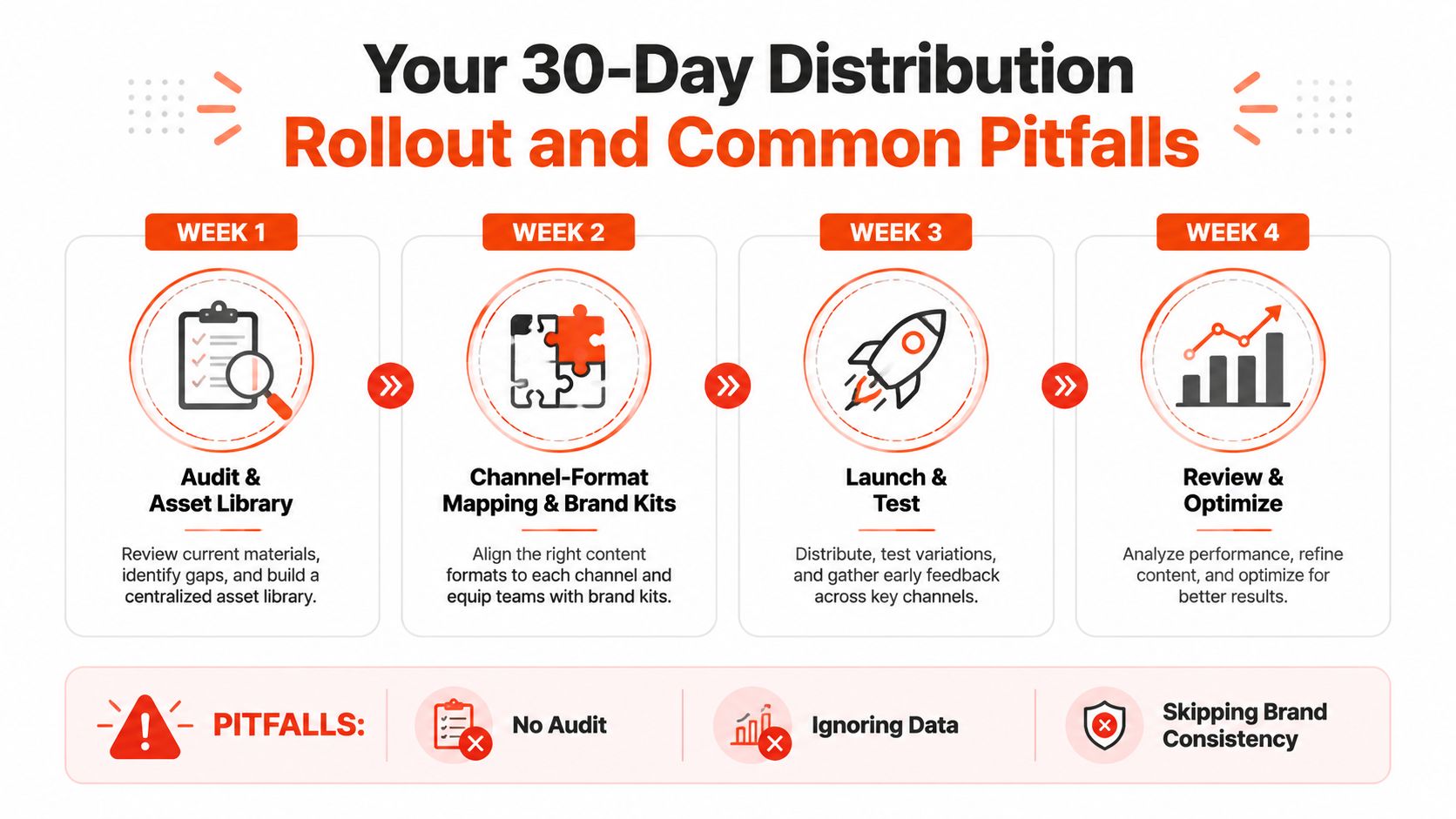
Use four weeks of focused deliverables
Week 1, audit and asset library
- Export recent content and performance data.
- Tag topic, intent, footprint, owner, and reuse status.
- Select the assets with the clearest opportunity for recycling.
Week 2, channel mapping and brand governance
- Assign each active channel a job and target journey stage.
- Match source ideas to platform-native formats.
- Finalize brand-kit rules, approval owners, and review criteria.
Week 3, launch and test
- Atomize selected source assets into a controlled queue.
- Schedule adaptations according to audience activity and team capacity.
- Test hooks, formats, and calls to action without changing the core message randomly.
Week 4, review and rebalance
- Review the primary and guardrail KPIs.
- Identify assets worth refreshing or extending.
- Reduce effort on channels that don't justify their production cost.
Watch for four quiet failure modes. Single-channel overinvestment gets a guardrail of capped production hours. Brand drift across derivatives gets a mandatory human QA review. Tool-first scheduling gets a documented channel role before automation. Emotional attachment to weak channels gets a pre-agreed retirement rule based on performance and audience fit.
Independent summaries of repurposing research report that converting one source asset into multiple formats can increase reach by 12x, reduce per-piece cost by 80% compared with creating net-new content for every channel, and that 94% of marketers repurpose content regularly, as summarized by Misar's content repurposing statistics. Treat those figures as directional benchmarks, not a promise for your team. The operational point is stronger than the headline: a documented source-to-derivative workflow lets small teams distribute more deliberately without asking creators to invent a new idea for every post.
Distribution isn't a launch event. It's a living operating system that needs audits, clear ownership, controlled reuse, and regular reallocation.
WaveGen.ai turns an article, newsletter, podcast script, or transcript into on-brand social assets such as carousels, short videos, quote cards, and platform-specific captions, then helps teams schedule and publish them across active channels. Visit WaveGen.ai to connect your source-content library with a repeatable repurposing and distribution workflow.
content distribution strategy
content repurposing
multi-channel marketing
social media workflow
content operations
Turn this kind of writing into a week of social content.
Paste a blog post, newsletter, or rough draft — WaveGen turns it into publish-ready carousels, captions, and slideshows for every channel.
No credit card · First posts in 2min