September 14, 2026
15 min read
What Is Content Scheduling and Why It Matters
Learn what is content scheduling, how it works, the benefits for consistent publishing, common scheduling models, and best practices to scale your reach.
Content scheduling is the practice of planning, creating, and queuing posts to publish automatically at chosen times across channels. Instead of opening each platform and posting in real time, you prepare the work ahead of time and let a defined publishing rhythm handle distribution.
A creator can be answering a Slack message on a laptop, editing a video on a phone, and watching a publishing window disappear at the same time. By the end of the day, the post may go out late, the caption may sound rushed, or the channel may receive nothing at all.
That's the problem content scheduling solves. It moves publishing from a daily emergency to a repeatable operating process. You still make the decisions, write the ideas, approve the assets, and respond to people. Scheduling separates that work from the moment a post appears in a feed.
Table of Contents
- What Content Scheduling Means and Why It Matters
- How Editorial Calendars Became Modern Scheduling Systems
- Key Benefits of Scheduling Content Consistently
- Common Scheduling Models and Calendar Formats
- Core Building Blocks of a Scheduling Workflow
- From One Idea to a Week of Scheduled Assets
- Does Scheduling Kill Authenticity and Timeliness
- Best Practices to Start Scheduling This Week
What Content Scheduling Means and Why It Matters
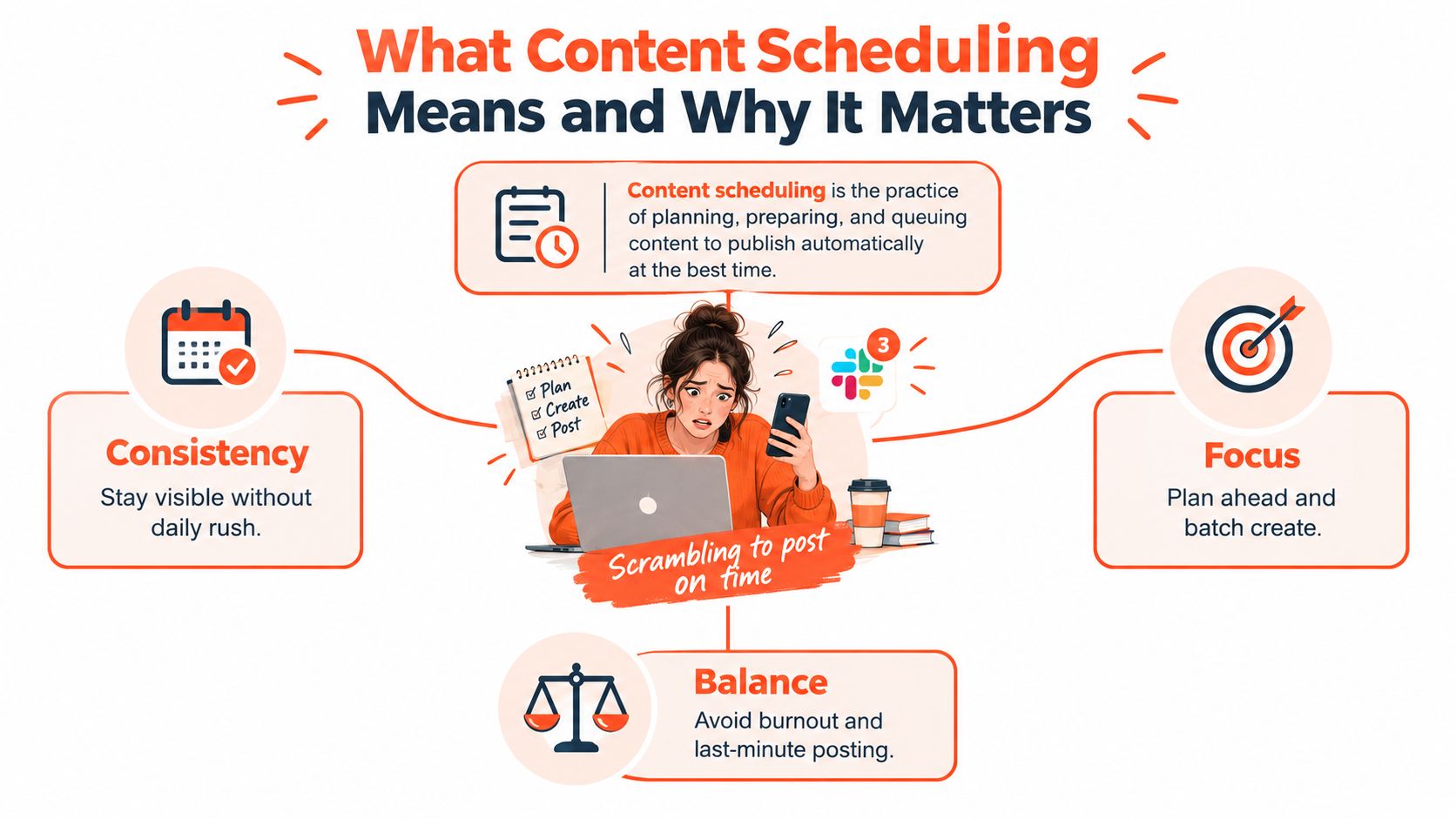
Content scheduling sits between ideation and distribution. First, you decide what your audience needs and create the content. Then you prepare the copy, visuals, links, and platform variations. Finally, you place each finished asset into a publishing queue with a chosen date and time.
Manual posting compresses all of those steps into one stressful moment. You think of an idea, create the post, check the format, open the platform, publish it, and hope you haven't missed the audience's active window. Repeat that across Instagram, LinkedIn, TikTok, email, a blog, and video channels, and even a small content program can become difficult to maintain.
The shift from reaction to rhythm
A schedule gives every piece of content a place before publication day arrives. That makes missed windows less likely, gives reviewers time to catch errors, and helps a team maintain a recognizable tone. It also protects creative energy because the person responsible for publishing isn't forced to switch constantly between writing, design, community replies, and administration.
The practice has become a mainstream part of social media operations. A 2026 industry report says 73% of social media marketers use dedicated scheduling tools, compared with 61% in 2024 and 47% in 2022, according to reported social media scheduling adoption data. The same source says users manage an average of 5.2 platforms and save 6.3 hours per week compared with manual posting, or about 328 hours per year. Those figures help explain why scheduling now supports more than convenience.
Practical rule: Treat the scheduled post as the final step in a workflow, not the workflow itself.
The outcomes are straightforward. You reclaim time, maintain a steadier cadence, review messaging with more care, and create cleaner conditions for measuring what works. Content scheduling doesn't guarantee growth, but it gives your team the consistency and visibility needed to pursue it deliberately.
How Editorial Calendars Became Modern Scheduling Systems
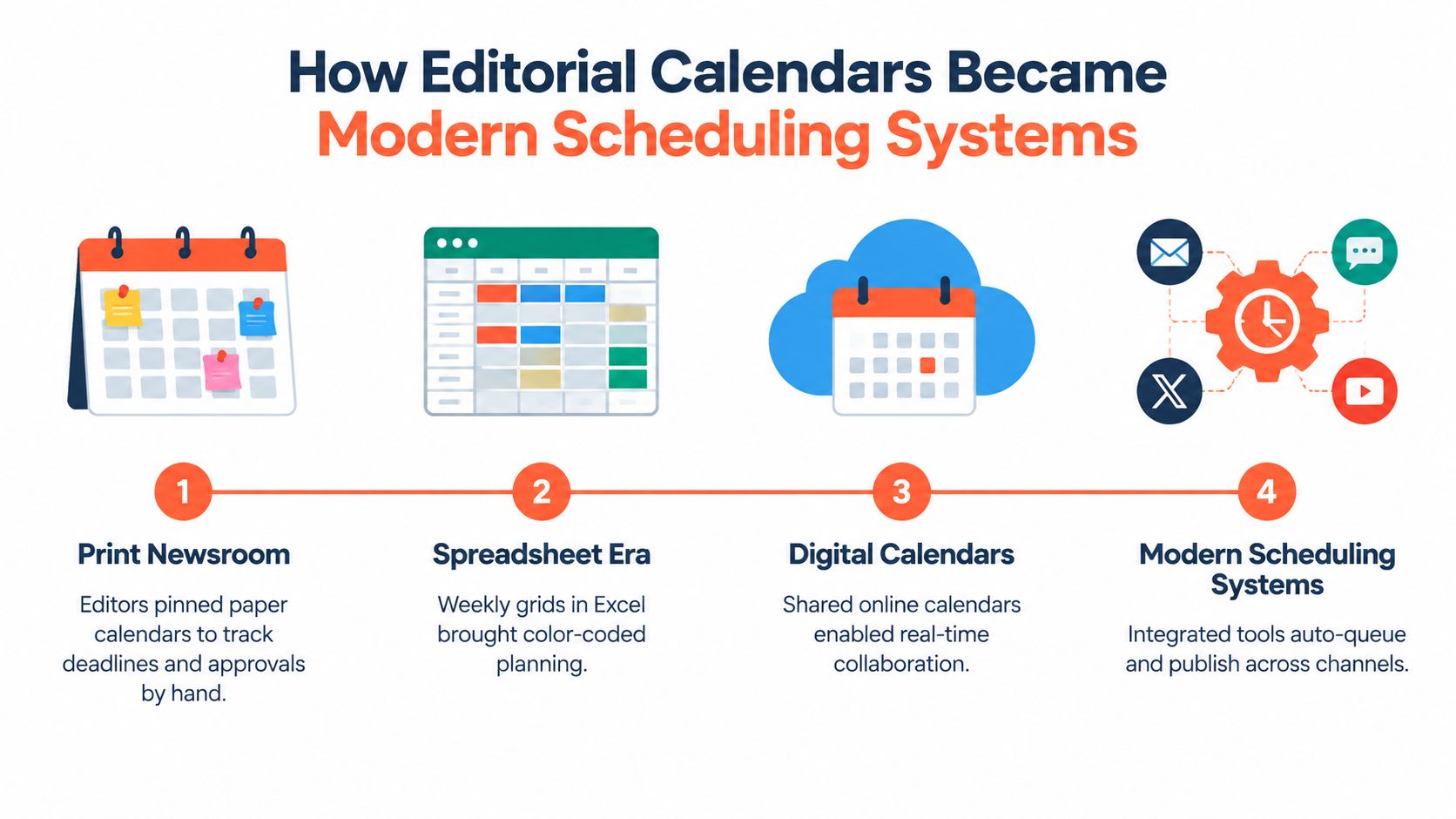
A printed editorial calendar once covered a newsroom wall. Editors used it to track issue deadlines, feature assignments, approvals, advertising commitments, and production handoffs. A monthly fitness magazine, for example, might plan its cover story, training sidebar, nutrition column, photography session, and related promotional material well before the issue reached readers.
The calendar didn't publish anything by itself. It gave people a shared view of what had to happen, who owned each task, and when the work needed to move forward. That logic later migrated into spreadsheets, where color-coded rows and weekly grids made planning easier to share and revise.
Digital publishing expanded the need for that same discipline. Blogs created pressure for regular articles, email teams coordinated newsletter sends, and publishers began adapting one editorial idea into several formats. The underlying process stayed familiar, but the number of destinations increased.
From date list to publishing infrastructure
Modern social networks changed the calendar again. A single campaign could require a blog article, podcast episode, newsletter, YouTube video, LinkedIn post, Instagram carousel, and TikTok clip. Each channel has its own format, audience expectation, approval path, and publication time.
Scheduling systems turned the calendar into a queue. Instead of merely recording that a post should go live, the system could hold the prepared asset and publish it automatically at the assigned time. Products such as Buffer and Hootsuite helped popularize that calendar-to-queue model, while broader content operations connected planning with approvals, asset management, and reporting.
The historical progression matters because it clarifies what a modern calendar should do. It shouldn't be a list of dates that nobody checks. It should function as a distribution operating system, connecting ideas to owners, formats, approvals, channels, and publication windows.
For a practical distinction between a simple calendar and a more useful operating document, compare this guide to what a content calendar includes. The strongest calendars don't just answer “When are we posting?” They also answer “Why this asset, for whom, in which format, and what happens after it goes live?”
Key Benefits of Scheduling Content Consistently
The value of scheduling appears in the work around publication. A marketer who posts manually may spend part of every day resizing assets, checking links, asking for approvals, and moving between platforms. A scheduled workflow groups those tasks into planned production blocks, leaving more room for research, creative development, and audience conversations.
One industry report on social media scheduling reports an average saving of 6.3 hours per week for teams using scheduling tools compared with manual posting. That's an operating-efficiency measure, not a promise that every team will see the same result. The mechanism is clear, though. Batching reduces context switching, while queued publishing removes repeated manual steps.
What changes in practice
A brand that posts whenever someone remembers may sound different from one post to the next. A planned review gives the team a chance to check voice, claims, links, accessibility, and platform fit before the content reaches the audience. That review also makes it easier to prevent two people from publishing conflicting messages on the same day.
Scheduling creates a cleaner basis for analysis, too. If the team repeatedly tests different windows and records the results, it can compare like with like instead of interpreting a mixture of rushed and carefully prepared posts. Audience behavior still changes, so the calendar should remain adjustable rather than becoming a rigid contract.
| Outcome | Manual Posting | Scheduled Posting |
|---|---|---|
| Time | Repeated setup and publishing interrupts the day | Creation and distribution can happen in separate batches |
| Cadence | Output depends on memory, availability, and urgency | Planned slots create a dependable publishing rhythm |
| Brand voice | Captions may receive little review under deadline pressure | Copy and creative can pass through an approval flow |
| Measurement | Timing and format often vary without a clear test plan | Teams can compare planned windows and formats more clearly |
| Team workload | Last-minute requests arrive through scattered messages | Owners, deadlines, and status live in a shared calendar |
Consistency also gives audiences a reason to return. A weekly educational series, a recurring product explanation, or a regular newsletter becomes easier to recognize when the publisher delivers it reliably. The relationship develops through repeated useful contact, not through volume alone.
The strongest operational gain may be team sanity. A shared calendar turns “Can we get this out today?” into a visible request with an owner, an asset, a deadline, and an approval state. That shift won't remove every urgent post, but it prevents urgency from becoming the default production model.
Common Scheduling Models and Calendar Formats
A content calendar works like a distribution operating system. It decides which rule moves an approved asset into the publishing queue, then helps a team coordinate formats, timing, and channels. Three models cover most scheduling plans, and each suits a different kind of work.
Time-based scheduling
Time-based scheduling assigns recurring slots to specific content types. A team might reserve Monday morning for an educational article, Wednesday afternoon for a customer question, and Friday for a lighter brand message. The pattern is easy to explain, so writers, designers, and publishers can coordinate around it.
This model fits dependable campaigns, recurring series, and strict launch dates. It also supports batching. A team can prepare several related assets together, then place each one into its planned slot. The weakness is that a fixed time may remain on the calendar after audience behavior changes. If people become active at another hour, the schedule needs adjustment.
Queue-based scheduling
Queue-based scheduling places approved posts in a sequence. Each asset enters a rotation, and the system publishes it according to a defined interval or channel rule. This works well for a steady library of evergreen content, especially when each post does not need its own appointment.
The trade-off is less control over exact timing. A queue may drift toward weaker hours, place similar formats too close together, or hold an important update behind lower-priority content. Review of the order remains necessary, particularly when one idea has been adapted into several channel-specific assets.
Engagement-based scheduling
Engagement-based scheduling uses audience activity data to choose publication windows. Cross-platform benchmark summaries identify weekday mid-mornings as a repeatable default, particularly Tuesday through Thursday and roughly 9 a.m. to 1 p.m. local time, according to Emplifi's benchmark guidance on posting times. The same guidance recommends testing two or three candidate windows per platform for at least two weeks.
This model suits teams that review native analytics and adjust their assumptions. It is more responsive, but it requires measurement, time-zone planning, and separate decisions for audiences in different regions. A strong operating system may therefore use fixed slots for launches, a queue for evergreen education, and engagement-based timing where audience data is useful.
| Model | How It Works | Best Fit | Main Trade-off |
|---|---|---|---|
| Time-based | Uses recurring fixed slots | Campaigns and regular series | Can ignore behavior changes |
| Queue-based | Publishes approved assets in sequence | Evergreen content libraries | Order and timing can drift |
| Engagement-based | Uses audience activity windows | Data-aware multi-channel teams | Needs ongoing review and testing |
Core Building Blocks of a Scheduling Workflow
A dependable system needs more than a calendar. It needs a path that moves each asset from an idea to a reviewed, correctly formatted, measurable publication.
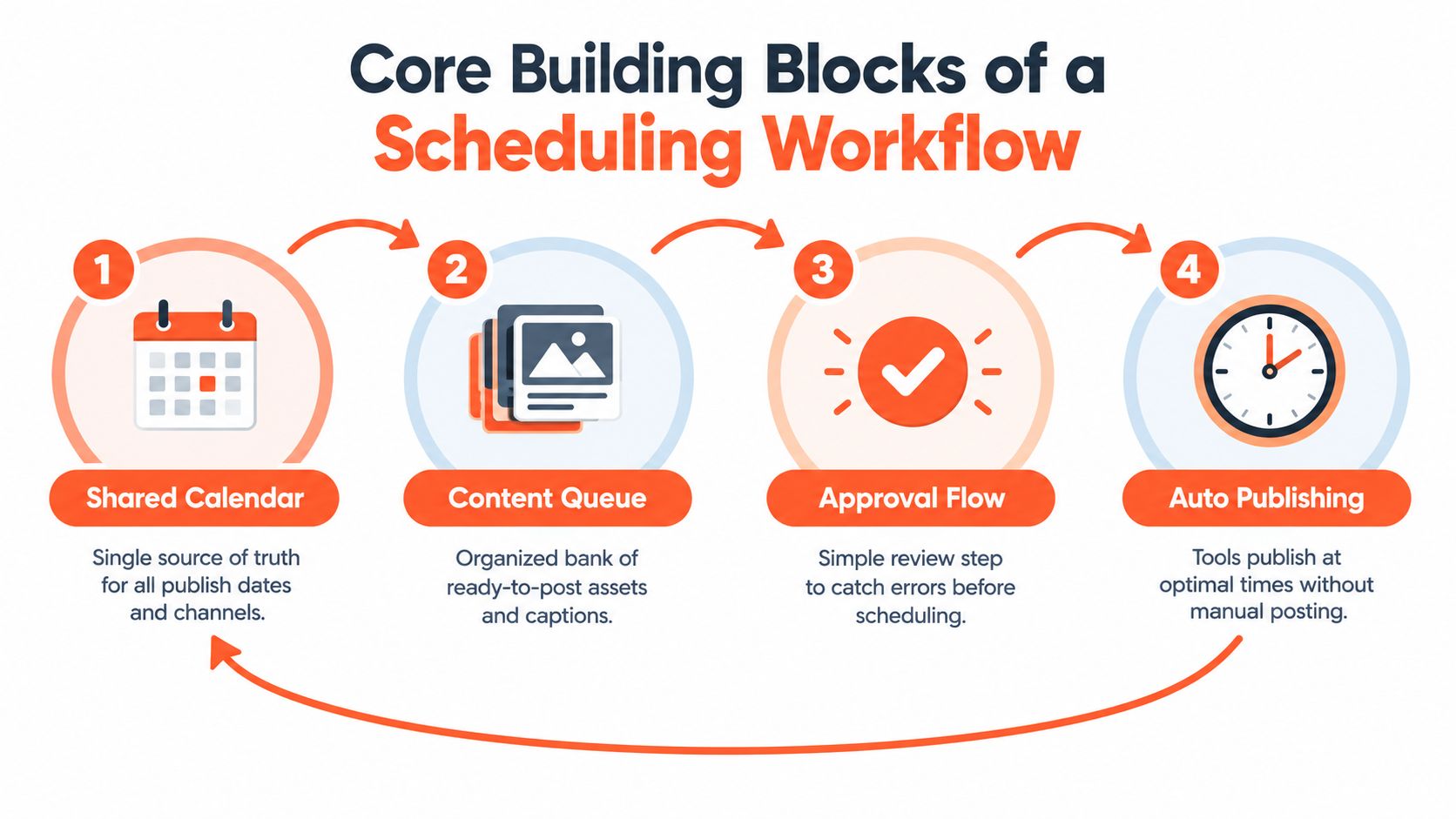
Start with one shared calendar
The calendar is the system's shared view. Give each entry a date, channel, asset type, owner, approval status, campaign label, and destination link. A single view prevents the social manager, writer, designer, and client from working from different versions of the plan.
The calendar should show enough detail to make decisions without becoming a second writing tool. Keep the full caption, design files, and final links attached to the item or stored in a connected workspace.
Build a queue of ready assets
The queue holds content that's prepared for distribution. Each item should include the final copy, visual, link, platform variation, accessibility text where needed, and any required notes for the publisher. A draft isn't ready just because the idea is good. It's ready when another person can check it without reconstructing the original brief.
Add brand controls and approval
A brand kit keeps recurring choices visible. Include approved colors, fonts, logos, tone guidance, naming conventions, and platform-specific restrictions. Then add a simple approval flow, such as draft, review, changes requested, approved, scheduled, and published.
Tools designed for smart task scheduling workflows can help teams coordinate owners and deadlines, but the process matters more than the software. If nobody knows who approves an asset, automation only moves confusion faster.
Close the loop with analytics
After publication, record what happened and feed the learning back into the calendar. Review reach, engagement quality, clicks, saves, replies, and conversions according to the channel's role. Don't judge every post by the same outcome.
The workflow behaves like a circuit:
- Calendar: Assigns the idea, channel, owner, and timing.
- Queue: Holds the complete asset until it's ready.
- Approval: Checks message, accuracy, brand fit, and formatting.
- Analytics: Captures learning and improves the next calendar cycle.
This short scheduling workflow video can help visualize the movement from planning to publication. Skip the calendar and the team loses coordination. Skip the queue and publishing stays reactive. Skip approval and errors reach the audience. Skip analytics and the system repeats decisions without learning.
From One Idea to a Week of Scheduled Assets
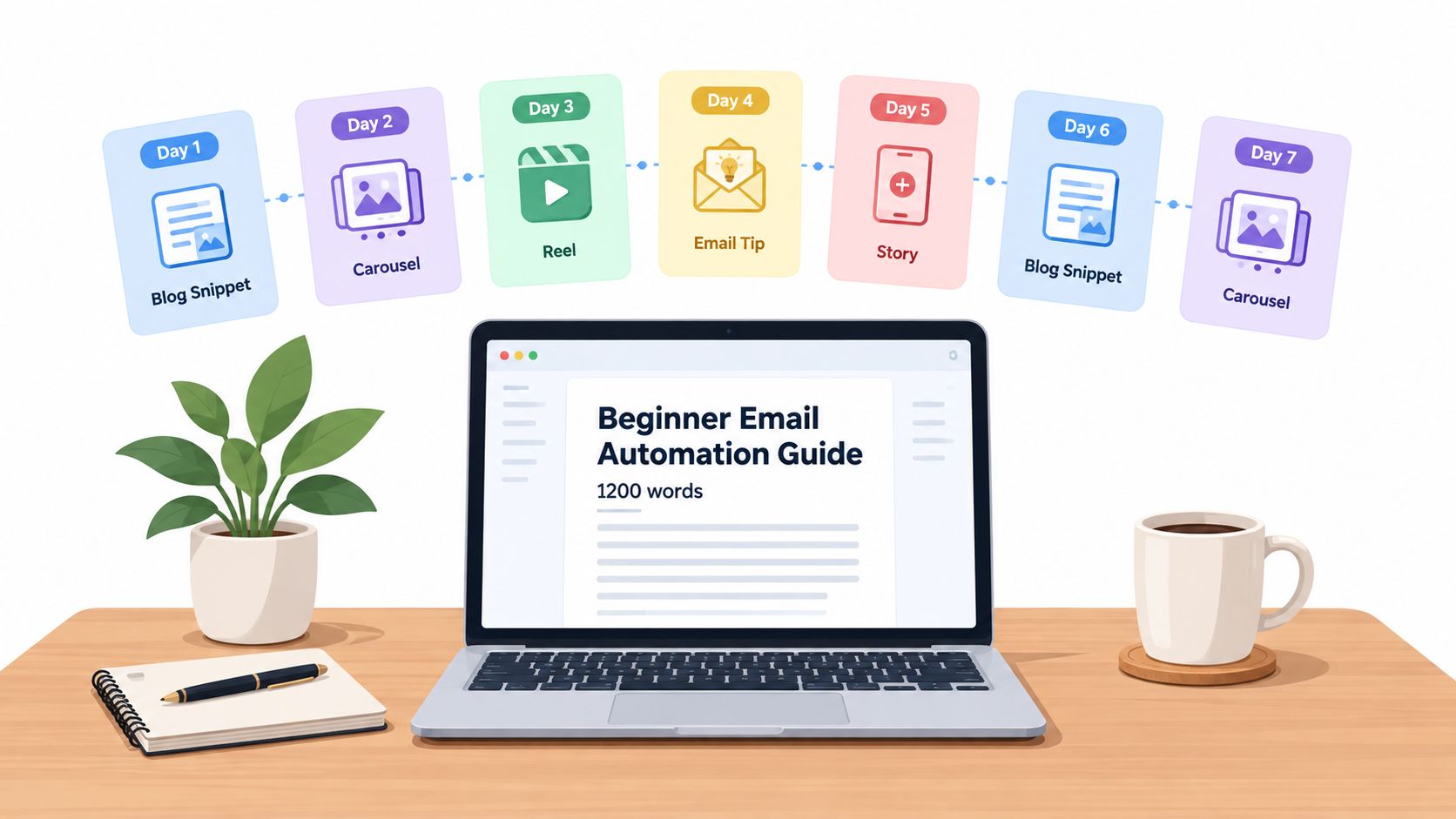
Start with one substantial source, such as a 1,200-word guide about beginner email automation. The goal isn't to copy that guide seven times. The goal is to identify distinct lessons, match each lesson to a channel-native format, and give every asset a reason to send people back to the original.
On Monday, the team reads the guide, marks its strongest examples, extracts practical steps, and prepares the visual direction. From that batch, a week of assets might look like this:
- Tuesday, LinkedIn: A short hook about the first automation mistake beginners make. The format shifts from guide to opinion-led post, with a call to read the full article.
- Wednesday, X: A thread that breaks the setup process into connected steps. The format becomes a sequence, and the final post points to the guide.
- Thursday, Instagram: A carousel showing the workflow from trigger to follow-up email. The format becomes visual teaching, with the article as the deeper resource.
- Friday, TikTok: A short video script explaining one common misconception. The format changes from written instruction to spoken demonstration.
- Saturday, Pinterest: A quote card or checklist graphic drawn from the guide. The visual leads viewers to the full explanation.
- Sunday, email: A newsletter paragraph introduces the problem and links to the guide for subscribers who want the complete process.
- Monday, community forum: A discussion prompt asks members which email task they'd automate first. The post invites replies while directing interested readers to the source.
Preserve the idea, change the delivery
The source remains consistent, but the presentation changes. LinkedIn can carry the argument, Instagram can carry the visual sequence, TikTok can carry the explanation, and email can carry the personal context. That's repurposing, not duplication.
A guide to repurposing content for social media can help teams map source ideas to platform formats. The important planning question is not “How many posts can we make?” It's “Which useful part of this idea belongs in each audience's preferred experience?”
The Monday batch then produces a queue that covers Tuesday through the following Monday. If a trend or urgent announcement appears, the team can pause one item, revise the order, or add a timely post without rebuilding the entire week.
Does Scheduling Kill Authenticity and Timeliness
Scheduling doesn't make a post robotic. Unedited, generic writing makes a post robotic. The caption is still written by a person before it enters the queue, and a review step can preserve the details, humor, judgment, and point of view that make a brand recognizable.
The first misconception is that automation removes personality. In practice, a brand voice guide, a human approval queue, and platform-specific editing can make scheduled content more deliberate. The second misconception is that a schedule prevents trend participation. A healthy workflow reserves capacity for manual posts, replies, updates, and timely reactions alongside planned content.
Authenticity comes from the quality of the decision and the relevance of the message, not from the number of times someone presses Publish.
The third misconception is that audiences can automatically identify scheduled content. They can recognize stale, irrelevant, or repetitive content, but scheduling itself isn't the cause. A well-timed educational post can feel more relevant than an improvised post published when few intended viewers are active.
Use a hybrid publishing rhythm
Engagement-based scheduling provides a useful middle ground. The team plans recurring content around observed audience windows, then leaves flexible spaces for current events, community questions, and trend responses. Templates can speed up production, while conditional rules can define which content is safe to queue and which content needs a live decision.
This distinction matters for sensitive subjects. A pre-approved evergreen explanation may be safe to schedule, while a post about breaking news, public criticism, or a rapidly changing product detail should wait for human review close to publication.
A practical hybrid workflow includes:
- Planned content: Evergreen education, recurring series, product explanations, and newsletter promotions.
- Responsive content: Trend reactions, customer replies, event commentary, and timely announcements.
- Protected human time: A daily check for comments, questions, mentions, and changes that require an immediate response.
Scheduling is best understood as judgment plus timing. It gives creative teams a stable base, then leaves enough room to notice what's happening and respond like people.
Best Practices to Start Scheduling This Week
Start with the last month of published content. Review each active channel and mark the formats that earned useful responses, the topics that drew attention, and the audience windows that appeared most active. Use native analytics where available, then compare a few candidate windows per platform for at least two weeks. Treat timing as a test, not a permanent rule.
Choose a scheduling model your team can maintain. Fixed times suit recurring series, queues suit evergreen libraries, and engagement-based timing fits teams willing to review audience behavior. A simple workflow used consistently will outperform a complicated one that stalls in approval.
Build a calendar that functions like a control panel:
- Date and time: Add the audience's local time zone.
- Channel and format: Identify the video, carousel, article, email, or text post.
- Owner: Assign responsibility for completion.
- Approval status: Mark draft, review, approved, or scheduled.
- Destination: Include the final link or conversion action.
Load the next two weeks rather than creating an oversized backlog. Reserve a short daily window for replies and reactive posts, so automation supports human participation instead of replacing it. Review performance weekly, then adjust timing monthly based on the evidence.
For broader workflow comparisons, review best marketing automation tools 2026 before choosing capabilities. For publishing mechanics, follow this practical guide on how to schedule social media posts.
WaveGen.ai turns an article, newsletter, podcast script, or YouTube transcript into platform-specific social assets, including carousels, short videos, quote cards, and captions. It also lets teams review and schedule content for Instagram, TikTok, LinkedIn, YouTube, and Facebook. Visit WaveGen.ai to see how one source idea can support a consistent, on-brand distribution workflow.
content scheduling
content calendar
social media tools
scheduling workflow
content distribution
Turn this kind of writing into a week of social content.
Paste a blog post, newsletter, or rough draft — WaveGen turns it into publish-ready carousels, captions, and slideshows for every channel.
No credit card · First posts in 2min