August 2, 2026
12 min read
RSS Feed to Social Media: Step-by-Step Automation Guide 2026
Transform your RSS feed to social media with this step-by-step guide. Set up automation with WaveGen.ai, Zapier, or IFTTT for consistent posting.
You've got a strong article or newsletter already, and now the publishing grind starts. Someone has to copy the title, trim the caption, find the image, rewrite it for LinkedIn, rewrite it again for Instagram, then schedule the same idea in three places before the next post goes live. Do that every week and the workflow stops feeling like marketing and starts feeling like a second job.
That's where rss feed to social media automation earns its keep. RSS has been a stable syndication format since Netscape formalized it in March 1999 and later refined it through RSS 0.91 and RSS 2.0 (RSS timeline). Social distribution changed just as dramatically when Twitter launched in 2006, Facebook introduced the News Feed the same year, and feed-style consumption kept expanding across platforms, including Threads reaching more than 30 million accounts in its first 24 hours (feed history overview). If you want a practical place to think about repurposing systems beyond one-off posts, tools for repurposing content is a useful reference point.
What matters now isn't whether automation exists. It's whether the pipeline keeps working when platforms change their rules, your feed schema shifts, or a post that looked fine in testing fails in production.
Table of Contents
- Introduction to RSS Feed to Social Media Automation
- How RSS to Social Automation Pipelines Work
- Choosing the Right Automation Tool for Your Workflow
- Mapping Feed Fields to Social Post Formats
- Platform-Specific Formatting and Scheduling Cadence
- Testing Monitoring and Troubleshooting Best Practices
- Conclusion and Your Next Implementation Steps
Introduction to RSS Feed to Social Media Automation
A client once brought me a content calendar that looked clean in a deck and painful in production. Every article needed a title rewrite, a social caption, an image check, a hashtag review, and a scheduling step before the post could reach the right audience. The content was fine. The distribution process was the bottleneck.
That is the practical use case for rss feed to social media automation. RSS has acted as a stable syndication layer for a long time, and that stability is why it still fits into modern publishing systems. The format only helps when the source content is predictable enough to connect to repeatable distribution rules, so value comes from consistency, not novelty.
Practical rule: automate the repeatable parts first, then keep manual control over anything that affects tone, timing, or brand risk.
The strongest workflows do not force every post to look identical across channels. They use RSS as the source of truth, then adapt that content into platform-native posts with the right length, structure, and visual treatment. That reduces the number of places where a human can introduce inconsistency, which matters more than shaving a few minutes off a task.
There is also a wider shift behind the tooling. Social feeds became the main attention surface as platforms moved from static profiles to constantly updating streams, so distribution now depends on speed, consistency, and format fit. If your team still posts manually, it usually spends its best attention on repetitive work instead of message quality, offer framing, and audience response.
Governance matters as much as setup. In client work, the pipelines that last are the ones with clear approval rules, fallback handling for broken images or malformed entries, and a plan for the API changes that can interrupt automation without warning. Teams that treat RSS as a publishing source instead of a content policy also avoid a common failure mode, where a feed pushes something that is technically new but not fit for every channel.
That is also where tools for repurposing content fit into the stack. A good tool does more than copy feed entries into queued posts. It gives you control over mapping, review, scheduling, and what happens when a network changes its formatting rules or rate limits.
How RSS to Social Automation Pipelines Work
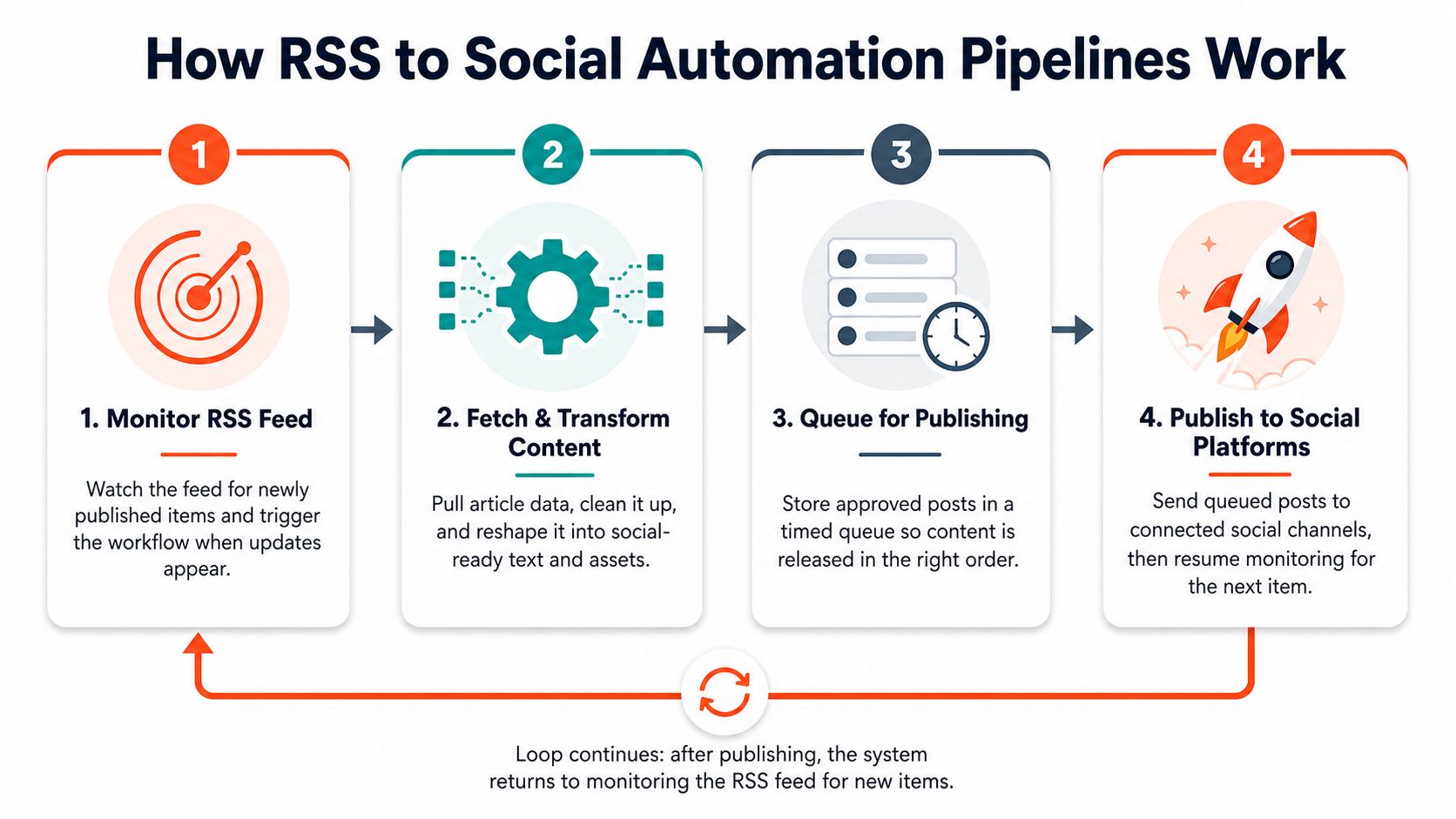
The cleanest way to think about the workflow is as a loop, not a one-time export. Your tool checks the feed on a schedule, pulls the new item, transforms it into platform-ready copy, sends it to a queue or publishes it directly, then watches for failures and formatting problems before the next cycle begins. In practice, teams usually start with a 15 to 60 minute monitoring interval, which gives the system enough frequency to stay current without hammering the feed unnecessarily (pipeline model).
1. Monitor the feed
This first stage is boring, and that's exactly what you want. The automation watches the RSS feed for new entries, and the polling cadence controls how quickly a post can move from publishing to promotion. If you publish several times a day, shorter intervals help; if your site updates less often, a looser cadence reduces noise.
2. Fetch and transform the content
Once a new item appears, the system extracts the title, description, URL, and image. Then it rewrites those fields for the target network. Here, many discover that a good blog title is not automatically a good social post, and that a clean excerpt can still need trimming before it fits a caption field.
3. Queue or schedule the post
Some teams publish immediately, while others stage content for later delivery. The scheduling layer matters when you want posts to land during active audience windows or when multiple articles are competing for visibility. A simple workflow can stop here, but mature ones usually add approval or queue logic before anything goes live.
4. Publish and inspect the result
The final step is where the system proves whether it works. You need to check for truncated text, broken links, missing images, and caption formatting issues after the post appears. A loop that doesn't inspect output will keep repeating the same failure forever.
The useful pattern is to begin with one or two platforms, let the pipeline run for a couple of weeks, and add error alerts before scaling. That gives you a real baseline for what breaks, instead of assuming every feed item behaves the same way.
Choosing the Right Automation Tool for Your Workflow
The right tool depends on how much control you need, not on which one has the flashiest demo. If you're repurposing one newsletter or blog into regular social posts, a system that handles brand kits, captions, and cross-platform formatting in one place can get you moving quickly. If your workflow has multiple feeds, conditional routing, or custom triggers, a more flexible automation stack makes more sense.
| Tool | Best For | Setup Time | Brand Control |
|---|---|---|---|
| Basic RSS Poster | Simple one-source posting | Lower | Limited |
| WaveGen.ai Autopilot | Brand-aware repurposing from one RSS source | Faster for standard workflows | High |
| Zapier | Conditional logic and multi-step workflows | Moderate | High |
| IFTTT | Lightweight connections and simple triggers | Low | Limited to moderate |
WaveGen.ai Autopilot is built around turning a source article, newsletter, or RSS item into platform-ready social assets, including captions and visual formats, while keeping brand settings consistent. Zapier and IFTTT give you more routing flexibility, which is useful when you need different posts to go to different destinations or you want to trigger actions beyond social publishing. If you're comparing broader scheduling stacks too, compare social media scheduling tools alongside the automation layer so you don't confuse content distribution with calendar management.
Operational reality: simple tools are easier to launch, but they're usually the first to wobble when you need approval steps, content rules, or selective cross-posting.
A practical configuration pattern from established tutorials uses a 12-hour polling interval and a maximum of two posts per check, with a separate field for hashtags and end-of-post metadata so feed items can be trimmed before posting (tutorial configuration example). That approach is conservative by design, which helps prevent overposting and formatting loss when the feed is busy or the source items are long.
If you only run a single blog or newsletter, the easiest path is the one that reduces manual cleanup the most. If you manage multiple RSS sources and different audience segments, prioritize routing logic and error visibility over convenience.
WaveGen.ai's free social media scheduler is also worth looking at if you want to understand how scheduling fits into a broader publishing stack.
Mapping Feed Fields to Social Post Formats
RSS gives you structured data, but social platforms want copy that reads like a person wrote it. That mismatch causes most automation errors, because teams assume a feed item can be dropped into a post composer without translation. In production, it usually needs cleanup, reshaping, and a fallback path when a field is missing or malformed.
Title, summary, link, and image each serve a different job
The title is usually the starting point, but it almost always needs shortening or rewriting. A headline that works on a blog can feel stiff or too long in a social post, especially on platforms that reward a faster hook. The description or excerpt should become the body copy, but HTML needs stripping and extra links often need to be removed or moved elsewhere.
The link should stay intact and visible. Teams often overcomplicate this part by wrapping the URL in too much formatting, which makes troubleshooting harder and can create odd previews. Keep the destination clear, then let the surrounding copy do the persuasion.
The image field is where the most frustrating breakage shows up. RSS feeds often carry legacy image formats or inconsistent dimensions, which creates problems when a social platform expects a cleaner upload. RSS has gone through long-lived format changes since its early versions in 1999 and 2002, and that history is one reason older feeds still carry messy image handling patterns (RSS evolution).
Practical rule: if a field can fail quietly, assume it will and build a fallback for it.
Hashtags need deliberate handling
Most RSS feeds don't include hashtags, so you need a rule for generating them. That can mean a custom field in your feed, a tag-mapping rule, or a simple keyword-based insertion system. The important thing is consistency, because random hashtag decisions look careless and make QA harder.
A clean mapping table inside your tool helps a lot here. Title becomes headline, summary becomes caption body, link stays as the destination, image gets resized or replaced if needed, and hashtags come from a controlled rule set rather than improvisation. When that structure is visible in the tool, post failures are much easier to diagnose, especially when a field breaks after a feed update or a social API changes its formatting rules.
WaveGen.ai's blog-to-social posts workflow is a useful example of how feed content can be turned into platform-ready formats without rebuilding every post by hand.
Platform-Specific Formatting and Scheduling Cadence
Copying the same text to every network is the fastest way to make automation look lazy. LinkedIn, Instagram, X, Facebook, and TikTok all reward different pacing, formatting, and content shape, so the source article has to be translated, not broadcast.
Match the post to the feed it will live in
LinkedIn usually tolerates longer captions and cleaner paragraph breaks, especially when the post reads like a professional insight rather than a teaser. Instagram leans visual, so hashtags usually belong in the caption and the image matters more than the link itself. X rewards brevity and a strong opening line, because the first sentence has to work before the rest of the copy gets any chance. Facebook often performs better with native-friendly media and shorter text that invites comment activity. TikTok is different again, because RSS-to-social tools usually support text or caption routing rather than generating an actual video asset from the feed item.
Cadence matters as much as wording
A feed that publishes too aggressively can make a brand look spammy. A feed that posts too rarely wastes the whole point of automation. In practice, a conservative cadence is usually safer, especially when one source is being distributed to several platforms, because you need room for platform-specific timing and quality checks.
Use the platform as the filter, not the feed. The feed is the source, the platform decides the format.
How to schedule social media posts is relevant if your bottleneck is timing rather than creation, because cadence and queue logic often matter more than the initial post write-up. The bigger mistake is treating schedule choice as a pure efficiency decision instead of a brand decision.
If the same article gets posted everywhere at once, it can flatten engagement instead of multiplying it. A slower, platform-aware rollout usually looks better and gives you space to adjust copy when one channel underperforms.
Testing Monitoring and Troubleshooting Best Practices
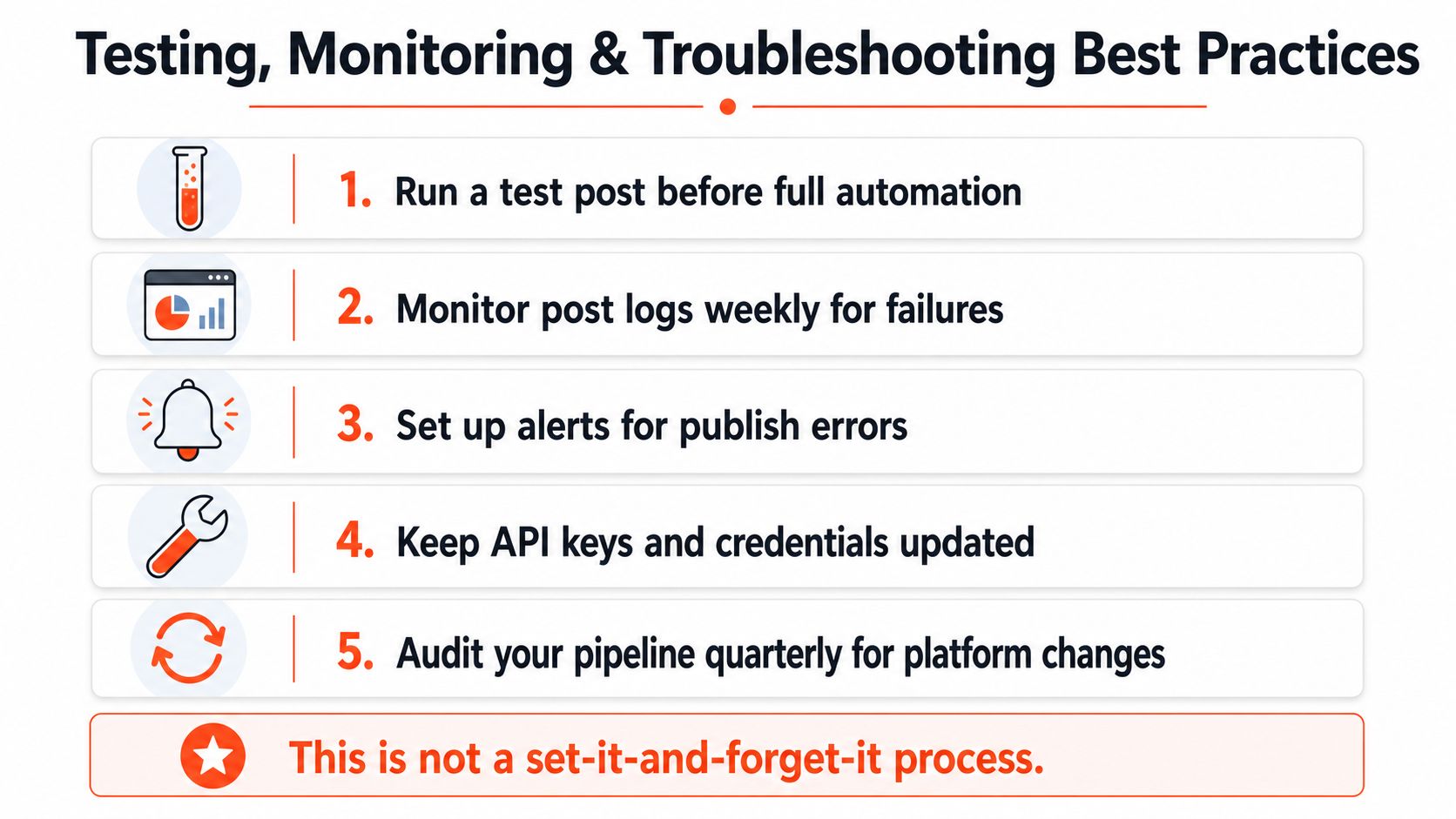
The weak point in most RSS-to-social systems is not setup, it's silence. A feed schema changes, a caption truncates, a token expires, or an image fails to pull through, and nobody notices until a week later. That's why rss feed to social media automation needs governance, not just configuration.
Start with a verification window
Run a short test phase before you trust the pipeline with live distribution. During that period, manually verify every post that comes through the system and check for the failure types that show up most often, truncated text, missing images, broken links, and hashtag mistakes. That sounds tedious, but it's faster than discovering the same error pattern after it has already affected multiple channels.
Watch the feed before blaming the platform
When something breaks, inspect the RSS item first. Publishers change CMS settings, redesign templates, or alter field structure without warning, and your mapping can fail even when the social platform itself is fine. If the raw feed is damaged, no amount of scheduling logic will save the post.
Keep a simple failure log
Track the type of failure, the platform involved, and what fixed it. You don't need a heavy process to get value from this, just enough structure to spot recurring issues. If missing images show up repeatedly, the problem is probably upstream in the source feed or the asset mapping rather than the social network.
Add fallback behavior
Manual override matters because not every article should cross-post automatically. Some content needs editing, some needs timing changes, and some shouldn't be distributed at all. The harder you automate, the more important it becomes to decide what qualifies for automation in the first place.
A useful mental shift is to treat automation as a monitored publishing system, not a broadcast pipe. That keeps the team focused on resilience, not just output volume.
Conclusion and Your Next Implementation Steps
RSS to social media automation works when it's treated like a distribution system with rules, not a shortcut. Start with the source feed, map the content fields deliberately, format for each platform, and monitor for failures before you scale. If you want the fastest path from one article to branded multi-platform output, WaveGen.ai can handle RSS monitoring, repurposing, scheduling, and crossposting in one workflow.
If you want a centralized way to turn a feed into consistent social content, visit WaveGen.ai and see how its RSS-driven autopilot fits into a real publishing workflow. It's built for teams that want to reduce manual posting without giving up brand control or visibility into what gets published.
RSS feed
social media automation
WaveGen
content distribution
social media
Turn this kind of writing into a week of social content.
Paste a blog post, newsletter, or rough draft — WaveGen turns it into publish-ready carousels, captions, and slideshows for every channel.
No credit card · First posts in 2min