July 25, 2026
13 min read
Tik Tok Automation: Safe Workflows for Scalable Content
Master tik tok automation with compliant workflows, content repurposing strategies, and measurable KPIs. Learn to scale safely without risking your account.
Most advice about TikTok automation starts with the wrong fear. It treats automation like a single switch, as if scheduling posts, generating drafts, and auto-following accounts all carry the same risk. They don't. The operational line is much sharper than that, and the key question is whether the workflow looks like disciplined content operations or like non-human engagement behavior that trips platform limits and moderation.
TikTok's own evolution points in the same direction. Business accounts, creator analytics, and TikTok Studio's Overview, Content, and Followers tabs made content workflows measurable, which is exactly what automation needs to work well, because you can publish, monitor, and iterate from real performance data rather than guesswork. At the same time, guidance around automation has moved from simple scheduling toward full workflow orchestration, with trend monitoring, backlog creation, templated scripting, batch production, scheduled publishing, engagement handling, and reporting. That shift matters because the safest systems aren't the most aggressive ones, they're the most controlled ones.
For teams trying to separate useful automation from risky behavior, the practical test is simple. If a workflow helps you create, organize, review, schedule, and measure content, it usually belongs in the safe zone. If it makes accounts look like they're liking, following, commenting, or messaging in machine-like bursts, the risk rises quickly.
Table of Contents
- Why Most TikTok Automation Advice Gets It Wrong
- The Four Types of TikTok Automation Explained
- TikTok Policy and Compliance Guardrails
- Building a Safe Automation Workflow Step by Step
- Real-World Automation Use Cases by Audience
- Measuring Automation Success With the Right KPIs
- How WaveGen.ai Enables Compliant Content Automation
Why Most TikTok Automation Advice Gets It Wrong
The worst TikTok automation advice collapses everything into one bucket. It tells people to “automate carefully,” but doesn't separate low-risk content workflows from high-risk engagement behaviors. That's a problem, because a calendar-based publishing system and a follow bot are not cousins, they're different animals entirely.
Backend automation versus front-facing engagement
Backend automation handles the work teams actually need done. That includes drafting, repurposing, scheduling, analytics, and reporting, which is where TikTok's measurable feedback loops make a real difference. Once you can see what was posted, when it went live, and how it performed, automation becomes a tool for iteration rather than a shortcut for spam.
Front-facing engagement automation is where the danger starts. Follow automation guidance in the market is already tightly constrained, with recommended limits of 10 to 15 actions per session, 10 to 15 minute breaks, 25 follows per hour, and a pause of at least 24 hours after a “limit reached” notification, according to Octoparse's TikTok automation guidance. Those ceilings are low for a reason. They show that engagement actions are the part most likely to look machine-driven and draw scrutiny.
Practical rule: automate the work that scales judgment, not the work that impersonates a person.
That's why guides focused only on posting cadence miss the point. Real TikTok operations use automation to reduce production drag, maintain cadence, and protect creators from repetitive tasks. They don't use it to flood the app with synthetic behavior.
A better mental model
The useful way to think about TikTok automation is as a spectrum. On one end sits content synthesis, planning, and analytics, which are generally compatible with platform-safe operations. On the other end sit bulk follows, repetitive comments, and scripted engagement patterns that can look unnatural even when the individual action seems small.
If you want a tighter view of the production side, this content creation automation guide maps well to the safer half of the stack. The important takeaway is not that automation is bad. It's that the type, timing, and volume of automation determine whether you're building a workflow or a liability.
The Four Types of TikTok Automation Explained
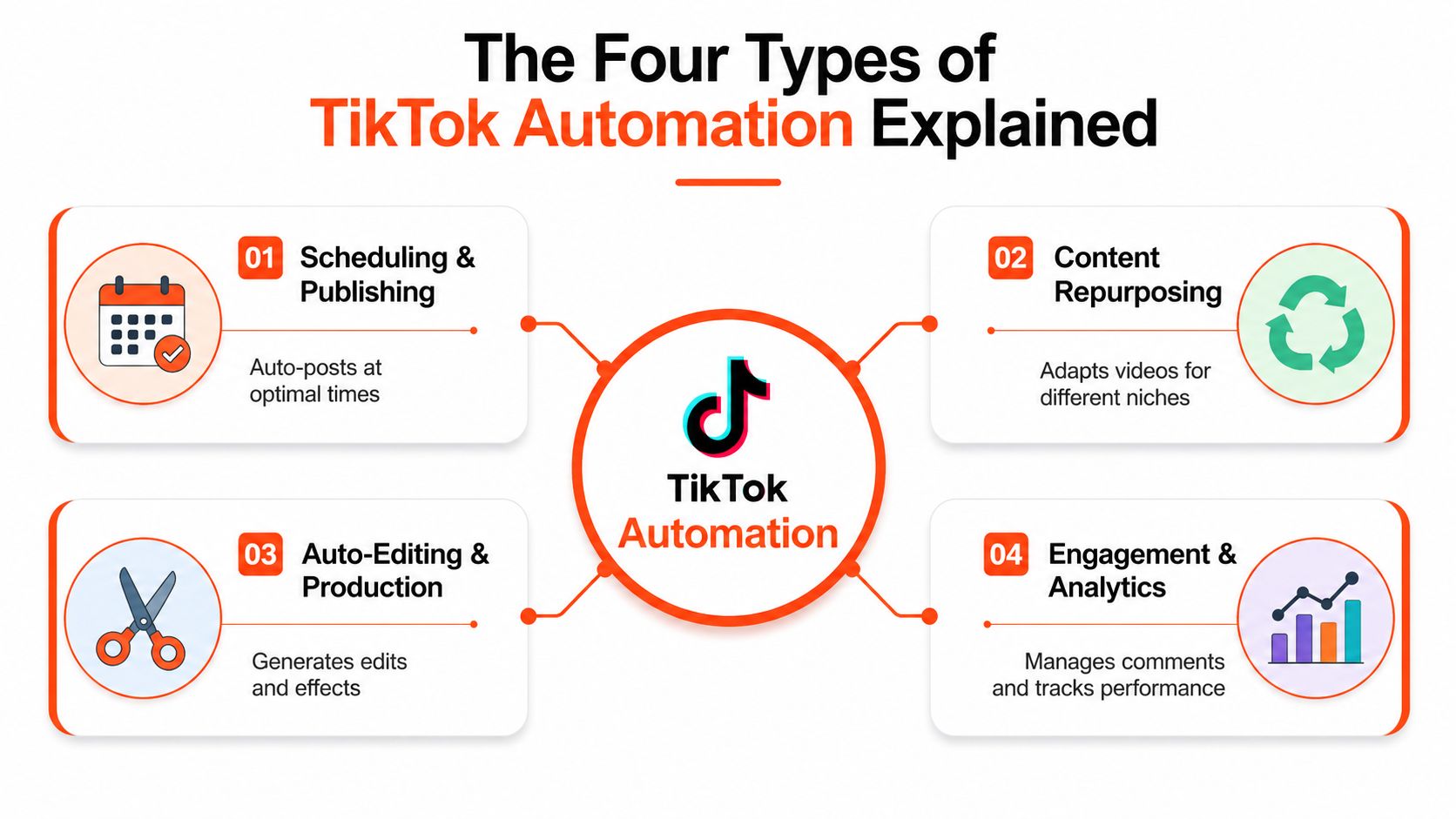
The easiest way to evaluate a tool is to ask which category it belongs to. If you can classify the workflow, you can usually predict the risk.
Scheduling and publishing
Scheduling tools queue posts for later delivery, often across multiple accounts or platforms. In a business setting, that's useful because it keeps publishing consistent without requiring someone to be online at the exact moment of posting. The risk stays relatively low as long as the tool works inside official permissions and doesn't try to mimic human behavior through fake sessions or automated engagement.
Content repurposing
Repurposing systems take a long-form source, like a webinar, podcast, or blog post, and turn it into multiple short clips or post variations. One guide in the brief says these systems can automatically extract 5 to 10 short clips from each long-form piece, resize them to 9:16, add branded elements, generate captions, and create variants for A/B testing. That's not spam, it's asset multiplication, which is why this category tends to deliver real operational value.
Auto-editing and production
Auto-editing tools sit one layer deeper. They help with trimming, captioning, formatting, effects, and variant generation. In practice, these tools reduce the cost of turning rough source material into publishable assets. They're most useful when teams already know what works and need to produce more of it without burning time in manual editing.
Engagement bots
Engagement automation covers follows, likes, comments, and sometimes direct-message handling. This category is the most sensitive because it interacts with other users in ways TikTok can interpret as non-human if the pace, pattern, or volume looks off. The operational thresholds in the brief make that clear. Safe content automation and risky engagement automation are not the same purchase decision.
A useful shorthand is this. If a tool helps you create and distribute your own content, it's usually a production workflow. If it tries to manufacture social proof or relationship signals at scale, it's moving into enforcement territory.
How to sort any tool fast
- Publishing tools: Low to moderate risk if they rely on approved access and normal cadence.
- Repurposing tools: Usually low risk when they transform your own source material.
- Editing tools: Generally safe when they stay inside content production.
- Engagement bots: Highest risk, especially when they automate follows, likes, or repetitive comments.
TikTok Policy and Compliance Guardrails
TikTok's safest automation posture starts with permission, not volume. The Content Posting API requires an audit and approval step before you build around public posting, so production systems need to treat posting as a governed integration, not a casual endpoint. That means draft creation can be automated freely, but the final publish step should stay inside eligibility, token control, and manual fallback logic.
Build around approval, not assumption
If the posting layer hasn't been approved, automation can still create content, but it can't complete distribution through public posting. That distinction matters in operations because it prevents teams from designing a brittle pipeline that looks complete in staging and fails the minute it needs to go live. A safer architecture splits content synthesis, compliance review, and publishing orchestration so one blocked layer doesn't break the entire system.
For a practical setup reference, PostPulse's TikTok Content Publishing API walkthrough is useful because it centers the approval and integration problem instead of pretending posting is a simple webhook.
When the publish layer is gated, the workflow needs a human or API-governed checkpoint. Otherwise the automation stack becomes a draft factory with no safe exit.
Respect action thresholds
The operational limits around engagement are narrow enough to matter. The brief's guidance recommends 10 to 15 follows per session, 10 to 15 minute breaks, a cap of 25 follows per hour, and no more than 8 hours per day, with a 24-hour pause if a “limit reached” notification appears, based on Octoparse's TikTok automation tips. Those numbers are a warning sign, not a growth playbook. They show how quickly engagement automation can drift into suspicious territory.
Business accounts and messaging workflows
Business accounts and creator-facing analytics are foundational because they give automation something measurable to work with. TikTok's emphasis on business messaging and API-based workflows also creates a narrow path for lead handling, especially in CRM-linked systems. If you want the mechanics of content posting and API structure, PostPulse's TikTok API setup article is a good companion reference.
If you're also thinking about content review before publishing, the content approval workflow guide fits naturally here, since approval is where safe automation either stays disciplined or starts leaking risk.
Building a Safe Automation Workflow Step by Step
A safe TikTok system starts with a split between creation and distribution. If you let one script do everything, you make debugging harder and compliance riskier. If you separate the layers, each stage can fail without taking the others down.
Step 1, synthesize content in batches
Batching is where the operational savings show up. One 2025 automation guide recommends generating 10 to 15 videos within the same thematic category, using slight prompt variations, then scheduling them over time and refining future content from performance signals, according to AIFreeAPI's TikTok automation guide. That works because the production team can stay in one subject lane instead of context-switching between unrelated ideas.
Step 2, review before you publish
The second layer is human or policy review. Automated drafts should still pass through a content check that looks for brand fit, claims risk, and obvious duplication. A clear review stage prevents low-quality assets from entering the scheduling queue and keeps the publishing layer from becoming a blind release valve.
Step 3, publish through a gated workflow
The posting layer should be treated as a permissioned handoff. That means eligible API access, token governance, and fallback manual review when the automation path is blocked. If the integration can't publish, it should stop gracefully and preserve the draft instead of forcing a broken release.
Step 4, store metadata for comparison
Track the theme, hook, format, and publish time for every variant. Without that metadata, performance data stays noisy and you can't tell whether a clip worked because of the opening line, the edit style, or the posting window. The automation system should improve memory, not just throughput.
Step 5, monitor and prune
Use early signals to decide what deserves another round. If one variant starts outperforming others, expand the series. If a batch underperforms, cut it fast and recycle the strongest angles instead of filling the calendar with weak content.
I've seen this architecture save teams more time than aggressive automation ever did, because it keeps the pipeline stable. The point isn't to maximize output at any cost. It's to make sure every published asset has already been through the right gates.
For editing specifics, how to edit a TikTok video is a helpful reference when the production layer needs a tighter handoff into publishing.
This is the embedded walkthrough for teams that want to see the sequence mapped visually.
Real-World Automation Use Cases by Audience
Consultants, agencies, solo creators, and professional experts don't need the same stack. The best automation choices depend on content volume, review burden, and how much risk each brand can tolerate.
Consultants and advisors
For consultants, a single long-form asset can feed a week of social output. A podcast episode, client memo, webinar transcript, or newsletter issue can become short posts, quote cards, and video clips without requiring daily creation from scratch. The useful move is not to automate persuasion, but to automate repackaging.
Agencies and multi-brand operators
Agencies need repeatability more than novelty. Their workflow usually starts with source content intake, passes through a templating layer, and ends with approval and scheduling across several brand accounts. That makes the pipeline feel less like a creator tool and more like an operations system.
Solo creators and bloggers
Solo creators benefit most from autopilot-style monitoring. RSS feed tracking, content intake, and scheduled repurposing can keep a feed active even when the creator is busy writing somewhere else. That keeps the cadence steady without forcing them into daily manual posting.
Professional experts with long-form material
Lawyers, educators, and financial advisors have a different constraint. Their content has to sound precise, not recycled. They do well when automation handles formatting and distribution, while the actual expertise stays human. For those users, analyze TikTok hooks and structure is a good reference for turning long explanations into stronger opening frames without losing the substance.
The pattern across all these groups is the same. Automation pays off when it reduces repetitive packaging work and preserves judgment for the parts that need expertise. It stops being useful the moment it tries to impersonate relationship-building at scale.
Measuring Automation Success With the Right KPIs
The wrong KPIs make automation look busy and ineffective at the same time. A calendar full of posts can still produce weak outcomes if the team never checks whether the workflow improved consistency, quality, or audience response. Measurement has to connect the production layer to real content performance.
Track the workflow, not just the post count
TikTok Studio's Overview, Content, and Followers tabs give teams a practical place to inspect results because the platform already centralizes account-level and video-level metrics there, as noted in the earlier analytics section from Sprout Social's TikTok metrics guidance. That matters because the feedback loop starts with visibility. If you can't see which variants moved, you can't refine the batch.
Use a simple KPI table
| Workflow Stage | Primary KPI | Measurement Method | Target Benchmark |
|---|---|---|---|
| Content Synthesis | Draft readiness | Count usable drafts after review | Consistent output across planned batches |
| Compliance Review | Approval rate | Share of drafts that pass review | Few rejects from avoidable issues |
| Publishing | Schedule adherence | Posts published as planned | Stable cadence without manual rescue |
| Early Performance | Variant lift | Compare hooks, captions, and formats | Clear winner identified from each batch |
| Audience Response | Comment and follow quality | Review inbound engagement patterns | More relevant responses, fewer low-value actions |
Reserve room for trend response
A mature system isn't rigid. The verified data says a strong operational mix is 60 to 70% planned evergreen content and 30 to 40% open for trending opportunities, based on Sprout Social's TikTok metrics guidance. That balance matters because automation should protect baseline cadence while leaving space for timely posts that fit the platform's tempo.
Tie content variants to outcomes
Batch production only pays off if the team stores enough metadata to compare results later. The hook, format, theme, and publish time should all live with the asset record, otherwise your conclusions stay fuzzy. Once the data is attached to the workflow, automation becomes a closed-loop system instead of a content factory.
I look for one thing above all else, whether the system helps the next batch get smarter. If it doesn't, the workflow is creating labor, not efficiency.
How WaveGen.ai Enables Compliant Content Automation
WaveGen.ai fits the safe side of TikTok automation because it works on repurposing and scheduling rather than risky engagement behavior. It turns a single article, newsletter, blog post, podcast script, or YouTube transcript into a week of social assets, including carousels, short videos, quote cards, and captions, while letting users set brand kits once so the output stays consistent.
The practical value is in the handoff. Teams can keep their own ideas as the source material, adjust the output in a visual editor, and schedule or crosspost without touching follow bots or other high-risk engagement tactics. For teams that want help with structure and tone, scene templates and hook formulas are useful companions because they improve the opening frame without changing the compliance model.
WaveGen isn't a workaround for platform limits, it's a distribution layer for content you already own. If your goal is to scale output while staying inside the safe content automation zone, that's the part of the workflow worth automating.
If you're building a TikTok system right now, start with content synthesis, review, and scheduling, then leave engagement automation out of the stack unless you have a clear compliance reason and a tightly governed use case. For teams that want to keep the workflow on the safe side while still moving faster, WaveGen.ai is a straightforward place to begin.
tiktok automation
content scheduling
social media workflow
tiktok compliance
content repurposing
Turn this kind of writing into a week of social content.
Paste a blog post, newsletter, or rough draft — WaveGen turns it into publish-ready carousels, captions, and slideshows for every channel.
No credit card · First posts in 2min