June 26, 2026
15 min read
Content Creation Automation Your 2026 Guide
Discover content creation automation. Learn to automate workflows, choose tools, and maintain brand voice to save time and scale your output.

If you publish regularly, you probably know the cycle by heart. You finish a blog post, then realize it also needs LinkedIn copy, an Instagram carousel, a short video script, newsletter blurbs, and a few follow-up posts so the piece doesn't disappear after one day. By the time you've repackaged one idea, the next deadline is already on your screen.
That's the problem content teams face in 2026. It's not usually a lack of ideas. It's the operational drag of turning one good idea into enough high-quality assets to stay visible without burning out.
Content creation automation helps, but only when it's used correctly. Used badly, it creates more noise, more generic posts, and more off-brand output to clean up. Used well, it removes repetitive production work so people can focus on judgment, positioning, and voice. The difference comes down to system design, especially whether you've built a clear source of truth for brand assets, messaging, and approvals.
Table of Contents
- Introduction The End of the Content Treadmill
- What Is Content Creation Automation Really
- The Automation Spectrum From Simple to Sophisticated
- The Benefits and Risks A Balanced View
- Your 5-Step Implementation Roadmap
- Real-World Automation Use Cases
- How to Maintain Quality and Brand Voice
- Frequently Asked Questions
Introduction The End of the Content Treadmill
Teams often don't need more content ideas. They need a better operating model.
The treadmill starts when every platform demands its own format, cadence, and style. A founder records a podcast. A consultant writes a newsletter. A marketing manager publishes a blog. Then someone has to cut that source material into smaller assets, adapt each one for different channels, schedule it, review it, and keep the branding consistent. That manual layer is what wears people down.
This is why content creation automation has moved from a niche experiment to a real operating category. The broader content creation market was worth USD 43.44 billion in 2026 and is forecast to reach USD 73.49 billion by 2031 at an 11.09% CAGR, according to Research and Markets reporting on AI-powered content creation. That growth reflects a simple reality. Teams are trying to build repeatable systems, not just generate more drafts.
Practical rule: Automate the repetitive parts of content production. Keep strategy, taste, and final judgment in human hands.
The mistake is treating automation like a slot machine for instant posts. That approach creates quantity without coherence. A better approach is to design a workflow where one strong source asset feeds many smaller assets, all controlled by a central brand system.
If your current process feels messy, it helps to fix the workflow before adding more AI. A solid guide to managing marketing chaos can help you map approvals, handoffs, and bottlenecks before you automate them.
What Is Content Creation Automation Really
Content creation automation is easiest to understand if you picture a professional kitchen. Strategy is the menu. Generation is prep. Repurposing is turning one main ingredient into multiple dishes. Distribution is getting every plate to the right table without confusion.
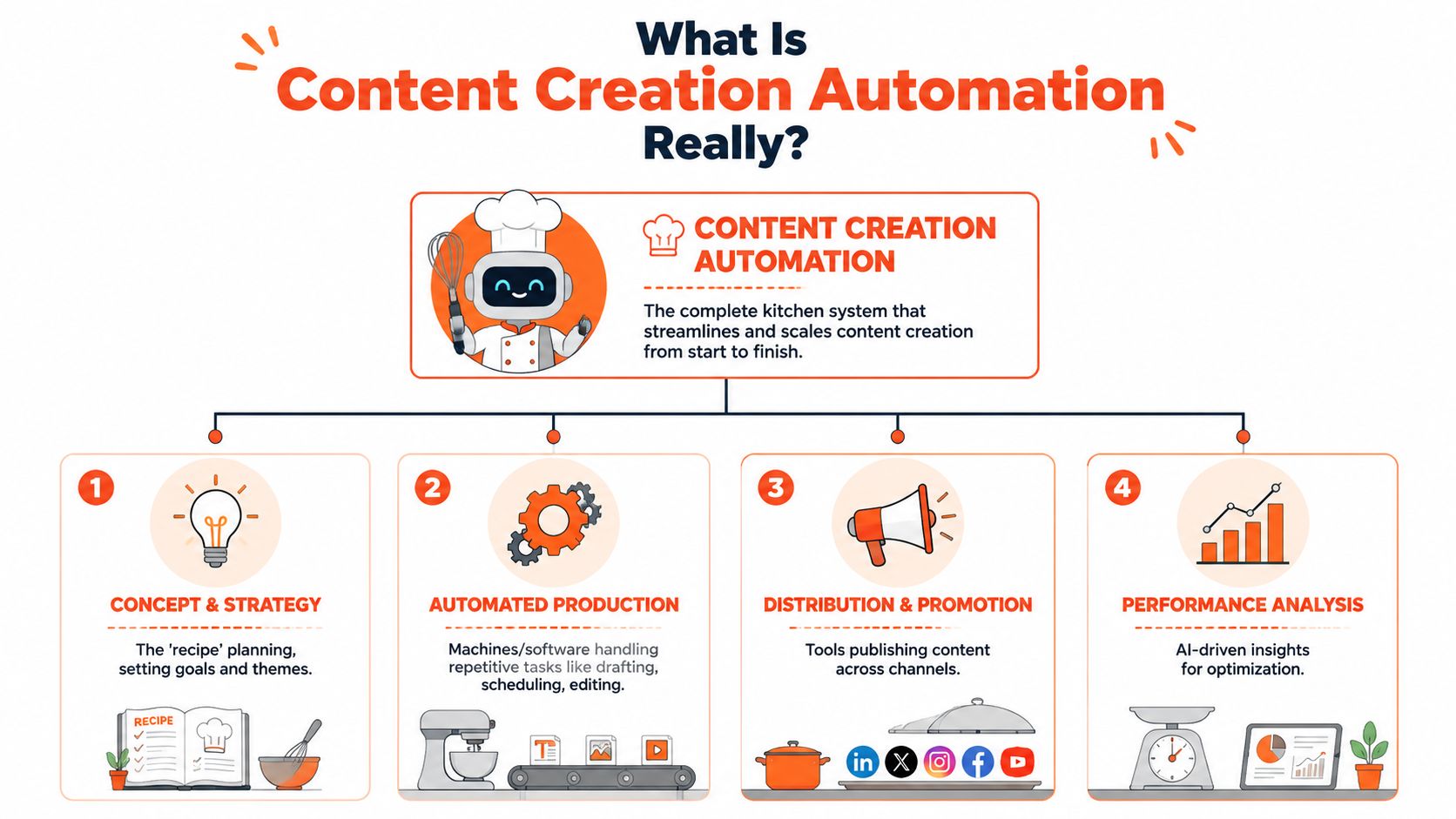
It is not one tool
A lot of tutorials reduce automation to “use AI to write faster.” That's too narrow. In practice, a stack is the common approach.
Here's the practical breakdown:
| Function | What it does | Example of the job |
|---|---|---|
| Generation | Creates a first draft from prompts or structured inputs | Draft a post outline or caption variations |
| Repurposing | Transforms existing material into other formats | Turn a blog into a carousel, quote card, and short script |
| Distribution | Schedules and publishes approved assets | Queue content to LinkedIn, Instagram, and YouTube |
| Governance | Keeps output aligned with brand rules | Apply logo, fonts, tone guidance, and approvals |
That distinction matters because different tools solve different problems. If you're comparing platforms, it helps to understand the split between generic generators and repurposing systems that work from your own source material. This guide to AI content creation is useful for seeing where broad generation tools fit and where they fall short.
How the machinery actually works
Under the hood, modern systems use Natural Language Processing and generative AI to analyze audience intent and historical performance, then draft SEO-ready variants while maintaining brand voice through rule-based logic and dynamic templates, as described in Activepieces' explanation of content creation automation.
That sounds technical, but the practical version is simpler. The system needs three things:
A repeatable template
Content structure has to be defined. That might be a carousel layout, a quote card format, or a caption framework.A data source
The source can be a blog post, transcript, newsletter, article feed, or content brief.Rules for adaptation
The tool needs guidance for channel format, calls to action, brand voice, and visual style.
Automation works best when the content already has a strong source. Weak inputs don't become strong outputs just because the workflow runs faster.
When people say content creation automation “doesn't work,” they're often describing a bad setup. They automated prompts without building the system around them.
The Automation Spectrum From Simple to Sophisticated
Teams typically don't jump from manual work to full AI orchestration. They move through stages. The useful question isn't “Should we automate?” It's “Which layer should we automate next?”
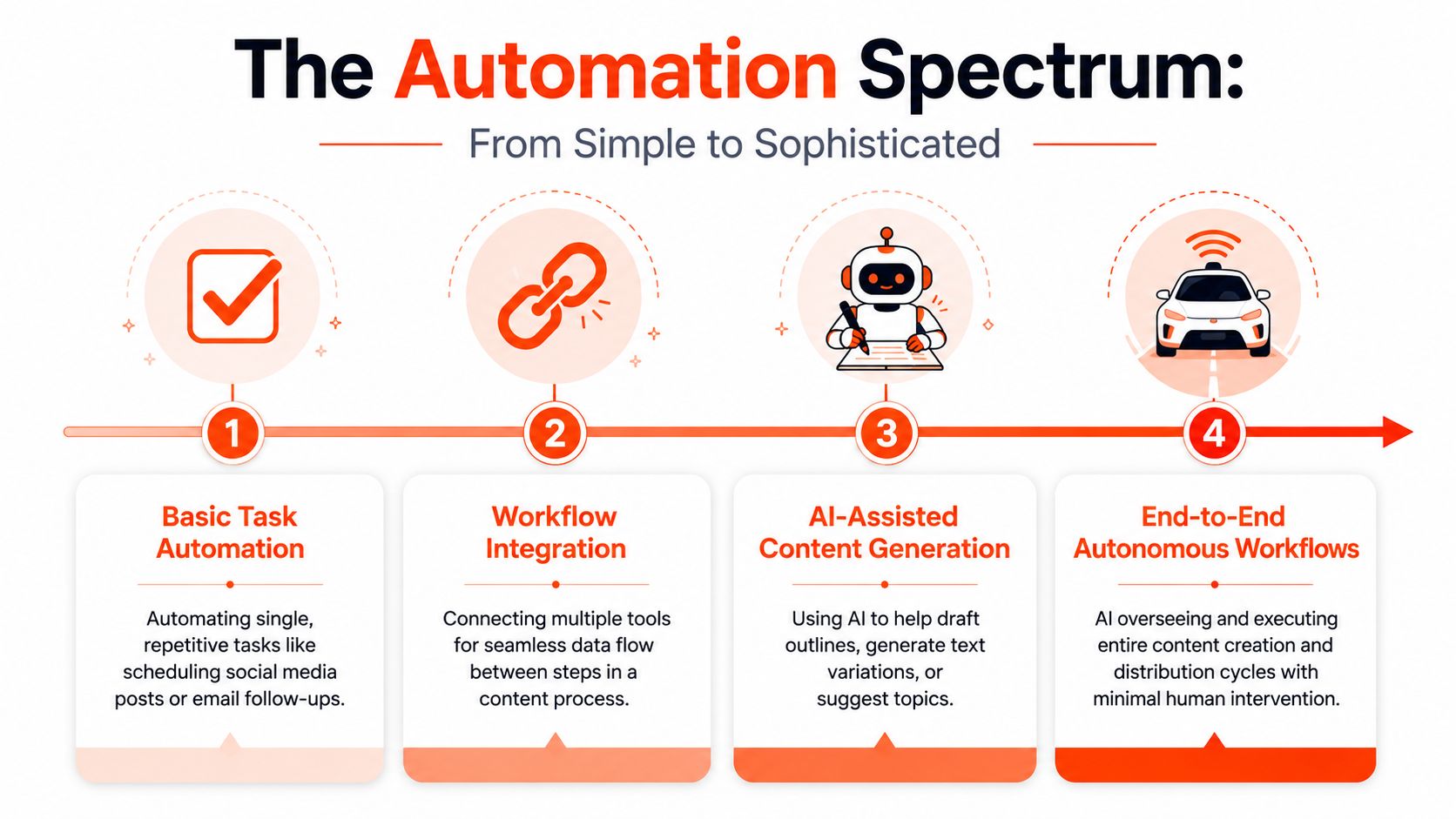
Level one single task automation
This is the entry point. A scheduler posts to social platforms. A workflow tool moves approved copy into a content calendar. A form sends a transcript to a shared doc.
It's useful, but narrow. You save time on repetitive clicks, not on content thinking.
Typical signs you're here:
Manual drafting still dominates
People still write every asset one by one.Brand consistency depends on memory
The team remembers fonts, tone, and formatting instead of enforcing them through systems.Publishing is easier, creation is not
The calendar runs better, but production still feels heavy.
Level two connected workflows
At this stage, teams connect tools. A new article triggers a workflow. The text moves into a document, a project board, or a review queue. Assets travel between systems with less manual handling.
Operations improve fast due to automation, as handoffs become cleaner. Automation also exposes weak processes. If approvals are unclear before automation, they'll still be unclear after automation.
A connected workflow often includes:
- A trigger, such as a new blog post, RSS update, or transcript upload
- A transformation layer, where content gets summarized, reformatted, or split into variants
- A review step, where a human checks accuracy and tone
- A publishing action, where approved content goes live
Level three AI assisted production
At this point, teams usually feel the first major shift. AI assists with outlines, caption variations, summaries, headline options, and format conversion.
Used well, it removes the blank-page problem. Used carelessly, it floods the team with nearly acceptable content that still needs cleanup.
A strong setup at this stage usually has two traits:
Working principle: Ask AI to create options, not final truth.
And:
- Clear role boundaries
AI drafts. Humans decide. - Strong source inputs
Expert commentary, transcripts, articles, and customer insights outperform vague prompts.
If you want to evaluate platforms built for this layer, reviewing a range of AI content creation tools helps clarify which products focus on ideation, which focus on repurposing, and which focus on distribution.
Level four agentic repurposing systems
This represents the advanced end of the spectrum. Instead of one AI prompt, you get a chain of specialized steps. Expert benchmarks show that automating content repurposing can reduce production time by transforming core concepts into channel-optimized variants like carousels, short videos, and quote cards through agentic AI systems with dedicated Data Aggregation, Creator, Reviewer, and Publisher agents, according to Kritikal Solutions' analysis of AI-driven creative automation.
That architecture matters because it mirrors how good editorial teams work. One layer gathers source material. Another creates assets. Another checks compliance and brand fit. Another distributes.
The trade-off is complexity. The more advanced the workflow, the more important your source of truth becomes. If your voice guide, templates, and brand kit are scattered across docs and folders, advanced automation only multiplies inconsistency faster.
The Benefits and Risks A Balanced View
Automation has real upside. It also creates very predictable problems when teams chase output without governance.
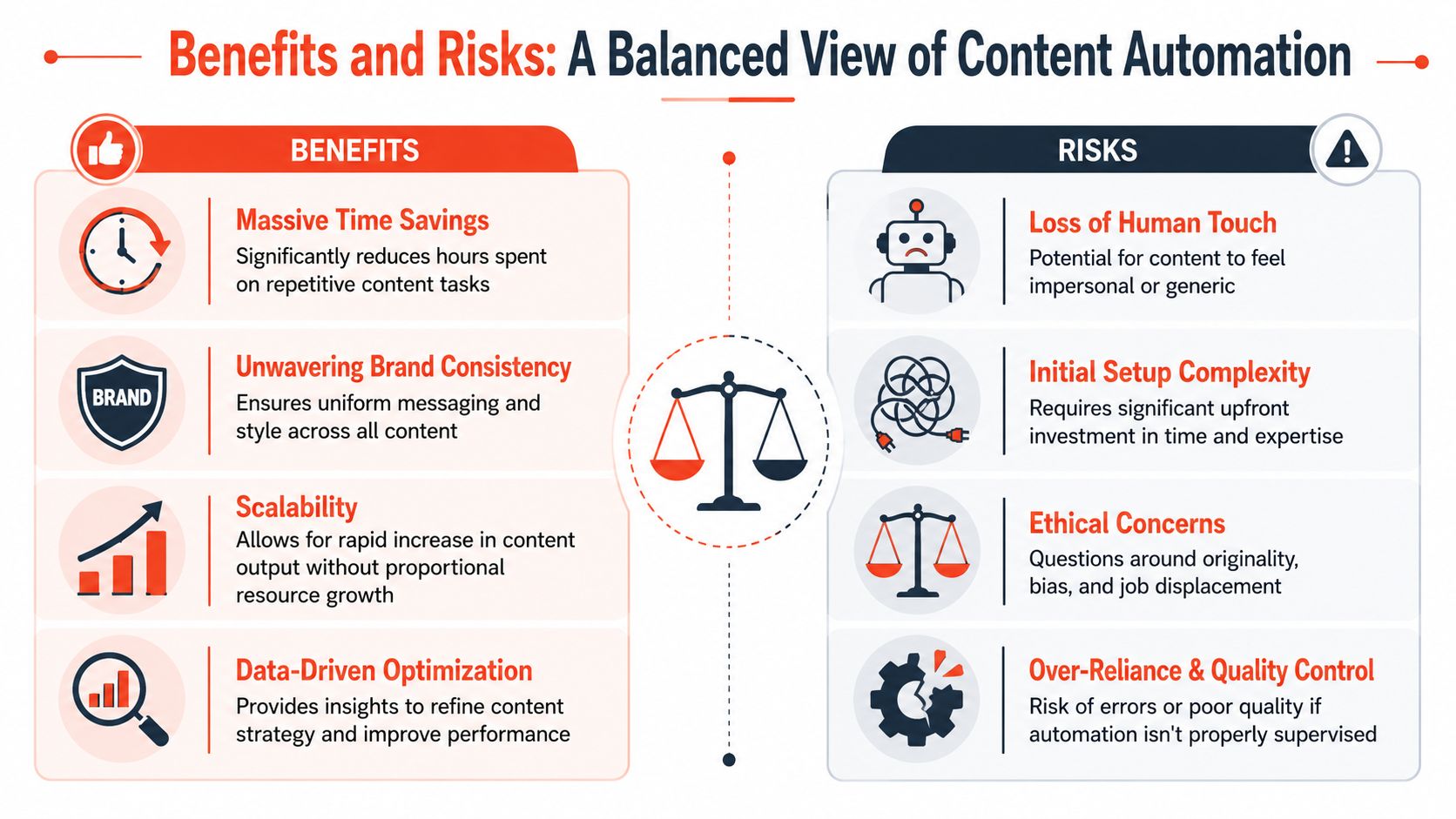
Where automation earns its keep
The economic case is easy to understand. Producing 1,000 words costs approximately $0.50 via AI compared to $200 for human writers, based on the figures compiled by Browsercat's summary of AI content statistics. That doesn't mean human writing is obsolete. It means the cost of first-pass production has changed dramatically.
The practical benefits are broader than price:
Repetitive production gets lighter
Caption drafting, resizing ideas for channels, and formatting variants no longer need full manual effort.Output becomes easier to sustain
Teams can keep a posting rhythm without inventing fresh content from scratch every day.Brand systems can scale
When templates and rules are configured well, the visual layer becomes more stable across channels.
Scaling creativity means extending one good idea into many useful formats without asking the team to rebuild it from zero each time.
Where teams get into trouble
The downside shows up when people automate too much, too early.
The biggest risk isn't just mediocre writing. It's brand dilution. If every tool drafts in a slightly different tone, every designer uses a slightly different template, and every platform gets a loosely adapted version, the audience stops getting a clear impression of who you are.
A high-volume system with no brand spine creates polished inconsistency.
There's also the emotional problem. Recent analysis highlighted an important gap: fully automated content often misses the hot takes, tension, and two-sided perspective that create reaction and trust, especially for consultants and coaches. That concern is echoed in this discussion of why viral content still needs human emotional reaction.
A few risks deserve constant attention:
| Risk | What it looks like in practice |
|---|---|
| Generic voice | Everything sounds acceptable but forgettable |
| Unchecked errors | AI inserts wrong facts, weak framing, or misleading claims |
| Template fatigue | Every post starts to feel mechanically similar |
| Over-reliance | The team stops developing editorial judgment |
Automation is strongest when it supports a point of view, not when it tries to replace one.
Your 5-Step Implementation Roadmap
Most failed automation projects skip the boring part. They buy tools first and design the workflow later. Start in the opposite order.
Here's what a more durable rollout looks like.
Step 1 audit the workflow you already have
Map your current process from source idea to final post. Don't make it abstract. List who writes, who edits, who formats, who approves, and where delays happen.
You're looking for friction such as:
Repeated rewrites
The same idea gets reworded for every channel from scratch.Scattered assets
Logos, fonts, captions, and templates live in different places.Approval confusion
People don't know who signs off on what.
If you can't diagram your process clearly, you're not ready to automate it well.
Step 2 define jobs and guardrails
Choose what the system should do, then define what it must never do. These are different decisions.
Adobe's 2025 executive summary found that 70% of content failures stem from disconnected modular assets, not lack of volume, and that teams need to update core components once so those changes flow across channels without manual revision, as summarized in Adobe's piece on scaling content creation workflows. That's the heart of on-brand modular consistency.
Your guardrails should include:
A brand kit
Logos, colors, fonts, visual rules, and reusable layouts.A voice guide
Tone, banned phrases, point-of-view rules, and example copy.Approval thresholds
Decide what can publish automatically and what always needs human review.
Step 3 choose tools by task
Don't ask one tool to do everything. Match the product to the job.
If you need prompt-based first drafts, use a general generator. If you need to convert source content into a social package, use a repurposing system. If you need distribution, choose a platform that handles scheduling and publishing cleanly.
For teams turning long-form material into social assets, social content workflow examples are useful because they show how one source can branch into captions, carousels, clips, and quote graphics. One example in this category is WaveGen.ai, which turns a source article, transcript, or newsletter into platform-formatted social assets using a stored brand kit and visual editor.
Step 4 build human review into the system
This is not optional. Every workflow needs a checkpoint where someone reviews claims, edits tone, and removes bland phrasing.
A practical review stack often looks like this:
- Accuracy review for factual claims and references
- Brand review for tone, positioning, and visual consistency
- Platform review for formatting, pacing, and CTA fit
Place the video here if you want to see the general workflow mindset in action:
Step 5 measure refine and document
After launch, document what works. Which assets need the most edits? Which channels benefit most from repurposing? Which steps still create bottlenecks?
The first version of an automation workflow is usually a draft. Treat it like an editorial process, not a permanent machine.
Keep a simple operations document with templates, review notes, approved asset types, and examples of strong outputs. That document becomes part of your source of truth.
Real-World Automation Use Cases
The easiest way to judge automation is to look at workflows, not promises.
The consultant with a weekly podcast
A consultant records one episode each week. The transcript becomes the source asset. An automation workflow extracts the strongest points, turns one into a LinkedIn article draft, another into quote cards, and another into a short video script for vertical platforms.
This works because the original material contains expertise and opinion. The system isn't inventing authority. It's redistributing it.
The B2B team with a blog engine
A small marketing team publishes educational blog posts. Every new article triggers a content workflow that produces social captions, visual post concepts, and platform-specific variants. A reviewer edits tone and checks that the call to action matches the campaign objective.
Some teams also add lightweight ad creative on top of that flow. If paid promotion is part of the mix, a tool like ShortGenius automated ad generation can fit into the visual production layer for turning campaign ideas into ad-ready video assets.
The agency managing multiple brands
Agencies feel the branding problem faster than most. One client wants restrained professional copy. Another wants punchy founder-led content. A third needs conservative compliance-friendly messaging.
The fix isn't more prompts. It's modular consistency.
A workable setup usually includes:
Separate brand kits per client
Each account needs its own fonts, color rules, logo usage, and layout patterns.Voice instructions tied to source material
The system should adapt the client's real articles, podcasts, or internal notes, not generic prompts alone.Review checkpoints by account
An agency editor or account lead approves before publishing.
When those pieces are in place, automation helps agencies scale output without flattening every client into the same house style.
How to Maintain Quality and Brand Voice
Most bad automated content doesn't fail because AI touched it. It fails because nobody built a governance layer.
Build the brand layer first
Start with a central source of truth. That means one place for logos, fonts, colors, approved layouts, CTA patterns, and messaging rules. It also means a written voice guide with examples of how the brand sounds when it's clear, persuasive, skeptical, warm, or direct.
If your team hasn't documented that yet, these brand guideline basics help translate vague preferences into usable operating rules.
A useful voice guide should answer questions like:
What tone should we avoid
Overhyped, stiff, academic, aggressive, vague.What perspective do we bring
Contrarian, reassuring, analytical, practical.What always appears
Signature phrases, recurring framing, preferred CTA style.
Make review non negotiable
The human review stage is the quality engine. It catches factual mistakes, weak emotional framing, repetitive copy, and subtle off-brand wording.
Set-it-and-forget-it automation is usually just outsourced inconsistency.
The strongest teams let automation handle assembly work. Humans still own taste. That's the part audiences respond to.
Frequently Asked Questions
Can AI replace a content team
No. It can reduce manual production work, but it can't replace editorial judgment, subject-matter expertise, or emotional calibration. That matters even more for coaches, consultants, and advisors, where trust depends on personality and perspective.
Does automated content still work for SEO
It can, if the content is useful, accurate, and clearly written. The stronger approach is to use automation for drafting, repurposing, formatting, and distribution while keeping humans responsible for expertise, clarity, and fact-checking.
What is the difference between generation and repurposing tools
A generation tool creates from a prompt. A repurposing tool transforms content you already made, such as a blog post, transcript, newsletter, or podcast script.
That distinction matters because many businesses already have valuable source material. They don't need more generic drafts. They need a faster way to turn their existing ideas into channel-ready assets while preserving personality. As noted earlier, tools like Jasper and Copy.ai can be efficient, but they often don't solve the deeper issue that strong content needs human emotional reaction and trust cues, especially for personality-led businesses.
If you already publish blogs, newsletters, podcasts, or videos, WaveGen.ai is worth considering as a repurposing layer. It's built to turn existing source content into on-brand social assets across multiple platforms, with brand kits and editing controls that support the kind of modular consistency most automation setups miss.
content creation automation
ai content creation
marketing automation
social media automation
content repurposing
Turn this kind of writing into a week of social content.
Paste a blog post, newsletter, or rough draft — WaveGen turns it into publish-ready carousels, captions, and slideshows for every channel.
No credit card · First posts in 2min