September 10, 2026
15 min read
Content Creation Software: A Practical Buyer's Guide
Find the right content creation software for your team. Compare features, workflows, and platforms with this practical buyer's guide.
Your team finishes recording a Tuesday podcast and feels productive. Then the real work starts: cutting clips, drafting captions, resizing graphics, writing LinkedIn posts, preparing an email, and loading everything into separate publishing tools. By Friday, you may have one episode and a collection of derivative assets, but nothing is scheduled and nobody is confident the brand voice survived the handoffs.
That's the buying problem most content creation software comparisons miss. The creation step is often manageable. The publishing-to-distribution gap is where teams lose time, consistency, and momentum. The right software shouldn't only help you draft faster. It should turn one source asset into channel-ready output, preserve human control, and move that output into a reliable publishing workflow.
Table of Contents
- Why Most Teams Are Drowning in Content Creation Tools
- What Content Creation Software Actually Does
- The Four Workflow Pillars That Matter Most
- How the Main Approaches Stack Up Against Each Other
- Matching the Software to Your Role and Cadence
- A Practical Buyer's Checklist You Can Run Today
- The Human Control Question Most Reviews Skip
- Choosing the Right Stack and Your First 30 Days
Why Most Teams Are Drowning in Content Creation Tools
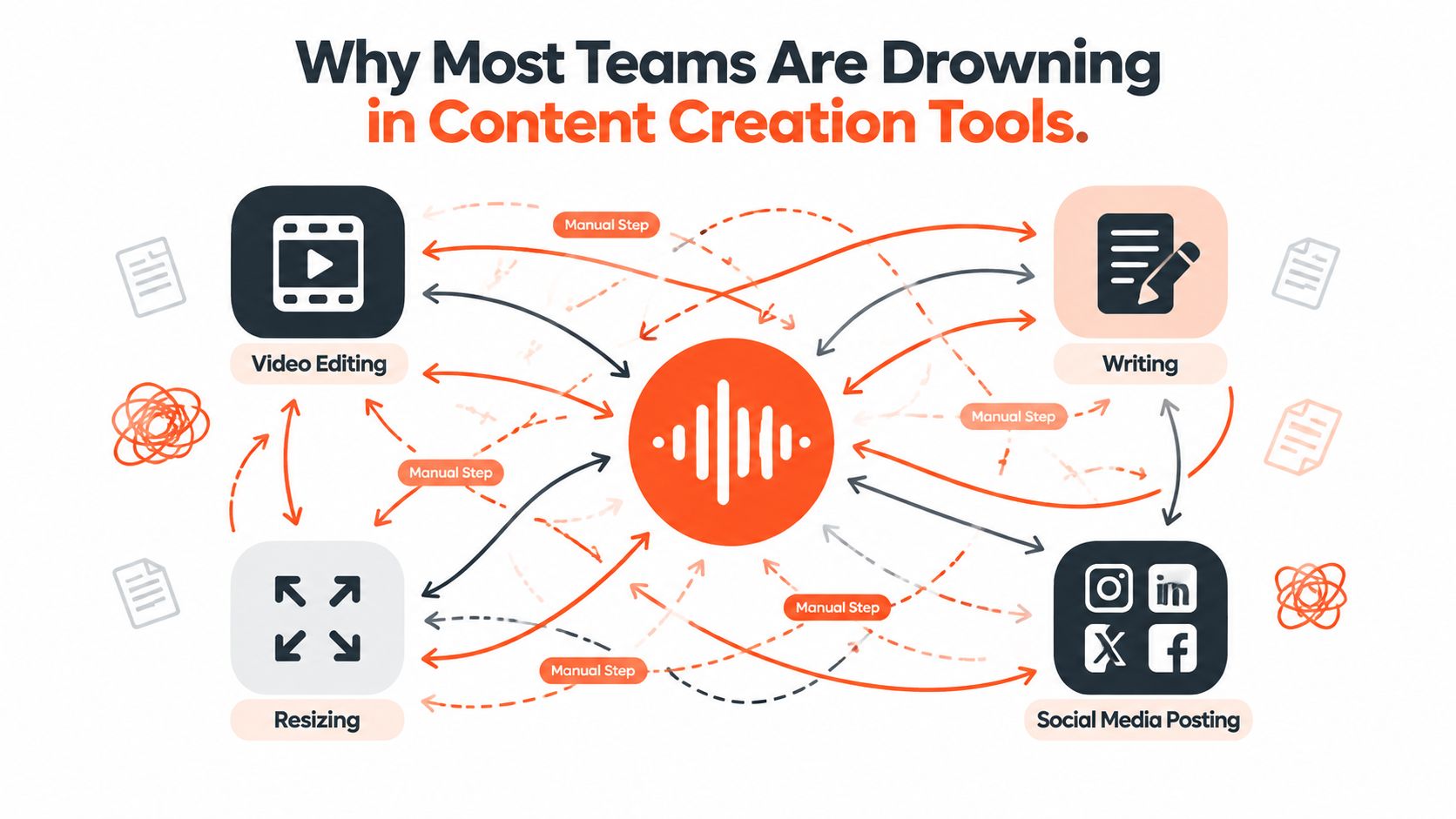
Small teams rarely buy a tool stack all at once. They add a writing assistant for blog drafts, a design suite for graphics, a video editor for clips, a scheduler for social posts, and a repurposing add-on when the manual work becomes impossible. Each purchase solves a local problem. Together, the tools create a workflow that depends on downloads, exports, copied text, renamed files, and repeated logins.
The result is familiar. A podcast becomes a transcript in one system, a video file in another, a set of captions in a third, and a publishing queue somewhere else. Nobody has a complete view of what has been approved, what still needs editing, or which version is supposed to represent the brand.
Find the actual bottleneck
Start by mapping the journey of one real asset. Choose your latest webinar, newsletter, article, or podcast episode and write down every step between recording and publication. Include approvals, resizing, caption editing, link insertion, scheduling, and performance review.
You'll usually find that the team isn't short of ideas. It's short of connected workflow infrastructure. A 2025 survey of content teams identified research and ideation as the largest time sink at 65%, followed by first drafts at 40%, editing and approvals at 37%, and post-publish promotion and performance tracking at 33%. Publishing and distribution still created friction for 21% of respondents, according to the State of Content Teams report from AirOps.
That distribution friction deserves more attention. A tool that generates ten captions but leaves your team to format, approve, schedule, and track them hasn't solved the complete problem.
Buy for fewer handoffs
Content creation software should collapse the stack around a source asset. It should help a team brief, draft, repurpose, apply brand rules, prepare channel variations, schedule content, and review results without forcing every step through a different application.
The category has become strategically important because the broader digital content creation market is expanding. One estimate places the market at USD 32.28 billion in 2024, with a projection of USD 69.80 billion by 2030 and a 13.9% CAGR from 2025 to 2030, as reported by Grand View Research. The scale matters less as a sales pitch than as a buying signal: teams are moving toward software that supports faster, cloud-based, multi-format production.
Practical rule: Don't ask whether a tool can create content. Ask how many manual handoffs remain after the content exists.
What Content Creation Software Actually Does
Content creation software is the operational layer between an idea and a published, measurable asset. It may include AI assistance, but AI drafting alone doesn't define the category. The useful question is whether the system handles the complete path from brief to draft, repurposing, brand application, scheduling, and measurement.
A generic AI writer can produce a paragraph, but it may not understand that LinkedIn, Instagram, email, and a CMS require different structures. A social scheduler can publish approved posts, but it usually won't transform a long-form article into a video script or quote card. A design suite can produce polished visuals, but export still leaves someone responsible for captions, platform formatting, approval, and queue management.
Use a working definition
For buying purposes, define the category this way:
Content creation software takes one source asset and reliably produces on-brand, channel-ready output without manual reformatting at every handoff.
That definition changes how you evaluate products. You're not looking for the deepest editor in one narrow lane. You're looking for a system that reduces the number of places where context can be lost.
| Tool Category | Drafting | Repurposing | Brand Controls | Multi-Channel Publishing |
|---|---|---|---|---|
| Generic AI writer | Strong for text drafts | Limited or manual | Usually prompt-based | Rarely native |
| Design suite | Visual-first | Often template-led | Strong visual controls | Usually export or limited scheduling |
| Social scheduler | Minimal | Limited | Basic or account-level | Strong publishing focus |
| Content creation software | Text, image, audio, or video support | Core capability | Brand kits and reusable rules | Built into the workflow |
The category isn't automatically better because it's all-in-one. Consolidation only helps when the product preserves quality across formats. Test whether the tool can retain the source message, adapt the structure for each channel, and let a person revise the result before publication.
For a broader view of individual writing, design, SEO, and video products, Outrank's guide to Outrank's featured tools is useful. Treat that type of list as a way to understand specialist categories, not as a substitute for testing the complete distribution workflow.
The Four Workflow Pillars That Matter Most
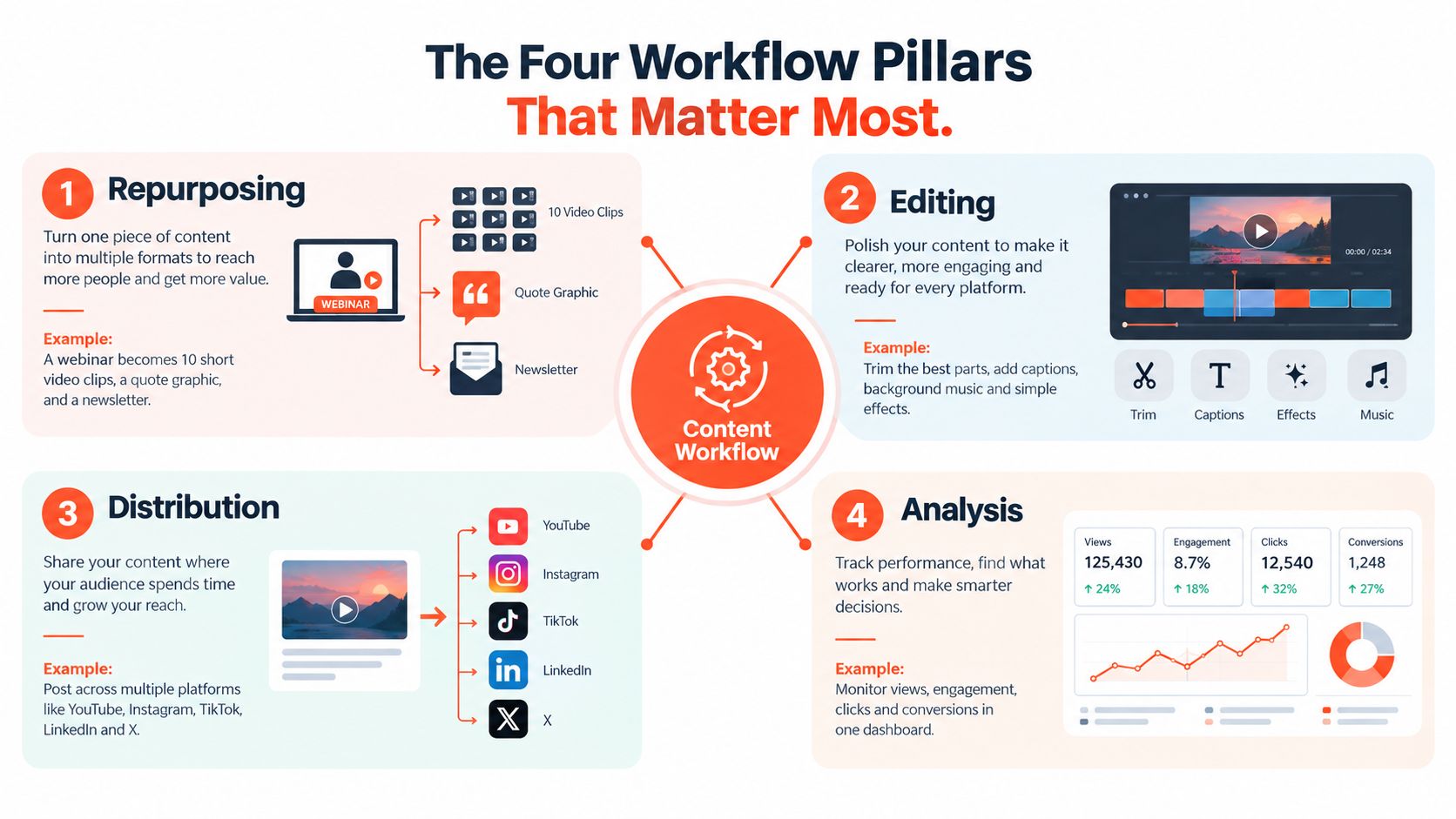
A content creation platform should be judged by four connected capabilities: repurposing, automation, brand kits, and multi-channel publishing. If one pillar is missing, the team usually recreates the same disconnected process inside a newer interface.
Repurposing creates leverage
Start with the source asset. A strong system should take a webinar and identify usable moments for short clips, pull quotable ideas for graphics, and create a newsletter summary without making the team start from a blank page each time.
The important test isn't the number of outputs. It's whether the outputs remain faithful to the source while becoming native to their destinations. A short video needs a different opening from a newsletter. A quote card needs visual restraint. A LinkedIn post needs enough context to stand alone.
Resources on how to batch and repurpose video content can help teams design this process before they choose a platform. For a deeper look at automation patterns, see WaveGen's guide to content creation automation.
Automation should remove repetition
Automation works best when it handles predictable decisions. Templates, triggers, reusable prompts, and approval routes can turn a newly published article into draft social variants without requiring someone to copy the headline into several tools.
Don't automate judgment. Automate the repetitive setup around judgment. The editor should still decide whether a claim is accurate, whether a clip has enough context, and whether the message fits the audience.
Use this video as a practical visual reference for the workflow:
Brand kits protect consistency
A brand kit should do more than store a logo. Look for controls covering fonts, colors, image treatments, layout rules, and approved language. The strongest systems make those settings available while someone is creating, rather than relying on a checklist after export.
This matters when several people publish under one brand. Without guardrails, every contributor makes small decisions about tone, spacing, color, or terminology. Those small variations accumulate into an inconsistent presence.
Publishing closes the loop
Multi-channel publishing is the pillar most comparisons underweight. The system should prepare channel-specific versions, send them through approval, and place them in one queue. Native publishing to LinkedIn, X, Instagram, email, and a CMS is more valuable than another isolated drafting feature if your team already has plenty of material.
Distribution also needs feedback. A useful platform shows which asset was published where, records its status, and makes performance information accessible enough to improve the next batch. Creation without distribution is inventory. Distribution without review is guesswork.
How the Main Approaches Stack Up Against Each Other
There isn't one universally correct software category. The right choice depends on where the workflow breaks. A design-heavy brand with specialist creative staff may need a traditional design suite. A lean team with a large archive of articles, interviews, or videos may gain more from an all-in-one repurposing platform.
The market itself is large enough to support several approaches. The global content creation market is estimated at USD 43.44 billion in 2026 and projected to reach USD 73.49 billion by 2031, with an implied 11.09% CAGR, according to Mordor Intelligence. Buyers should expect different vendors to optimize for different parts of the workflow.
| Approach | Repurposing | Multi-Channel Publishing | Brand Kit Support | Collaboration | Typical Cost Model |
|---|---|---|---|---|---|
| All-in-one repurposing platform | Deep across source formats | Usually central to the product | Strong for reusable kits | Designed for lean teams and marketing workflows | Subscription, often tiered by users or usage |
| Traditional design suite | Strong for visual adaptation, weaker for narrative transformation | Often separate or secondary | Advanced visual controls | Strong for creative review | Subscription, seats, or bundled plans |
| AI copy generator | Fast for text ideation and drafts | Usually limited | Depends on prompts or workspace settings | Varies considerably | Subscription, credits, or usage |
| Point solution such as a scheduler or DAM | Narrow by design | Strong in its lane | Asset storage or account controls | Often strong for approvals or governance | Per-seat, workspace, storage, or usage |
All-in-one platforms
These tools win when the problem is handoff volume. They can connect a source article, podcast, or video to multiple output formats and a publishing queue. Their compromise is usually advanced creative depth. If you need intricate motion design or pixel-level compositing, a specialist editor may still belong in the stack.
Design suites
Design suites remain the choice for teams that treat visual craft as the primary differentiator. They offer control over layouts, assets, and composition. The weakness appears after export. Someone still has to write channel-specific copy, create variations, load the posts, and maintain the calendar.
AI copy generators
AI writing tools are useful for overcoming blank-page friction, brainstorming angles, and producing rough variants. They're poor substitutes for a distribution system. If the buyer cares about repurposing, approval history, and brand enforcement, a text generator will need companions.
Point solutions
Schedulers, digital asset managers, and project tools can be excellent at one job. They become expensive operationally when the team must stitch them together. Use them when a specific governance or publishing requirement is strict, not because a long feature list looks reassuring.
For teams evaluating the AI portion of the stack, WaveGen's overview of AI content creation tools provides a useful starting point. The final decision should still come from a real campaign test.
Matching the Software to Your Role and Cadence
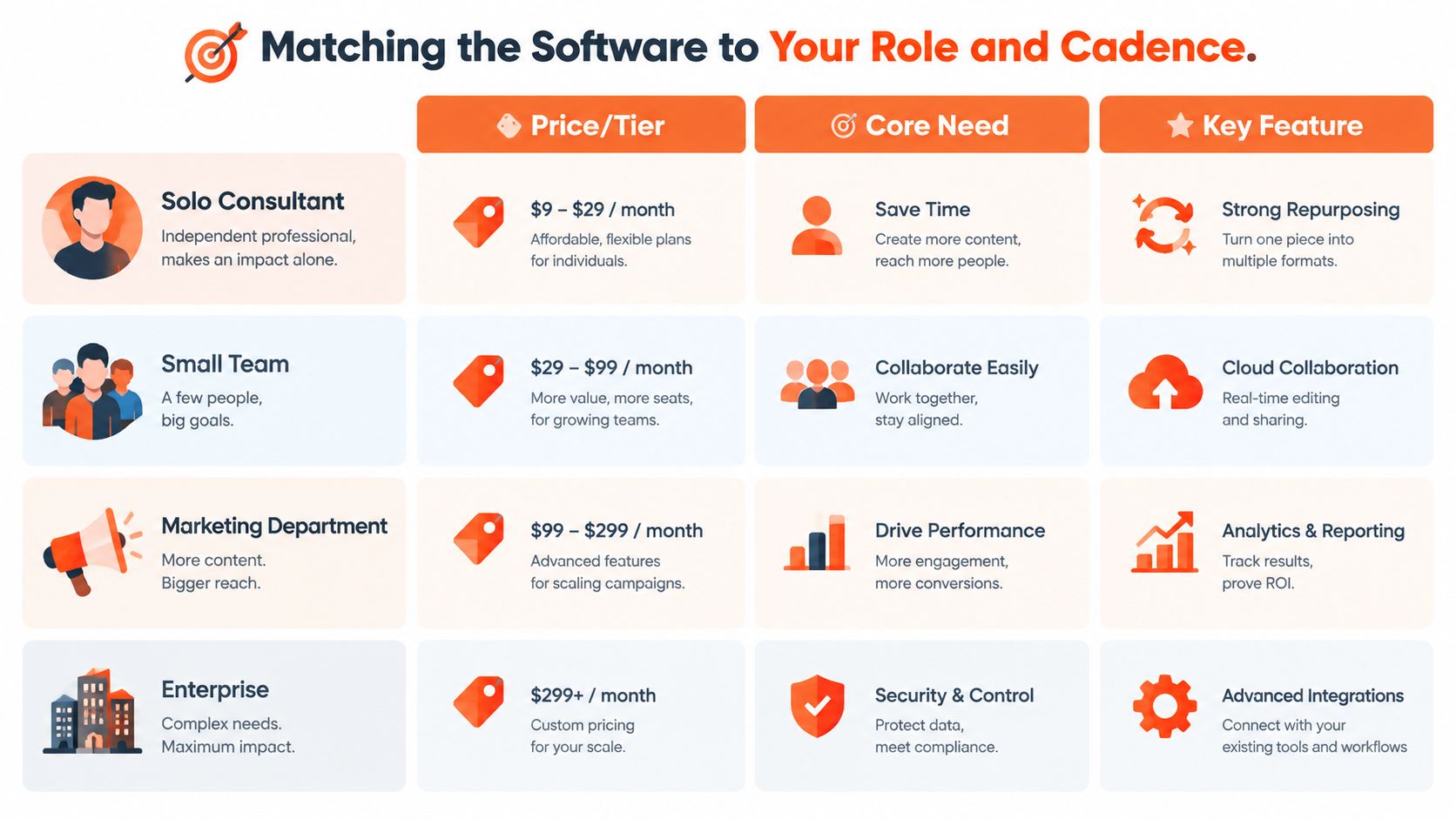
Your role determines which failure is most expensive. A consultant needs a steady presence without adding another production job. An in-house marketer needs governance. An agency needs separation between clients. A solo creator needs speed and low friction.
Solo consultants
Optimize for one idea becoming several useful touchpoints. Choose lightweight software that can turn a newsletter or article into LinkedIn posts, an email follow-up, a proposal insight, and visual snippets. Strong repurposing matters more than enterprise permissions.
Your trial test is simple. Import a real piece of expertise and check whether the resulting assets sound like you, preserve important qualifications, and require editing rather than complete rewriting.
In-house marketers
Optimize for brand-safe throughput. Your priority is a brand kit, approval routing, reusable templates, and a clear record of who changed what. AI volume matters less than keeping a campaign coherent across the calendar.
Ask whether a reviewer can approve individual assets without blocking an entire batch. Also check whether the platform fits your existing analytics and campaign workflow instead of creating another reporting island.
Solo creators
Optimize for speed to publish. A creator who works across video, captions, carousels, and community posts needs fast transformation and channel-aware formatting. An elaborate enterprise interface can slow down the person it's meant to help.
Test the time from source upload to a scheduled post. If you need to open several editors before publishing, the product isn't solving the cadence problem.
Agencies and social media managers
Optimize for client separation and repeatability. Look for multiple workspaces, role-based permissions, reusable brand kits, client review links, and reporting that can be presented without manual assembly.
Don't buy on the promise of unlimited output. Buy the system that prevents one client's assets, fonts, voice rules, or approvals from leaking into another workflow. A practical content calendar software guide can help you compare the planning layer alongside the creation layer.
A Practical Buyer's Checklist You Can Run Today
Run the evaluation with a real asset, not a polished demo file. Use a recent blog post, transcript, newsletter, or webinar recording that contains the nuance your team needs to preserve. Then score each vendor against the same tests.
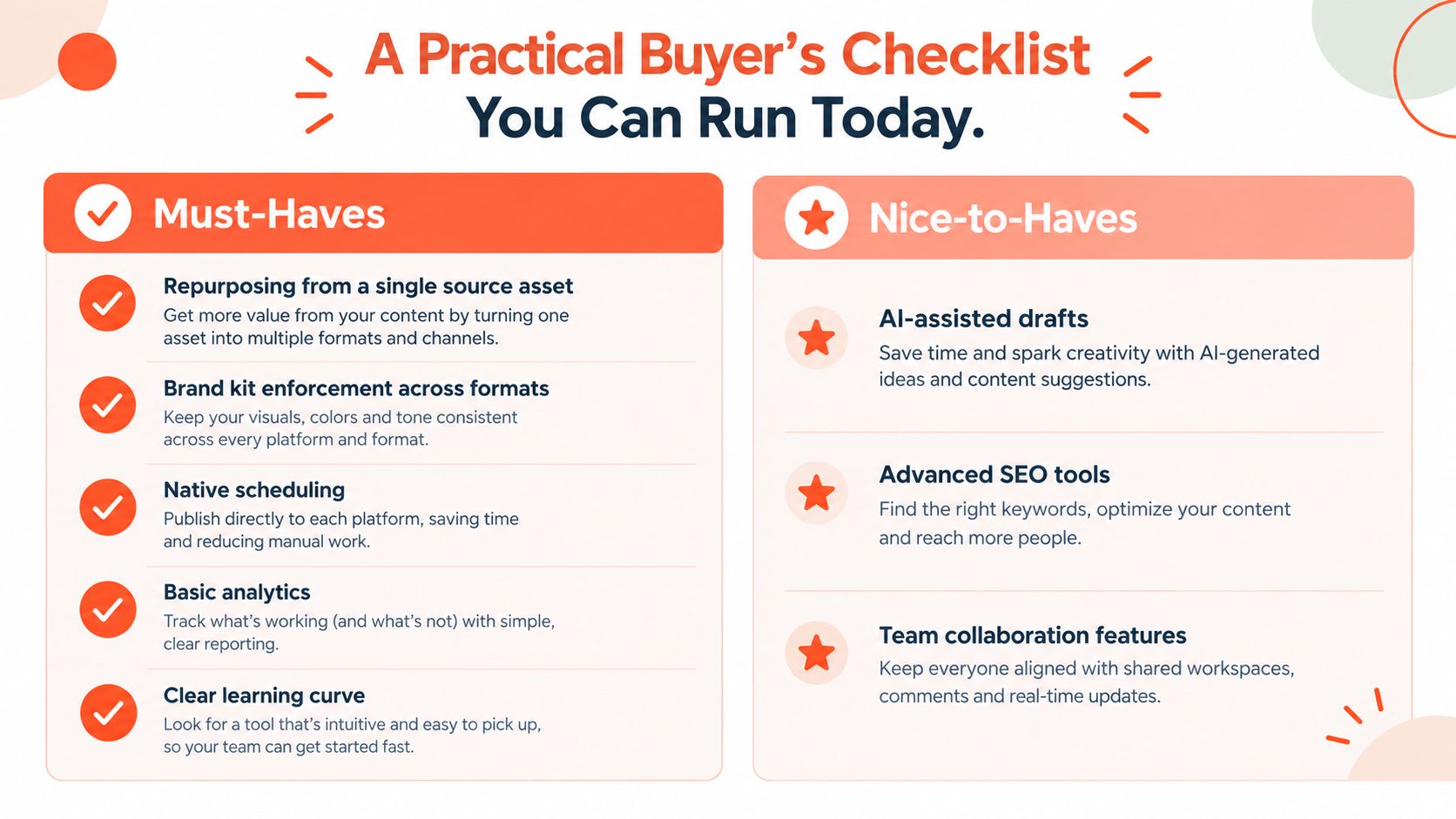
Must-haves
- Single-source repurposing: Import one source asset and request several channel-specific outputs. Check whether the tool extracts distinct ideas or repeats the same paragraph in different wrappers.
- Brand kit enforcement: Set colors, fonts, logo rules, and voice guidance. Create assets through different templates and inspect whether the controls persist.
- Native publishing: Connect the channels your team uses and prepare a real queue. Confirm that the platform adapts formatting instead of sending identical copy everywhere.
- Basic role-based access: Invite a reviewer and test permissions. The reviewer should be able to approve or request changes without gaining unnecessary administrative control.
- Transparent pricing: Identify what changes the bill, including seats, workspaces, storage, exports, or usage. If you can't explain the pricing to your finance lead, treat that as a procurement risk.
Nice-to-haves
- AI ideation: Useful when it accelerates angles and outlines, but it shouldn't outrank source fidelity or publishing controls.
- Analytics dashboards: Valuable when they connect published assets to channels and make the next editorial decision easier.
- Client portals: Important for agencies, less important for a solo operator.
- Advanced video editing: Worth paying for when editing is your bottleneck. Don't buy it to compensate for a broken distribution process.
- Project management integrations: Helpful if they reduce duplicate status updates. They're unnecessary if they merely add another notification stream.
Trial test: Turn one blog post into several platform-specific drafts, apply the brand kit, route the outputs for approval, and schedule the approved versions. Record every manual intervention.
The category is growing alongside measurable-ROI demand. Content marketing software is projected to grow from USD 11 billion in 2025 to USD 13.15 billion in 2026, at a 19.6% CAGR, according to The Business Research Company. That makes workflow proof more important than feature theater. If a platform fails two must-haves, remove it from the shortlist regardless of its headline AI features.
The Human Control Question Most Reviews Skip
More generated content doesn't automatically produce better content. The useful advantage comes from reducing repetitive production work while keeping a person accountable for meaning, tone, claims, and publication.
Adobe's global creator study found that 86% of creators already use generative AI, while 85% said the final creative decision should remain with the creator. The same study found 57% said AI outputs still need moderate or extensive editing, and 75% believed audiences can detect AI involvement, as reported in Adobe's 2025 creator survey.
Design the approval boundary
Human-in-the-loop isn't a vague promise. It means the workflow has visible control points:
- Draft approval: AI output stays in review until a named person approves it.
- Voice guardrails: The team defines tone, prohibited claims, preferred terminology, and required disclaimers.
- Version history: Reviewers can see what changed and restore an earlier version.
- Override controls: An editor can reject a suggested crop, rewrite a caption, replace an image, or remove an asset from the queue.
Unchecked automation can publish a technically polished clip with an incomplete statement. It can turn a qualified professional's advice into an absolute claim. It can also select a visually engaging excerpt that changes the speaker's intended meaning when removed from its original context.
A constrained workflow handles those risks differently. The system proposes variations, the owner checks the source, the brand reviewer confirms fit, and the platform publishes only the approved version. That process may produce fewer automatic outputs, but it creates a dependable editorial standard.
Any shortlist that can't demonstrate approval steps, version history, and override controls should be downgraded. AI is a production assistant, not the accountable editor.
Choosing the Right Stack and Your First 30 Days
Use three questions to narrow the field:
- Which channels matter to your audience?
- Who owns final approval for voice, claims, and publishing?
- Which existing tools must integrate with the new workflow?
In the first week, audit a recent campaign from source asset to post-publish review. Mark every manual transfer, repeated edit, and approval delay. In the second week, run two shortlisted platforms against the same real campaign, not a sample prompt.
During week three, compare the outputs for repurposing efficiency, brand consistency, and remaining handoffs. In week four, choose the stack, document the workflow, assign approval ownership, and create a reusable operating guide for the next campaign.
The right system isn't the one that promises the most AI output. It's the one your team can use every week to turn its own ideas into consistent, approved, multi-channel content without burning out.
WaveGen.ai turns articles, newsletters, podcast scripts, and YouTube transcripts into on-brand social content, including carousels, short videos, quote cards, and platform-specific captions, with brand kits, editing, scheduling, and publishing in one workflow. Visit WaveGen.ai to test whether it can close the distribution gap in your current content operation.
content creation software
content marketing
AI content tools
social media automation
repurposing
Turn this kind of writing into a week of social content.
Paste a blog post, newsletter, or rough draft — WaveGen turns it into publish-ready carousels, captions, and slideshows for every channel.
No credit card · First posts in 2min