August 10, 2026
18 min read
10 Smart LinkedIn Post Ideas to Grow Your Brand
Stuck staring at a blank screen? Here are 10 proven LinkedIn post ideas to boost engagement, build authority, and connect with your audience. Get examples now.
What makes a linkedin post idea work, a clever hook, or a repeatable system that gives one strong insight multiple lives across the feed? Many individuals keep posting one-off thoughts and then wonder why their content fades fast. The better approach is to build posts that can be repurposed, segmented, and measured, so each idea does more than fill a slot in your calendar.
That matters on a platform where LinkedIn's own analytics track impressions, members reached, reactions, comments, reposts, saves, sends, profile viewers, followers gained, and link clicks, and let you review performance across a 7-day to 365-day window or export to .XLSX for deeper analysis, according to LinkedIn's post analytics help. It also matters because the average LinkedIn post received around 811 impressions in 2024, up from about 696 in 2023, an increase of over 16%, based on Statista's LinkedIn impressions dataset. In a saturated B2B channel where LinkedIn is already a default distribution platform for marketing professionals, the winning post idea is the one that combines clarity, relevance, and format discipline.
If you want a faster way to collect raw prompts before you turn them into a system, start with best tools for content ideas.
Table of Contents
- 1. The Behind-the-Scenes Repurposing Process
- 2. The Honest Content Consistency Challenge
- 3. The 'One Source, Many Formats' Case Study
- 4. The Platform-Specific Strategy Breakdown
- 5. The Personal Brand Kit Showcase
- 6. The Productivity ROI & Time Audit
- 7. The Common Content Distribution Mistakes (And How to Fix Them)
- 8. The Content Repurposing System Tutorial
- 9. The Timely Algorithm & Trends Update
- 10. The Data-Backed Client Success Story
- Comparison of 10 LinkedIn Post Ideas
- Start Posting with Purpose
1. The Behind-the-Scenes Repurposing Process
A strong repurposing post works because it shows the before and after. You're not just saying you create content efficiently, you're showing the raw material, the decisions, and the final assets that came out of one idea. That gives readers a useful mental model, especially consultants, marketers, and solo creators who need consistency without endless reinvention.
A clean way to frame it is to open with the original source, a blog post, podcast, webinar, or newsletter, then walk through what it became. A podcast can become a carousel, a quote card, a short video clip, and a text post with a sharper angle. If you want to visualize that workflow, pair the post with this content repurposing process guide from WaveGen.ai and the image below.
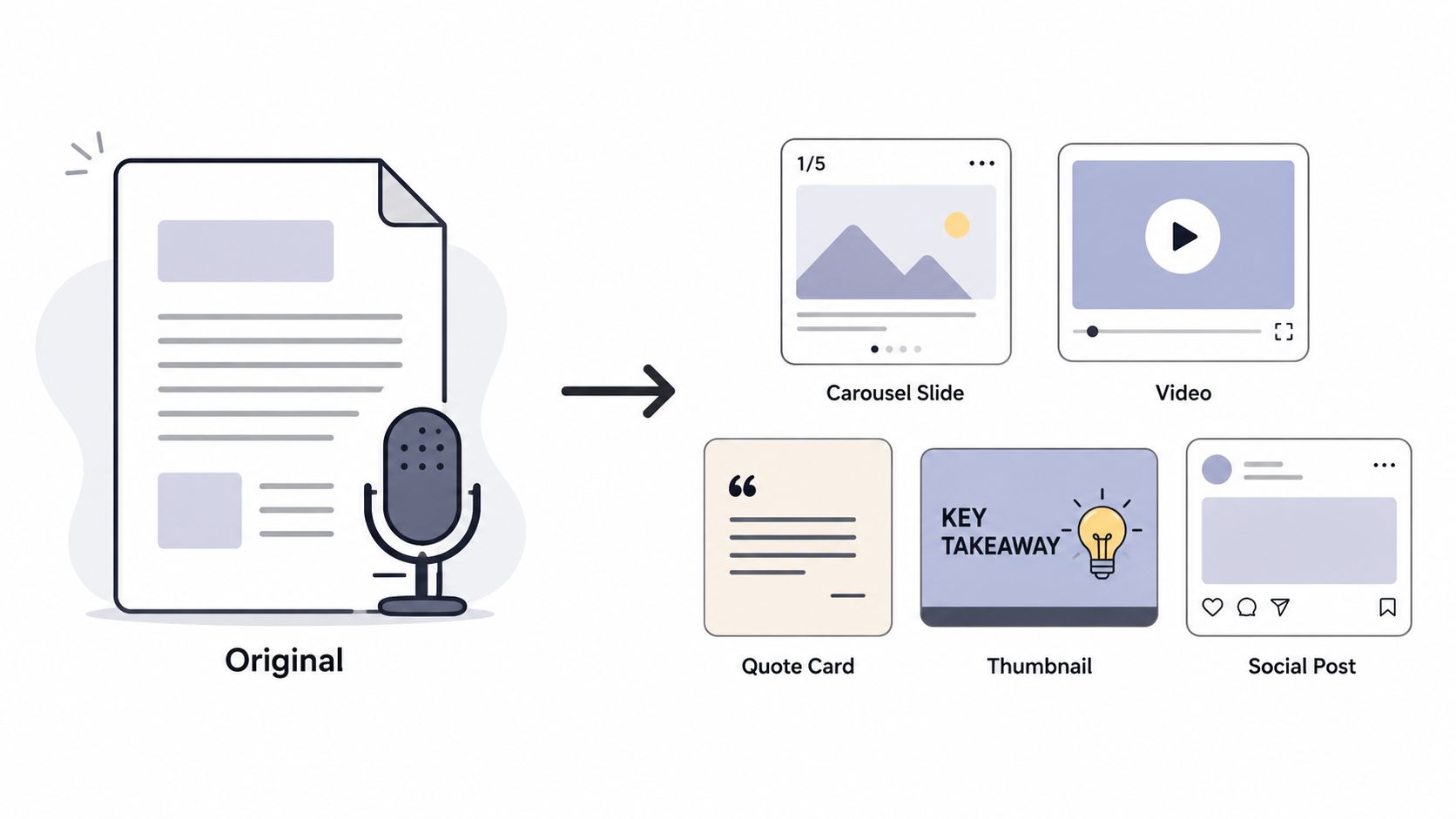
Practical rule: don't list every asset you made. Show the decision that changed the result, like turning one dense paragraph into one carousel slide and one short post hook.
A good repurposing post also proves you're thinking like a distribution operator, not just a writer. Mention what got stripped out, what got emphasized, and what got saved for later. That's the part people copy, because it's actionable.
A simple structure works well:
- Original source: name the article, episode, or talk.
- Core insight: explain the one idea that carried across formats.
- Format shift: describe how the same idea changed for LinkedIn.
- Republishing angle: show the next place the same idea could go.
This type of linkedin post idea is especially useful when you want to make your process feel tangible. It also signals that your content system is repeatable, which is far more persuasive than saying you're organized.
2. The Honest Content Consistency Challenge
People trust a creator faster when they admit that consistency is hard. Not because struggle is trendy, but because every serious publisher has felt the pressure of keeping content moving while client work, lead gen, and platform changes compete for attention. A post about that tension feels grounded, not performative.
The best version doesn't dramatize burnout. It names the primary friction, deciding what to post, deciding where to post it, and deciding what to leave out. Then it shows the fix, whether that's batching ideas, using a brand kit, or keeping a standing list of repeatable post angles.
A useful angle is to tie the struggle to audience expectations. If you post on LinkedIn, your audience often expects insight, not random updates. LinkedIn is also a high-saturation B2B distribution channel, with 93%–96% of B2B marketers using it as a primary content distribution platform and 87% of B2B marketers using LinkedIn overall, according to Brenton Way's LinkedIn marketing stats. That means your consistency problem isn't just personal, it's competitive.
You can write this post in three parts:
- What felt unsustainable: maybe you were writing everything from scratch.
- What changed: maybe you moved to a weekly content batch.
- What you learned: consistency improves when the system gets simpler.
The trade-off is honesty versus overexposure. Share enough to feel human, but keep the focus on the lesson. A post that only vents doesn't help anyone. A post that explains how you adjusted your workflow gives your audience a model they can reuse.
This is one of the most reliable linkedin post idea formats for building trust because it shows maturity. You're not pretending the work is easy. You're showing how you keep going anyway.
3. The 'One Source, Many Formats' Case Study
One strong source piece can feed a week of posts if you treat it like a content asset library. A blog post becomes a thread, a podcast becomes a quote card, a newsletter becomes a carousel, and a single concept becomes multiple entry points for different audiences. That's what makes this kind of post useful, it teaches how to maximize impact.
The strongest case-study version focuses on transformation, not volume. A creator might start with a long-form article, extract the central argument, then publish a short LinkedIn post, a slide deck, a native video summary, and a follow-up question post. The point isn't that more is always better, it's that one idea can travel farther when each format serves a different attention style.
A short H3 can help you frame the story.
What changed across formats
The original piece usually holds depth. The LinkedIn versions should hold clarity. If the source was a 1,500-word article, the carousel should not try to repeat every point. It should isolate the strongest 5 to 7 ideas and make the path obvious.
This also creates a clean repurposing loop. One long-form source becomes the authority piece. Shorter formats become the discovery layer. That's especially valuable for consultants and B2B marketers who need both trust and reach.
The best repurposing case study shows a system, not a content dump. Readers should leave with a method they can copy, not a list of everything you published.
If you use WaveGen.ai or a similar workflow to move from source content to platform-ready assets, keep the post focused on the logic of the process. People don't need your exact stack, they need the sequence: source, extract, format, publish, reuse. That sequence makes the post feel strategic instead of busy.
This linkedin post idea works because it gives readers proof that content multiplication is possible without sacrificing quality. It also invites them to look at their own archive and see assets they've already paid to create.
4. The Platform-Specific Strategy Breakdown
A lot of posts fail because they treat every platform like the same room. LinkedIn wants clarity and professional relevance. Other platforms may reward different pacing, tone, or visual density. A breakdown post shows that you understand how to adapt one message without flattening it.
The practical value is in the contrast. Take one core topic, such as lead generation, personal branding, or customer education, then show how it changes on LinkedIn versus TikTok versus Instagram. On LinkedIn, the same idea usually needs more context and a stronger point of view. On a short-form video platform, the message gets compressed. On Instagram, the visual framing does more of the work.
LinkedIn's own guidance on content angles emphasizes varied perspectives, matching format to platform, and building a content series, as outlined in LinkedIn's content angle guidance. That lines up with what works in practice. The best creators don't just reuse content, they translate it.
A useful structure is to compare:
- Tone: professional and direct on LinkedIn, faster and looser elsewhere.
- Length: fuller context on LinkedIn, tighter framing on short-form channels.
- Visuals: document-style assets on LinkedIn, lighter design on other feeds.
- CTA: discussion prompt on LinkedIn, follow or save prompt elsewhere.
The trade-off is that platform-specific rewriting takes effort. But that effort pays off because it prevents lazy cross-posting. A polished LinkedIn post idea can still underperform if it reads like it was copied from another channel without adjustment.
This post style also helps you educate clients, teammates, or stakeholders who assume distribution is mechanical. It isn't. The same message needs different packaging depending on where it appears and what the audience expects.
5. The Personal Brand Kit Showcase
A brand kit post turns something private into something practical. Instead of just showing a logo, it shows the logic behind your visual identity, your voice, and the rules that keep your content recognizable across formats. That makes it useful for agencies, consultants, and creators who want to look consistent without looking generic.
The strongest version includes a glimpse of the system, not a full design dump. Show color choices, type treatment, voice notes, and how those elements carry into carousels, quote cards, and thumbnails. A brand kit is only interesting on LinkedIn if it explains how the system supports recognition and trust.
If you want to pair it with a workflow reference, this brand kit guide from WaveGen.ai fits naturally into the post. Then use the image to make the system visible.
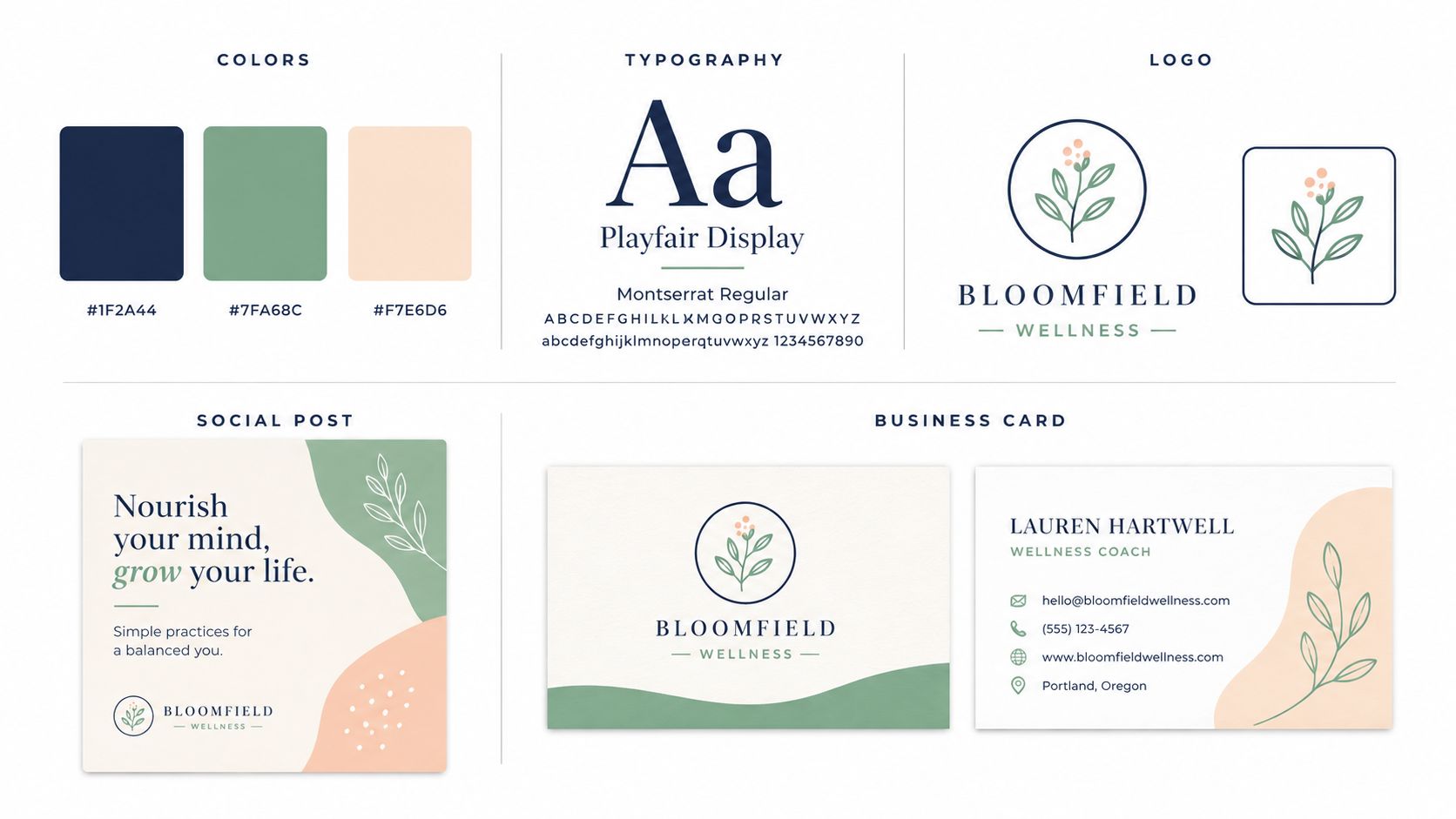
You can make this post stronger by splitting it into two layers. First, show the brand assets. Second, explain how those assets reduce decision fatigue. This is its primary business value. A clear kit saves time because nobody has to reinvent fonts, colors, or tone for every new post.
A few useful points to include:
- Voice rules: what you always sound like, and what you avoid.
- Visual rules: what stays consistent in graphics and covers.
- Usage rules: where the kit applies, from LinkedIn posts to client decks.
- Maintenance rules: what gets updated when the brand evolves.
This is a smart linkedin post idea because it does more than showcase taste. It shows operational discipline, and people notice that. A consistent brand system feels easier to trust than a feed that changes style every week.
6. The Productivity ROI & Time Audit
Time audits do well on LinkedIn because they make hidden work visible. Instead of saying you work hard, you show how much effort goes into content production and what happens when the workflow gets tighter. That creates a practical, numbers-driven story without needing to boast.
The cleanest version compares your old process to your new one. Maybe you used to draft each post separately, then you moved to batching. Maybe you used to design assets manually, then you built templates. The post doesn't need exact arithmetic if you don't have verified numbers, but it should be clear about the cost of doing things the slow way and the value of reclaiming time.
A useful angle is opportunity cost. Every hour spent reformatting the same idea is an hour not spent on client work, selling, research, or product development. That makes the post feel business-minded rather than merely efficient.
Practical rule: if you can't defend every step of your content process, you probably have a system problem, not a creativity problem.
You can structure it like this:
- Old workflow: outline, write, design, post, repeat.
- Bottleneck: the same decisions kept coming back.
- New workflow: source once, repurpose many times.
- Payoff: more consistent output with less friction.
This is also a good place to mention tools if they're part of the process. WaveGen.ai, for example, is relevant because it turns one article, newsletter, blog post, podcast script, or YouTube transcript into a week of social content. That fits the logic of a time audit better than a generic productivity claim, because it connects process to output.
A strong linkedin post idea here tells readers that efficiency is not about doing less work, it's about doing the right work once. That's a message professionals understand immediately.
7. The Common Content Distribution Mistakes (And How to Fix Them)
Mistake posts work because they lower the barrier to engagement. People recognize themselves in the errors, then stay for the fix. The key is to make the post helpful, not smug. You're not calling people out, you're showing them where distribution usually breaks.
A good structure starts with the symptom and ends with the correction. Maybe the mistake is posting the wrong format on the wrong channel. Maybe it's pushing the same caption everywhere. Maybe it's using a link-out post when a native format would hold attention better. The fix should be specific enough that a reader can adjust their own process the same day.
LinkedIn-facing content roundups often highlight story-driven posts, step-by-step guides, questions, and timely takes as strong formats, but they don't always explain when those formats should be used or how empty provocation hurts trust. That gap is useful. You can write a post that says what not to do, then explain what a better version looks like.
A few common error patterns:
- Wrong format: using a link-heavy post when a document or native post would travel better.
- Weak consistency: posting irregularly, then expecting reliable attention.
- Generic hooks: opening with language that could fit any niche.
- No audience match: writing for peers when buyers need a clearer business outcome.
The trade-off here is tone. If you get too sharp, the post turns into a rant. If you keep it too soft, it loses authority. The sweet spot is candid and useful. Readers should feel informed, not judged.
This is a strong linkedin post idea for consultants and marketers because it positions you as someone who has seen the same mistakes across many accounts. That's real expertise, and it shows up quickly in the comments.
8. The Content Repurposing System Tutorial
Tutorial posts are reliable because they give the reader a process they can try immediately. On LinkedIn, that usually means moving from broad advice to a numbered workflow. The more repeatable the method, the more useful the post becomes.
The strongest tutorial starts with one source item, then shows each repurposing step in order. For example, you can begin with a blog post, pull out the central thesis, turn the thesis into a short LinkedIn post, extract one supporting point for a carousel, and save a related anecdote for a video. That keeps the method concrete.
A short H3 makes the process easier to scan.
A simple repurposing sequence
Start with the source asset. Identify the core insight. Decide which format will carry that insight best. Then rewrite for the audience, not just the channel.
People often confuse copying with repurposing. Copying repeats the same sentence everywhere. Repurposing changes structure, length, and emphasis so the idea fits the platform. That difference is why tutorials on content systems tend to outperform vague productivity advice.
A useful tutorial also names the decision rule. For instance, if the idea is dense, use a carousel. If it's a strong opinion, use a short text post. If it has proof, use a case-study format. Those are judgment calls readers can apply without needing your exact niche.
You can finish the post with a direct takeaway:
The system beats the blank page. If you can extract one idea and assign it to three formats, you've already cut your content friction.
That line works because it's practical. It tells readers what to do next, without pretending every workflow is identical. This linkedin post idea gives you authority because it teaches process, not just opinion.
9. The Timely Algorithm & Trends Update
Timely updates work when they connect current movement to practical action. If you chase trends without interpretation, the post feels thin. If you explain what changed and what creators should do about it, the post feels grounded.
The best version is concise and useful. Mention what's getting attention now in your space, then interpret the implications for format, pacing, or content angle. For example, if native video is gaining more attention in your audience, that suggests a test worth running. If document-style posts are outperforming for your niche, that suggests you should lean into slide-based explanations.
Format matters here. In the benchmark data, carousel or document-style posts lead LinkedIn at about 6.6% to 7.0% engagement, native video sits around 5.6% to 6.0%, image posts around 4.85% to 5.3%, text-only posts around 4.0% to 4.5%, and link posts around 3.25% to 3.30%, according to Martal's LinkedIn statistics roundup. That makes the trend discussion concrete, because it points to a format choice rather than just a topic choice.
A strong trend post usually follows this sequence:
- What changed: a new behavior, pattern, or platform shift.
- Why it matters: the effect on attention, trust, or reach.
- What to try next: a format, posting angle, or test.
The trade-off is freshness versus durability. Trend posts can go stale quickly, so tie them to a broader principle. A timely update about what's working right now is more valuable when it helps readers make better content decisions next week, not just today.
This linkedin post idea is best when you want to signal that you're current without sounding reactive. It tells your audience you're watching the feed with a strategist's eye.
10. The Data-Backed Client Success Story
A client success story is one of the easiest ways to build trust because it shows proof instead of promise. The post is stronger when it explains the path to the result, not just the result itself. That gives readers both credibility and a method.
The best version starts with the client's starting point, then the strategy, then the change. If you have measurable results, use them carefully and only if they're verified. If you don't, stay qualitative and describe the process, the decision points, and the business impact in plain language.
A useful H3 can keep the story tight.
How to shape the proof
Open with the client's problem. Show the strategy you used. Then explain what changed in the workflow, the content mix, or the distribution approach.
This post type is persuasive because it helps readers see themselves in the result. A consultant can use it to show how a method works in a real account. A marketer can use it to show how a content system improved consistency. A coach can use it to show how a repeatable process supported better outcomes.
If the story comes from a repurposed content workflow, linking to a detailed breakdown like WaveGen.ai's client success stories gives readers a place to see the format in action. That works especially well when the story is tied to content production, brand consistency, or distribution efficiency.
A few things make the story more convincing:
- Specific starting point: what wasn't working before.
- Clear intervention: what changed in the process.
- Real-world context: who the work was for and why it mattered.
- Practical lesson: what the reader can borrow.
This is one of the most dependable linkedin post idea formats because it combines proof and teaching. It doesn't just say you're effective, it shows how your approach translates into results people care about.
Comparison of 10 LinkedIn Post Ideas
| Content Idea | 🔄 Implementation Complexity | ⚡ Resource Requirements & Efficiency | 📊 Expected Outcomes | 💡 Ideal Use Cases | ⭐ Key Advantages |
|---|---|---|---|---|---|
| The Behind-the-Scenes Repurposing Process | Moderate, stepwise demo of workflow | Low–Moderate resources (screen recording + editing tools); efficient reuse | Strong engagement; clear asset output and consistency | Creators demonstrating productivity and process | Visual proof of workflow; credibility; time-savings |
| The Honest Content Consistency Challenge | Low, narrative + solutions | Low resources (carousel + short video) ; quick to produce | High relatability and engagement; trust-building | Personal brands addressing burnout and consistency | Builds authenticity; encourages audience interaction |
| The "One Source, Many Formats" Case Study | High, requires asset mapping and metrics | High resources (multi-format creation + analytics) | Persuasive ROI proof; measurable reach and engagement lift | Agencies, consultants, and growth-focused creators | Data-driven credibility; strong social proof |
| The Platform-Specific Strategy Breakdown | Moderate, requires platform expertise per channel | Moderate resources (format examples, captions, visuals) | Actionable improvement per platform; better platform performance | Educators, social strategists, platform-driven campaigns | Teaches tactical differentiation; high practical value |
| The Personal Brand Kit Showcase | Moderate, compile design system and docs | Moderate resources (design files, templates, possible animation) | Increased brand recognition and perceived professionalism | Brand builders, designers, client-facing creators | Signals professionalism; ensures visual consistency |
| The Productivity ROI & Time Audit | Moderate, time tracking and calculations | Low–Moderate resources (time logs, simple charts) ; high efficiency payoff | Clear time-savings proof; compelling business rationale | B2B audiences, LinkedIn, productivity-focused posts | Tangible ROI metric; strong single-number hook |
| The Common Content Distribution Mistakes (And How to Fix Them) | Low, checklist and corrective tips | Low resources (examples and short video) | Helpful authority; reduced audience errors; shareable content | Beginners, how-to series, short-form educational content | Practical fixes; high shareability and utility |
| The Content Repurposing System Tutorial | High, full step-by-step framework | Moderate–High resources (slides, templates, recordings) | High engagement and adoption; repeatable follower results | Workshops, courses, step-by-step guides for creators | Actionable, replicable framework; high perceived value |
| The Timely Algorithm & Trends Update | Low, short research-driven update | Low resources; fast to produce and publish | Short-term engagement spikes; positions you as current | Stories, Shorts, trend-aware audiences, news alerts | Shows currency and relevance; drives immediacy |
| The Data-Backed Client Success Story | Moderate, collect permissions and metrics | Moderate resources (case materials, visuals, testimonials) | Strong social proof; higher conversions and trust | Sales enablement, client acquisition, trust-building posts | Persuasive social proof; measurable credibility |
Start Posting with Purpose
Now you've got 10 proven linkedin post ideas that go beyond surface-level updates. The advantage isn't posting more, it's posting with a repeatable structure that makes each idea easier to write, easier to repurpose, and easier to measure. That's where many fall short, they keep hunting for inspiration instead of building a system.
Choose one or two formats that match your goals, then use them consistently enough to learn what your audience responds to. If you need a simple way to turn one source piece into multiple LinkedIn assets, WaveGen.ai is one option that fits this workflow. It's designed to help you repurpose articles, newsletters, blog posts, podcasts, or transcripts into on-brand social content, so your posting rhythm doesn't depend on starting from scratch every week.
The strongest LinkedIn presence usually comes from creators who treat content like an operating system, not a mood. Pick one idea, publish it well, review what happened, and reuse the pattern.
WaveGen.ai helps you turn one article, newsletter, blog post, podcast script, or YouTube transcript into a week of LinkedIn-ready content. If you want a practical way to repurpose your own ideas into carousels, captions, and short posts, visit WaveGen.ai and see how the workflow fits your content system.
linkedin post idea
linkedin marketing
content strategy
social media ideas
personal branding
Turn this kind of writing into a week of social content.
Paste a blog post, newsletter, or rough draft — WaveGen turns it into publish-ready carousels, captions, and slideshows for every channel.
No credit card · First posts in 2min