June 19, 2026
14 min read
How to Create Social Media Content: Your 2026 Guide
Learn how to create social media content that builds your brand. Get a step-by-step workflow for repurposing & automating distribution.
You're probably not short on ideas. You're short on a workflow.
Individuals who ask how to create social media content often find themselves in the same loop. They publish one decent post, disappear for a few days, then come back to a blank calendar and start from zero again. That's not a creativity problem. It's a production problem.
The fix is to stop treating every post as a separate assignment. A better system starts with one strong source asset, then turns that single idea into a week of platform-specific content. That shift matters because social isn't a niche channel anymore. As of 2026, social media use has surpassed 5.41 billion people globally, representing more than 65% of the world's population, and people use an average of 6.6 different social networks each month, according to RafflePress social media marketing statistics. Your audience doesn't see your brand in one place. They see fragments of it across several feeds.
That's why consistency beats spontaneity. Not generic consistency. On-brand, repeated, adapted consistency.
Table of Contents
- Beyond the Daily Content Treadmill
- Define Your Content Pillars and Core Asset
- Mine Your Source Asset for High-Impact Angles
- Build and Batch Your Multi-Format Social Assets
- Systemize Your Distribution with Scheduling and Automation
- Analyze, Troubleshoot, and Refine Your Content Engine
Beyond the Daily Content Treadmill
The daily-post mindset burns people out because it forces constant invention. You wake up asking, “What should I post today?” That question sounds harmless, but it wrecks quality fast. It pushes you toward recycled tips, weak hooks, and last-minute design.
A more durable approach starts with a single substantive piece of content. That could be a blog post, a newsletter edition, a webinar transcript, a podcast outline, or a client memo with a strong opinion inside it. From there, you break it into smaller assets that fit different platforms and attention spans.
Practical rule: Don't create seven ideas for seven days. Create one idea that can survive seven different expressions.
The audience is large, but attention is scattered. People switch between platforms, scan quickly, and rarely reward posts that feel copied and pasted. If you're building a repeatable system, your job isn't to be everywhere with the same asset. Your job is to be recognizable everywhere with the right version of the asset.
Here's the shift that usually enables the process:
- Start with a core belief. What do you think that your audience needs to hear?
- Build around a source asset. Pick one piece with enough depth to repurpose.
- Adapt by platform. Change framing, format, and packaging instead of reposting identical copy.
If short-form video is part of your mix, a useful reference is this BlitzReels video guide, especially for thinking about how one idea changes when it has to earn attention quickly on mobile.
A good content engine doesn't ask for more hustle. It asks for better inputs, cleaner decisions, and a workflow you can repeat next week without dread.
Define Your Content Pillars and Core Asset
Most weak social content starts before the writing does. It starts when a brand tries to talk about too many things at once.
If you want people to remember you, narrow the field. The simplest way is to define 3 to 5 content pillars. These are the topics you'll return to repeatedly until the audience associates them with your name, company, or expertise.
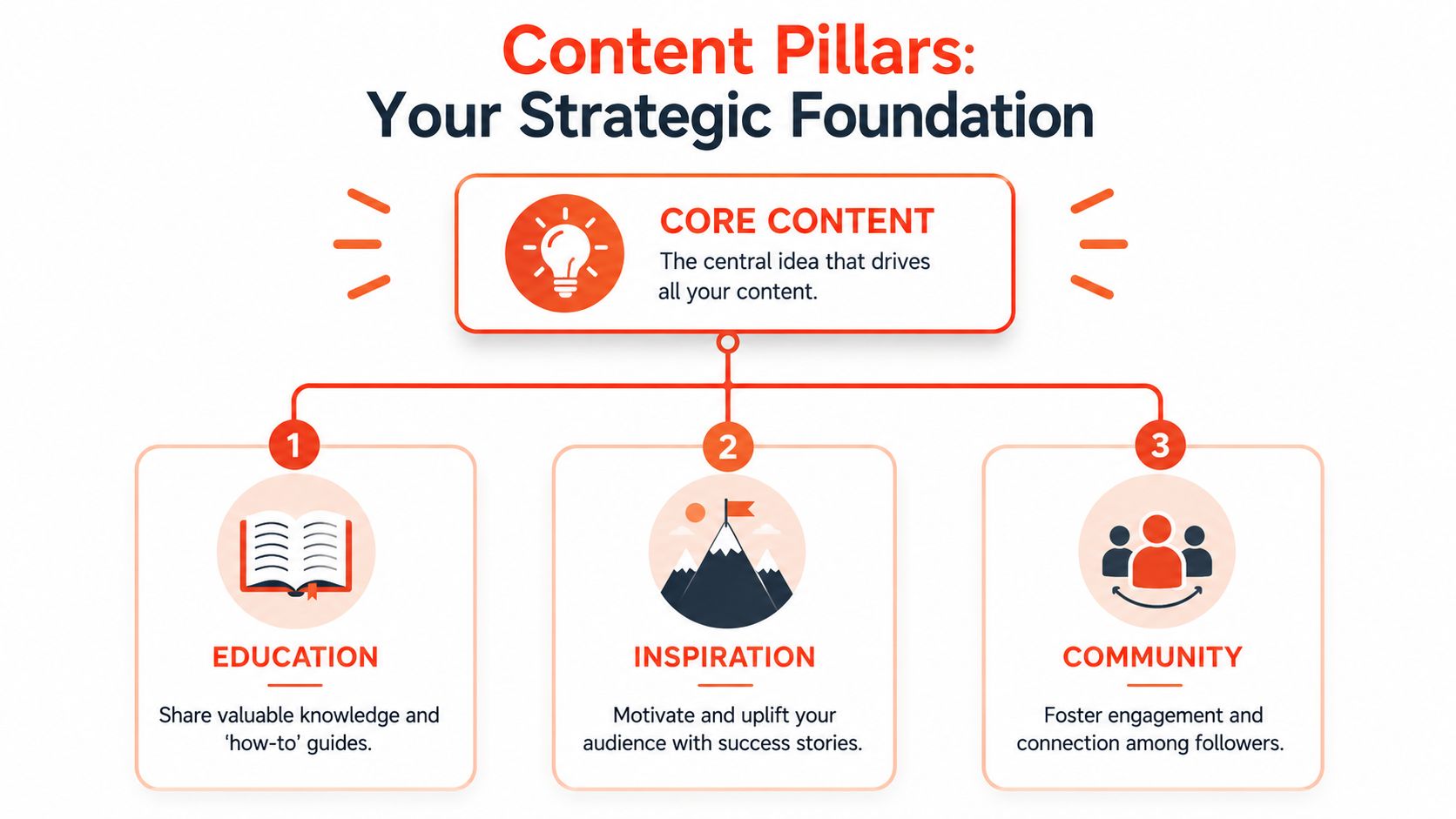
Choose pillars your audience will remember
Strong pillars sit at the intersection of what you know well and what your audience keeps struggling with. They aren't random categories like “marketing,” “business,” and “mindset.” They're specific enough to guide creation.
A consultant might use:
- Client education about common mistakes
- Decision-making frameworks for buyers
- Behind-the-scenes process showing how work gets done
- Industry commentary with a clear viewpoint
A coach might use:
- Practical how-to advice
- Belief shifts that challenge stale assumptions
- Client pattern recognition
- Common objections answered directly
Benchmark guidance also supports this planning-first approach. A strong workflow starts with objectives, audience pain points, and platform constraints. It also notes that captions around 138 to 150 characters often perform best for clicks, which is a useful reminder from PlayPlay's social media content creation guide that clarity usually beats over-explaining.
Pillars should reduce decisions, not create more of them. If a post doesn't fit a pillar, it usually doesn't belong on the calendar.
Pick a source asset with enough material inside it
Once the pillars are set, choose a core asset. This is the long-form piece you'll mine for a week of posts.
The best source assets usually contain several of these elements:
A strong claim
Example: “Most brands don't need more content. They need better repurposing.”A repeatable process
Example: a step-by-step client framework, onboarding checklist, or review method.Memorable phrasing
Look for lines that could stand alone as a hook, quote card, or opening slide.Useful proof points
That can include examples, observations from client work, or verified data you already have permission to cite.Natural objections
If the source asset triggers a likely disagreement, you already have material for follow-up posts.
A bad source asset is vague, broad, and purely informational. A good one has tension inside it. It says something specific. It solves a defined problem. It contains language worth reusing.
A quick test helps here:
| Question | Good source asset | Weak source asset |
|---|---|---|
| Does it make a clear point? | Yes, one argument stands out | No, it rambles |
| Can it produce several post types? | Yes, quote, carousel, clip, caption | Barely one post |
| Does it fit a pillar? | Cleanly | Only loosely |
| Would the audience care? | It answers a pressing problem | It fills space |
If you can't extract at least a handful of distinct angles from the source piece, don't repurpose it yet. Strengthen the asset first.
Mine Your Source Asset for High-Impact Angles
Repurposing breaks down when people confuse extraction with copying. Pulling a sentence out of a blog post and pasting it into LinkedIn isn't a strategy. It's a shortcut, and audiences can tell.
The better move is to mine the source asset for angles. An angle is the lens that makes the idea memorable. That's often the missing piece in advice about how to create social media content. As noted in this piece on remarkable content angles, a content angle should be something others can disagree with, but not contrarian for its own sake. That's the difference between forgettable educational content and a post people remember.
Turn one takeaway into three different posts
Take a simple core takeaway: “Posting daily is less effective than building a reusable content system.”
That can become three very different assets.
A carousel might open with a tension-based first slide:
- Stop trying to invent a new post every day
- Your workflow is the problem
- Start with one source asset
- Turn it into a week of content
- Adapt by platform
- Review what worked
- Repeat
A short video would need a sharper spoken hook: “Many individuals don't have a content problem. They have a repurposing problem. If your week starts with a blank calendar, you're rebuilding the system every single time.”
A text post for LinkedIn could lean more opinionated: “Daily posting sounds disciplined. In practice, it often produces thin ideas, rushed creative, and inconsistent messaging. A better system starts with one substantive piece and extracts several platform-native posts from it.”
Same idea. Different packaging.
If you need additional prompts once you've extracted the main takeaway, this roundup of social media content ideas is useful for pressure-testing whether your angle can branch into multiple post types without drifting off-brand.
Look for tension, not just information
When you review a source asset, don't only look for facts. Look for friction.
Here's what I scan for when I'm breaking down a long-form piece:
Claims people might challenge
Those make strong text posts and talking-head scripts.Process steps
These naturally become carousels, checklists, and educational captions.Common mistakes
Good for “stop doing this” posts that interrupt feed scrolling.Before-and-after thinking
Useful when you want to show a shift in approach, not just a task list.Lines with personality
If the sentence sounds like something only your brand would say, save it.
The strongest social post usually isn't the most complete idea. It's the sharpest slice of a complete idea.
A lot of source material contains enough for five to ten posts. People miss that because they're reading for completeness. You should read for extraction.
Build and Batch Your Multi-Format Social Assets
The least sustainable way to run social is to design, write, edit, and publish in the same sitting. That workflow feels productive because you're always busy. It's also why consistency collapses the moment client work, meetings, or travel pile up.
The practical fix is batching. Write several hooks at once. Draft all captions in one pass. Design all quote cards and carousels in one block. Record short videos back-to-back while the framing, lighting, and talking points are already set.
That approach fits how content teams work now. In a 2026 marketing survey, 83% of marketers said publishing higher-quality content less frequently is more effective, and 85% reported using AI tools for content creation, according to Salesgenie's content marketing statistics. That doesn't mean quality happens automatically. It means more teams are building workflows around repurposing, editing, and format optimization instead of creating every post from scratch.
Batching fixes the real bottleneck
The bottleneck usually isn't ideation. It's switching cost.
Every time you jump from writing a caption to choosing a template to trimming a clip to finding hashtags, you lose time and voice consistency. Batching removes that churn.
A clean weekly production session often looks like this:
- Review the source asset and highlight the best hooks, claims, and steps.
- Write all platform-specific copy in one document.
- Design visuals together using one brand kit, one set of fonts, and a limited template set.
- Record video variations in one session if you're using face-to-camera or voiceover.
- Export assets into a publish-ready folder by platform.
For teams that want software support, tools vary by need. Canva helps with templates. CapCut helps with editing. Buffer and Hootsuite help with scheduling. AI content creation tools can also support conversion from a source asset into captions, slides, and short-form variations. One example is WaveGen.ai, which turns a blog post, newsletter, article, or transcript into brand-aligned social assets and keeps formatting tied to a saved brand kit.
Use one idea in several native formats
You don't need more ideas. You need more output from the same idea.
Here's a simple example from one source paragraph about client trust:
| Format | Best use | Adaptation |
|---|---|---|
| Carousel | Teach a process | Break the point into slides with one idea each |
| Quote card | Reinforce a belief | Pull the sharpest sentence and pair it with branded design |
| Short video | Add tone and emphasis | Script a hook, one argument, one takeaway |
| LinkedIn text post | Start conversation | Lead with an opinion and end with a question |
| Reel with B-roll | Stay visible with low lift | Use text overlay, voiceover, and simple supporting visuals |
A short demo makes the batching mindset easier to visualize:
The mistake to avoid is posting the exact same creative everywhere. Keep the argument. Change the expression. That's how you stay efficient without looking automated.
Systemize Your Distribution with Scheduling and Automation
A content batch sitting in a folder doesn't solve much. Distribution is where many solid creation systems fail.
The common pattern looks like this. A team writes and designs several posts, then delays scheduling because captions aren't finalized, hashtags aren't organized, approvals are still floating around, and nobody knows which version belongs on which platform. The work gets done, but the publishing stays manual and inconsistent.
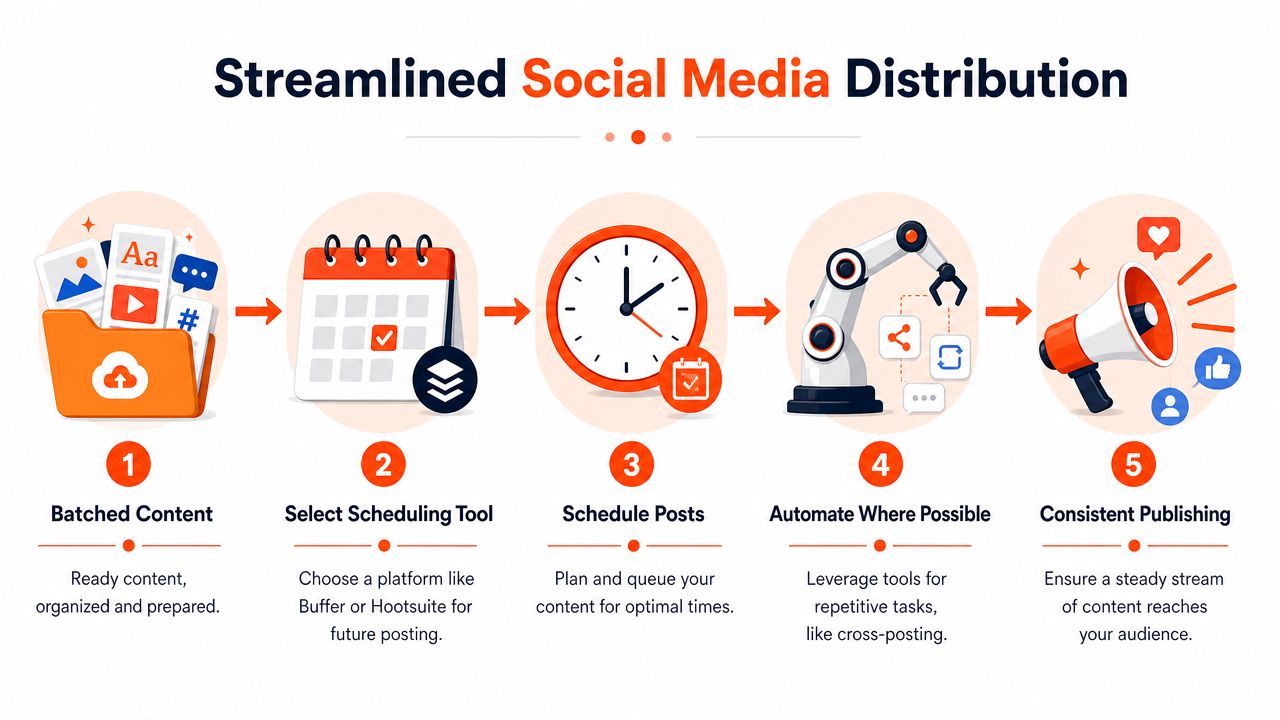
Where most distribution systems break
The first failure point is undefined ownership. If no one owns the final queue, scheduling gets pushed to the end of the week and often slips.
The second is format drift. A post written for LinkedIn gets reused on Instagram without adjusting the caption, visual proportions, or CTA. That usually leads to content that feels slightly off everywhere.
The third is manual repetition. People rebuild the same scheduling setup every week. They retype hashtags, paste standard CTAs, search for links, and rename files again and again.
For busy professionals, especially those who don't want to be on camera all the time, low-lift formats matter here. Converting long-form material into B-roll reels, quote cards, and carousels is a practical way to maintain trust and topic authority consistently, as discussed in this faceless content workflow video.
If distribution feels chaotic, the problem usually started upstream. Publishing exposes workflow weaknesses that creation can hide.
A simple diagnostic for busy teams
If your system keeps breaking, run this quick audit:
Check the handoff
Can someone move from draft to scheduled post without asking three people for missing files?Check the asset naming
If posts live in folders called “final,” “final final,” and “new version,” the issue isn't creativity.Check the caption library
Reusable CTA patterns, hashtag groups, and brand-safe language should be stored once, not recreated weekly.Check the calendar view
You should be able to see cadence, format mix, and platform spread in one place. Tools in the content calendar software category are useful here because they make gaps obvious before a week slips by.Check the automation triggers
If you publish a newsletter, blog, or Substack regularly, connect that publishing habit to your repurposing process. Teams building that kind of pipeline can learn a lot from approaches that grow your Substack audience faster by tying content distribution to repeatable automation rather than manual promotion.
A simple publishing stack is often sufficient:
- Calendar tool for visibility
- Scheduler for queueing posts
- Template system for on-brand visuals
- Asset library for captions, hashtags, and links
- Automation layer for recurring source inputs
You don't need a complex setup. You need one that removes repeated decisions.
Analyze, Troubleshoot, and Refine Your Content Engine
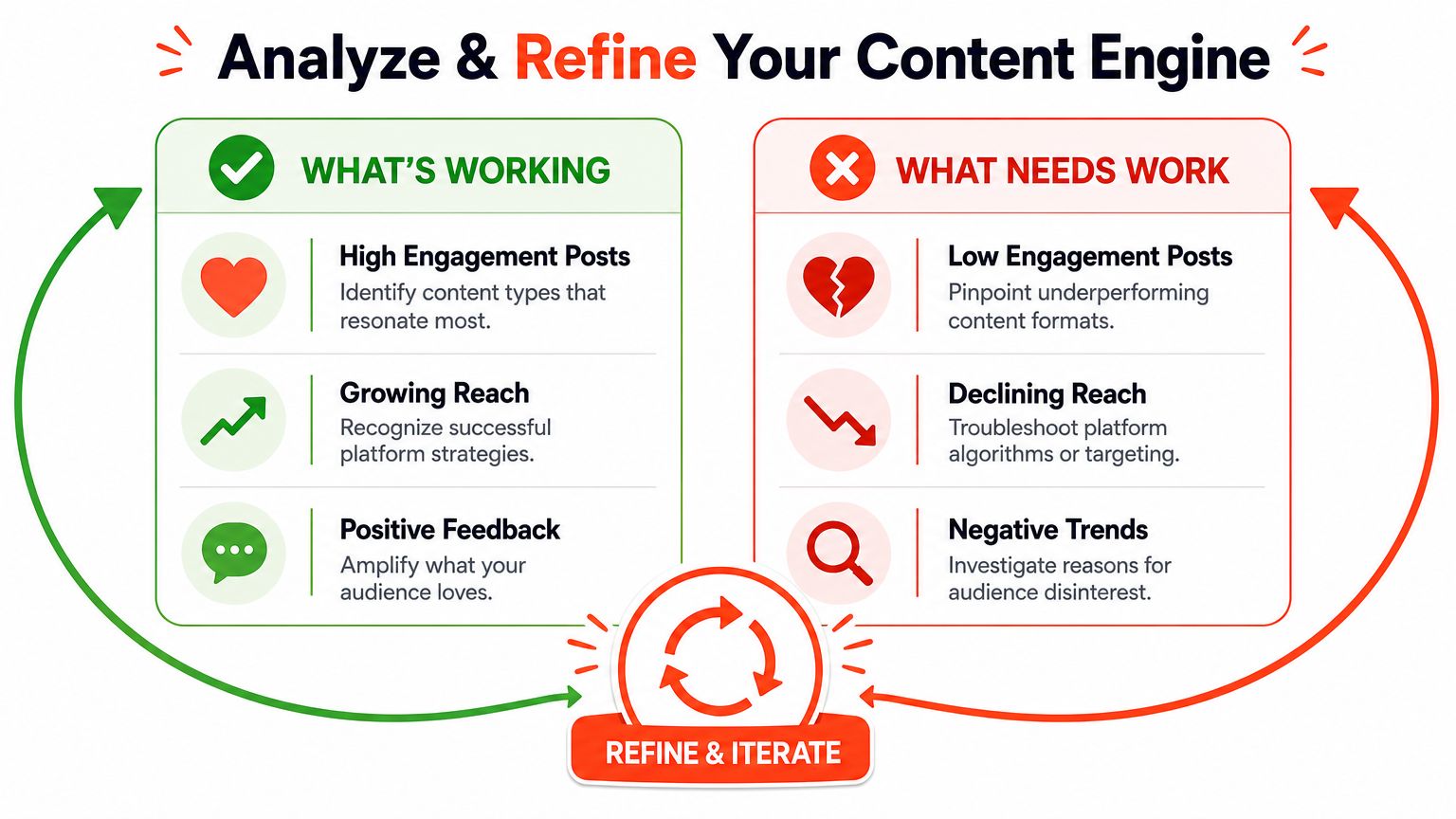
A repurposing workflow only becomes a real engine when it improves after each cycle. Publishing isn't the finish line. It's the point where you collect evidence for the next batch.
That's why the strongest optimization habit isn't posting more. It's testing and adjusting. Sprinklr's guidance on social media content creation recommends A/B testing post formats, caption styles, and posting times, then using analytics on engagement and impressions to refine what comes next. That feedback loop matters more than trying to outwork the calendar.
Measure what changes the next batch
Teams often either over-measure or under-measure. They either drown in dashboards or rely on vibes.
Use a narrower review set. Focus on signals that help you make the next content decision:
- Engagement quality
Comments, saves, shares, and thoughtful replies usually tell you more than passive likes. - Hook strength
If people stop early or ignore a post, the opening likely missed. - Format fit
Some ideas work better as carousels than video. Others need a text-first treatment. - Conversion intent
Which posts lead to profile visits, replies, clicks, or direct conversations?
A useful review question is simple: What exactly should we do more of, less of, or differently next week?
Good analytics don't just report performance. They shorten the distance between a weak post and a better one.
Fix the common problems without rebuilding everything
Most breakdowns in social production fall into a few familiar buckets.
| Problem | Likely cause | Fix |
|---|---|---|
| Posts feel repetitive | You're changing format, not angle | Return to the source asset and extract a sharper point of view |
| Engagement is flat | Hooks are too generic | Lead with tension, a claim, or a specific mistake |
| Content takes too long | You're still producing one by one | Batch by task, not by day |
| Brand voice feels uneven | Too many templates and writing styles | Limit formats and define tone rules |
| Distribution slips | Scheduling happens last | Treat publishing as part of production, not an afterthought |
If posts feel stale, don't assume you need a brand-new topic. Often you just need a stronger stance. Educational content becomes more memorable when it says what to stop doing, what to believe instead, and why that change matters.
If engagement is low, test one variable at a time. Change the hook but keep the body. Change the format but keep the message. Change the CTA but keep the creative. When you change everything at once, you learn nothing.
If the process still feels heavy, reduce the number of formats. A simple mix often works better than an ambitious one. For many professionals, one weekly source asset plus a small set of repeatable outputs is enough:
- One carousel
- One text post
- One quote graphic
- One short video or B-roll reel
- One repost or reframed version for another platform
That's a manageable engine. It gives you repetition without sameness.
The ultimate win isn't filling a content calendar. It's building a system that keeps your message consistent while giving you enough variation to stay useful, recognizable, and publishable week after week.
If you already have long-form content but don't want to manually turn it into carousels, captions, videos, and branded social posts every week, WaveGen.ai is built for that workflow. It takes a source asset like a blog post, newsletter, transcript, or article and converts it into platform-specific social content with brand kits, editing, and scheduling in one system.
how to create social media content
content creation workflow
social media strategy
content repurposing
automation best practices
Turn this kind of writing into a week of social content.
Paste a blog post, newsletter, or rough draft — WaveGen turns it into publish-ready carousels, captions, and slideshows for every channel.
No credit card · First posts in 2min