August 20, 2026
14 min read
AI Caption Generator: How to Scale On-Brand Social Content
Master your AI caption generator workflow with prompt formulas, brand-voice setup, platform formatting, and quality checks that keep content authentic at scale.
Most advice about an AI caption generator starts with the wrong promise: generate more captions, publish faster, and let volume solve the social media problem. That approach can produce plenty of copy, but it also produces plenty of captions that sound interchangeable. The practical challenge isn't getting an algorithm to assemble polished sentences. It's giving that algorithm enough brand context, platform context, and editorial friction to stop generic language before it reaches the feed.
I've tested caption tools across different account types, and the pattern is consistent. AI saves time on first drafts, variations, repurposing, and formatting. It still needs a human eye for claims, cultural context, product nuance, and the small expressions that make a brand recognizable. The teams that get durable value treat caption generation as a controlled publishing workflow, not a slot machine for random copy.
Table of Contents
- Why Most AI Caption Workflows Produce Generic Output
- Setting Up Brand Voice and Prompt Formulas
- Platform-Specific Formatting for Maximum Engagement
- Quality Checks That Catch AI Caption Failures
- Building a Scalable Caption Production Workflow
- Tracking Performance and Iterating on What Works
Why Most AI Caption Workflows Produce Generic Output
The popular workflow is simple: paste in a topic, ask for several options, choose the least awkward version, and schedule it. That process feels efficient because the first draft arrives quickly. It fails because the model has been asked to make creative decisions without being given the information that makes those decisions distinctive.
An AI caption generator doesn't know that one client avoids hype, another uses dry humor, and a third needs every claim checked against regulated product language. Without those rules, it reaches for familiar marketing patterns: “level up,” “game changer,” “you won't want to miss this,” and broad invitations to “join the conversation.” The grammar may be clean, but the identity is missing.
Market demand shows that caption generation has moved beyond experimentation. A recent estimate valued the AI-generated influencer caption segment at $1.95 billion in 2025 and projected $2.46 billion in 2026, representing a projected 26.2% year-over-year growth rate in that report's forecast (Research and Markets market estimate). More spending on the category doesn't automatically mean better captions. It means more teams need a way to control quality while using these systems repeatedly.
Practical rule: If your prompt could be handed to five competing brands and still make sense, it isn't a brand prompt.
Why templates alone break at scale
A template can standardize structure, but it can't supply positioning. “Write a hook, explain the benefit, add a CTA” tells the model how to arrange the caption. It doesn't tell the model which benefit matters most, what the audience already believes, or what the brand would never say.
The problem gets worse when an agency manages multiple clients. A general prompt library may encourage consistency inside the workflow while flattening the differences between accounts. Every caption begins to share the same rhythm, punctuation, emotional register, and call to action.
Configuration beats endless regeneration
Regenerating ten versions of a weakly specified caption rarely fixes the underlying issue. The model keeps sampling from the same broad language pool. A better process defines the brand's vocabulary, tone boundaries, approved claims, audience assumptions, and platform behavior before generation begins.
That configuration layer also supports broader content operations. Teams producing captions alongside graphics, carousels, and other social assets may benefit from reviewing Bulk Image Generation software as part of a broader system for coordinating visual and written production. The principle is the same: scale the repeatable work, but keep the brand rules visible and enforceable.
Setting Up Brand Voice and Prompt Formulas
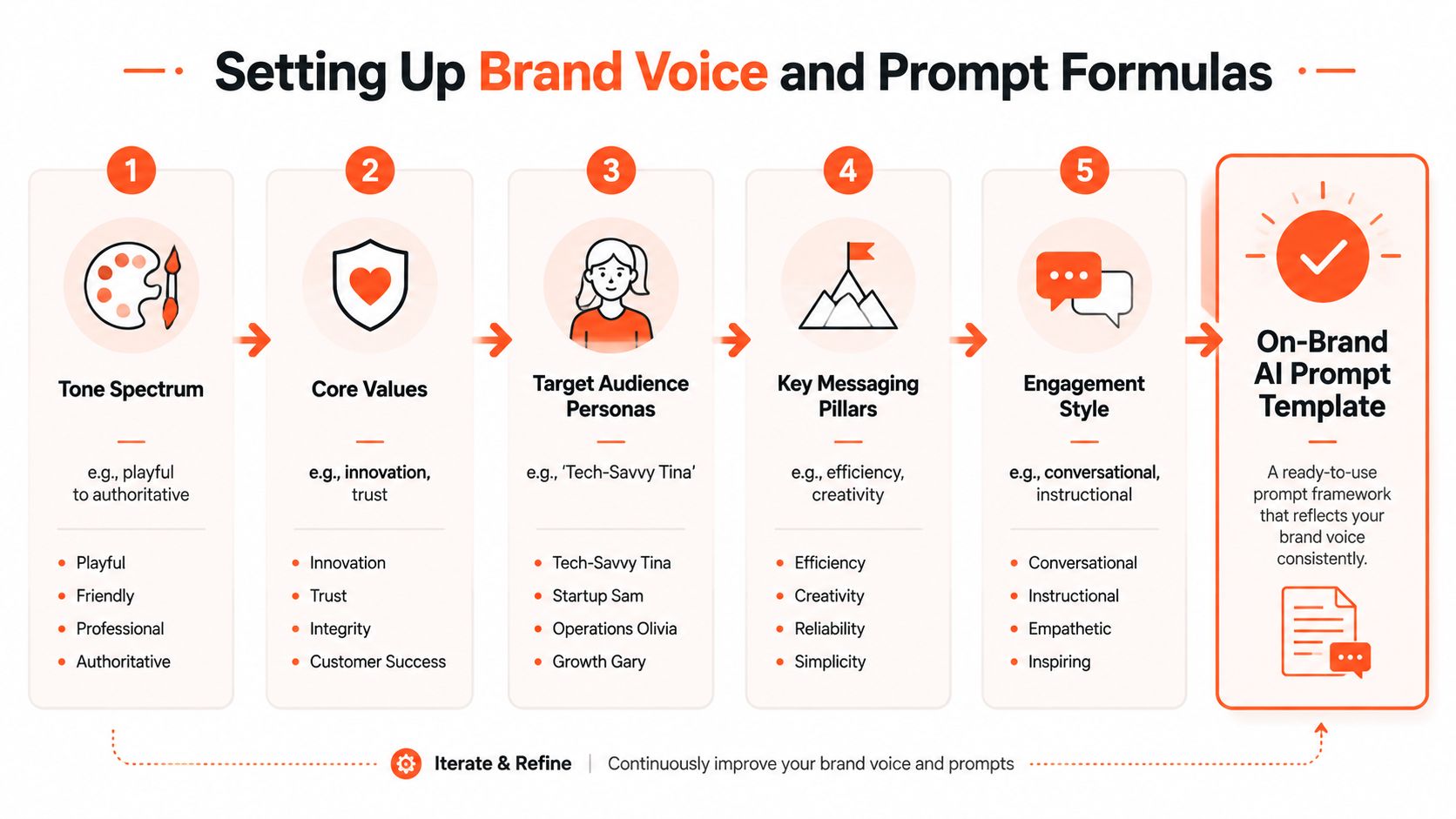
Start with a brand-voice profile that a new social manager could use without guessing. I usually document five dimensions, then turn that document into reusable prompt components.
Tone spectrum: Define the acceptable range, such as authoritative but warm, playful but not sarcastic, or direct but never aggressive. A spectrum works better than a single adjective because it tells the model where the boundaries sit.
Vocabulary constraints: List preferred terms, product names, spelling conventions, and banned phrases. Include words that sound harmless but have become overused in your category. If the brand says “members” rather than “customers,” state that explicitly.
Sentence rhythm: Describe whether captions should use short, punchy lines, conversational paragraphs, or a measured educational cadence. Add a rule for sentence openings if the account has a recognizable pattern.
Emoji policy: Specify whether emojis are prohibited, limited to certain contexts, or reserved for CTAs. A caption can be on-brand in wording and still feel wrong because the symbols are too loud.
CTA style: Clarify whether the account asks for a reply, save, click, share, consultation, or quiet consideration. The CTA should match the post's intent, not appear as a generic closing line.
The guidance in Flexwork Podcast Studios brand voice tips can help teams think about voice as a documented system rather than a vague creative instinct. For a more formal reference, keep your rules alongside voice and tone guidelines so writers, reviewers, and AI tools work from the same source.
Use a four-layer prompt
A reliable prompt separates the information the model needs instead of compressing everything into one vague instruction.
- Context injection: Give the model the subject, audience, offer, post objective, visual details, and approved facts. State what the audience should understand after reading.
- Voice directives: Paste the relevant voice rules, including tone boundaries, vocabulary, rhythm, emoji policy, and examples of acceptable phrasing.
- Structural requirements: Define the hook, body, CTA, line-break behavior, hashtag treatment, and requested number of variations.
- Negative constraints: Say what to avoid, such as unsupported statistics, exaggerated promises, empty superlatives, clichés, invented testimonials, or references to features not listed in the source brief.
A weak request might say:
“Write an Instagram caption about our new product.”
A layered request would say:
“Write three Instagram captions for a new appointment-booking feature. The audience is independent consultants who lose leads when they reply late. Use a calm, practical tone with short conversational sentences. Explain the time-saving workflow without claiming guaranteed results. Open with a specific problem, include one concrete product benefit, end with a question that invites relevant replies, and avoid ‘game changer,’ ‘revolutionize,’ and generic motivational language.”
The second prompt gives the model a decision framework. It also makes review faster because the reviewer can compare the output against explicit rules instead of debating whether it “feels right.”
Store prompts like operating assets
Save each prompt by client, campaign type, platform, version, and approval status. Keep a small example bank with approved captions and rejected captions, including the reason for rejection. Versioning matters because a voice profile changes as a brand learns what its audience responds to, and untracked edits quickly create conflicting instructions.
Platform-Specific Formatting for Maximum Engagement
A caption that works on Instagram may look awkward on LinkedIn, while a TikTok description and a YouTube description serve different discovery jobs. The source idea can stay the same, but the opening, pacing, keyword placement, and CTA need to change.
Consider a product launch for a scheduling feature. The source message is: “Our new feature helps consultants organize booking requests and follow-ups in one place.” A platform-aware AI caption generator should transform that message rather than paste it everywhere.
| Platform | Ideal Length | Hook Style | Formatting Rules | Key Algorithm Signal |
|---|---|---|---|---|
| Keep the opening concise, then expand where useful | Lead with a problem, tension, or specific benefit | Use line breaks for scanning, keep the CTA distinct, place hashtags deliberately | Meaningful interactions, retention, and content relevance | |
| TikTok | Keep the copy tight and searchable | Use a direct phrase that names the topic or audience problem | Include natural keywords, avoid padded explanation, support the video's premise | Topic classification, viewer behavior, and interaction quality |
| Longer narrative captions can suit professional topics | Start with an observation, lesson, or business problem | Use short paragraphs, clear professional framing, and a genuine question | Conversation quality, relevance, and dwell behavior | |
| YouTube | Put the searchable context first | State what the video helps viewers learn or decide | Organize the description, chapters, and links in a clear hierarchy | Search relevance, viewer satisfaction, and session behavior |
One message, four executions
Booking requests shouldn't live in five different places.
Our new scheduling feature brings requests and follow-ups into one workflow, so independent consultants can spend less time searching for the next action.
What part of your booking process still feels manual?
TikTok
Consultant booking workflow, without the scattered follow-ups. See how the new scheduling feature keeps requests in one place.
A missed follow-up rarely looks dramatic when it happens. It's usually one request buried in an inbox, one reminder left in a notebook, or one task without an owner.
We built a scheduling feature that brings booking requests and follow-ups into one workflow for independent consultants. The useful part isn't another dashboard. It's having a clearer next action.
Which part of your client intake process creates the most friction?
YouTube
How consultants can organize booking requests and follow-ups in one workflow. This walkthrough covers the new scheduling feature, the setup process, and the decisions it helps simplify.
Chapters
00:00 The follow-up problem
00:00 Feature overview
00:00 Setting up the workflow
00:00 Practical use cases
I've found that the prompt needs to name the platform and the platform's job. “Write a caption” is incomplete. “Write a TikTok description that helps viewers identify this as a consultant scheduling workflow” produces a different result from “write a LinkedIn post that frames the feature around missed follow-up decisions.”
For Facebook-specific variations, a dedicated Facebook caption generator workflow can help teams account for the platform's conversational context instead of treating it as another place to paste an Instagram caption. Also check line breaks after publishing. Some schedulers, native composers, and mobile views render spacing differently, so preview the final post rather than trusting the draft.
Quality Checks That Catch AI Caption Failures
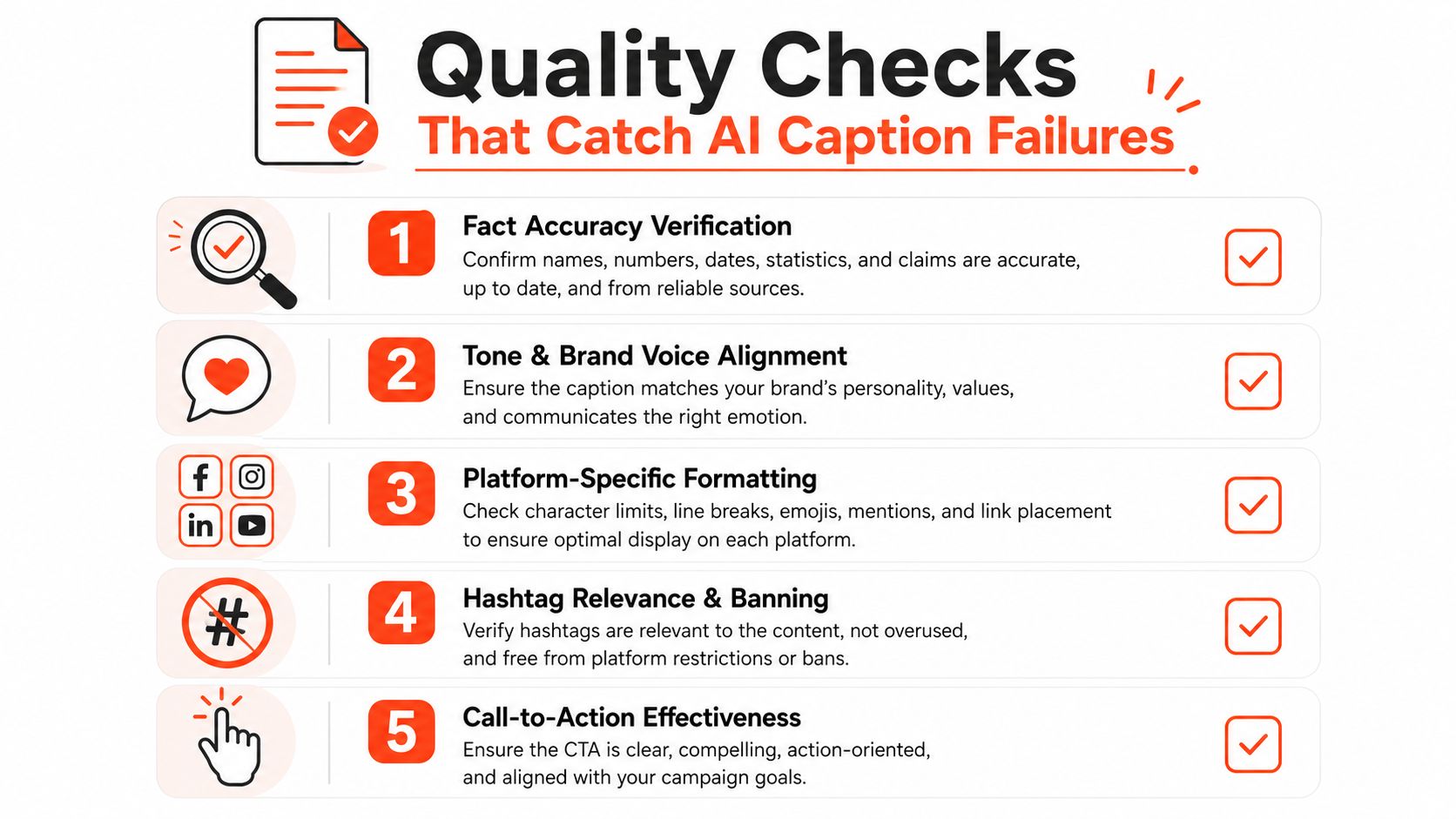
AI caption failures rarely announce themselves as nonsense. The more dangerous version is fluent, plausible, and slightly wrong. A model can add a benefit the product doesn't offer, turn an old feature into a current one, misread an image, or attach an optimistic claim to a post that needs careful wording.
The technical foundation behind modern caption generation comes from image-captioning research. The nocaps benchmark introduced 166,100 human-generated captions describing 15,100 images, and Microsoft later reported human parity on that benchmark while describing its system as two times better than the image-captioning model used in its products and services since 2015 (nocaps and PixelProse research overview). Those milestones show how far generation has progressed, but fluent output still requires validation.
Three review tiers
Automated checks should catch mechanical problems before a person spends time editing. Check for prohibited words, missing required disclosures, unsupported numbers, broken links, duplicate hashtags, excessive length, and absent CTAs where a CTA is required.
Human review should test meaning and brand fit. The reviewer needs the source asset, current product information, campaign objective, and voice profile beside the generated caption. They should ask whether every factual statement is supported, whether the hook matches the visual, and whether the CTA asks for a realistic next step.
Audience testing should examine resonance rather than grammar. Compare approved caption structures against a human-written baseline, but keep the visual, audience, timing, and objective as consistent as practical. A usage increase doesn't prove an outcome increase. Hootsuite-referenced reporting cited in 2026 describes social marketers using AI for editing and for producing text from scratch, but those figures measure adoption, not whether captions improve saves, replies, clicks, or lead quality (AdWhite social media trends coverage).
Review the claim, not just the sentence. Polished language can hide an unsupported promise.
Use semantic evaluation for higher-stakes content
Caption teams building or evaluating their own systems shouldn't rely only on word overlap. Common metrics include BLEU, METEOR, ROUGE-L, CIDEr, and SPICE, but SPICE is more semantically grounded because it compares objects, attributes, and relationships through scene graphs. In one benchmark, SPICE showed a 0.88 system-level correlation with human judgments on MS COCO, compared with 0.43 for CIDEr and 0.53 for METEOR (NNEval research paper).
For operational review, newer benchmarks also focus on correctness and completeness. CAPability evaluates captions across 12 dimensions using nearly 11,000 human-annotated images and videos, while CapArena-Auto reported 94.3% correlation with human rankings at about $4 per test (CAPability and CapArena-Auto research). The practical lesson is simple: sample outputs, test them against visual and brand facts, and track recurring failures such as missing entities, relationship errors, and verbosity drift.
Building a Scalable Caption Production Workflow
A scalable workflow begins before the AI caption generator sees the content. Create a clean intake record containing the source asset, campaign objective, audience, approved product facts, offer details, destination link, required disclosures, target platforms, and deadline. If those inputs are incomplete, generation should pause rather than fill the gaps with guesses.
Build the pipeline around reusable source material
Organize the prompt library by content type, not just by platform. Product launches, educational explainers, customer questions, founder commentary, behind-the-scenes content, and promotional offers need different editorial logic. Each content type can then produce platform variants from a shared source brief.
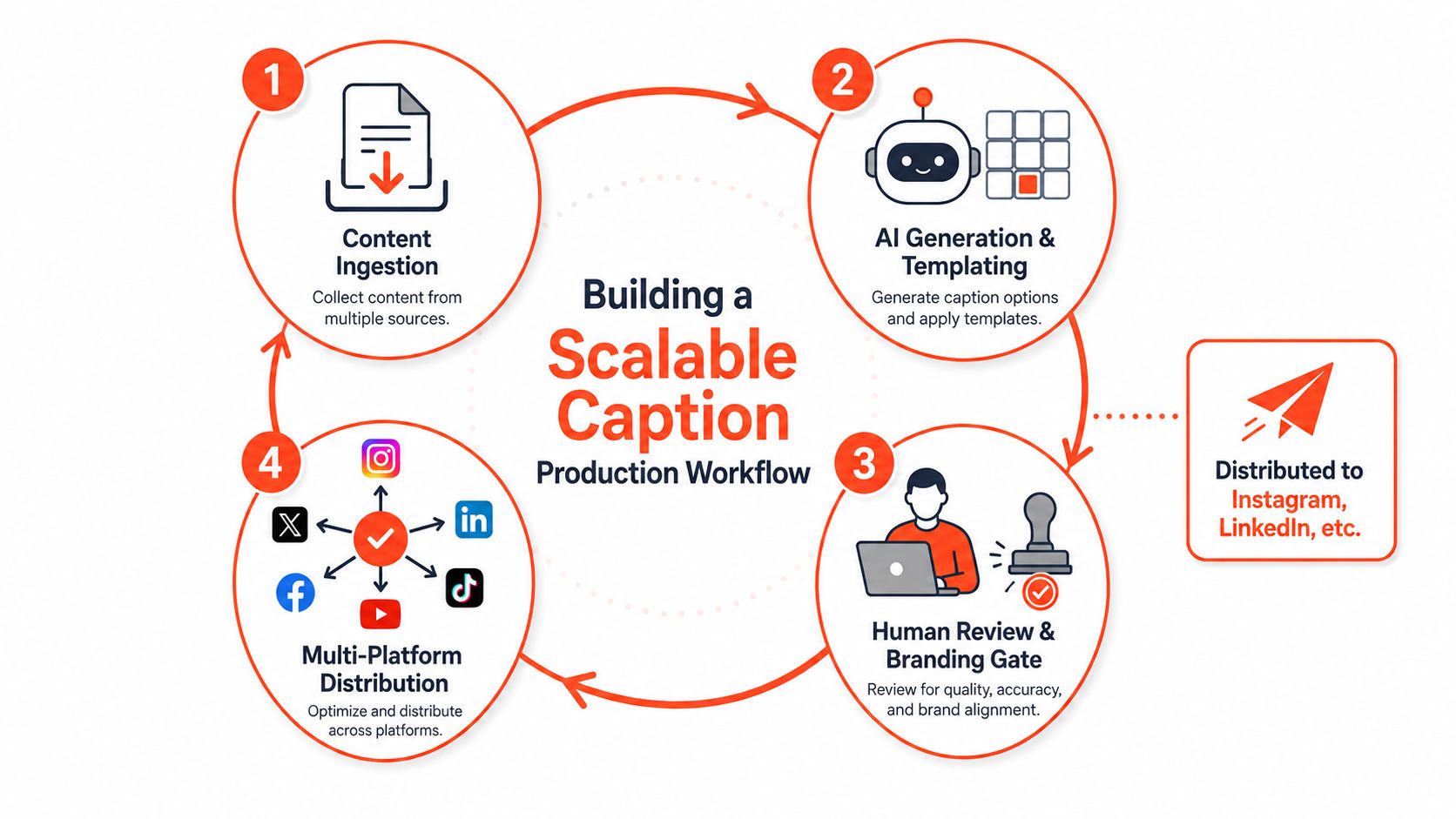
A practical sequence looks like this:
- Ingest the source: Add the article, transcript, product notes, or visual description to a structured brief.
- Generate the master message: Ask for the central idea, approved facts, audience problem, and intended action before requesting polished captions.
- Create platform variants: Apply separate instructions for Instagram, TikTok, LinkedIn, YouTube, and any other active channel.
- Run the branding gate: Check voice, facts, claims, formatting, links, and platform requirements.
- Schedule approved assets: Send only cleared versions to the publishing system, then record the prompt version used.
Reduce bottlenecks without removing judgment
Use conditional instructions for audience segments. For example, a prompt can tell the generator to emphasize setup simplicity for first-time users, workflow control for managers, and repurposing efficiency for agencies. The facts stay fixed, but the framing changes.
A master caption can also spawn channel-specific versions, provided the human reviewer checks that each version still sounds native to its platform. For visual posts that use humor or cultural references, teams can get started with meme templates while keeping the caption rules separate from the visual joke. The caption should clarify or extend the idea, not repeat the text already visible in the asset.
Teams can connect approved outputs to scheduling tools such as Buffer or Hootsuite, but automation should stop at the approval boundary. A broader content creation automation workflow can connect source material, asset creation, review, and distribution, as long as it preserves version history and makes the responsible reviewer clear.
WaveGen.ai is one option for this type of workflow. It turns a source article, newsletter, podcast script, blog post, or YouTube transcript into platform-formatted social content, including captions, hashtags, carousels, short videos, and quote cards, while storing brand colors, fonts, logos, and voice settings in a brand kit.
Tracking Performance and Iterating on What Works
Likes are easy to report and difficult to interpret. A caption may earn attention because the visual is strong, because the subject is timely, or because the audience already knows the account. To evaluate caption quality, track signals that reveal whether the wording delivered value, encouraged action, or created a useful conversation.
| Metric | What It Measures | Why It Matters for AI Captions | Target Benchmark |
|---|---|---|---|
| Saves | Perceived future usefulness | Shows whether the caption gives people a reason to return | Establish an account-specific baseline |
| Comment sentiment | Quality and tone of response | Reveals whether the language invites trust or irritation | Compare against prior posts with similar intent |
| Click-through rate | CTA effectiveness | Tests whether the caption moves people beyond passive viewing | Compare variants with the same destination |
| Shares | Audience advocacy | Indicates whether the message feels useful or identity-relevant | Review alongside share context and comments |
| Replies | Conversation depth | Helps distinguish authentic prompts from empty engagement bait | Assess relevance, not just volume |
The table's final column should remain a working benchmark rather than a universal target. Social performance differs by audience, creative, platform, offer, and account maturity. Set a baseline for each content type, then compare similar posts instead of judging every caption against the same number.
Connect results to the prompt
Tag every published caption with its prompt version, content type, platform, CTA style, and primary idea. When a post performs well, save the exact caption and prompt in a swipe file. Don't copy the wording blindly. Identify the underlying structure, such as a specific problem hook, a short explanation, and a question that invites practitioners to share experience.
Run controlled comparisons where possible. Keep the source visual and objective stable while changing the opening, framing, or CTA. Review saves, replies, clicks, shares, and comment quality together. A caption with more likes but weaker clicks may be better for awareness and worse for acquisition.
The strongest evaluation process treats performance as feedback for the prompt library. Retire formulas that repeatedly create vague claims, strengthen rules around recurring errors, and add approved examples from the brand's own posts. That is how an AI caption generator becomes more useful over time without turning the account into a stream of polished sameness.
WaveGen.ai can turn your existing articles, newsletters, podcast scripts, and videos into on-brand captions and platform-specific social assets, using saved brand kits and a visual editor before publishing. Visit WaveGen.ai to test a content distribution workflow that keeps human approval in the loop while reducing repetitive caption production.
ai caption generator
social media captions
ai content tools
brand voice
caption workflow
Turn this kind of writing into a week of social content.
Paste a blog post, newsletter, or rough draft — WaveGen turns it into publish-ready carousels, captions, and slideshows for every channel.
No credit card · First posts in 2min