October 3, 2026
15 min read
Blogging on LinkedIn: A Complete Step-by-Step Guide
Master blogging on LinkedIn with actionable tactics for formatting, headlines, repurposing, and engagement. Build authority and reach with this detailed guide.
A LinkedIn article reaches a median of 596 people, while a native document or carousel reaches 1,198, according to a recent personal-profile analysis of LinkedIn content formats (AuthoredUp's comparison of LinkedIn articles and posts). That gap changes how professionals should think about blogging on LinkedIn. A long-form article shouldn't be treated as the entire campaign. It should be the source asset that gets reshaped into formats built for reach, conversation, and continued discovery.
The practical question isn't whether long-form writing still has value. It does. The better question is how to turn one strong idea into a distribution system without flattening it into repetitive posts. The workflow below covers positioning, structure, searchability, repurposing, publishing ownership, and measurement.
Table of Contents
- Why LinkedIn Long-Form Content Matters for Professionals
- Structuring Your Long-Form Post for Maximum Impact
- Crafting Headlines and Optimizing for LinkedIn SEO
- Repurposing One Idea Into Multiple Content Assets
- Publishing on Personal Profiles vs Company Pages
- Measuring Success and Maintaining a Sustainable Cadence
Why LinkedIn Long-Form Content Matters for Professionals
Quick updates are easy to publish and easy to forget. A thoughtful long-form piece asks more from the writer, but it also gives a consultant, founder, or specialist enough space to demonstrate how they think. That distinction matters in professional markets, where buyers often assess judgment before they assess a service page.
LinkedIn wasn't built as a blogging platform. It began as a professional networking service in 2003, reached more than 4 million members by the end of 2005, and added publishing capabilities as the network matured. LinkedIn introduced its Publishing platform in 2012, then expanded access in February 2014 so more members could write long-form posts. Before that expansion, LinkedIn was already curating professional news through LinkedIn Today, which drew stories from more than 10,000 publishers and blogs and was described as publishing about 5,000 blog posts each day (LinkedIn's company history).

Depth creates a stronger trust signal
Consider a B2B advisor who publishes a short opinion about a familiar problem. The post may start a conversation, but it gives readers limited evidence of the advisor's method. A detailed article can define the problem, explain the trade-offs, show a decision process, and give readers language they can use internally.
That depth supports three outcomes:
- Authority: Readers can see whether your thinking is original, practical, and relevant to their situation.
- Searchability: A well-focused article creates a durable page around a professional topic, rather than a fleeting update in the feed.
- Relationship quality: Detailed ideas give the right readers a reason to comment with context, send the piece to a colleague, or return to your profile later.
The format's role has changed. LinkedIn articles are no longer the obvious default for every idea, especially when shorter and more visual formats can generate broader distribution. They work best as cornerstone content, while posts, documents, and images help carry the idea into different moments of the buyer's attention.
For a wider view of how professional services firms can use the platform, the Big Moves Marketing B2B guide is a useful companion. Teams developing a point of view can also connect their publishing plan to thought leadership positioning, so every article supports a recognizable expertise area instead of becoming an isolated performance experiment.
Practical rule: Use long-form writing to prove how you think, not merely to announce what you sell.
Structuring Your Long-Form Post for Maximum Impact
A long LinkedIn post fails when the reader has to work too hard to find its point. Strong research and useful advice won't compensate for a dense opening, long paragraphs, or an ending that asks for nothing.
The structure should guide a mobile reader from recognition to understanding, then toward a small action.
Build the opening around one promise
Start with a line that identifies a problem, challenges a familiar assumption, or names a specific outcome. Don't begin with background about your company or a broad statement about the industry. The reader needs to know why the idea deserves attention now.
A useful opening sequence looks like this:
- Hook: State the tension in one or two lines.
- Context: Explain who faces the problem and what goes wrong.
- Promise: Tell the reader what the post will help them decide, change, or avoid.
For example, a content strategist might open with the difference between publishing one article and building a reusable content asset. The next lines can explain why teams waste effort when they create every format from scratch. The promise then becomes a clear method for extracting a carousel, short post, and newsletter segment from the same source.
The first line should create interest, but it must also be accurate. Clickbait can produce a momentary pause while damaging the trust that long-form content is meant to build.
Make the body easy to scan
Keep paragraphs short enough to read comfortably on a phone. Use line breaks to separate ideas, and use bullets when the reader needs to compare steps, symptoms, or options. LinkedIn doesn't give you the visual hierarchy of a full editorial page, so spacing becomes part of the argument.
Avoid placing several abstract points in one paragraph. Give each point a concrete explanation, an example, or a practical implication. A post about content repurposing, for instance, should distinguish between extracting a framework for a document and extracting a personal observation for a text post. Those are different jobs, and treating them as identical produces repetitive content.
A long-form post can follow this rhythm:
- Problem: Describe the situation in terms the audience recognizes.
- Diagnosis: Explain why common solutions underperform.
- Method: Present the process in a logical order.
- Application: Show how the reader would use it.
- Decision: State what to do next.
Longer posts have a real performance case, but length alone isn't the strategy. An analysis of 438,413 posts found that posts with 1,500 or more characters averaged 49% more engagement than posts under 300 characters, with median likes and comments roughly doubling across the shortest and longest length bands (Linkpost's LinkedIn length analysis). The useful lesson is to give one idea enough room to become useful, not to add words after the argument is complete.
For more guidance on adapting voice, rhythm, and formatting to the feed, use this copywriting guide for social media. End with a specific question or action. Ask readers to choose between two approaches, describe how they handle the problem, or request a practical example. “Thoughts?” invites low-effort reactions. A focused question invites expertise.
Crafting Headlines and Optimizing for LinkedIn SEO
A headline has two audiences. The first is the person scanning a feed or profile. The second is the person searching LinkedIn for a topic, specialist, or solution. A strong headline satisfies both without sounding like it was written for an algorithm.
Put the main subject near the beginning. “LinkedIn content repurposing for B2B teams” gives a clearer signal than a clever phrase that only reveals the topic at the end. Then add a value frame that tells the reader what they'll gain, such as a process, a comparison, or a way to avoid a common error.
Match the promise to the reader's intent
Different headline patterns support different jobs:
| Headline approach | Best use | What it should clarify |
|---|---|---|
| How-to | A repeatable process | What the reader will be able to do |
| Mistake-led | A common failure | What the reader may be doing wrong |
| Contrarian | A disputed assumption | Which belief you're challenging |
| Framework-led | A complex decision | How the subject will be organized |
| Question-led | An unresolved problem | Why the reader should examine it |
Specificity usually beats drama. “How B2B consultants can turn one article into a week of LinkedIn content” tells the reader who the piece serves and what it covers. “The secret to dominating LinkedIn” communicates neither.
Build topical relevance naturally
LinkedIn SEO is less about forcing a keyword into every paragraph and more about making your expertise legible. Use the central phrase in the headline, opening, and a relevant subheading. Add related language that a professional audience would naturally associate with the subject, such as thought leadership, content distribution, B2B marketing, document posts, or LinkedIn newsletters.
The article should answer one recognizable search intent. If the headline promises a guide to blogging on LinkedIn, the content should address format selection, structure, distribution, and measurement. A post that jumps between personal branding, recruiting, sales outreach, and company announcements may contain useful advice, but it creates a weak topical signal.
Optimize the surrounding profile
Search visibility doesn't belong to the article alone. Your profile headline, About section, featured content, and experience descriptions should reinforce the same expertise area. When a reader discovers one article, the profile should make the next step obvious.
Use descriptive language rather than inflated labels. “B2B content strategist for cybersecurity companies” provides more context than “growth enthusiast.” Connect related articles through your profile's Featured section and through natural references in later posts. This creates a small knowledge library that helps readers understand your point of view.
Don't promise an outcome the article can't support. A specific headline paired with a useful body can attract fewer accidental clicks but more relevant attention. For professional services, that trade-off is usually worthwhile because the goal is qualified trust, not empty traffic.
Repurposing One Idea Into Multiple Content Assets
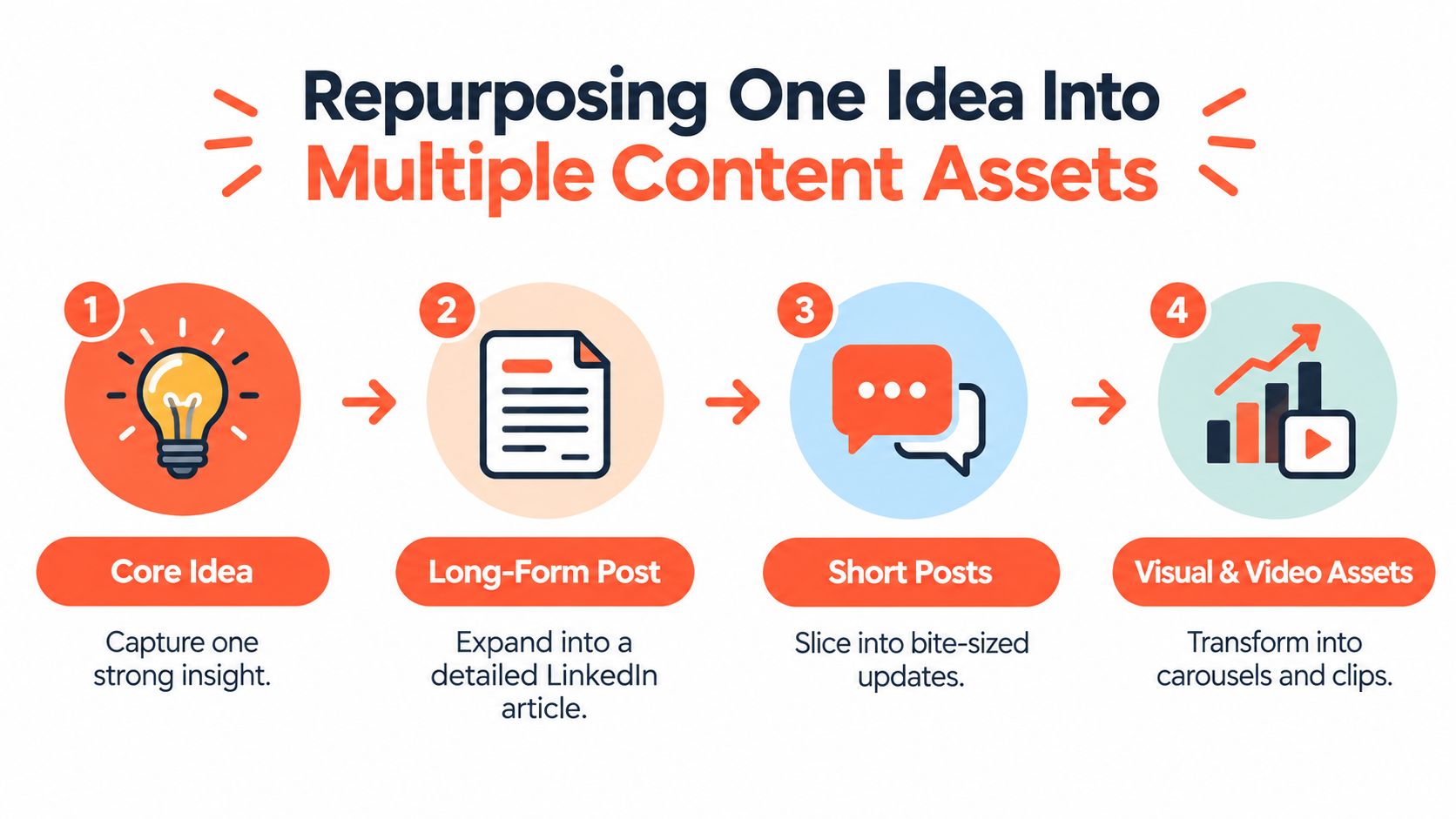
The most efficient LinkedIn workflow starts before the article is published. Define the core idea, the audience problem it addresses, and the few sub-points that can stand alone. Then write the long-form piece as a source document rather than as a one-time post.
A practical source asset contains more than a conclusion. It includes a framework, an example, a useful distinction, a warning, and several quotable observations. Those components give you material for formats with different reading behaviors.
Extract the strongest units
Start by marking the article's independent units:
- The central claim: Turn it into a concise text post with a strong point of view.
- The process: Convert it into a native document or carousel, with one step per page.
- The objection: Write a short post that addresses why a common alternative fails.
- The practical example: Use it as a story-led update that shows the idea in context.
- The conclusion: Develop it into a newsletter introduction or a prompt for discussion.
Don't copy the same paragraph into every format. Preserve the idea, but change the entry point. A carousel can teach through sequence. A short post can create tension. A newsletter can add context and invite a more sustained response.
Use documents for visual teaching
Native document posts uploaded directly to LinkedIn averaged a 7.00% engagement rate, the highest among major content types in Socialinsider's 2026 benchmark, while text-only posts and link shares sat at the lower end (Socialinsider benchmarking cited by Stan Store). That doesn't mean every idea should become a carousel. It means visual packaging deserves a deliberate place in the workflow.
A useful document doesn't place an entire article onto slides. It reduces the argument to a clear path:
- Define the audience problem.
- Introduce the framework.
- Explain each part with a short example.
- Show the decision or action that follows.
- Close with a useful prompt or next step.
Write a caption that complements the document instead of repeating it. The caption should provide the hook, identify the audience, and explain why the document matters. Keep the most valuable detail inside the native asset so the reader has a reason to swipe.
Sequence distribution instead of duplicating it
Publish the source article first, then distribute its components according to their purpose. A carousel can introduce the framework to people who haven't read the article. A short post can challenge an assumption from the piece. A newsletter can gather the most useful material into a more complete edition.
Keep a simple content map with the source URL, extracted idea, format, audience, CTA, and planned date. This prevents two common problems: publishing several versions on the same day and losing track of which point has already been used.
The LinkedIn content repurposing workflow can help teams formalize this process. The standard is not maximum volume. It's maximum usefulness per original idea, with enough variation that each asset feels native to its format.
Publishing on Personal Profiles vs Company Pages
The publishing account changes the meaning of the content. A personal profile presents an argument through a person with experience, judgment, and a visible professional identity. A company page presents the same argument as part of an organization's communication system.
For long-form authority building, that distinction matters more than many teams admit.
Personal profiles create the conversation
Recent LinkedIn-related benchmarking reports that personal profiles receive 63% more engagement and 238% more comments per post than company pages (Metricool's LinkedIn trends analysis). The same source reports that 63% of B2B buyers rely on creators early in the buying process, while more than half use creators later to validate decisions. These figures support a practical observation: buyers often want to understand the people behind an offer, not only the brand that sells it.
Use a personal profile when the content depends on:
- A professional opinion
- A lesson from direct experience
- A strong interpretation of market change
- A point of view that invites disagreement
- A conversation with peers or prospective buyers
The author should do more than attach a name. They should respond to comments, add context after publication, and make the article part of an ongoing body of work. A silent profile with polished content still feels corporate.
Company pages provide continuity
Company pages remain useful for brand-level information. They can publish product education, research summaries, hiring news, event material, customer guidance, and curated resources. They also give a team a stable place to organize official communications.
A company page is usually the better route when the information belongs to the organization rather than one expert. It can also support distribution after an individual publishes. The brand page can share a document, summarize the argument in its own voice, or connect the topic to a relevant service without pretending to be the original author.
| Goal | Primary channel | Supporting role |
|---|---|---|
| Build an expert reputation | Personal profile | Company page shares the strongest assets |
| Explain a company position | Company page | Leaders add interpretation from profiles |
| Start a specialist discussion | Personal profile | Subject-matter colleagues contribute |
| Announce an organizational update | Company page | Employees extend relevant reach |
The choice isn't a contest between human and brand publishing. It's a routing decision. Put the first, most opinionated version with the person who owns the expertise. Use the company page to preserve the idea, add organizational context, and reach people who follow the brand rather than the individual.
Teams working on books, guides, or other authority assets can also borrow practical distribution ideas from these BarkerBooks book marketing tips. The underlying principle is similar: give the idea a recognizable human voice, then build supporting distribution around it.
Measuring Success and Maintaining a Sustainable Cadence
Views are useful for understanding distribution, but they don't tell you whether the content earned attention from the right people. A post can reach a broad audience and produce little evidence of trust. Another can attract a smaller but more relevant group that asks detailed questions, saves the framework, or starts a sales conversation later.
LinkedIn provides analytics for posts and articles, including reach, audience demographics, and combined portfolio performance over time. Article views are measured separately from other post metrics, and the available reporting windows differ by metric type (LinkedIn's post analytics guidance). That makes disciplined tracking more useful than checking one headline number.
Track the path from attention to business value
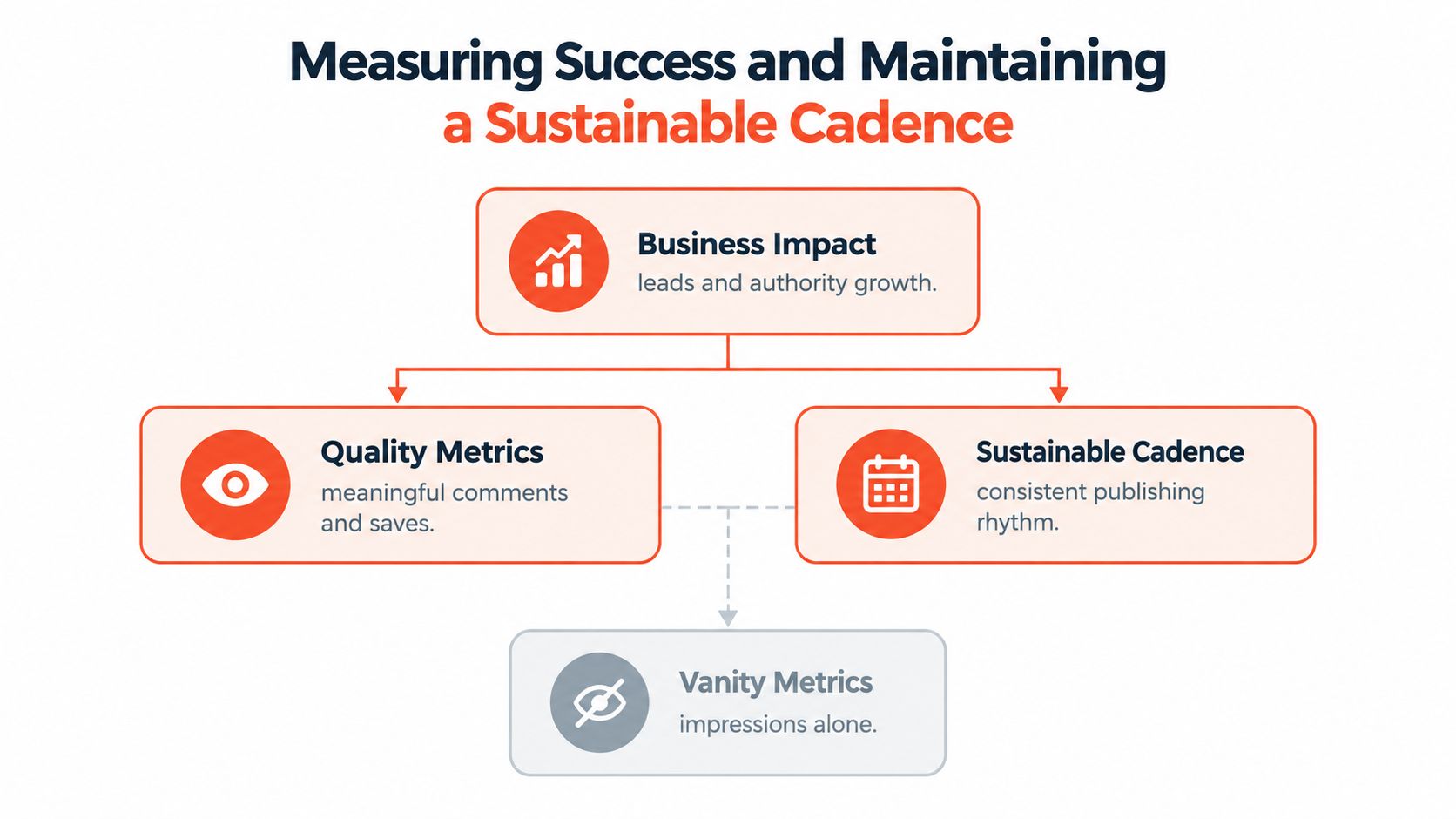
Create three layers in your reporting:
- Distribution: Reach, views, and audience composition show who encountered the content.
- Quality: Meaningful comments, saves, sends, and reposts show whether the idea had practical value.
- Business impact: Profile visits, relevant connection requests, conversations, referrals, and attributed opportunities show whether attention moved toward a commercial outcome.
LinkedIn's engagement counts now include saves, sends, and reposts alongside reactions and comments. Treat those actions as evidence of utility, not as interchangeable applause. A saved checklist may be more valuable for a B2B campaign than a large number of quick reactions because it suggests the reader expects to use the material later.
Record the topic, format, author, hook, CTA, audience, and resulting conversations. Review patterns across related pieces rather than declaring a winner from one post. If articles attract thoughtful comments but documents reach more of the right job functions, keep both in the system and give each a distinct role.
Design a cadence you can maintain
Sustainability starts with batching. Reserve one session for choosing the core idea, another for drafting, and another for extracting derivative assets. Store reusable prompts, brand guidance, approved examples, and CTA variations in one shared workspace so the team isn't rebuilding the process each time.
A dependable cadence can include:
- One substantial source asset when the team has a well-developed idea
- Several native posts that explore different angles from that asset
- A document that teaches the framework visually
- A newsletter or longer update that gathers the strongest insights
- A review period that informs the next topic, format, and author
Don't publish long-form content just to fill a calendar. If the article has no clear audience problem, no defensible point of view, or no useful next step, more distribution won't repair it. A smaller pipeline of strong source ideas is easier to maintain and gives every derivative asset a job.
WaveGen.ai turns an article, newsletter, podcast script, or transcript into LinkedIn-ready posts, carousels, quote cards, short videos, and platform-specific captions, with brand kits and scheduling for a more consistent workflow. Visit WaveGen.ai to turn your next long-form idea into a coordinated LinkedIn content system instead of a single publication.
blogging on linkedin
linkedin content strategy
long-form posts
linkedin seo
thought leadership
Turn this kind of writing into a week of social content.
Paste a blog post, newsletter, or rough draft — WaveGen turns it into publish-ready carousels, captions, and slideshows for every channel.
No credit card · First posts in 2min