September 15, 2026
16 min read
How to Repurpose Content for Multi-Platform Reach
Learn how to repurpose content into carousels, short videos, quote cards, and captions with a step-by-step workflow that saves hours and stays on brand.
You finish a strong blog post on Monday, publish a podcast on Tuesday, and by Wednesday five platforms are waiting for something “new.” The source material is already there, but the team still starts from blank documents, rewrites the same ideas, resizes graphics by hand, and discovers too late that the captions don't fit the platform.
That workflow treats every social post as a separate creative project. A better approach treats the long-form piece as a source asset and builds a controlled production pipeline around it. You extract ideas, assign each idea to a suitable format, adapt the message for the channel, apply the brand system, review the outputs, and schedule the finished batch.
The difference isn't publishing more for the sake of volume. It's making each version useful on its own while reducing the amount of original thinking required for every new placement.
Table of Contents
- Why Repurposing Has Become the Default Content Workflow
- Matching Long-Form Sources to Platform-Native Formats
- The Repurposing Pipeline From Source to Scheduled Asset
- Rewriting for Each Platform Without Starting From Scratch
- Brand Kits and Visual Editors That Keep Every Asset Consistent
- The Quality Threshold That Separates Repurposing From Recycling
- Scheduling, Crossposting, and a Weekly Cadence That Holds
Why Repurposing Has Become the Default Content Workflow
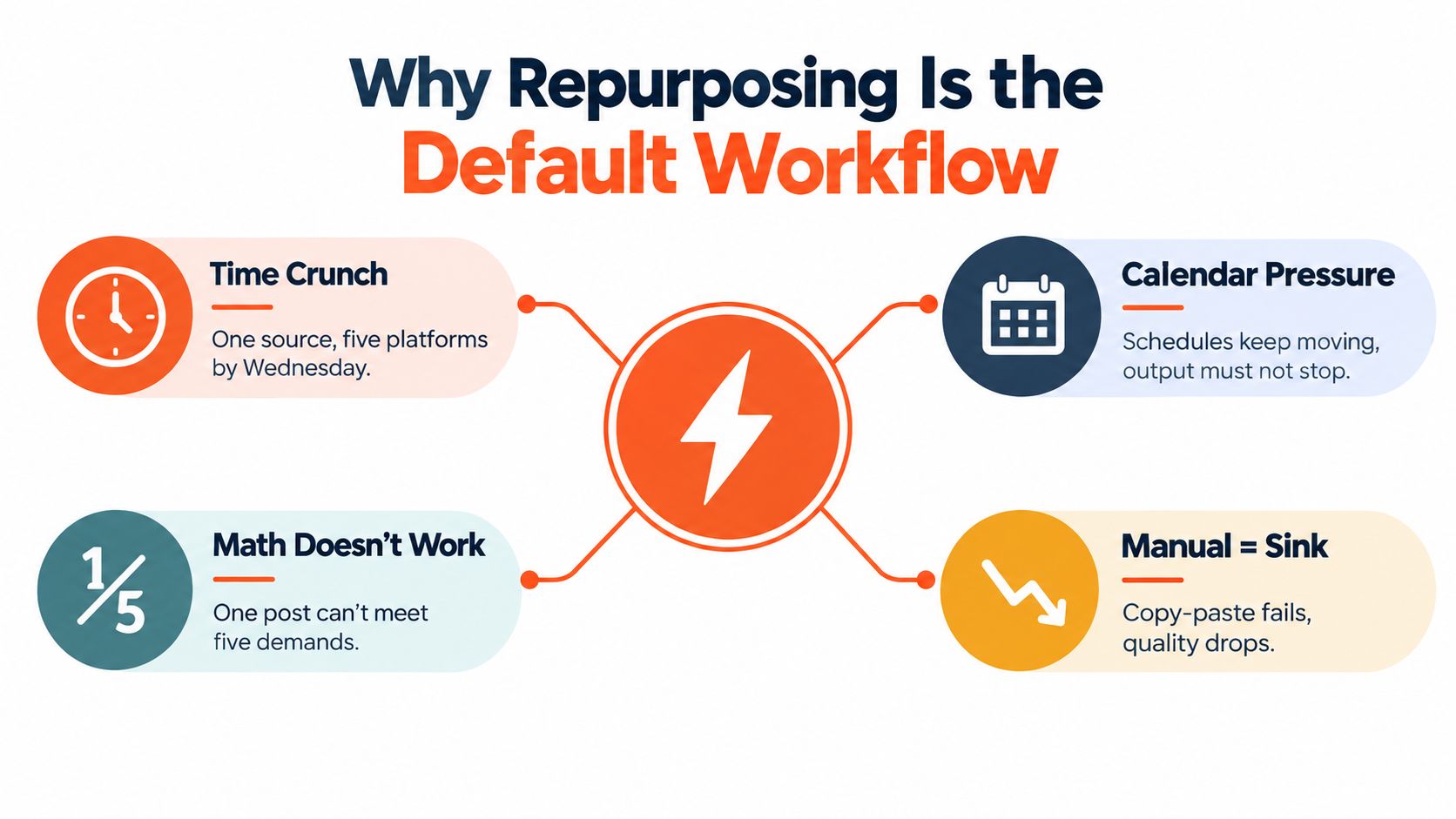
By midweek, most small content teams face the same constraint. The article is finished, the podcast has been edited, or the webinar recording is ready, but LinkedIn, Instagram, TikTok, YouTube, and the newsletter all need material with different shapes and expectations. Treating each deliverable as a fresh assignment forces the team to rediscover the same argument repeatedly.
Repurposing changes the unit of work. Instead of asking, “What should we post today?” the team asks, “What usable ideas exist inside this source asset, and where will each one work best?” That shift gives writers, editors, designers, and social managers a shared starting point.
A 2026 survey summary found that 94% of 48 marketers repurpose content, while 65% described repurposing as the most cost-effective workflow. The same summary reported that 31% selected video as the most effective repurposing format. These figures come from TapVid's content repurposing statistics summary, and they point to a practical change in operating expectations. Repurposing is no longer an occasional rescue tactic for an old blog post. It's becoming part of how modern teams plan distribution.
The bottleneck is usually production design
A source asset can support multiple outputs, but only if someone makes decisions before production begins. Which points deserve a short video? Which argument needs a carousel? Which quote needs more context before it becomes a graphic? What should remain exclusive to the original?
Teams lose time when those questions get answered inside individual tasks. A designer creates a card before the writer has settled the wording. A social manager schedules a caption that still contains language meant for the blog. An editor then has to repair the entire batch.
Production rule: Repurposing works when every output has a source, an owner, a format, and a clear adaptation brief.
The process also helps solo creators. A consultant can record one substantive conversation, turn its strongest explanation into a written post, extract a framework for a carousel, and create short clips from the most self-contained moments. If you need fresh ideas for a short-form channel, a resource such as top TikTok content ideas for 2026 can help you choose angles before you start cutting footage.
The point isn't to force one asset onto every network. It's to build a repeatable path from one well-made source to several platform-native contributions, without asking the creator to invent the central idea again each time.
Matching Long-Form Sources to Platform-Native Formats
Format selection should happen before atomization. A source may contain valuable information but still be a poor fit for a particular output. A detailed tutorial can become a useful video clip, while its transcript may become a clumsy carousel because the argument depends on demonstrations, visual sequence, or extended context.
A 45-minute podcast, for example, usually offers several clean moments for Reels, Shorts, and TikTok. Editors can look for a clear problem, a surprising answer, a disagreement, or a complete explanation that makes sense without the rest of the episode. The same recording rarely becomes a strong carousel by placing transcript excerpts on slides. Spoken language needs restructuring, and a carousel needs a visual progression rather than a conversation transcript.
A blog post has different strengths. Its headings can become a carousel outline, its argument can become an X thread, and its practical conclusion can become a LinkedIn post or newsletter section. A webinar often splits into talking-head clips, objection-handling posts, quote cards, and follow-up emails because the discussion already contains questions and answers.
| Long-Form Source | Best-Fit Platform Assets | Risky Translation |
|---|---|---|
| Podcast interview | Short clips, audiograms, newsletter takeaways, quote-led posts | Transcript pasted into a carousel without rewriting |
| Blog post | LinkedIn post, X thread, carousel, newsletter feature, short explainer script | Publishing the article summary unchanged across channels |
| Webinar | Talking-head clips, objection posts, quote cards, follow-up email | Cropping the full recording without a new hook |
| Whitepaper | Data-led LinkedIn posts, infographic pins, executive summary carousel | Removing context from a complex finding |
| Case study | Problem-solution post, proof-point carousel, sales enablement clip | Turning a customer narrative into unsupported claims |
| YouTube tutorial | Shorts, step clips, written checklist, community post | Cutting a segment that depends on unseen screen action |
Written assets tend to atomize around claims, frameworks, examples, and objections. Video assets atomize around moments, demonstrations, reactions, and complete answers. Newsletters often provide strong opinions and concise observations, which can become social hooks, while a collection of related newsletters may support a larger guide.
If you're converting written ideas into video, a text to video AI generator can help assemble an initial visual draft. It still needs editorial review. Automated scenes may match the words while missing the intended emphasis, audience, or brand tone.
Choose the source based on its quotable density and current relevance, not its length alone. A short, focused article with several distinct ideas may feed a better batch than a long piece built around one narrow point.
The Repurposing Pipeline From Source to Scheduled Asset
A reliable pipeline gives each stage a decision and a handoff. Whether one person handles everything or a 10-person team shares the work, the sequence should remain visible in a project board or content operations sheet.
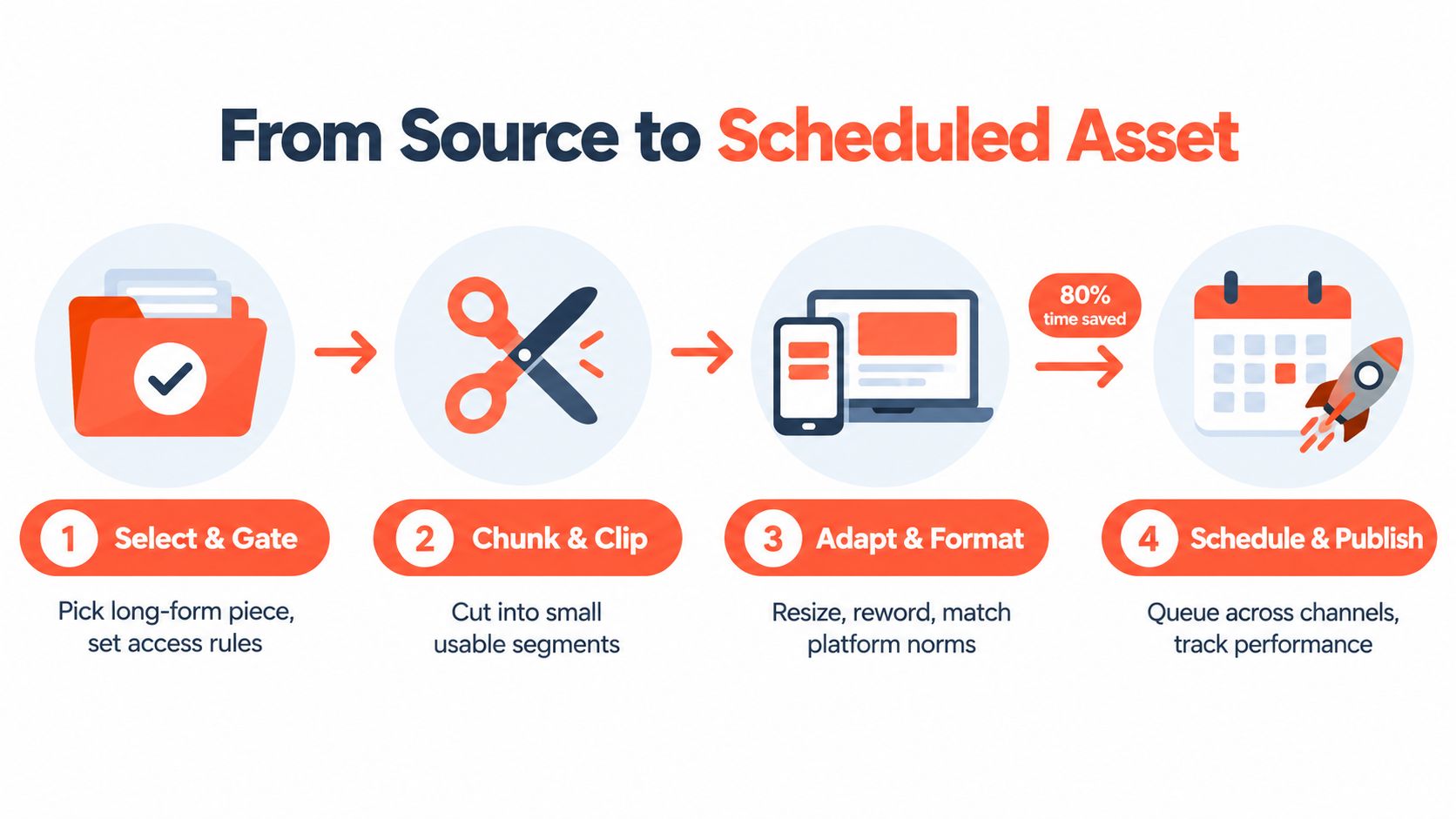
Select and gate the source
Start by choosing a source that is relevant, accurate, and rich enough to support more than one angle. The owner might be a content lead, editor, or solo creator. The decision is whether the piece has distinct claims, useful examples, or clear teaching moments.
A weak source produces weak derivatives. If the original is outdated, refresh it before extracting anything. If it makes one point repeatedly, don't stretch it into a large batch just to fill a calendar.
Extract and tag moments
For written content, copy the outline and mark definitions, steps, objections, examples, and quotable sentences. For audio or video, work from a transcript, then tag moments by subject and editorial value. The editor's job isn't to highlight everything. It's to identify material that can stand without excessive explanation.
Use a simple tagging system such as:
- Hook: A tension, mistake, question, or unexpected point.
- Proof: A specific example or supported explanation.
- Framework: A sequence, checklist, or decision rule.
- Conversion: A useful next step connected to the offer.
Assign formats and assemble drafts
Map each tagged moment to one output before writing. A framework may become a carousel, a compact opinion may become LinkedIn copy, and a self-contained explanation may become a short video script. Assign a single owner to draft assembly, then pass the batch to design rather than sending individual requests through chat.
For blog-led workflows, a process such as turning a blog into social media posts provides a useful starting model. The draft should still be rewritten for the intended channel.
Apply the brand kit and run QA
Brand application is a frequent time sink because teams postpone it until every asset is nearly finished. Apply approved templates, type styles, colors, logo treatments, and image rules before final review. This prevents the designer from rebuilding the same visual repeatedly.
QA should check factual accuracy, captions, subtitles, links, spelling, safe areas, accessibility, thumbnail clarity, and whether each asset makes sense without the source. A social manager then schedules the approved files and records the source relationship in the content library.
Here is the operational sequence in compact form:
- Gate the source: Confirm relevance and idea density.
- Extract material: Pull claims, moments, examples, and calls to action.
- Assign formats: Match each idea to a platform-native asset.
- Draft and design: Rewrite first, then apply templates.
- Review and schedule: Run QA, customize publishing details, and queue the batch.
A pipeline doesn't eliminate judgment. It protects judgment from being wasted on repetitive coordination.
Rewriting for Each Platform Without Starting From Scratch
The rewrite stage shouldn't be a blank page. Start with the source idea, then apply a platform rule set that controls the hook, structure, visual treatment, and next action. This keeps the core message consistent while preventing the output from sounding copied.
LinkedIn rewards a clear point of view and enough context to make the post valuable on its own. Open with tension, challenge a common assumption, or state the practical consequence. Keep the first line focused, and don't lead with an external URL if the post needs to earn attention before asking for a click.
Instagram carousels need a visual argument. Give each slide one job, such as naming the problem, explaining the cause, presenting a framework, or showing the next step. The caption should reinforce the takeaway rather than repeat every slide.
X threads need standalone lines. A reader may encounter an individual post without reading the entire sequence, so each line should carry a complete idea and point naturally to the next one. TikTok and Reels need an immediate spoken or visual hook, a compact middle with clear beats, and a direct call to action that doesn't wait until the final frame.
| Platform | Format | Hook and Length | CTA and Hashtags |
|---|---|---|---|
| Text post or document carousel | Contrarian or problem-led opening, concise narrative | One relevant action, restrained hashtag use | |
| Carousel, Reel, or caption | Visual first frame or immediate spoken premise | Save, share, comment, or visit a relevant resource | |
| X | Thread or standalone post | Number-led, question-led, or sharp claim | Invite a reply or continue to the next post |
| TikTok | Short video or slideshow | Spoken hook with visible text support | Encourage a specific response or follow-up |
| YouTube Shorts | Vertical clip | Keyword-relevant opening and clear premise | Use description and pinned comment for context |
Use a rewrite brief
For each asset, record five fields before drafting:
- Source idea: The exact claim or moment being adapted.
- Audience tension: What the viewer or reader wants solved.
- Native structure: Thread, carousel, clip, quote card, or post.
- Proof element: Example, demonstration, contrast, or explanation.
- Action: The one thing the audience should do next.
This brief prevents the common shortcut of changing only the dimensions and first sentence. A video script needs spoken rhythm and visual cues. A carousel needs slide-level hierarchy. A text post needs line breaks and a reason to keep reading.
Editorial test: If removing the original link makes the derivative confusing, the derivative needs more context.
Keep the central insight stable, but change the entry point. The same source can lead with a mistake on LinkedIn, a checklist on Instagram, a question on TikTok, and a sequence of claims on X. That is adaptation, not inconsistency.
Brand Kits and Visual Editors That Keep Every Asset Consistent
A repurposing pipeline can produce a large batch that looks like several unrelated brands if visual decisions live in individual designers' heads. A brand kit turns those decisions into reusable controls. It gives writers and editors boundaries, while giving designers components they can apply without rebuilding every asset.
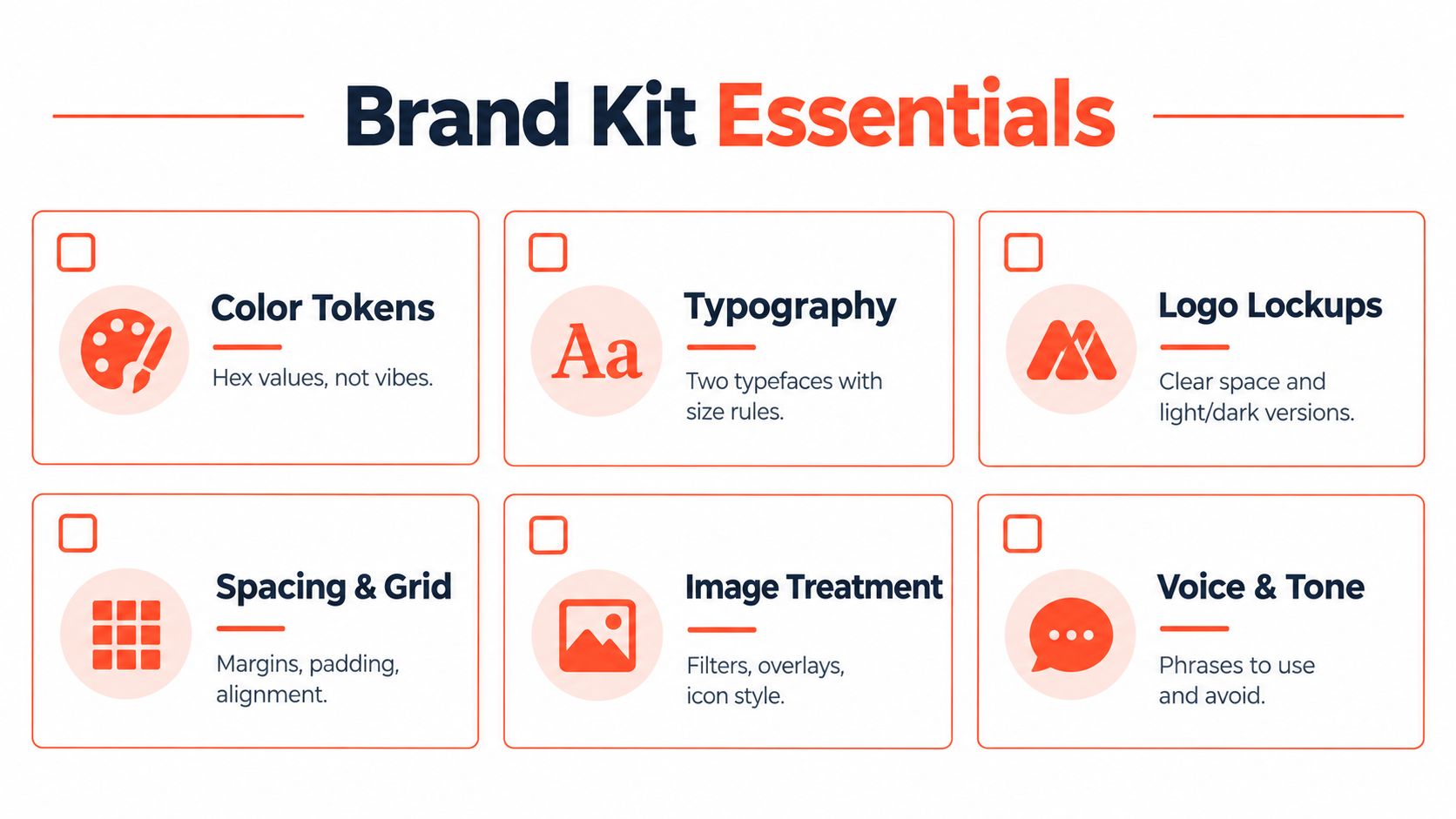
Document the essentials:
- Color tokens: Store approved hex values for backgrounds, text, accents, and status elements.
- Typography: Define primary and secondary typefaces, hierarchy, and size rules.
- Logo lockups: Include light and dark versions, clear space, and placement guidance.
- Spacing and grid: Set margins, alignment, padding, and recurring layout patterns.
- Image treatment: Specify crops, overlays, filters, icon styles, and illustration rules.
- Voice and tone: Record preferred phrases, banned wording, sentence style, and calls to action.
Tools such as Canva, Figma, and Adobe Express work well when the team treats templates as controlled components rather than blank canvases. Create variants for carousels, quote cards, video covers, document posts, and story frames. Lock the elements that shouldn't change, and leave editable areas for the hook, supporting copy, image, and call to action.
One source of truth
Store the kit and templates in one shared location. The latest logo shouldn't live in a private folder, and a designer shouldn't have to ask which orange is approved for every batch. A practical review process starts with the template, not with a screenshot exported from an old post.
The same principle applies to language. A voice guide should help an editor decide whether a sentence sounds too formal, too promotional, or too vague. It shouldn't force every post into identical phrasing.
For a deeper explanation of the components, what is a brand kit is a useful reference before documenting your own system.
A visual editor becomes especially valuable when it lets the team adjust text, images, and tone without breaking the layout. WaveGen.ai can turn an article, newsletter, blog post, podcast script, or YouTube transcript into social formats such as carousels, quote cards, short videos, and captions, while applying saved brand settings before review. The important control remains human approval. Templates accelerate production, but editors still need to catch awkward line breaks, unsupported claims, and visuals that don't fit the message.
The Quality Threshold That Separates Repurposing From Recycling
Resizing isn't repurposing. If the original idea remains in the same structure, with the same hook and the same supporting context, the new asset may save production time while losing audience attention.
Ask one question before approval:
Would this post earn engagement if the reader never saw the original?
A LinkedIn essay copied into an X thread usually fails because the paragraphs weren't built for sequential reading. A carousel that repeats the source's headings may look polished but offers no new path through the idea. A landscape screencast cropped into a vertical video can leave the important interface unreadable and the viewer unsure what to watch.
What genuine adaptation changes
A strong derivative changes at least the entry point, information order, presentation, or action. It might turn a long explanation into a decision tree, convert an objection into a direct answer, or use a demonstration instead of a paragraph.
The core claim can remain consistent. The experience shouldn't.
| Repurposing | Recycling |
|---|---|
| Rewrites the hook for the channel | Keeps the original opening |
| Restructures the information | Copies the same sequence |
| Uses native visual or interaction patterns | Changes dimensions only |
| Makes sense without the original | Depends on prior context |
| Gives the audience a channel-specific action | Repeats the original call to action |
A 2026 research roundup reported that 48% of social media marketers share similar or repurposed content across platforms with minor adaptations, while 17% publish the exact same content without changes. The same roundup cited findings that repurposed content can produce 60% more engagement than single-format original content, and that 60% of marketers find repurposed content generates more leads than original content. These figures appear in Shno's content repurposing statistics roundup. The useful lesson isn't to promise a particular outcome. It's that adaptation quality matters more than duplication.
Recent coverage also highlights a growing concern about low-effort AI output, transcript-to-post publishing, and audience fatigue. RepurpuzAI's 2026 trend analysis frames the practical gap clearly: teams need guidance on how much to compress, expand, or re-angle a source for each channel, not just more format lists.
Review every asset for independent usefulness. If it would feel thin without the original, send it back for a stronger angle.
Scheduling, Crossposting, and a Weekly Cadence That Holds
A good cadence separates creative decisions from publishing administration. The exact days can change, but the handoffs should remain stable so the team knows when a source becomes a batch and when that batch becomes scheduled inventory.
Use this weekly rhythm:
- Monday, source release: Publish or finalize the long-form article, podcast, newsletter, or video. Save the final URL, transcript, outline, thumbnail, and source notes in the content library.
- Tuesday morning, atomization: Extract claims, moments, examples, objections, and possible calls to action. Assign each item to a platform-native format.
- Tuesday afternoon, rewriting: Draft platform versions using the rewrite brief. Keep the central idea consistent, but change the hook, sequence, pacing, and CTA.
- Wednesday, visual production: Build carousels, quote cards, covers, clips, captions, and subtitles from approved copy. Apply the brand kit before review.
- Thursday, QA and scheduling: Check links, subtitles, dimensions, spelling, claims, permissions, and publishing details. Queue the approved assets.
- Friday, review: Compare qualitative audience responses and platform signals, then mark useful winners for a future angle. Don't repost a winner unchanged. Identify what made it work and rebuild that insight for another context.
Buffer, Later, Hootsuite, and Metricool can handle batch queuing and cross-network planning. Native schedulers are often simpler when one person manages one platform. Cross-network tools become more useful when the same campaign needs coordination across several channels, provided the team can still customize the copy and creative for each destination.
A fillable planning template
| Asset | Platform | Hook | Caption length | Hashtags | CTA |
|---|---|---|---|---|---|
| Source idea or clip | LinkedIn, Instagram, X, TikTok, YouTube | The first line or spoken premise | Short, medium, or long | Selected tags or none | Comment, save, click, follow |
| Visual version | Destination format | Cover text or opening frame | Caption variation | Platform-appropriate set | One next action |
| Follow-up asset | Channel and date | New angle | Adjusted copy | Reviewed tags | Continue, compare, or learn |
The crossposting trap is treating identical captions, timestamps, and hashtags as a complete distribution strategy. A shared campaign can have coordinated themes without having identical executions. Customize the first line, media treatment, caption rhythm, CTA, and publishing context before scheduling.
For a more detailed operational checklist, use this guide to schedule social media posts. Then build a small content library with source links, approved derivatives, publishing dates, and performance notes. That record prevents the team from repeating weak versions and makes successful angles easier to develop.
A 2026 marketing-statistics summary reported that teams with repurposing workflows produce 47% more content at 35% lower cost per piece, while a single blog post can be atomized into 8 to 12 assets. The same summary found that only 29% of marketers have a systematic repurposing process, according to ContentMation's repurposing ROI statistics. The opportunity is therefore less about finding more source material and more about building the handoffs that turn existing material into approved, useful distribution.
WaveGen.ai turns a single article, newsletter, blog post, podcast script, or YouTube transcript into on-brand social assets, including carousels, short videos, quote cards, and platform-specific captions, with scheduling and publishing controls built into the workflow. Set your brand kit, review the generated variations in the visual editor, and visit WaveGen.ai to start repurposing your next source asset into a coordinated week of content.
content repurposing
content workflow
social media strategy
content distribution
brand consistency
Turn this kind of writing into a week of social content.
Paste a blog post, newsletter, or rough draft — WaveGen turns it into publish-ready carousels, captions, and slideshows for every channel.
No credit card · First posts in 2min