September 9, 2026
15 min read
Newsletter Social Media Post Workflow That Saves Hours
Turn one newsletter issue into a full week of social posts. Learn the newsletter social media post workflow with captions, visuals, scheduling, and metrics.
The newsletter is sent, the subject line worked, and the team has finally closed the document. Then someone opens the social calendar and finds a blank week. The obvious response is to paste the newsletter link into LinkedIn, Instagram, Facebook, and every other channel, but that approach turns one useful idea into the same interruption repeated across the audience's feeds.
A better newsletter social media post workflow treats the issue as a source library. You extract its strongest ideas, test different hooks, match each one to a suitable format, and release the adaptations with enough space for each post to do its own job. The result isn't endless content. It's a controlled distribution system that protects the original idea from becoming repetitive.
Table of Contents
- The Monday Problem Every Newsletter Writer Knows
- Extracting the Right Atoms From Your Newsletter
- Matching Each Idea to the Right Platform and Format
- Writing Captions That Earn the Click and the Save
- Designing Carousels, Quote Cards, and Short Videos
- Scheduling Without Cannibalizing Your Own Reach
- Measuring What Matters Across Channels
The Monday Problem Every Newsletter Writer Knows
Monday morning starts well. The newsletter went out, the team likes the argument, and the editor has a clean archive link. By lunchtime, the social manager needs posts for the rest of the week, but the only approved asset is the newsletter itself.
That pressure usually produces a predictable sequence: “New newsletter,” followed by the same headline, the same link, and nearly the same caption on every platform. It's efficient in the narrowest sense, but it gives followers no reason to engage with the second or third version. People who see the same idea repeatedly may remember the brand, but they can also decide that the brand has nothing new to say.
The practical shift is simple: stop treating the newsletter as the finished message. Treat it as a collection of testable hooks, stories, examples, viewpoints, and evidence.
Start with the job each post must do
Before extracting copy, choose the main outcome for the week. A post can support:
- Subscriber growth: Lead with the problem the newsletter solves and invite readers to receive future issues.
- Reach: Use a surprising observation, concise story, or platform-native visual that can travel without requiring a click.
- Authority: Turn the newsletter's framework or contrarian position into a useful professional explanation.
- Conversion: Focus on one relevant pain point and connect it to a service, product, consultation, or next step.
One issue can support several outcomes, but each post should have one primary job. If every caption asks people to subscribe, click, comment, and buy at once, none of those actions feels well chosen.
Build the week before writing the captions
Create a small content bank for the issue. Add the central argument, supporting teaching points, examples, data, and sharp opinions. Then choose one anchor post, usually the clearest explanation of the newsletter's main idea, and schedule lighter or more visual adaptations after it.
Practical rule: One source can produce several distinct posts, but it shouldn't produce several identical announcements.
LinkedIn is especially relevant for newsletter distribution. Reported data indicates that more than 500 million professionals have subscribed to newsletters on LinkedIn, while about 28 million unique members subscribe and the average subscriber follows around 17 newsletters. The same source reports about 146,000 active newsletters, suggesting a large audience relative to the number of active publications. LinkedIn newsletter statistics also reports engagement rising from 4.48% in January 2024 to 5.76% by March 2025, although performance still depends on the topic, hook, audience, and execution.
That environment rewards useful variation. Publish the strongest explanation first, then let later posts answer different questions raised by the same issue.
Extracting the Right Atoms From Your Newsletter
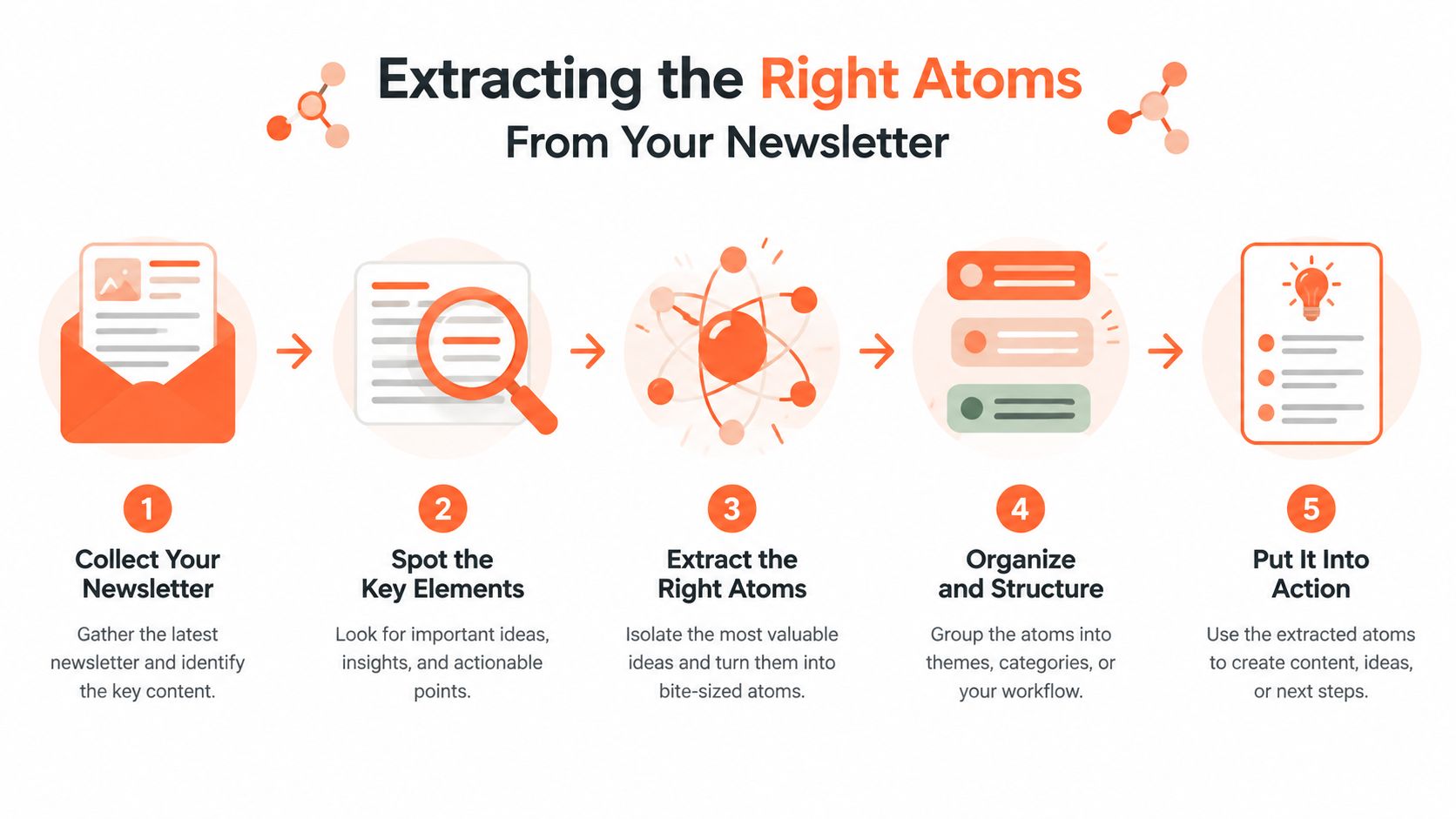
Strong repurposing starts before anyone writes a caption. Open the newsletter and break it into content atoms, small pieces that can stand alone without needing the entire article for context.
Begin with the central thesis. Write one sentence answering, “What should a reader remember after closing this issue?” If the answer needs several clauses, it isn't clear enough yet. This thesis becomes the anchor for the week, but it shouldn't automatically become every post's opening line.
Create an extraction sheet
Use a document, spreadsheet, or a visual workspace such as this visual workspace journal to collect the raw material. The exact tool matters less than making every candidate visible before you choose what to publish.
Pull the following from each issue:
- Three to seven teachable points. These become text posts, carousel slides, or short educational scripts.
- One to three concrete stories or examples. A client situation, internal mistake, process change, or observed pattern gives the idea a human setting.
- One to two data points. Keep the source and context attached. A number without interpretation rarely makes a useful post.
- At least one strong viewpoint. Look for a sentence that challenges an assumption or makes a clear prediction.
- One action a reader can take. This gives the audience a practical next step instead of another abstract lesson.
This extraction range comes from a practical newsletter repurposing playbook, which recommends pulling teachable points, stories, data points, and viewpoints before adapting the material. The workflow described there also allocates roughly 30 minutes to generation, editing, native formatting, and scheduling, with the largest share reserved for adding specifics and stronger hooks.
Label each atom by purpose
An extraction sheet becomes more useful when every item has two labels. First, mark its intent as educate, challenge, entertain, or convert. Second, mark its format potential, such as LinkedIn text, carousel, quote card, talking-head video, or discussion prompt.
A tutorial may yield the steps, a common mistake, and a quick-start action. A case study can separate the original problem, the intervention, and the outcome into three different teaching moments. For more examples of this approach, review newsletter repurpose examples.
Don't publish every candidate. Shortlist the pieces that can stand alone, offer a distinct angle, and fit a real audience need. The newsletter is the inventory. Editorial judgment decides what earns distribution.
Matching Each Idea to the Right Platform and Format
A newsletter atom becomes stronger when its format matches its natural behavior. A compact professional framework shouldn't be forced into a decorative graphic, while a visual before-and-after story may lose its impact as a dense LinkedIn paragraph.
Use a platform-to-purpose lens rather than asking which network should receive the entire newsletter. LinkedIn often suits professional frameworks, contrarian observations, and compact business examples. Instagram favors visual explanations, checklists, and saveable carousels. TikTok and Reels benefit from demonstrations, personal context, and quick transformations. YouTube Shorts can support a slightly more complete explanation, while Facebook often gives community questions and relatable stories room to develop.
| Platform | Best newsletter atoms | Strong format | Primary job |
|---|---|---|---|
| Frameworks, opinions, professional examples | Text-led post or carousel | Build authority and conversation | |
| Checklists, visual steps, before-and-after stories | Carousel or quote card | Earn saves and visual discovery | |
| TikTok | Demonstrations, mistakes, personal context | Short video | Create fast recognition and reach |
| YouTube Shorts | Processes, explanations, compact tutorials | Short video | Deliver a complete practical takeaway |
| Relatable stories, questions, community lessons | Discussion post or shared article | Encourage discussion and referral traffic |
Match the amount of information to the format
Use one sharp insight for a quote card. Use three to seven connected points for a carousel, with each slide doing one clear job. Use a demonstrated process for video, because showing the action usually carries more weight than reading a list aloud.
Don't copy the same caption across channels. Keep the underlying message, then change the opening, example, pacing, line breaks, and CTA. An Instagram carousel might ask people to save a checklist. A LinkedIn post might ask practitioners whether they've seen the same problem. A short video might invite viewers to follow for the next step.
For a useful comparison of video, UGC and carousel strategies, consider what the audience can understand natively before adding a link. Links often belong in the caption, profile, comments, or a landing-page path rather than inside the main visual.
Platform matching also limits fatigue. Your audience can encounter the same core idea several times without feeling chased if each version gives them a different entry point.
Writing Captions That Earn the Click and the Save
A platform-native caption has three working parts: a first line that earns attention, a body that fits the channel's reading rhythm, and a CTA that matches the post's purpose.
The first line shouldn't summarize the newsletter title. It should create a useful tension. “Your content calendar isn't empty because you need more ideas” is stronger than “Our latest newsletter is live” because it starts with a problem the reader may recognize.
Rewrite the same atom four ways
Assume the newsletter's core atom is: repurposing fails when teams repeat the same post everywhere.
Your newsletter shouldn't become six identical announcements.
Extract the argument, the example, and the practical step. Then give each one a different role across the week.
Which format creates the best conversations for your audience?
This version uses short paragraphs and a discussion CTA. It doesn't need a string of hashtags to explain the subject.
One newsletter. Several useful angles.
Turn the main idea into a checklist, the strongest opinion into a quote card, and the process into a carousel. Save this workflow for your next issue.
#ContentRepurposing #NewsletterMarketing #SocialMediaStrategy
The carousel earns the save, so the CTA should support that behavior. Hashtags can provide context, but they shouldn't replace a clear caption.
TikTok caption
Posting the same newsletter everywhere? Try this instead: extract one story, one opinion, and one action, then give each a different format.
The video carries the explanation. The caption only needs to reinforce the hook and clarify the premise.
YouTube Shorts description
A newsletter can supply several social posts without creating repetition. Start with the strongest hook, show the process, and change the CTA for each platform. Follow for practical content distribution workflows.
The description supports discovery and follow-through without reproducing the full newsletter.
For additional guidance on copywriting for social media, focus on clarity before cleverness. Automation tools such as Repurpose.ai or Lately can help produce rough drafts or identify recurring language, but manual editing remains necessary for founder voice, technical accuracy, sensitive subjects, and nuanced opinions.
Use this one-page checklist before publishing:
- Hook: Does the first line create a specific reason to continue?
- Context: Can someone understand the post without opening the newsletter?
- Format: Does the caption support the visual or video rather than duplicate it?
- CTA: Is there one action that fits the post's job?
- Accuracy: Have you checked names, figures, links, and qualifications?
- Voice: Would the intended author say this?
- Variation: Is this meaningfully different from the other adaptations?
Designing Carousels, Quote Cards, and Short Videos
Visuals carry the first load of a social post. They need to communicate the subject quickly, make the next step obvious, and remain recognizable when separated from the newsletter that inspired them.
A reusable visual system gives the team speed without making every asset look identical. Set a brand kit with your logo, typefaces, primary colors, two accent colors, and a restrained background treatment. Lock the type scale so a carousel headline, supporting text, and CTA remain consistent even when different people create the assets.
Three templates cover most newsletter atoms
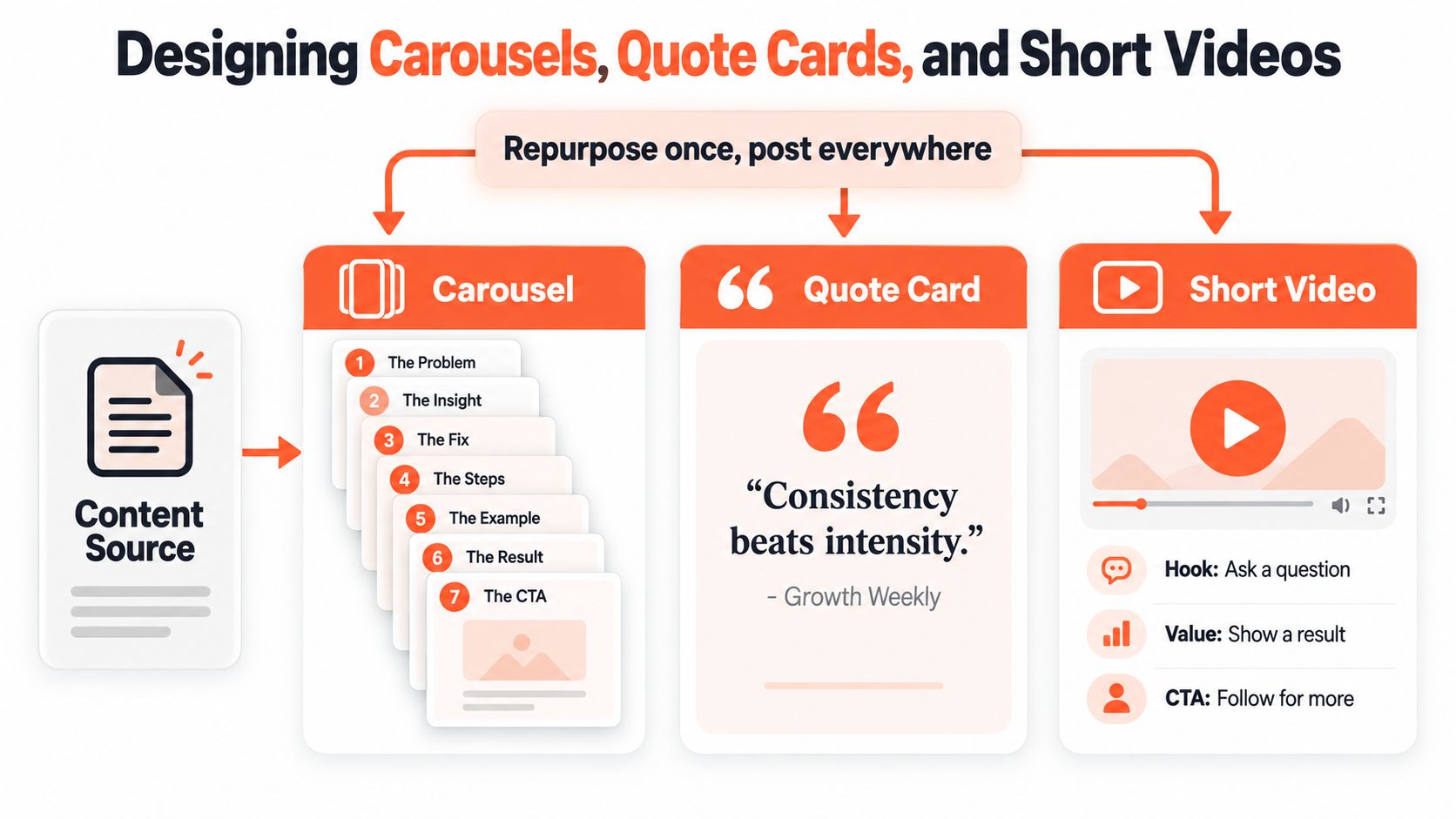
Carousel: Build a sequence around one framework. The opening slide names the problem, the next slide introduces the insight, the middle slides explain the steps, and the final slide gives the action or CTA. Keep one idea per slide and make the first slide understandable in isolation.
Quote card: Pull a sentence with a clear point of view. Remove surrounding explanation, but don't remove the qualification that keeps the statement accurate. A quote card should provoke interest, not misrepresent the newsletter.
Short video: Open with the strongest question or tension, show the process or example, and finish with one next step. Talking-head delivery works when personal context matters. Kinetic text or screen recording works when the workflow itself is the evidence.
Protect readability during production
Design in Canva, Figma, or Adobe Express using reusable templates. Keep important text away from the edges and from interface areas that may cover captions, buttons, or profile details. Check the exported asset on a phone before scheduling it, because a slide that looks balanced on a large monitor can become cramped on a feed.
A practical prompt for a design assistant is: “Turn this newsletter framework into a clean carousel. Use one short headline per slide, preserve the technical qualification, include a final action step, and leave safe margins for mobile viewing.” Give the same source atom to a quote-card template or short-video script, but change the requested structure.
Teams that publish regularly should document building scalable type guidelines, especially when several people touch the design process. For further carousel planning, see social media carousel guidance. Consistency should make production easier, not force every idea into the same visual shape.
Scheduling Without Cannibalizing Your Own Reach
The main scheduling trade-off is not volume versus silence. It's distribution versus fatigue. Releasing every adaptation on the same day may save administrative time, but it also compresses the audience's exposure and makes the posts compete with one another.
Staggered publication gives each angle a chance to find its natural audience. It also lets you observe which hook earns attention before deciding how aggressively to reuse the idea. Guidance on repurposing supports spacing content across days and formats rather than publishing every variant in the same form at once. The same guidance also notes that posting one to two times per week can perform meaningfully better than posting nothing, which favors a sustainable cadence over indiscriminate volume. Buffer's repurposing guide provides the background for this cadence approach.
A workable weekly rhythm
| Day | Platform | Format | Hook angle | CTA |
|---|---|---|---|---|
| Day 1 | Carousel | Explain the core framework | Save the framework | |
| Day 2 | Quote card | Challenge a common assumption | Share with a colleague | |
| Day 3 | YouTube Shorts | Short video | Demonstrate one step | Follow for more |
| Day 4 | TikTok | Repurposed clip | Show the mistake or tension | Comment with an experience |
| Day 5 | Text post | Introduce a new interpretation | Join the discussion | |
| Day 7 | Re-share or discussion post | Connect the idea to a community problem | Read or discuss |
This schedule isn't a rule that every brand must follow. It's a starting structure that separates formats and changes the audience's reason for paying attention. If the same followers see every channel, increase the space between closely related versions. If the audiences barely overlap, you can publish more closely, but you should still vary the creative.
Native schedulers can simplify channel-specific publishing. LinkedIn's scheduler suits direct professional posts, Meta Business Suite handles Facebook and Instagram workflows, and tools such as Buffer or Later help coordinate broader calendars. The distribution path also differs by platform. LinkedIn can support a direct article link in the post, while Instagram commonly relies on a profile link or a dedicated landing-page route.
Review the calendar before approval. Look for repeated openings, identical CTAs, same-day duplication, and visual assets that look interchangeable. If two posts have the same job, move one or rewrite it.
Measuring What Matters Across Channels
Raw likes are a weak operating system for newsletter distribution. A useful measurement routine asks whether the adaptation created value, conversation, intent, or a measurable path back to the newsletter.
Track engagement rate, reach or views, shares and saves, clicks, and conversions rather than treating likes as the final verdict. A benchmark synthesis on repurposed content identifies these metrics as the main evaluation set and reports that marketers repurposing across channels can see up to 300% more reach, while repurposing can save 60% to 80% of creation time. Those figures come from an industry synthesis, so use them as directional context rather than a promise for an individual account. Repurposed content statistics also stresses that adapted posts should be compared with platform averages, not automatically with the original newsletter.
Read metrics by audience behavior
- Saves and shares indicate that the audience considers the post useful enough to keep or pass along.
- Comment depth and quote-posts show whether the idea created a conversation rather than a passive reaction.
- Profile taps and link clicks signal intent, especially when the post's CTA points to a relevant next step.
- Newsletter signups show whether social discovery is contributing to owned-audience growth. Use UTM-tagged links and dedicated landing pages so assisted conversions don't disappear into general analytics.
Review performance at 48 hours, 7 days, and 30 days. The early window captures initial distribution, the weekly window shows whether the post sustained interest, and the monthly window helps compare formats after the feed has moved on.
Use a simple decision rubric
| Decision | Evidence to look for | Next action |
|---|---|---|
| Repurpose-worthy | Strong value signals, meaningful conversation, or clear intent | Adapt the atom into a new format |
| Iterate-worthy | Reach exists, but the hook, CTA, or format underperforms | Rewrite one variable and retest |
| Archive | Little value, conversation, or intent after review | Keep the lesson, retire the asset |
Don't invent universal save-rate, comment-ratio, view-through, or subscriber-conversion thresholds when account size, audience intent, and platform distribution vary widely. Set baselines from your own recent platform averages, then judge each newsletter-derived post against the relevant channel, not against a different network's norms.
Run a weekly Monday audit for individual posts, compare formats around the middle of the month, and review the channel mix at month end. The winning atom may not be the newsletter headline. It may be the surprising data point, the objection, the workflow step, or the opinion that initially seemed secondary.
WaveGen.ai turns a newsletter, article, podcast script, or transcript into platform-specific carousels, short videos, quote cards, captions, and scheduling assets, with brand kits for consistent colors, fonts, logos, and voice. If you want to build a spaced, varied newsletter social media post workflow without recreating every asset manually, visit WaveGen.ai and explore the available free trial.
newsletter social media post
content repurposing
social media workflow
newsletter marketing
social captions
Turn this kind of writing into a week of social content.
Paste a blog post, newsletter, or rough draft — WaveGen turns it into publish-ready carousels, captions, and slideshows for every channel.
No credit card · First posts in 2min