September 7, 2026
13 min read
Repurposing Content on LinkedIn: A Practical Guide
Learn the art of repurposing content on LinkedIn. This guide offers step-by-step tactics and templates for turning one blog post into a week of content.
You publish a detailed article, record a thoughtful podcast, or spend hours editing a useful video. It performs briefly, earns a few reactions, and then disappears beneath newer posts. The problem usually isn't the quality of the idea. It's that one asset was asked to do all the distribution work.
Repurposing content on LinkedIn gives strong ideas more opportunities to reach the right people, but only when you adapt the idea instead of duplicating the asset. A blog post can become a text argument, a document carousel, an image-led summary, and a short video, with each version built for the way LinkedIn users consume and respond to content.
Table of Contents
- Why Your Best Content Deserves a Second Life on LinkedIn
- The Repurposing Mindset Beyond Simple Reposting
- How to Mine Your Long-Form Content for LinkedIn Gold
- Matching Your Message to the Right LinkedIn Format
- Crafting High-Impact LinkedIn Posts From Your Source Material
- Building a Sustainable Repurposing Workflow
Why Your Best Content Deserves a Second Life on LinkedIn
A consultant publishes an article about onboarding. Inside it sit a central argument, a diagnostic checklist, a client objection, a process breakdown, and a lesson from implementation. The article may earn attention once, but publishing it as a single URL leaves those useful ideas tied to one format and one distribution moment.
LinkedIn gives each idea a different route to discovery. A reader might skip a link post but pause for a sharp opinion in the feed. Another may save a step-by-step document for a problem they expect to face later. A short video can make a complex point feel personal, while an image can give one principle enough visual weight to stand out.
The format should follow the idea and the intended response. Use the consultant's objection as a text post that invites practitioners to disagree. Turn the process breakdown into a document people can save. Rebuild the implementation lesson as a short video with one concrete example. The source stays the same, but the angle, structure, and interaction change.
Repurposing is therefore a distribution decision, not a shortcut around original work. Each version needs enough rewriting to offer a distinct reason to stop, read, save, or respond. Near-duplicate posts can make an idea feel repetitive, while a properly adapted version gives it a fresh entry point.
Distribution matters as much as creation
LinkedIn's public engagement benchmark for 2026 is 5.20%, an 8% year-over-year increase, with engagement rising across videos, images, and text posts, according to LinkedIn's 2026 organic reach benchmark. The useful takeaway is not that every format performs equally. Format variation gives each idea more chances to match how people consume content in the feed.
Organic visibility is becoming more selective. A global analysis of 673,658 posts from 63,108 accounts found that company-page impressions per post fell 10% between January–February 2025 and the same period in 2026, while clicks rose 5% and engagement rate rose 14%, as reported in LinkedIn organic reach research. Fewer people may see a post, but a better-matched format can prompt stronger action from those who do.
Practical rule: Treat your best source assets as idea libraries, not finished LinkedIn posts.
A workable system protects the effort behind every article, podcast, or video. Find the next useful angle, choose the format that supports it, then rewrite the asset so the LinkedIn version earns attention on its own.
The Repurposing Mindset Beyond Simple Reposting
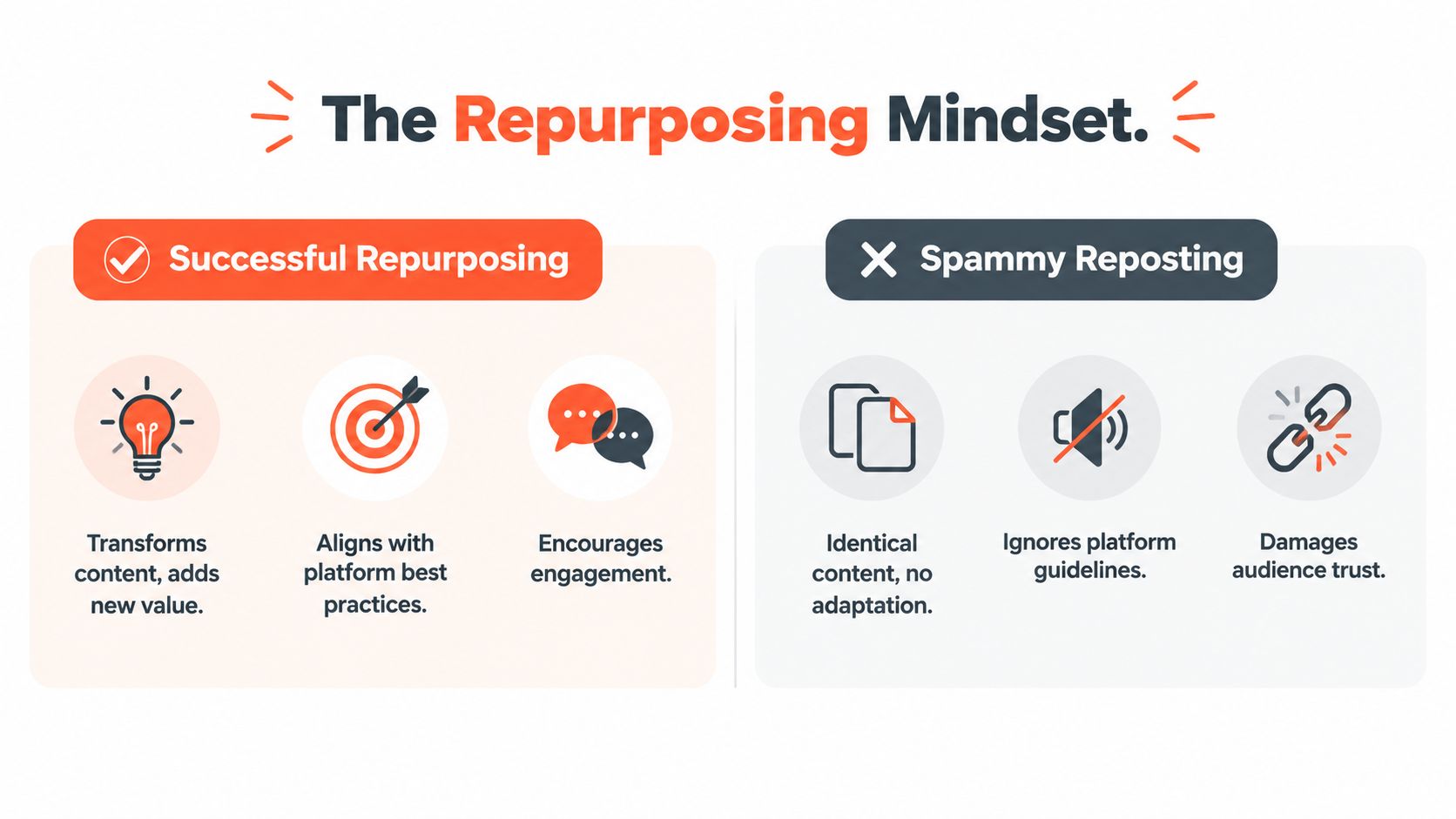
Reposting takes an existing asset and places it somewhere else with little or no meaningful change. Repurposing preserves the underlying insight while changing the structure, emphasis, format, and interaction designed for the new audience.
LinkedIn's own marketing guidance separates content reuse into eight methods, including revitalize, reposition, repackage, reformat, reframing, refresh, remix, and reposting as-is after three months, as outlined in its content repurposing guidance for marketers. That vocabulary matters because “turn the blog into a carousel” is only one possible move. You might instead update an old argument, challenge your original conclusion, combine two related posts, or turn a broad article into a focused question.
Choose the reuse mode before the format
Start with the audience and the job the post must perform.
- Revitalize: Use an older idea when its core lesson remains useful, but replace dated examples, language, or evidence.
- Reframe: Keep the subject while changing the argument. A tutorial about reducing meetings might become a post about the cost of unclear ownership.
- Repackage: Preserve the insight but turn a checklist into a document, a narrative into a video, or a set of principles into an image series.
- Remix: Combine related source material into a stronger point, such as merging several small observations into one operating framework.
The same source asset can support several of these modes, but each LinkedIn version should have one clear purpose. A post that tries to summarize an entire article usually feels like an incomplete article. A post that extracts one decision, tension, or practical lesson gives readers something they can understand and discuss in the feed.
The best transformations add value for the person who never sees the original source. Resources on transforming content into new formats can help teams think beyond simple extraction and design each version around its native medium.
Reuse the idea. Rebuild the experience.
How to Mine Your Long-Form Content for LinkedIn Gold
Open the source asset without trying to write the LinkedIn post immediately. First, create a mining document with a row for each useful fragment. Your job is to separate the raw material from the final packaging.
Read an article once for the argument, then again with a highlighter or notes tool. For a podcast or video, review the transcript and mark moments where the speaker explains, disagrees, surprises, demonstrates, or answers a real objection. If your source is a YouTube video, a workflow that helps you create a podcast from YouTube can also expose spoken insights that are easy to miss when you only think in terms of video.
Build a snippet bank
Sort the material into distinct categories:
The core claim. Write the source's main argument in one sentence, then write the consequence for the audience. “A larger content team won't fix unclear positioning” is more useful than “content strategy overview.”
The practical sequence. Pull out a process someone could follow. A section about editorial reviews might yield a post built around “before publishing, check the promise, proof, and next action.”
The tension or objection. Find the point where the source challenges a common assumption. This is often stronger than a neutral summary because it gives the reader something to evaluate.
The example. Extract an anecdote, scenario, or before-and-after explanation. Remove unnecessary setup and preserve the decision or lesson that makes the example useful.
The question. Note every question the source answers, including questions implied by headings. Each one can become a discussion prompt, a poll, or the opening of a text post.
A source article might therefore produce a contrarian thesis, a short checklist, a document sequence, and a question for practitioners. Store the exact source passage beside your rewritten angle, but don't publish the passage unchanged.
For additional ideas on turning one asset into several social outputs, use this collection of repurposing examples as a prompt library. The point isn't to copy the examples. It's to train yourself to spot multiple content jobs inside one finished piece.
Score each fragment
Give every snippet a quick editorial assessment:
- Relevance: Does it address a current audience problem?
- Specificity: Can a reader apply it without guessing what you mean?
- Conversation potential: Does it invite a useful disagreement or response?
- Format potential: Would the idea become clearer as text, slides, an image, or video?
Keep the fragments that score strongly on at least two dimensions. Drop generic introductions, repeated background, and points that need the full source to make sense. Your bank should contain usable ideas, not a transcript archive.
Matching Your Message to the Right LinkedIn Format
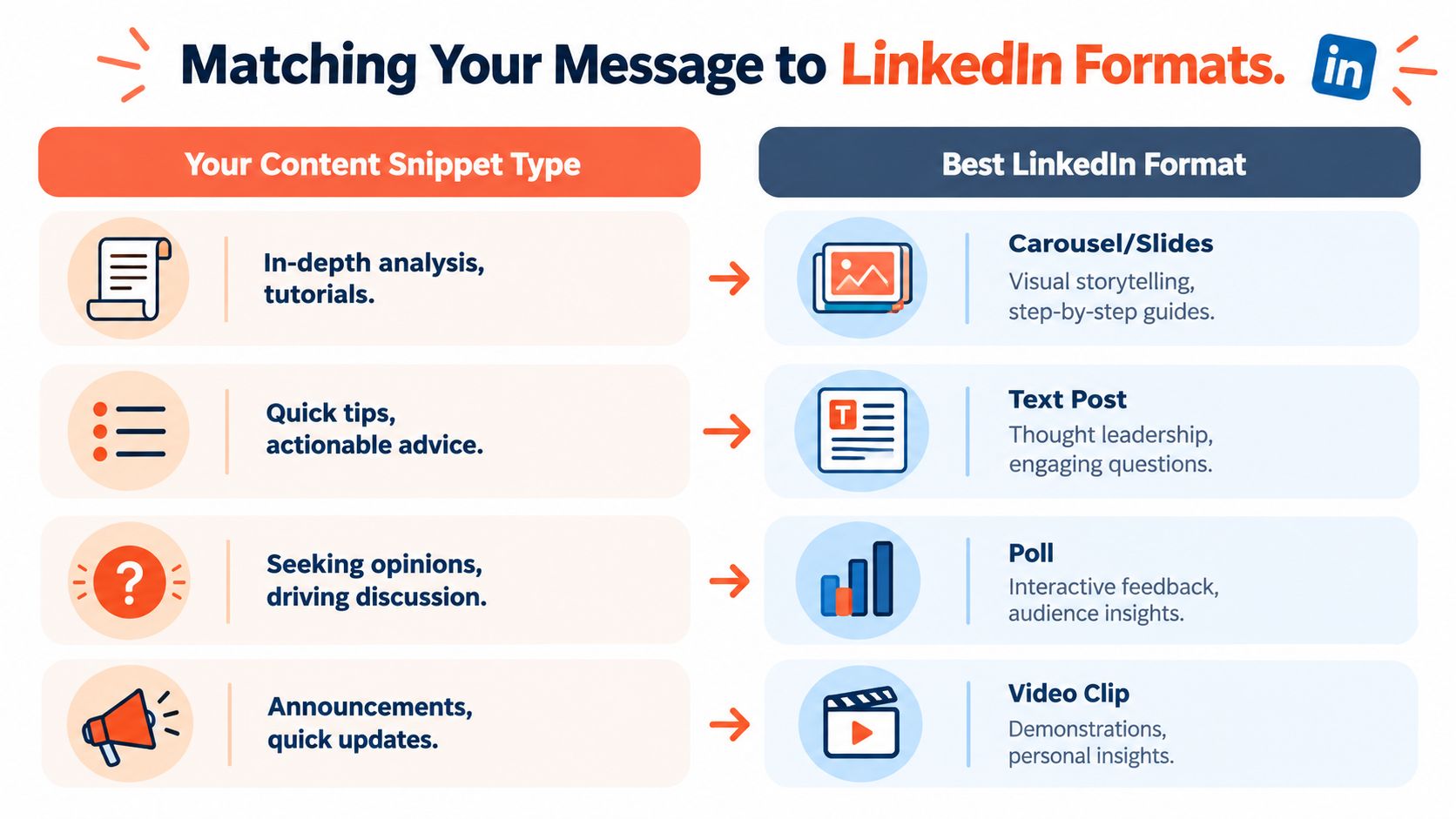
Format selection should follow the shape of the idea. Don't begin with “I need a carousel this week.” Begin with “What does this idea ask the reader to do?”
A detailed process benefits from sequencing. A sharp opinion needs room for context and disagreement. A single comparison may need visual contrast. A personal observation may work best when the audience can hear or see the person making it.
Use the idea's natural shape
| Source snippet | Strong starting format | Why it fits |
|---|---|---|
| A step-by-step process | Document or carousel | Each stage can receive its own visual space |
| A contrarian argument | Text post | The feed format supports context and discussion |
| A single comparison or principle | Image post | The reader can grasp the point quickly |
| A demonstration or personal explanation | Short video | Voice, expression, and movement add meaning |
| A question with several plausible answers | Poll or text question | The format makes participation the central action |
Native document posts deserve particular attention. One 2026 multi-format analysis reported a 1.39x reach multiplier and a 1.30x engagement multiplier for document posts versus the average post. Image posts also performed well at 1.20x reach and 1.33x engagement, while text-only posts recorded 1.07x reach and 0.78x engagement, and reshares recorded 0.29x reach and 0.22x engagement, according to LinkedIn format performance analysis. These results don't make carousels universally correct. They show why a transformed, native document often gives a structured idea a stronger starting point than a copied paragraph or simple reshare.
Make a decision in under a minute
Ask four questions:
- Does the idea require sequence? Choose a document.
- Does it depend on voice or demonstration? Choose video.
- Can one visual communicate the entire point? Choose an image.
- Is the value in the argument and response? Choose text.
If two formats fit, choose the one that creates the clearest interaction. A tutorial can become a carousel, but a mistake hidden inside the tutorial may become a stronger text post because readers can compare it with their own experience.
For more prompts when the source material feels too broad, browse this LinkedIn post idea resource. Use it to narrow the angle, not to replace your own expertise.
Crafting High-Impact LinkedIn Posts From Your Source Material
A strong repurposed post doesn't read like a compressed article. It starts with one promise, delivers one useful idea, and closes with an interaction that feels natural.
Write the hook first. Keep it under 60 characters, a recommendation included in a six-month LinkedIn engagement playbook on post formatting and engagement. The opening should identify a tension, expose a mistake, or promise a clear shift.
Try these structures:
- Contrarian: “More content won't fix weak positioning.”
- Diagnostic: “Your carousel may be hiding the best point.”
- Outcome-led: “Turn one tutorial into a usable checklist.”
- Experience-led: “The review step commonly neglected.”
Write for scanning
Short paragraphs and deliberate line breaks make a text post easier to process in a fast-moving feed. The same playbook found that posts with heavy line breaks and short paragraphs generated 4.6x more engagement than walls of text, while a direct question at the end increased engagement by 26% and nearly doubled comments, according to the linked engagement research.
Use a simple structure:
- Hook.
- Problem or tension.
- One explanation.
- Three practical observations.
- Direct question.
Don't paste the article's introduction, preserve every qualification, or add several unrelated conclusions. A post about content review should finish with a question such as, “Which part of your publishing process catches the most avoidable mistakes?” It shouldn't end by asking readers to comment, share, book a call, and visit three links.
Outbound links deserve restraint. The same source recommends placing links in comments rather than the body when a link is necessary, so the post can keep attention on the native idea.
Rebuild the carousel
A document carousel needs a visual argument, not a collection of screenshots. Give the first slide one promise, use the middle slides to advance the logic, and reserve the final slide for a practical next step or focused question.
A useful sequence looks like this:
- Slide one states the problem.
- The next slides show the flawed approach and its consequence.
- The central slides present the improved process.
- The final slide gives the reader a decision or action.
Rewriting matters across every format. One practitioner guide claims that format change alone may be insufficient when wording remains heavily similar, and recommends combining substantial lexical changes with structural transformation. Treat that as a practical warning rather than a guaranteed algorithmic threshold. LinkedIn's guidance favors adaptation and enrichment, so change the point of view, order, examples, sentence rhythm, and call to action instead of swapping a few words.
A blog paragraph may explain why content calendars fail. The LinkedIn text version could open with the manager's mistake, use three short observations, and ask readers how they decide what to publish. The carousel could turn the same insight into a diagnostic sequence. Same source, different experience.
Building a Sustainable Repurposing Workflow
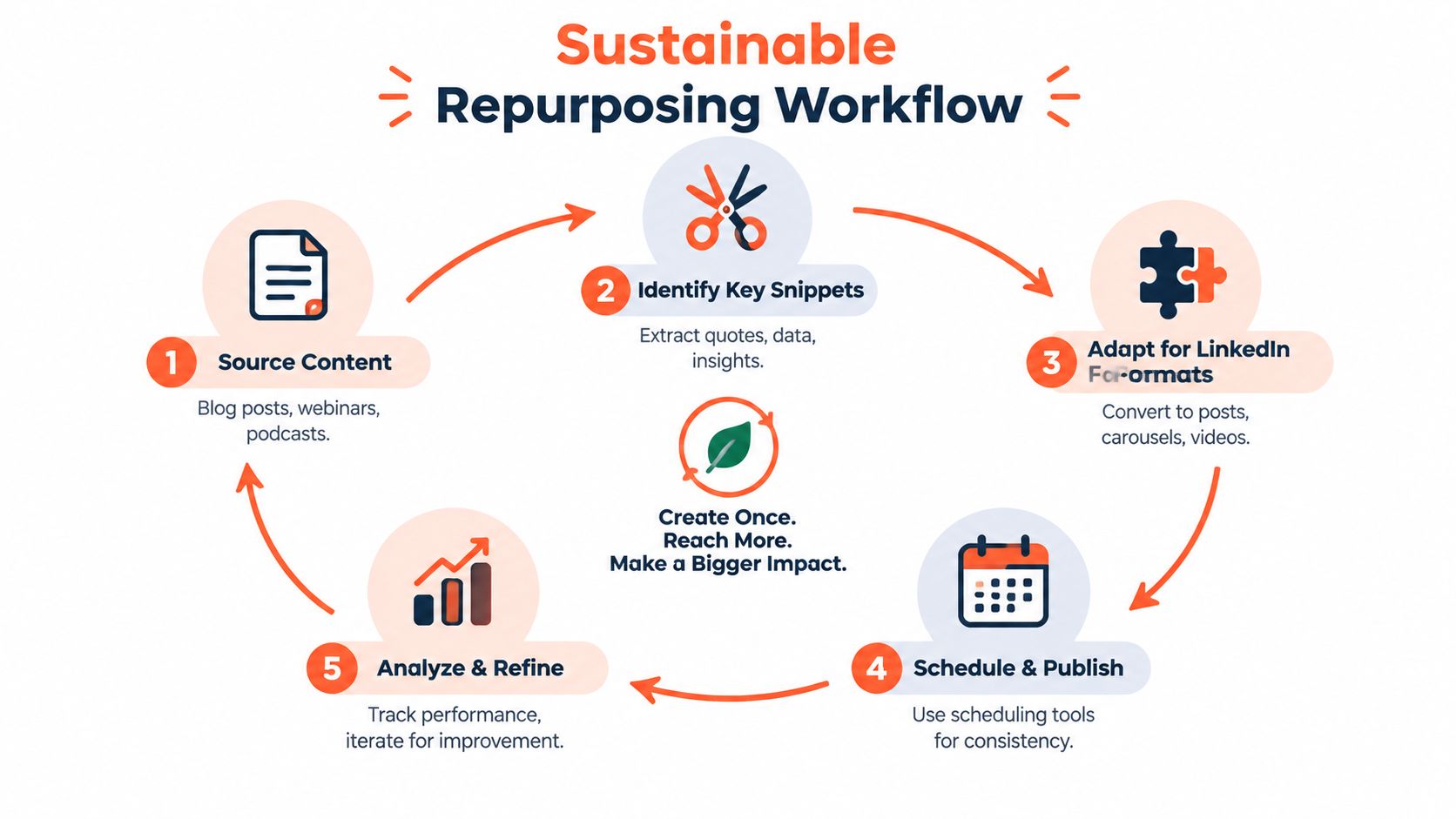
A sustainable workflow separates research, production, publishing, and review. If one person handles all four tasks in one sitting, repurposing feels like endless content creation. Separate work blocks turn it into planned distribution.
Use a repeatable production loop
Start with one source asset and give each block a focused job:
- Mine the source: Record claims, examples, objections, processes, and audience questions in a shared document.
- Choose the angles: Match each idea to an audience problem and a suitable LinkedIn format.
- Create in batches: Draft text posts together, then build documents, images, or video cuts from the approved angles.
- Review for transformation: Check that every version has its own hook, structure, example, and call to action. Rewrite the wording and sequence substantially so the posts do not read like near-duplicates.
- Schedule and learn: Publish consistently, capture meaningful responses, and use the findings to shape the next batch.
A content calendar should record the source asset, reuse mode, format, audience problem, publication date, and status. This makes repetition visible before publication. It also helps a team avoid three posts built around the same thesis, order, and wording.
A blog paragraph explaining why content calendars fail might become a LinkedIn post about a manager's publishing mistake, a carousel that diagnoses the failure step by step, or a short video showing the corrected process. The source stays consistent, while the reader's experience changes. For additional workflow ideas, use this guide to turning a blog into social media posts.
Tools can reduce production friction, but automation does not replace editorial judgment. WaveGen.ai can turn a blog, newsletter, article, podcast script, or YouTube transcript into LinkedIn carousels, short videos, quote cards, and formatted captions. Brand kits and scheduling tools help organize the output. The final review should remain with someone who understands the audience, the claim, and the reason for repurposing it.
Measure each post against its intended job. Track engagement rate, clicks, comments, saves when available, and the quality of replies. Compare similar ideas across formats rather than treating every post as an isolated verdict. A post designed to start discussion should not be judged by the same standard as one designed to drive clicks.
Start with one strong article, mine several distinct angles, and review the results before expanding the system. Increase publishing capacity only after the workflow produces clear variations without lowering editorial quality.
WaveGen.ai turns one article, newsletter, podcast script, or YouTube transcript into on-brand LinkedIn posts, PDF carousels, short videos, quote cards, and captions, with brand kits, editing, scheduling, and publishing built into the workflow. Visit WaveGen.ai to repurpose your next source asset and build a more consistent LinkedIn distribution system.
repurposing content on linkedin
linkedin content strategy
content repurposing
linkedin marketing
social media content
Turn this kind of writing into a week of social content.
Paste a blog post, newsletter, or rough draft — WaveGen turns it into publish-ready carousels, captions, and slideshows for every channel.
No credit card · First posts in 2min