August 20, 2026
11 min read
Repurpose a Newsletter Into Social Posts: 4 Steps
Turn one newsletter into a week of on-brand social media posts with a four-step workflow for creation, review, scheduling, and automation.
If you already publish a newsletter, you probably have enough original material to stay active on social media all week. The problem is rarely a shortage of ideas. It is the extra work of extracting those ideas, rewriting them for each platform, designing the visuals, and scheduling every post.
The short answer: To repurpose a newsletter into social media posts, treat the newsletter as source material rather than a finished social post. Extract several standalone ideas, adapt each one to a platform-native format, apply your brand, review the drafts, and schedule them across the week. A repeatable workflow lets you do this without starting from scratch every day.
This guide walks through that workflow using a real example from PetroPeak Investments, an investment fund that publishes a biweekly newsletter called The Mineral Edge. If you want to try it as you read, open WaveGen's newsletter-to-social-posts tool.
Watch the full six-minute newsletter repurposing tutorial on YouTube.
What is newsletter content repurposing?
Newsletter content repurposing is the process of turning ideas from one newsletter issue into new formats for other channels. Instead of copying and pasting the entire email, you select the strongest claims, lessons, statistics, stories, and quotes, then reshape each one for the way people consume content on a specific platform.
One issue might become:
- A LinkedIn insight post built around one clear argument
- An Instagram or LinkedIn carousel that teaches a process
- A quote card featuring a memorable line
- A short, captioned slideshow for TikTok or YouTube
- A Facebook post that invites discussion
- A Pinterest image or carousel that links back to the source
Repurposing is different from cross-posting. Cross-posting publishes essentially the same asset everywhere. Repurposing preserves the underlying idea while changing the hook, length, format, and call to action for each channel.
Why use your newsletter as the source?
A good newsletter already contains the hardest parts of content creation: your expertise, point of view, examples, and supporting evidence. By the time you send it, you have already decided what matters and how to explain it.
Separating newsletter writing and social media into two unrelated jobs throws away that work. A content repurposing workflow gives each original idea more opportunities to reach people while keeping the newsletter as the source of truth.
It also makes review easier. You are not fact-checking a completely new batch of ideas every week. You are approving new presentations of material you have already written.
The four-step newsletter content repurposing workflow
The full process is:
- Set up your brand kit once.
- Generate several posts from one newsletter issue.
- Review, adapt, and schedule each post.
- Monitor your newsletter so the workflow repeats automatically.
Step 1: Set up your brand kit
Start by defining the elements that should remain consistent across every post:
- Logo
- Brand colors
- Fonts
- Visual references and reusable assets
- Brand voice
In WaveGen, you can create this brand kit manually or enter your website URL so the system can draft one from the site. Review what it extracts before saving it. A brand kit is a reusable set of instructions, not a substitute for judgment.
This is a one-time setup. Once the kit is ready, it can be applied when each new post is generated, so you do not need to restyle every carousel or quote card by hand.
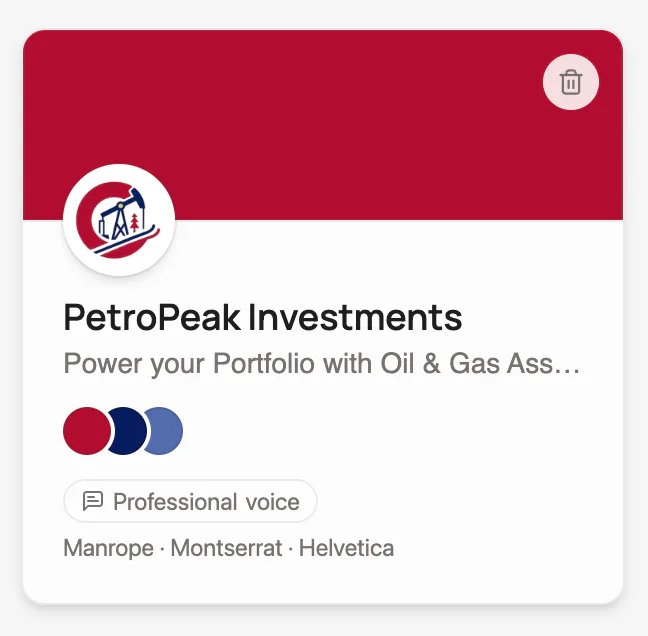
A saved brand kit gives every future draft the same visual and editorial starting point.
Step 2: Generate posts from the newsletter
Next, add the newsletter issue. For a public newsletter, you can use its URL. For a draft, private issue, or email without a public archive, paste the text directly.
The goal is not to produce one generic summary. It is to find several independent reasons to stop scrolling. Useful source elements include:
- A surprising statistic
- A counterintuitive claim
- A practical framework
- A strong quotation
- A before-and-after story
- A common mistake and its fix
- A prediction or opinion worth discussing
The newsletter should also supply more than words. If an issue already contains photographs, charts, diagrams, or infographics, WaveGen automatically extracts those assets and matches relevant images to the post ideas it generates. This preserves the context of the original content and removes much of the work of downloading files, organizing them, uploading them again, and deciding which visual belongs with each post.
WaveGen prioritizes relevant source images where they fit. When a post needs a new visual, the saved brand kit guides its style so the output still feels connected to the original issue.
The source issue shown below is the example used in the video. It contains both original analysis and visual assets that can be reused in the generated social posts:
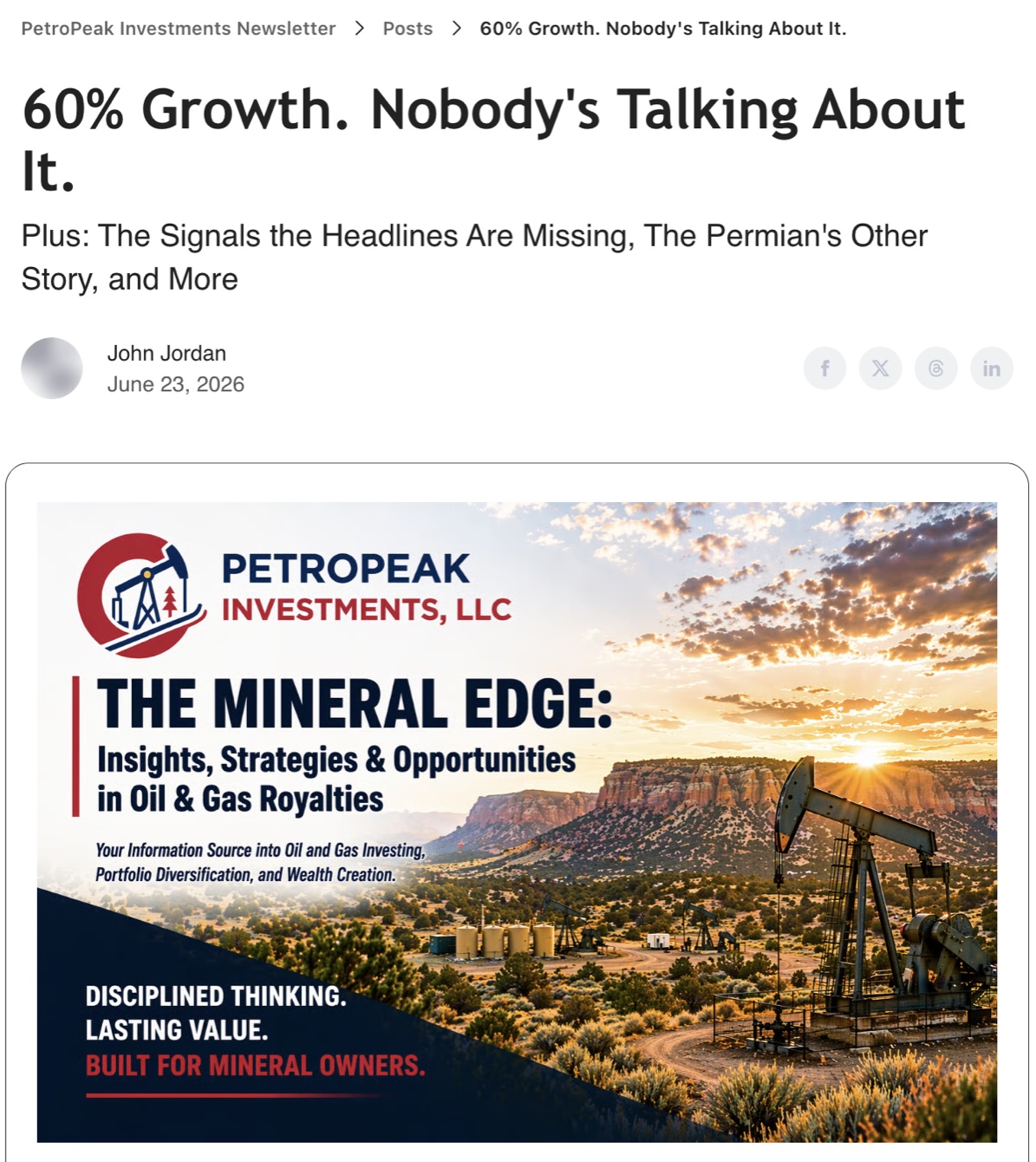
Example source: an edition of The Mineral Edge with text and visual assets available for extraction and reuse.
When reviewing generated ideas, ask one question: Would this post still be useful if someone never clicked through to the full newsletter? A strong social post delivers one complete takeaway while giving interested readers a reason to explore the source.
Step 3: Review, adapt, and schedule
WaveGen presents the generated ideas as individual drafts, making it easier to compare angles and choose what deserves a place on the calendar.
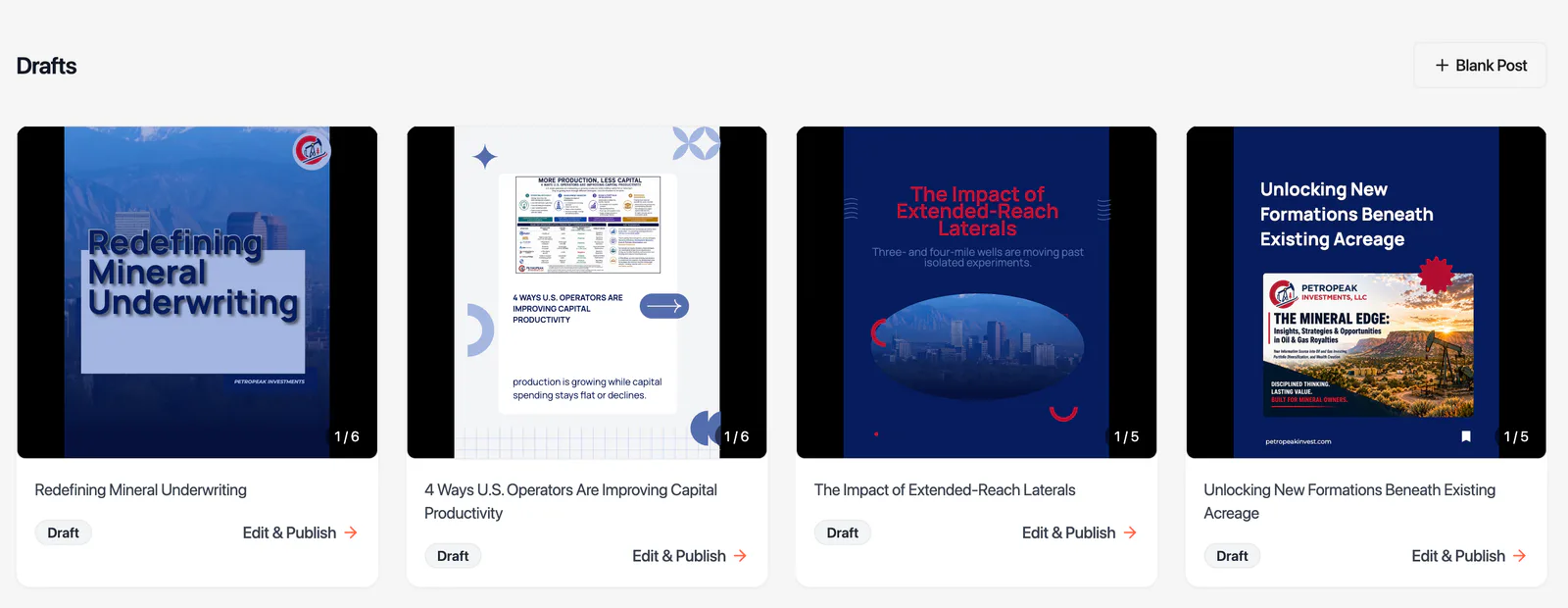
One newsletter issue becomes several distinct, editable post drafts.
AI should create the first draft, not make the final editorial decision. Review every post for:
- Accuracy: Does it preserve the meaning and context of the newsletter?
- Hook: Does the opening earn attention without exaggerating the claim?
- Focus: Does the post communicate one main idea?
- Readability: Is the text easy to scan on a phone?
- Brand fit: Do the language and visuals feel like your business?
- Call to action: Is the next step clear and appropriate for the platform?
Everything in a WaveGen draft can be reviewed and edited before publishing. You can correct overlapping text, rewrite a caption, swap an image, or adjust a slide in the drag-and-drop editor.
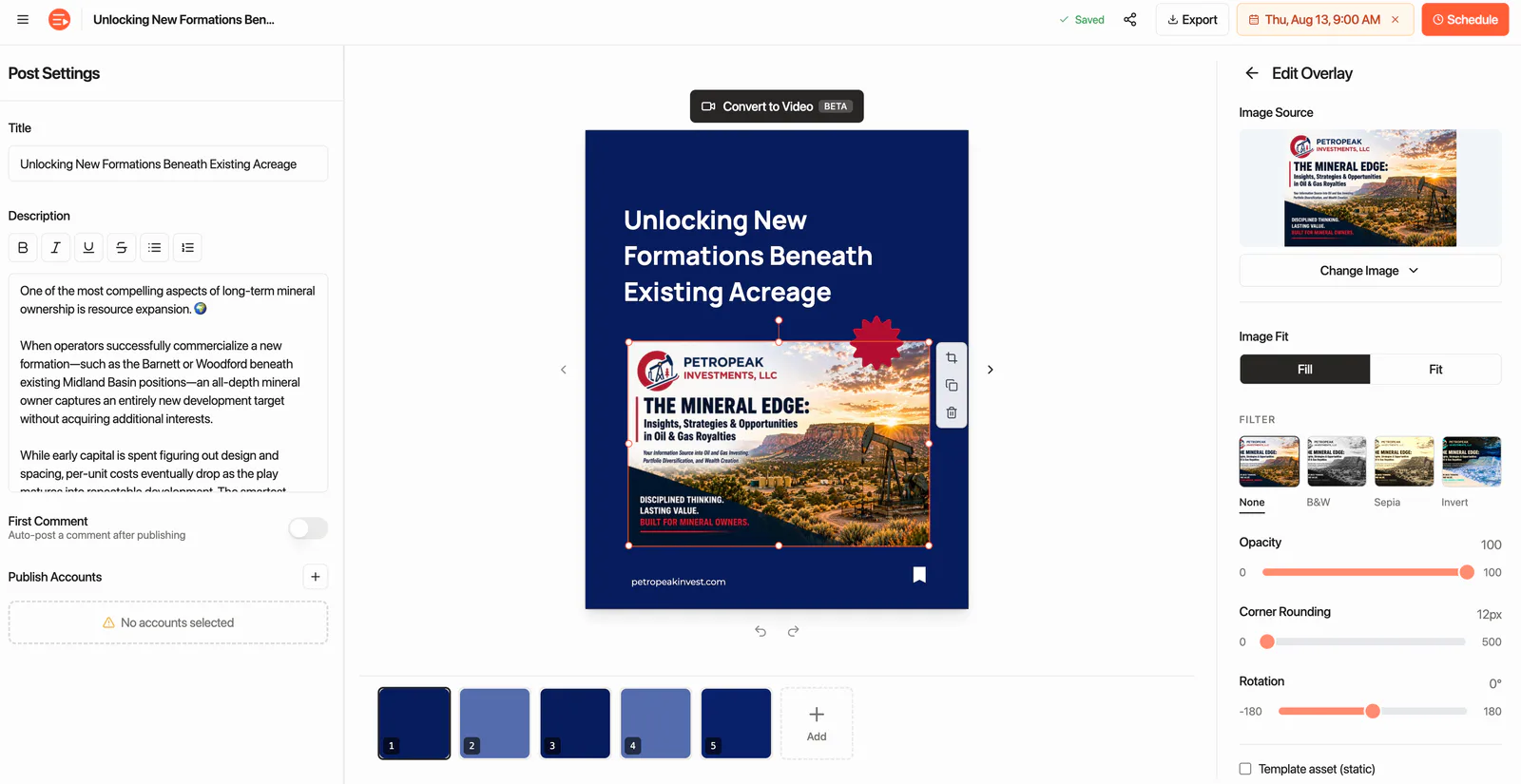
The extracted newsletter image remains editable inside the post rather than becoming a locked template.
The same idea may also need a different output format by platform. A carousel can remain a set of images or a document where that format is supported. For a video-first destination such as YouTube, WaveGen can turn the slides into an animated, captioned slideshow.
Once the posts are ready, spread them across the next week rather than publishing every angle at once. Here is a simple example:
| Day | Content angle | Possible format |
|---|---|---|
| Monday | The issue's central argument | Text or single-image post |
| Tuesday | One useful statistic | Quote or data card |
| Wednesday | A step-by-step lesson | Carousel |
| Thursday | A common mistake | Short slideshow video |
| Friday | A founder opinion or prediction | Discussion post |
| Weekend | An evergreen idea from the archive | Carousel or image post |
This is a starting point, not a quota. Publish only the angles that add something useful.
Step 4: Put the workflow on Autopilot
The first three steps turn one issue into a week of posts. The fourth removes the need to remember to repeat the process.
Add the newsletter as a monitored source in WaveGen Autopilot. When a new issue appears, WaveGen can detect it and propose new social post ideas. On days without a new issue, you can configure the system to revisit suitable evergreen content from the archive.
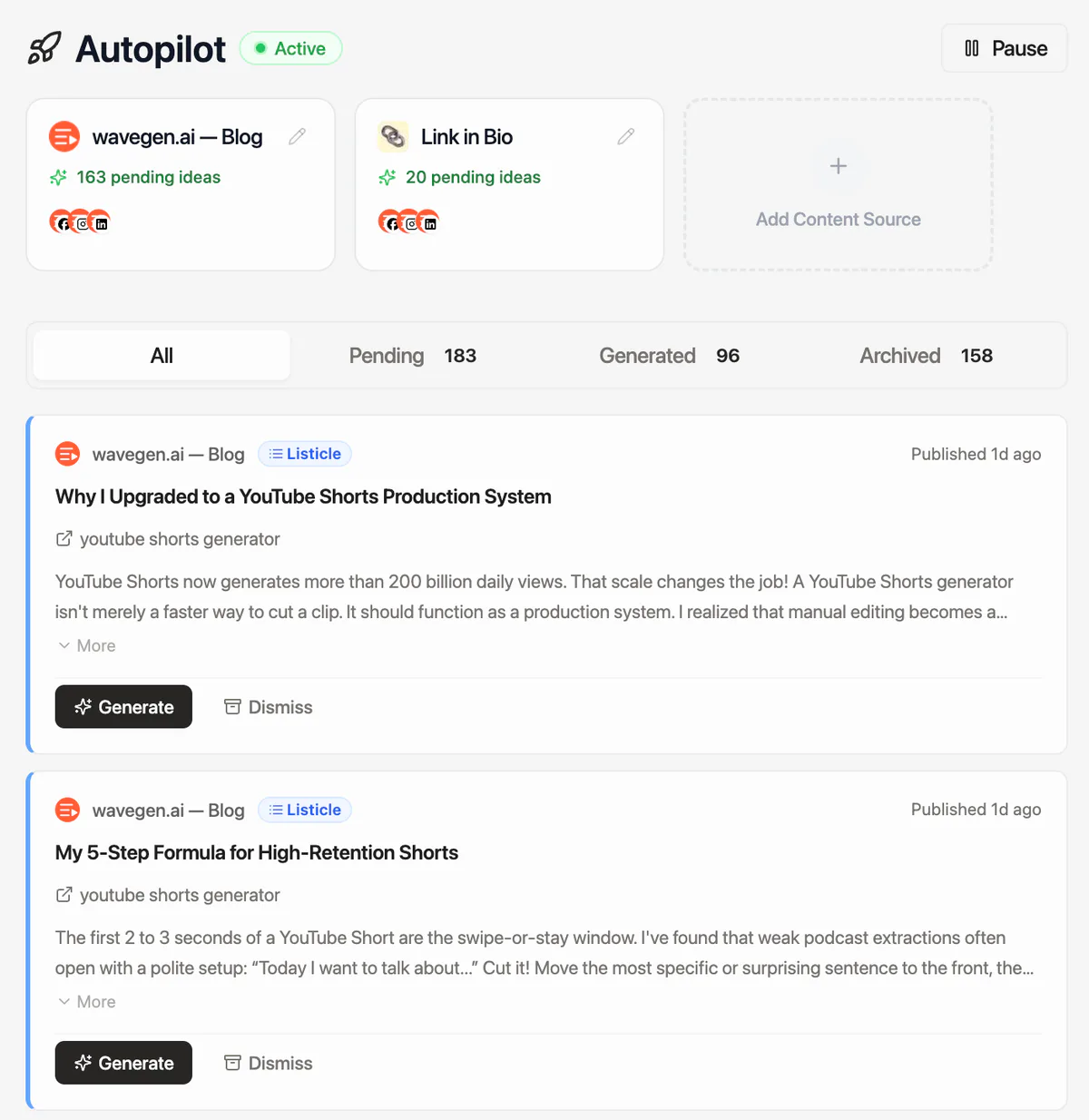
Autopilot monitors connected sources and keeps new ideas ready for review.
The review step remains important. WaveGen can email a weekly list of proposed ideas so you can approve the ones worth publishing and skip the rest. Automation should remove repetitive production work while keeping you in control of what represents the brand.
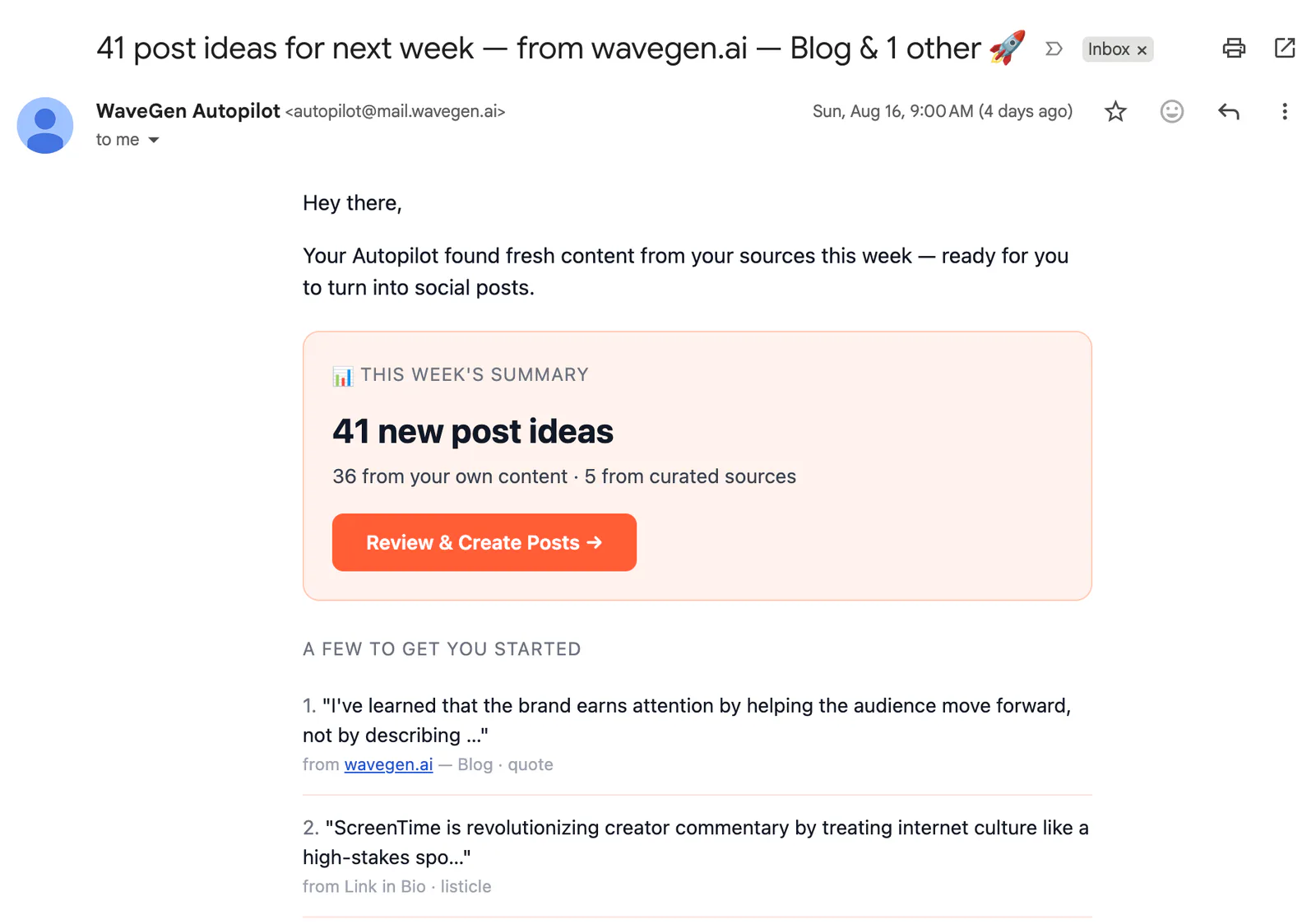
The weekly email brings the review queue to you; nothing needs to be accepted just because it was suggested.
A real example: PetroPeak's newsletter became its social media engine
PetroPeak Investments is an investment fund specializing in mineral and royalty interests. Before this workflow, it worked with an agency to create four short-form videos per month. The process cost more than $2,000 per month and required over 10 hours of founder John Jordan's time for scripts, filming, coordination, and review.
PetroPeak was already publishing original analysis every two weeks in The Mineral Edge. That newsletter became the source for a new system:
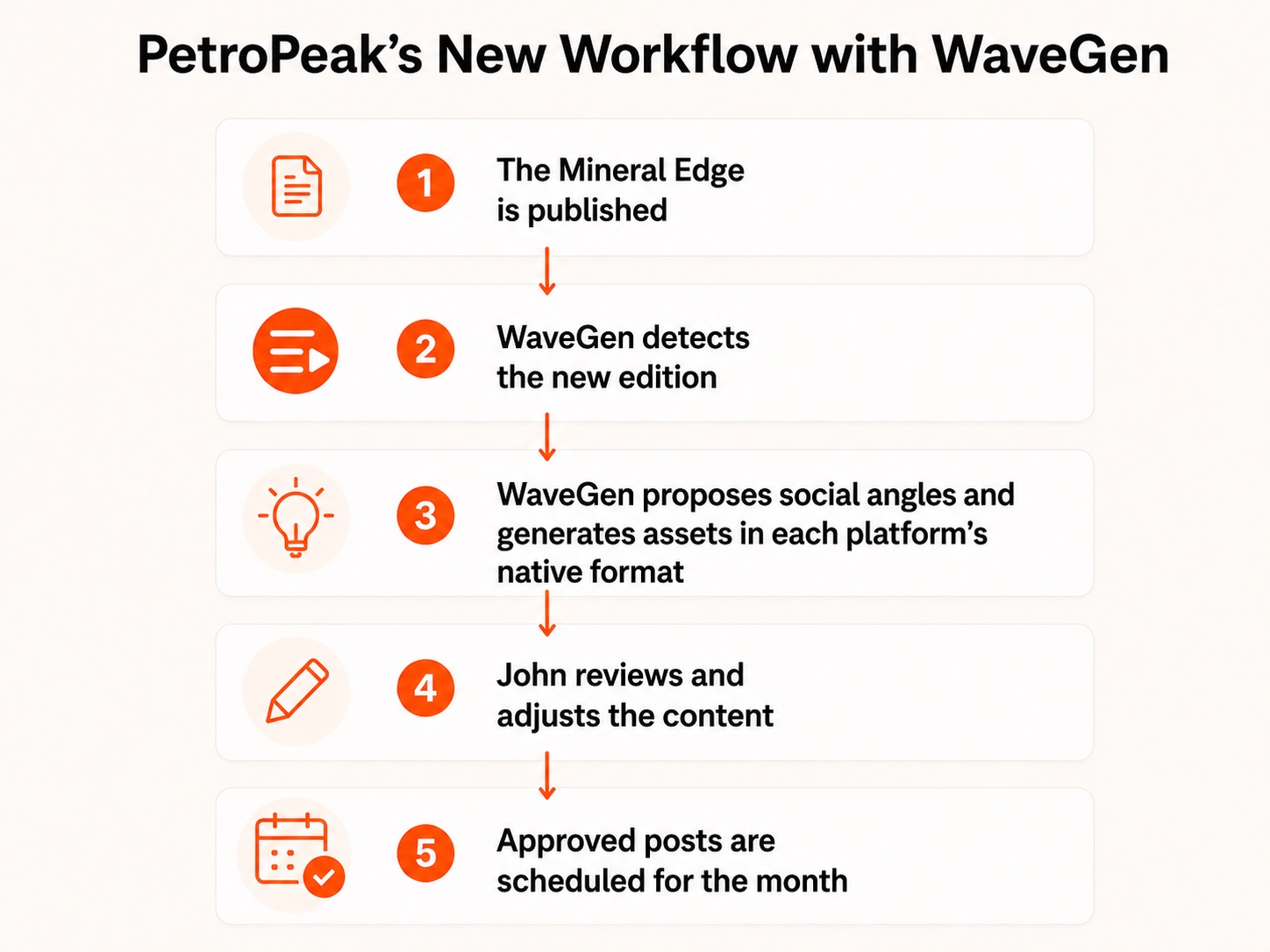
With WaveGen, PetroPeak moved from four agency-produced videos per month to a daily publishing cadence across LinkedIn, Instagram, Facebook, TikTok, and YouTube. John now spends about one to two hours per month reviewing and scheduling the content, rather than writing and filming a separate set of social scripts.
The important change was not simply “more AI content.” PetroPeak connected two activities that had been running separately. The newsletter remained the place where the original thinking happened; social media became its distribution system.
Read the complete PetroPeak case study, including the before-and-after workflow and example posts.
How to keep repurposed posts from feeling repetitive
The fastest way to make repurposing feel stale is to publish the same summary on every platform. Use these rules instead.
Give each post one job
One post might teach. Another might challenge an assumption. A third might show evidence or invite a response. Different jobs create variety even when the posts share one source.
Change the angle, not just the dimensions
Cropping the same graphic into six aspect ratios is formatting, not meaningful repurposing. Rework the hook, depth, pacing, and call to action for the audience and behavior of each platform.
Reuse source visuals when they add evidence
Charts, screenshots, diagrams, and photographs from the newsletter can carry context into the social post. Reusing them also makes the connection to the original issue more recognizable.
Keep a human approval step
Brand voice is more than a list of adjectives. It includes what you choose to say, which claims you avoid, and how much context your audience needs. A short review protects those decisions.
Send interested readers back to the source
The social post should stand on its own, but it can still point to the full edition for the deeper analysis. Use a relevant link or first comment where supported, and add campaign parameters if you want to measure which posts attract readers or subscribers.
What should a newsletter repurposing tool do?
At minimum, a useful tool should help you:
- Import a public newsletter URL or pasted text.
- Extract multiple ideas rather than produce one summary.
- Create both written and visual formats.
- Apply a reusable brand kit during generation.
- Let you edit every draft before publishing.
- Adapt output for different platforms.
- Schedule approved posts.
- Monitor the source for new issues.
Some tools focus only on writing captions, while others begin after the creative is already finished and handle scheduling. Choose based on the bottleneck you actually have. WaveGen combines extraction, visual generation, editing, scheduling, and source monitoring in one workflow.
Frequently asked questions
How many social media posts can one newsletter create?
A focused 800-to-1,500-word newsletter will often contain three to six useful social post ideas. Those ideas can produce more platform-specific versions, but quality matters more than reaching an arbitrary number. Each post should make one distinct point.
Do I need to rewrite the newsletter for every social platform?
You do not need to start over, but you should adapt the material. Keep the source idea and change the hook, length, visual format, pacing, and call to action to fit the platform.
How do I turn a newsletter into a carousel?
Choose one idea with a clear sequence, such as a framework, list, process, or before-and-after story. Give each slide one job, keep the copy concise, and reuse relevant charts or images from the issue. For a dedicated workflow, use WaveGen's newsletter-to-carousel generator.
Can I repurpose a Substack, Beehiiv, Mailchimp, or Kit newsletter?
Yes. WaveGen can repurpose a public newsletter issue into captions, carousels, images, and short slideshow videos. If the issue has a public archive URL, add that URL directly; otherwise, paste the newsletter text. Autopilot can monitor a public source for new issues and prepare ideas for review.
Can I repurpose old newsletter issues?
Yes. Evergreen frameworks, explanations, customer stories, and lessons can be reused when they are still accurate. Update dated examples or statistics before publishing and avoid repeating the same angle too frequently.
Will AI content repurposing make every post sound generic?
It can if the system starts from a generic prompt and publishes without review. Starting from your own newsletter preserves your ideas and examples. A brand kit and a human approval step help the final post retain your voice.
What is the difference between content repurposing and content recycling?
Content recycling republishes an existing asset, sometimes with minor updates. Content repurposing transforms the source into a different angle or format for another context. Both are useful, but repurposing usually involves more adaptation.
What is the best format for repurposing newsletter content?
Use the format that best expresses the idea. Processes and lists often work well as carousels. Strong lines work as quote cards. Stories and arguments suit text posts. Visual sequences can become short slideshow videos. A single newsletter can contain ideas for several formats.
Start with your next issue
You do not need a second content calendar full of new ideas. Start with the newsletter you are already writing:
- Choose the three strongest ideas.
- Give each idea a distinct social angle.
- Create and review the platform-ready drafts.
- Schedule the approved posts across the week.
Turn your newsletter into social media posts with WaveGen. You can start free, with no credit card required.
content repurposing
newsletter marketing
social media automation
AI content repurposing
content workflow
Turn this kind of writing into a week of social content.
Paste a blog post, newsletter, or rough draft — WaveGen turns it into publish-ready carousels, captions, and slideshows for every channel.
No credit card · First posts in 2min