July 30, 2026
13 min read
LinkedIn Personal Brand: The Complete 2026 Guide
Build a LinkedIn personal brand that drives opportunities. Learn profile optimization, content systems, and engagement tactics that convert visibility into
A strong LinkedIn personal brand turns profile views into interviews, clients, and meaningful partnerships by signaling trust and expertise before any conversation starts. Investing in your profile and content is investing in a sales and hiring funnel that works while you sleep.
Table of Contents
- Why Your LinkedIn Personal Brand Drives Opportunity
- Real Operational Priorities
- Quick Example Workflow
- Impact Metrics of a Strong LinkedIn Personal Brand
- Optimizing Your Profile Foundation for Search and Trust
- Building a Sustainable Content System and Cadence
- Repurposing Long-Form Assets Into Native Posts
- Engagement Tactics That Convert Visibility Into Relationships
- Measuring Growth Beyond Vanity Metrics
Why Your LinkedIn Personal Brand Drives Opportunity
A complete LinkedIn presence functions like a conversion landing page for professionals. It reduces friction for recruiters, buyers, and partners who vet you before a call. This matters because decision-makers increasingly rely on public signals to shortlist candidates and vendors.
- Recruiter trust: Profiles with well-written summaries and visible outcomes get more interview requests.
- Buyer confidence: Case-study highlights and featured assets shorten procurement cycles.
- Network effects: Consistent posting increases referral probability and recall.
For example, a consultant I worked with added three case studies to Featured and rewrote the About section to list exact results. Within six weeks inbound discovery calls rose by 40%, and two contracts closed from warm referrals.
A public profile is often the first credibility check before a backlink, intro, or RFP is considered.
Real Operational Priorities
- Make your headline outcome-focused and searchable with one solid keyword phrase.
- Use the About section to answer who you help, the results you deliver, and what next steps look like.
- Feature a one-page case study and a clear call to action to convert visitors into conversations.
Quick Example Workflow
Start by auditing your current profile for gaps in outcomes and evidence. Then draft a 150–200 word About that leads with value and ends with a call to action. Add three Featured items: a client slide, a short video, and a PDF case study. From there, publish one weekly post that showcases a client lesson with measurable impact.
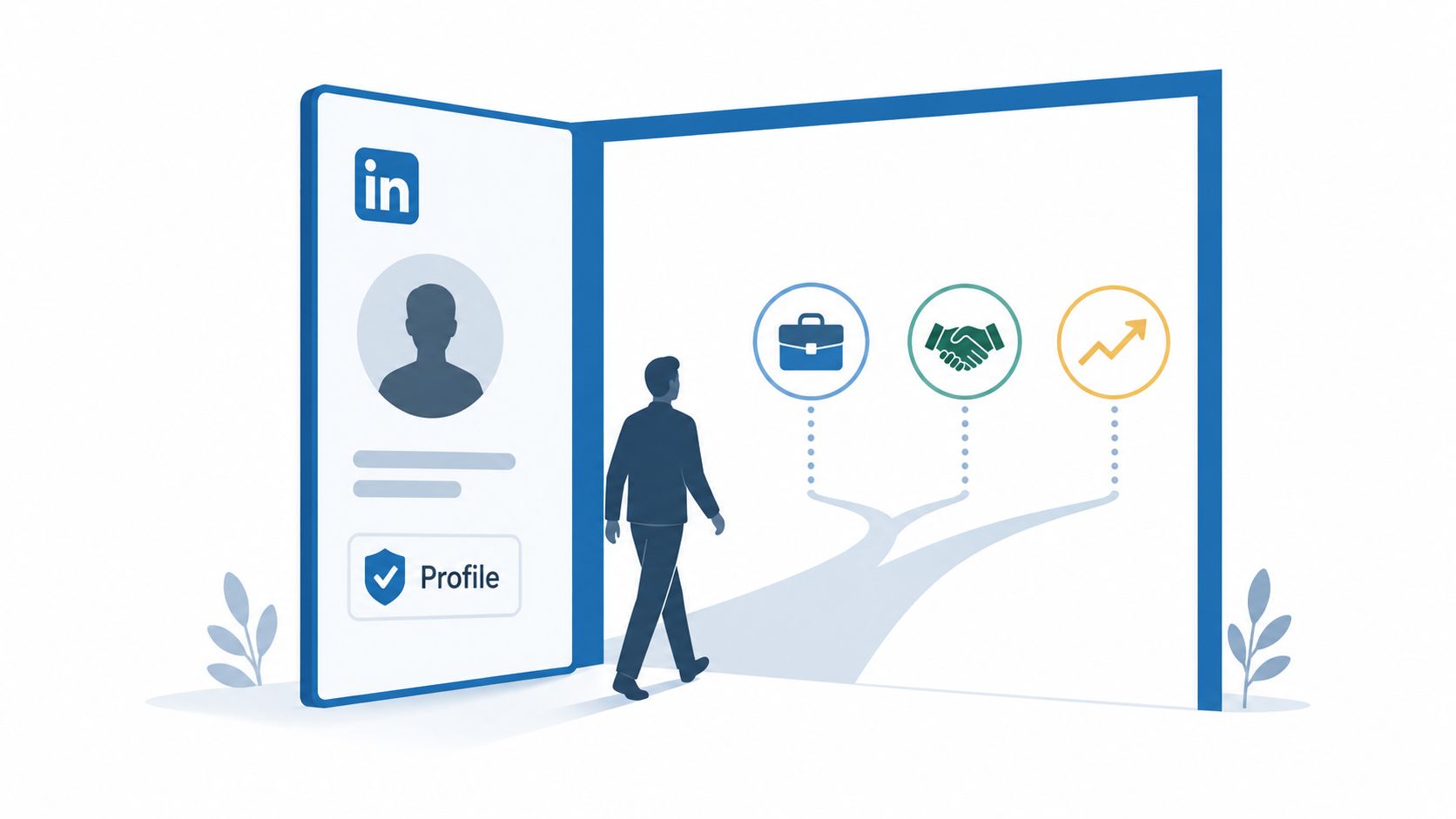
Use visuals strategically. The image below works well as a banner or post to illustrate career momentum.
For more ideas on using authored content to amplify trust, check out Storyloft on author branding.
Treating LinkedIn as a business function rather than a hobby converts visibility into predictable opportunity flow.
Impact Metrics of a Strong LinkedIn Personal Brand
Numbers help justify the time investment. The table below summarizes key statistics that quantify the ROI of personal branding efforts across hiring, engagement, and business growth.
| Metric Category | Key Statistic | Business Implication |
|---|---|---|
| Hiring & Recruitment | 85% of hiring managers say personal branding affects candidate selection | A polished profile directly influences who gets shortlisted |
| Profile Engagement | Optimized profiles receive up to 20 times more views | Greater visibility translates into inbound opportunities |
| Content Reach | Native posts with images get 2x higher engagement | Visual-first content amplifies your message further |
| Business Growth | Professionals with strong brands earn 10–15% more per engagement | Authority directly impacts pricing and deal size |
| Network Expansion | Active posters grow their network by 5–10x lapsed users | Consistency compounds connections over time |
Building a LinkedIn brand is a compounding asset. The data consistently shows that those who invest strategically see outsized returns across hiring, sales, and partnership channels.
By treating your profile and content as a deliberate system rather than a once-a-year cleanup, you build a reputation engine that opens doors without constant pitching.
Optimizing Your Profile Foundation for Search and Trust
Think of your profile as a landing page that needs to answer a visitor's questions in seconds. Every section should work toward building trust and making your value obvious.
Start with your headline. The best ones combine a clear outcome, a searchable role keyword, and a human hook. Something like "Fractional Marketing Leader — Help SaaS teams hit 25% ARR growth by clarifying ICPs" does all three without sounding robotic.
Your About section should function as a mini value proposition. Follow a tight arc: who you serve, the measurable result you deliver, proof that you can back it up, and a single next step. Keep sentences short—most people are reading on their phones—and use line breaks generously to make it scannable.
When filling out Experience entries, focus on impact rather than activities. Instead of "Managed campaigns," try "Drove a 3x increase in MQLs in six months using ABM and content tests." Specific numbers build credibility and help with keyword relevance at the same time.
Weave keywords naturally into these spots:
- Headline (primary)
- First two sentences of About (high weight)
- Experience job titles and bullet points (contextual)
- Skills and featured assets (supporting evidence)
Mobile Readability and Visual Signals
Your banner image should reinforce niche authority. A clean workspace, an event stage shot, or a client outcome graph all work well. Leave breathing room around your headshot so it doesn't get awkwardly cropped on mobile.
- Use a current professional photo that matches your tone
- Add 2–4 Featured items: one case study, a lead magnet, and a recent post
- Pin a short intro post that explains who you help and how to work with you
One clear value statement beats a long list of credentials every time
Formatting Tricks and Proof
Bullet points improve skim time and keep the profile friendly on phones. Numbered lists work well in About when outlining steps you take for clients—think Audit, Plan, Execute.
A couple of real-world examples:
- A consultant leads with "I help B2B founders double demo rates" and adds a Featured two-page case study. Inbound qualified leads doubled in eight weeks.
- A coach uses a landscape banner of a workshop and pins a testimonial video to increase trust.
For more help crafting headlines that actually convert, check out the LinkedIn headline generator from WaveGen.ai.
Finally, test and iterate monthly. Swap one Featured item, tweak your headline, then track search appearances and profile view quality to see what actually moves the needle.
Building a Sustainable Content System and Cadence
Consistency is what separates creators who attract real opportunities from those who eventually burn out. Start by defining three to four content pillars tied directly to your niche—think product strategy lessons, client case studies, or executive career advice. These pillars keep your LinkedIn personal brand focused and make generating ideas a predictable routine rather than a guessing game.
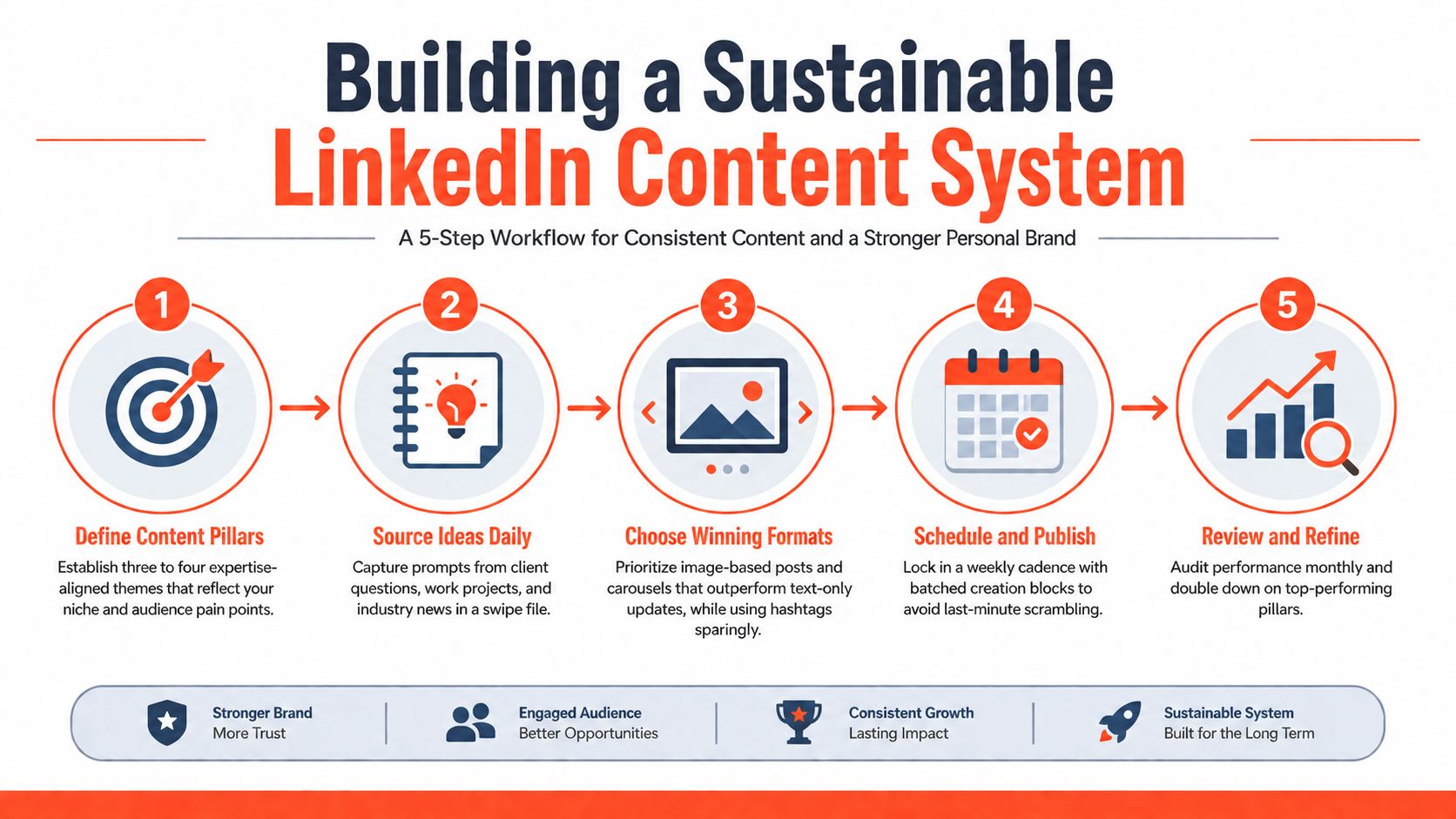
The infographic above maps out a five-step workflow for a repeatable LinkedIn content engine. It highlights where to capture ideas, which formats perform best, and when to audit your performance.
Look closely at the visualization to spot practical choices. For instance, prioritize image-led posts and carousels—visual posts routinely pull 2x the engagement of text-only updates. You will also notice the recommendation to use hashtags sparingly to avoid reach penalties.
Capture Ideas From Daily Work
Keep a simple swipe file in Apple Notes or Notion and consistently add three types of prompts:
- Client questions that reveal pain points and short solutions.
- Project outcomes with crisp metrics you can quote.
- Industry news paired with a one-line commentary linking it back to your pillar.
Capturing ideas is the cheap, high-impact habit that prevents blank-screen panic.
Use this running list to batch-create content in one focused block each week. When you do this, publishing becomes an operational habit instead of an aspirational goal.
- Draft four captions tied to different pillars in 60 minutes.
- Pair each caption with an image or carousel frame.
- Schedule two posts across the week and reserve time to reply to comments.
Choose Formats That Scale
Image posts and carousels win for clarity and scannability on LinkedIn. Short videos work well when you can script a tight 45–90 second takeaway. Text threads are fine for deep dives, but always pair them with a visual to boost your reach.
- Quick format checklist
- Image posts for lessons with a one-line hook.
- Carousels to teach step-by-step processes.
- Short videos for storytelling and showing personality.
Tie your weekly cadence to the metrics that actually matter—profile views, message quality, and inbound requests. This way, you measure business impact instead of chasing likes. If you want to expand this approach across platforms, check out our guide on how to plan social media content with WaveGen.
Repurposing Long-Form Assets Into Native Posts
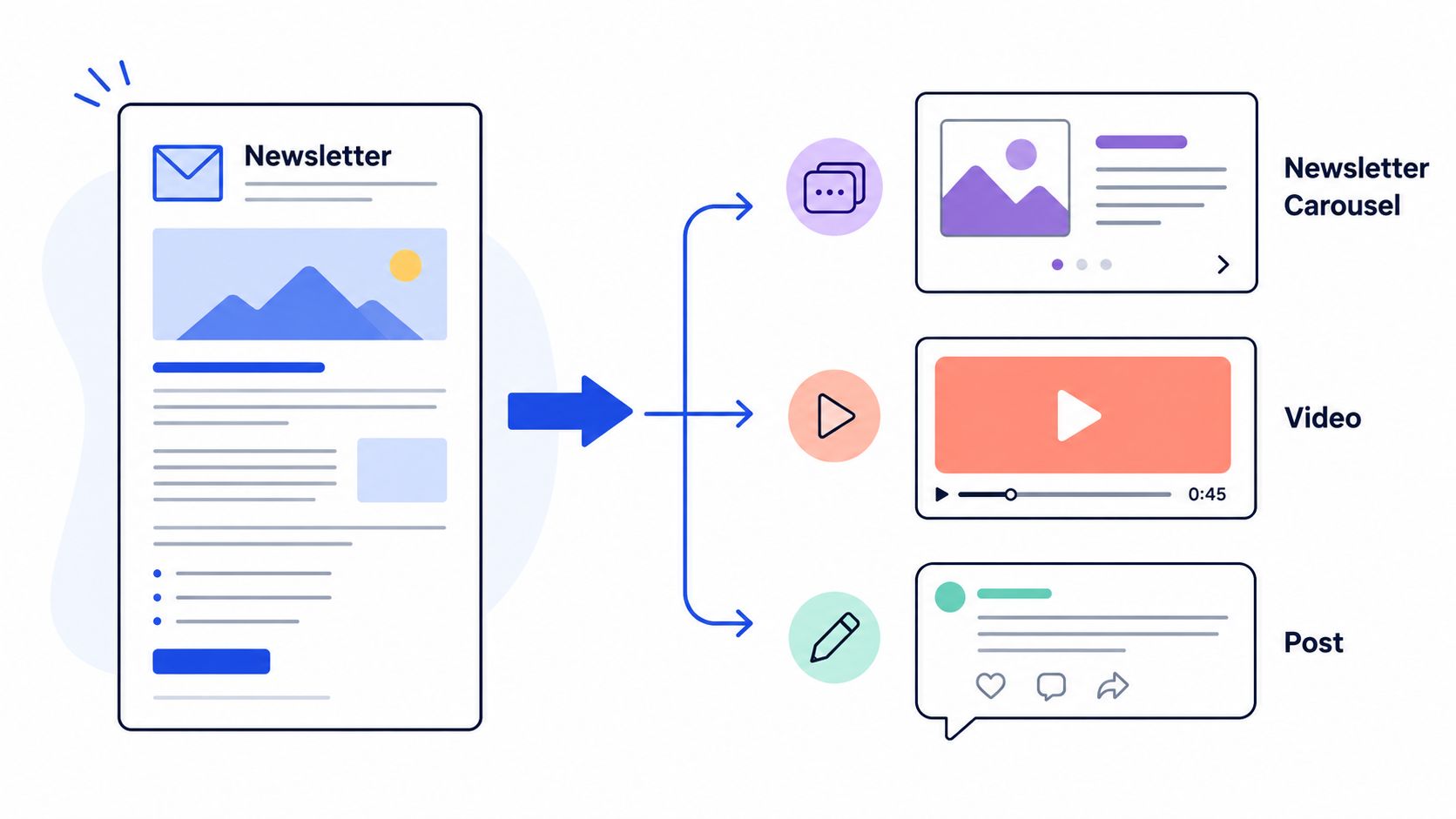
Repurposing long-form work saves hours and keeps your LinkedIn personal brand active without burning you out. Start by scanning a source asset for three tight takeaways you can explain in a sentence or two.
Break those takeaways into formats that actually perform on LinkedIn. A newsletter with five tips, for instance, becomes a single-image post with the top tip and a short hook, a six-slide carousel walking through the sequence, and a 60–90 second clip where you talk through one tactic. Same core message, three different ways to consume it. That's how you multiply output without sounding repetitive.
Extracting High-Value Elements
Pull direct quotes, metric highlights, and a short step list from transcripts or articles. Quotes make great caption openers. Metrics become bolded stat cards. Step lists convert naturally into carousel frames.
Turn one 1,200-word article into a week of posts by extracting 3 quotes, 2 stats, and 4 micro-lessons.
Use a simple table to map source sections to post types:
| Source Piece | Post Type | Purpose |
|---|---|---|
| Newsletter intro | Image post | Hook new readers |
| Transcript segment | Short video | Show personality |
| Case study metric | Quote card | Social proof |
Automate the tedious parts. Save your brand colors, fonts, and logo in a visual kit so every export looks consistent without extra effort. Tools like WaveGen.ai can generate captions, carousels, and short clips from a single upload, which cuts production time dramatically.
Example Workflow That Scales
Upload the long-form asset and run a quick highlight pass to mark quotes and stats. From there, build a carousel outline: title slide, three teaching slides, and a CTA slide. Record two short clips — a 30-second hook and a 60-second example. Then generate a few caption variations for testing and schedule them across four days.
Mix formats to keep your feed native and varied. Always tweak automated outputs for voice so posts sound like you, not a template.
For a deeper dive on audio content, check out this guide on how to grow pipeline with podcast content.
One practical tip: pair each repurposed post with a fresh image from your brand photo bank. It boosts recognition and trust across the week without requiring new photography every time.
Engagement Tactics That Convert Visibility Into Relationships
Active engagement is what separates a LinkedIn personal brand from being just another broadcast channel. Spend 20–30 minutes a day on focused actions that actually build trust and expand your reach without burning you out.
Pick accounts that genuinely matter and show up with value in the comments. Think industry leaders, your ideal clients, and partners who complement what you do. When you comment, summarize what they shared, add one fresh idea, and ask a quick question to spark a real reply.
- Identify 5 priority profiles to monitor weekly.
- Comment on 2 posts per day with a 2–3 sentence insight—no promotion.
- Save smart replies as snippets to speed up honest, thoughtful responses.
Nurturing Inbound Conversations
When someone reaches out first, treat it like a mini-sales conversation focused on discovery. Use a soft sequence: acknowledge, ask a clarifying question, offer a relevant example, and propose a low-commitment next step.
- Thank them and mirror their point back.
- Ask one question to qualify the need.
- Suggest a micro-offer like a 15-minute review.
Prioritize relationship quality over vanity. A warm reply that converts is worth far more than 100 likes.
Use LinkedIn features beyond the feed to deepen relationships. Host audio events for topic-led Q&A, or publish a monthly newsletter that curates lessons and invites replies. Both formats build permission to message and create repeat touchpoints.
Practical templates help scale authenticity. Keep outreach under 120 words and reference a specific post or profile detail. For example, mention a recent comment they made and link that to how you solved a similar problem.
Measure relationships with qualitative and quantitative signals. Track message response rates, meeting-to-win conversion, and referral sources alongside impressions and engagement.
- Ratio to watch: meetings booked per 100 meaningful comments.
- Monthly goal: 8 new conversations that advance to discovery calls.
Small, intentional engagement routines turn passive visibility into predictable opportunity flow for your LinkedIn personal brand.
Measuring Growth Beyond Vanity Metrics
Numbers only tell you something useful when they connect back to what you're actually trying to achieve. Start there — define outcomes that genuinely matter to your goals. We're talking client meetings booked, qualified leads, podcast interviews, or speaking invites. Then work backward: translate each outcome into something you can actually measure. That might mean tracking inbound messages that mention budget, counting discovery calls, or noting when someone refers you to a colleague. This is how you stop treating LinkedIn like a popularity contest and start treating it as a channel with real business impact.
Profile signals matter, but they don't tell the whole story on their own. Keep an eye on profile views, search appearances, and who's actually following you — their roles, industries, seniority levels. Then layer in the quality of interactions. Are people leaving generic "great post!" comments, or are they asking questions that open real conversations? That distinction matters far more than raw engagement counts.
Data Quality And Reliability
Here's something most people skip: if your tracking is messy, your conclusions will be too. Before you start optimizing, make sure the data you're relying on is actually trustworthy.
To make your LinkedIn metrics genuinely useful, think seriously about data quality from the start.
A solid resource here is the mastering data quality metrics guide — it walks through how to validate your sources, filter out bot-driven noise, and create a consistent way to tag and categorize leads that come from LinkedIn.
- Build a weekly dashboard that captures:
- Profile views and search appearances, with notes on where they came from.
- Inbound messages sorted by intent — is it an inquiry, a referral, or a collaboration request?
- New connections broken down by role and industry, plus how many match your ideal client profile.
Interpreting Trends And Pivot Signals
Don't chase spikes. Look for directional shifts over weeks and months. If your profile views are climbing steadily but your inbound inquiries aren't budging, that's a visibility problem without relevance — usually a sign your headline or About section isn't clarifying what outcomes people can expect from working with you. On the flip side, if qualified messages are rising even while impressions stay flat, your content is already reaching the right people. Double down on what's working.
Growth benchmarks shift depending on where you are:
- Early stage (0–2k followers): Focus on search appearances and message quality. Getting found is the priority.
- Growth stage (2k–10k): Prioritize conversion rates — how many comment threads turn into actual meetings?
- Mature stage (10k+): Track referral volume and how many inbound opportunities land each month.
A few things to check monthly:
- Audit your top 10 posts by conversions, not by likes. A post with 50 likes and three discovery calls beat one with 500 likes and zero replies.
- If your engagement windows are shifting, adjust your posting times accordingly.
- Replace underperforming pillar content with experimental posts. Stagnant content libraries bleed reach.
Closing The Feedback Loop
This is where most people fall off. They track numbers but never tie them back to decisions. Log your experiments. Keep notes on copy changes, headline tweaks, and timing shifts. Over time, you'll develop a simple, repeatable playbook: which content formats, posting times, and profile adjustments most reliably create meetings and opportunities.
For a deeper understanding of how impressions work and how they differ from reach, check out our article on Impressions on LinkedIn.
For automated repurposing and consistent content output, try WaveGen.ai at https://wavegen.ai
linkedin personal brand
personal branding
content strategy
profile optimization
social selling
Turn this kind of writing into a week of social content.
Paste a blog post, newsletter, or rough draft — WaveGen turns it into publish-ready carousels, captions, and slideshows for every channel.
No credit card · First posts in 2min