October 5, 2026
20 min read
10 Content Repurposing Examples That Work
Explore 10 content repurposing examples for turning articles, podcasts, newsletters, and videos into effective social media assets.
Effective content repurposing isn't copying and pasting. It's taking one clear idea, reshaping it for a platform's viewing habits, and connecting each new asset back to the original source.
A 2023 HubSpot survey found that 48% of social media marketers share similar or repurposed content across platforms with minor adjustments, while 34% create unique content for each platform and 17% post identical content without adaptation. The finding shows why repurposing is now a standard distribution habit, and it also exposes the common weakness: reuse without enough platform-specific editing. The survey analysis points to a useful distinction. Efficient teams reuse the idea, not the exact asset.
The ten content repurposing examples below focus on the production change between the source and the final format. You'll see how a blog becomes a carousel, how a podcast becomes a set of clips, how research becomes an infographic, and how an email sequence becomes a social campaign. Tools such as WaveGen.ai can support brand consistency, editing, scheduling, and crossposting, but strategic review still decides whether the output feels useful or recycled. Even basic workflows benefit from a clean publishing process, including the post-duplication practices described in LPagery's guide to duplicating WordPress posts.
Table of Contents
- 1. Blog Post to Social Media Carousel Series
- 2. Long-Form Article to Short-Form Video Scripts
- 3. Newsletter Content to Quote Graphics and Quote Cards
- 4. Podcast Episodes to Social Media Clips and Highlights
- 5. YouTube Videos to Educational Graphics and How-To Infographics
- 6. Research Articles to Infographics and Data Visualizations
- 7. Blog Series to LinkedIn Articles and Professional Thought Leadership
- 8. Webinar and Live Stream Recordings to Educational Video Series
- 9. Customer Case Studies to Success Story Social Series
- 10. Email Sequences and Lead Magnet Content to Educational Social Campaign
- Content Repurposing: 10 Examples Compared
- Build a Repurposing System, Not a Content Pile
1. Blog Post to Social Media Carousel Series
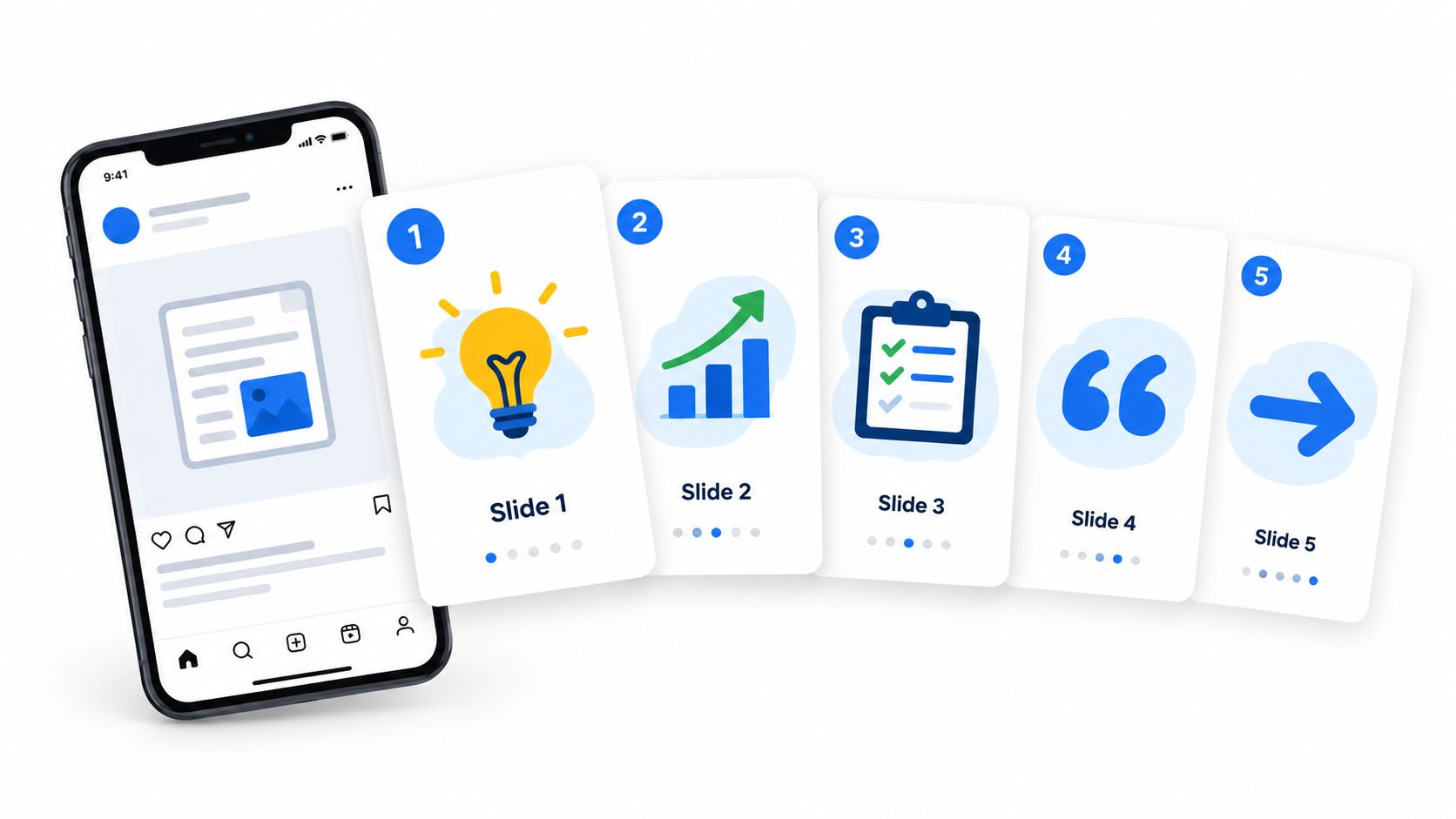
A blog post gives you depth. A carousel gives readers a sequence. The repurposing work sits between those formats, because a long article's introduction, supporting explanations, examples, and conclusion can't just be pasted onto slides.
Start by extracting the article's single strongest promise. Turn that promise into the opening slide, then assign one supporting idea to each following slide. Remove qualifying paragraphs, combine overlapping points, and rewrite every slide so it can be understood without the surrounding article.
A practical carousel structure looks like this:
- Opening insight: Lead with the most useful or surprising idea, not the article title.
- Supporting points: Give each slide one claim and one visual cue.
- Application slide: Show what the reader should do with the information.
- Final action: Direct people to the full article, a consultation, or another relevant resource.
The visual system should remain consistent, but the design shouldn't overpower the argument. Use the same colors, typography, and logo treatment across the series while keeping text large enough for mobile viewing. A carousel about technical SEO, for example, might turn one detailed section about internal links into a sequence of mistakes, fixes, and a final audit prompt.
A SaaS repurposing case study illustrates why the adaptation matters. After one webinar was converted into formats customized for each platform, impressions rose from 50,000 to 150,000, CTR from 0.5% to 1.2%, trials from 27 to 65, CPL fell from $185.19 to $76.92, and ROAS increased from 1.5x to 3.2x. These figures come from the published SaaS case study, and they describe a customized distribution approach, not a promise that every carousel will produce the same result.
For layout and platform-specific decisions, use this practical guide to creating a social media carousel. WaveGen's visual editor can help adjust text and images before publication.
2. Long-Form Article to Short-Form Video Scripts
A long-form article contains more reasoning than a short video can carry. The mistake is trying to compress every paragraph. A better workflow extracts one argument, one tension, or one practical lesson and builds a short script around it.
Begin with the point that would make someone stop scrolling. It might be a counterintuitive recommendation, a common mistake, or a result that challenges the usual advice. Then rewrite the article's formal prose into spoken language. Replace transitions such as “the following factors” with direct phrasing that sounds natural aloud.
Turn one article into several angles
The same article can support several scripts without repeating itself. One version might explain the problem, another might show the process, and a third might challenge a popular assumption. Each script needs its own opening and payoff, even if all three point back to the same source.
Use on-screen captions because viewers may encounter the video without sound. Add visual changes when the idea changes, but don't force constant movement into a serious explanation. A financial adviser discussing retirement planning, for example, should prioritize clear labels and careful wording over flashy edits.
The final call to action should match the video's role. A discovery video can invite viewers to follow for more advice. A deeper explainer can send them to the full article through the profile or description. Don't ask a viewer to book a consultation before you've established why the topic matters.
WaveGen's workflow for creating short videos for social media can support scripting and formatting, but a subject-matter expert should review every claim, especially in legal, healthcare, financial, and B2B advisory content.
3. Newsletter Content to Quote Graphics and Quote Cards
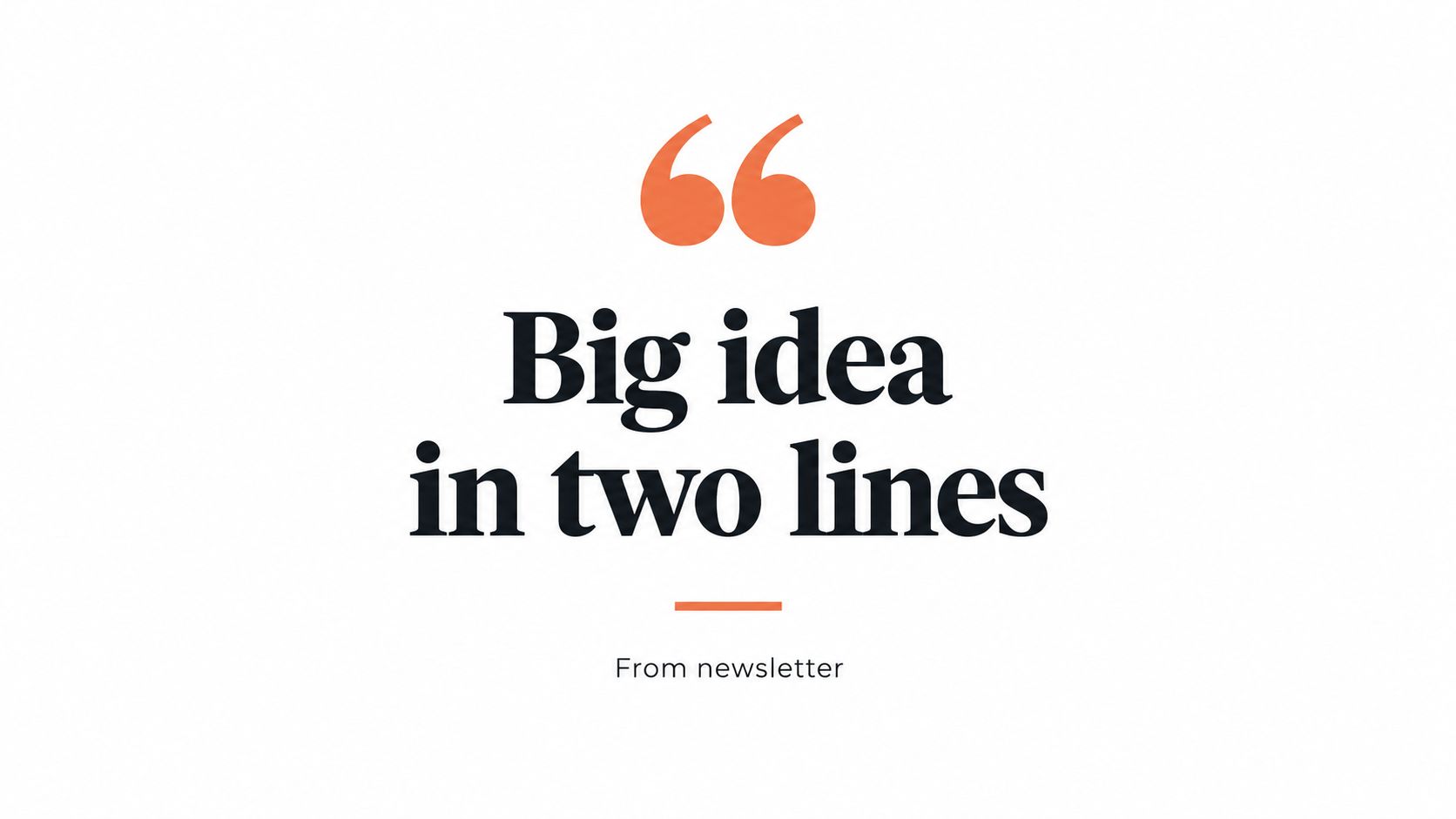
A newsletter often contains sentences that work well alone, but a strong paragraph isn't automatically a strong quote card. The source gives you context. The graphic needs a complete thought that makes sense when someone sees it outside the email.
Look for statements with a clear point of view, a useful distinction, or language that invites reflection. Avoid selecting a sentence only because it looks short. A vague line such as “consistency matters” has little value without the reason behind it. A better card might explain what consistency helps a consultant achieve and what behavior supports it.
Edit for independence
Quote cards need enough context to stand on their own. Remove references such as “in this week's issue” or “as mentioned above.” If the statement depends on a specific example, add a short supporting line in the caption rather than overcrowding the image.
The design should make the quote easy to recognize and the source easy to verify. Use a restrained watermark, the author's name, and a link or profile reference where appropriate. Strong contrast matters, but decorative elements shouldn't compete with the sentence.
A newsletter from a leadership coach could produce a small set of cards around decision-making, delegation, and feedback. Each card would carry a different idea, while the caption explains the practical situation behind it and points readers toward the full issue. That gives the audience a reason to save the graphic and another reason to visit the newsletter.
WaveGen's templates for creating quote graphics can help maintain typography, colors, and logo placement across a series. Review the final wording manually, because a quote card that changes the source's meaning damages trust.
4. Podcast Episodes to Social Media Clips and Highlights
Podcast audio contains natural opinions, stories, objections, and moments of surprise. Those moments rarely appear at neat intervals, so clip production starts with transcript review rather than random cutting.
Search the transcript for a complete exchange that has a beginning, a useful turn, and a satisfying conclusion. A guest's answer to a specific question often works better than a promotional introduction. Remove throat-clearing, repeated phrases, and private context that a new viewer won't understand.
Practical rule: A clip should deliver a complete idea before it asks the viewer to listen to the full episode.
The final video needs more than a waveform. Add the speaker's name, the episode context, readable captions, and visual pacing that fits the platform. LinkedIn may suit a measured expert exchange, while TikTok or Reels may need a sharper opening and faster movement. The source stays the same, but the edit should respect how people encounter the clip.
A B2B podcast might turn a discussion about procurement into separate clips about budget objections, evaluation criteria, and implementation risk. Each clip can stand alone, while the description links to the full conversation. That structure gives the audience several entry points without publishing the entire episode in fragments.
The B2B video content engine guide offers a useful reference for connecting podcast material to broader distribution. WaveGen can assist with transcript analysis and clip preparation, but the producer should confirm that every excerpt preserves the speaker's intended meaning.
5. YouTube Videos to Educational Graphics and How-To Infographics
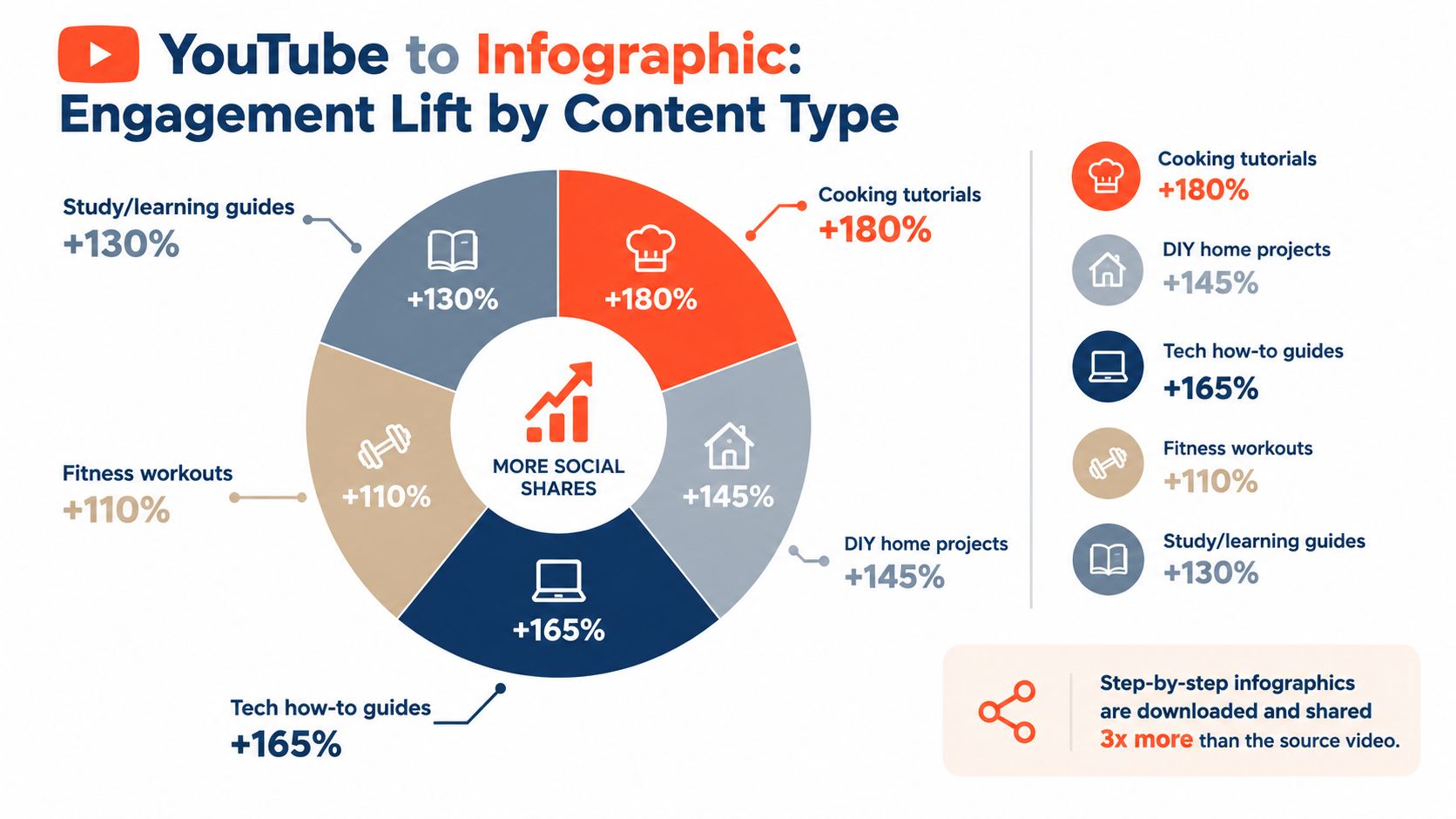
A tutorial video relies on movement, demonstration, and spoken explanation. An infographic has none of those advantages, so the repurposing process must make the sequence visible through labels, icons, and concise instructions.
Start with the task the viewer is trying to complete. Extract the steps in the order they must happen, then remove commentary that doesn't help someone perform the task. If the video explains how to audit a Google Business Profile, the infographic might show the audit path, the fields to inspect, and the common issues that require follow-up.
Preserve the decision points
The best how-to graphics don't merely list actions. They show where the user must make a decision. Add a short warning where skipping a step creates a problem, and include troubleshooting guidance when the source video addresses a frequent mistake.
A recipe creator can turn a demonstration into a visual sequence of preparation, cooking, and serving. A software trainer can create a downloadable guide that shows each interface action with a short annotation. In both cases, the infographic should be useful without forcing readers to watch the original first.
Create a social version for quick scanning and a larger document for people who want to save or download it. The social asset can point to the full video, while the downloadable version can support lead generation if the audience has a clear reason to exchange contact information.
WaveGen can generate a starting layout from a transcript, but visual accuracy requires review. Screenshots, interface labels, measurements, and procedural order must match the original video.
6. Research Articles to Infographics and Data Visualizations
Research content earns attention through evidence, but audiences often struggle to interpret a dense report. An infographic should reduce the reading burden without reducing the accuracy of the findings.
Begin with the research question, not the most attractive chart. Identify the central finding, the relevant sample or methodology, and the limitation that affects interpretation. Then choose a visual form that matches the evidence. A comparison may suit a bar chart, a process may suit a flow diagram, and a change over time may need a timeline.
Make credibility visible
Include the source, date, methodology notes, and definitions near the relevant visual. Don't use a large percentage as decoration if the audience can't tell what it measures. If the original report distinguishes between respondents, customers, and the wider population, preserve that distinction in the graphic and caption.
A research team studying workplace communication could create one infographic about the headline finding, another about the underlying behaviors, and a LinkedIn post explaining the limitations. This is more useful than shrinking the entire report into one crowded image.
The infographic should lead readers back to the full article or report. Add written context in the accompanying post, particularly when a chart could be misunderstood without explanation. In regulated industries, have a qualified reviewer confirm the wording before publication.
WaveGen's data visualization templates can support a consistent design system, but they don't replace source verification. The creator remains responsible for labels, calculations, attribution, and context.
This video offers a visual reference for how a source can be adapted into an explanatory asset.
7. Blog Series to LinkedIn Articles and Professional Thought Leadership
A blog series usually answers a search need. A LinkedIn article needs a stronger professional point of view. Republishing the same text may preserve the information, but it won't necessarily create a reason for LinkedIn readers to engage.
Choose one argument from the blog series and expand the practical implications. Add a personal observation, a client scenario, or a clear explanation of where the common advice breaks down. A consultant writing about marketing measurement might use the original article for definitions, then use the LinkedIn version to explain why teams often measure activity instead of business outcomes.
The opening should sound like a professional insight, not a search snippet. Use short sections, descriptive subheadings, and one or two supporting visuals. Keep the article focused enough that readers can identify the author's position quickly.
End with a question that encourages informed responses, not a generic request for comments. “Which reporting decision causes the most friction in your team?” gives readers a subject to discuss. A caption can then introduce the article to existing followers and invite the right audience to read it.
A useful trade-off is reach versus ownership. Native LinkedIn publishing may make the article easier to consume on the platform, while the original blog remains the stronger home for search, internal links, and conversion paths. Treat the two versions as related editorial assets, not identical copies.
8. Webinar and Live Stream Recordings to Educational Video Series
A webinar is usually organized around a broad promise, but attendees ask questions at a much more specific level. Those teaching moments are the raw material for a focused video series.
Review the recording and mark every distinct topic, useful answer, demonstration, and objection. Build each segment around one viewer need. Remove waiting time, technical interruptions, introductions that only made sense live, and tangents that don't support the segment's title.
Give every segment its own identity
Each video needs a new opening, a clear title, and a short conclusion. Add context so a viewer who missed the webinar knows why the topic matters. A webinar about hiring, for example, might become separate videos about writing the brief, evaluating candidates, and improving the first week of onboarding.
Use custom thumbnails and descriptions that reflect the specific segment rather than the original event. Add timestamps to longer uploads and point viewers toward the complete recording when they need more depth. The same segment can also become a short social clip, a carousel explaining the framework, or an email linking to the video.
The main risk is publishing excerpts that feel unfinished. A speaker may say, “as we discussed earlier,” or refer to a slide that isn't included. Rewrite the introduction or add a short voiceover so the segment works independently. WaveGen can help turn transcripts into draft assets, but a producer should check every cut for continuity and context.
9. Customer Case Studies to Success Story Social Series
A case study has a persuasive structure that social content can make more visible. The source usually contains the customer's situation, the problem, the intervention, and the result. The social series should reveal that progression without exaggerating the evidence.
Start with permission. Confirm which company name, employee names, quotes, results, screenshots, and operational details the customer has approved. Then divide the story into posts that each answer one question. What was difficult before the change? Why did the customer choose this approach? What changed afterward? What would another buyer learn from the experience?
Keep proof connected to context
Specific outcomes can make a case study credible, but only when the measurement period, baseline, and customer language are clear. Never turn a qualified result into a universal promise. If a customer says the process reduced manual work, preserve that wording instead of claiming that every buyer will achieve the same result.
A B2B agency could publish a short problem post, a quote card about the decision, a carousel showing the implementation, and a final post linking to the full case study. The sequence creates narrative movement while giving the customer several opportunities to share the story with its own audience.
Use different formats when they serve different parts of the story. A quote card can establish emotion, a carousel can explain the process, and a short video can make the customer voice more personal. The series should feel like one account, not a collection of unrelated promotional claims.
WaveGen can help create format variations from approved source material, but compliance and customer approval should happen before the content enters the scheduling queue.
10. Email Sequences and Lead Magnet Content to Educational Social Campaign
An email sequence is usually written for subscribers who already accepted a relationship with the brand. Social content reaches people with less context, so each email must be converted into a self-contained lesson before publication.
Extract the sequence's teaching progression. Turn the first email into a problem or misconception, the next into a framework or action, and later emails into examples, objections, or an invitation to go deeper. Keep each post centered on one idea rather than trying to reproduce the full email.
A financial adviser might convert an educational email course into posts about preparing questions, comparing options, and recognizing decision risks. A productivity creator might turn each lesson into a short caption, then create a carousel from the framework and a video from the most common objection.
Build toward the offer without hiding the value
The campaign should provide useful information before asking for a download or consultation. Adapt the email subject line into a social hook, but don't treat it as final copy. Social hooks need more immediate context, and they shouldn't imply that the audience already knows the email's subject.
Keep the visual language consistent across the campaign so people recognize the sequence. Alternate standalone posts, carousels, and short videos instead of publishing the same format repeatedly. Track which posts lead people to the signup page, then refine the next sequence around the topics that attract qualified interest.
A broader campaign analysis reported 1,250 leads on a $43,000 blended budget, with an average CPL of $34.40 and estimated ROAS of 7.2x at a 5% lead-to-customer conversion rate. The analysis also found that email nurture had a 12% open rate, while guest posts produced referral leads without media costs. These figures are specific to the reported multi-channel campaign, so they should guide questions about channel roles, not serve as a forecast for a new campaign.
Content Repurposing: 10 Examples Compared
| Title | Implementation Complexity 🔄 | Resource Needs ⚡ | Expected Outcomes 📊⭐ | Ideal Use Cases 💡 | Key Advantages ⭐ |
|---|---|---|---|---|---|
| Blog Post to Social Media Carousel Series | Medium, chunking + sequencing 🔄 | Low–Medium, design templates, imagery ⚡ | Higher engagement; extended content lifespan (3–5x) 📊 | Content marketers, agencies, consultants 💡 | Reuses long-form content into swipeable, high-engagement posts ⭐ |
| Long-Form Article to Short-Form Video Scripts | High, tight scripting & pacing 🔄 | High, video equipment/editing, motion assets ⚡ | Strong reach and shareability with younger audiences 📊 | Solo creators, coaches, educators aiming for viral reach 💡 | Fast-growth format; many variations per article ⭐ |
| Newsletter Content to Quote Graphics and Quote Cards | Low, select & design quotes 🔄 | Low, simple graphic templates, typography ⚡ | High shareability and authority; evergreen traffic 📊 | Newsletter authors, thought leaders, coaches 💡 | Quick to produce; high viral potential and reuse ⭐ |
| Podcast Episodes to Social Media Clips and Highlights | Medium–High, clip selection + edit 🔄 | Medium–High, transcription, audio/video editing ⚡ | Drives listeners to full episodes; discoverability lift 📊 | Podcasters, creators, promotional teams 💡 | Turns long episodes into multiple promo assets; viral moments ⭐ |
| YouTube Videos to Educational Graphics and How‑To Infographics | Medium, distill steps + design 🔄 | Medium, design skills, layout tools ⚡ | Long shelf-life; downloadable reference; traffic back to video 📊 | Educators, course creators, service providers 💡 | Converts procedural content into shareable, printable guides ⭐ |
| Research Articles to Infographics and Data Visualizations | High, data distillation + accuracy 🔄 | High, analysis tools, design & data expertise ⚡ | High authority and engagement; clarifies complex findings 📊 | B2B pros, consultants, financial advisors 💡 | Makes data accessible and credible; strong thought leadership ⭐ |
| Blog Series to LinkedIn Articles and Professional Thought Leadership | Medium, rewrite for professional tone 🔄 | Low–Medium, writing time, 1–2 images ⚡ | Better B2B reach, networking, and qualified leads 📊 | B2B consultants, corporate leaders, advisors 💡 | Leverages LinkedIn native publishing to build authority ⭐ |
| Webinar and Live Stream Recordings to Educational Video Series | Medium–High, segmenting + polish 🔄 | Medium, editing, captions, thumbnails ⚡ | Multiple focused videos; increased watch time and SEO 📊 | Educators, coaches, consultants repurposing sessions 💡 | Maximizes recorded content into topic-specific assets ⭐ |
| Customer Case Studies to Success Story Social Series | Medium, narrative design + permissions 🔄 | Medium, design, testimonial collection ⚡ | Strong social proof and conversion impact 📊 | B2B service providers, agencies, coaches 💡 | Builds trust via sequential storytelling and metrics ⭐ |
| Email Sequences & Lead Magnet Content to Educational Social Campaign | Medium, adapt sequencing for social 🔄 | Low–Medium, copy editing, scheduling tools ⚡ | More list signups and multiple nurture touchpoints 📊 | Email marketers, course creators, coaches 💡 | Extends lead magnet ROI; tests and drives conversions ⭐ |
Build a Repurposing System, Not a Content Pile
The best workflow depends on the source and the business goal. A blog post is a strong input for carousels, captions, professional articles, and short scripts because its ideas are already organized. A podcast or webinar is better suited to clips and educational video because the source contains voice, pacing, and conversation. Research content belongs in carefully labeled infographics, while email sequences work well as progressive social campaigns.
Production effort changes with the output. A quote card needs careful selection and restrained design. A carousel needs editorial hierarchy and slide-level rewriting. A video clip requires transcript review, trimming, captions, and platform-specific editing. A case study adds a separate approval process because the customer must remain accurately represented.
Choose the format based on the audience's next action, not the tool's easiest export. If the goal is discovery, a short clip or concise carousel may work well. If the goal is trust, a detailed professional article, research visual, or customer story may be more appropriate. If the goal is conversion, connect the social asset to a useful landing page, email sequence, consultation, or full source.
A practical system follows a repeatable sequence:
- Choose one strong source: Start with a useful article, recording, newsletter, report, or approved case study.
- Extract distinct ideas: Separate the thesis, supporting points, examples, objections, quotes, and evidence.
- Assign native formats: Match each idea to a carousel slide, clip, quote card, caption, infographic, or article.
- Apply brand rules: Use approved colors, fonts, logos, terminology, and voice across every asset.
- Review claims and context: Check sources, permissions, statistics, qualifications, and whether each excerpt still means what it meant originally.
- Schedule and measure: Publish according to the platform and campaign plan, then review meaningful actions rather than chasing volume alone.
The central editorial question is not “How many posts can this source produce?” It's “Which version helps this audience understand or do something?” That question prevents content piles. It also protects authority, because repurposing becomes transformation rather than duplication. Current guidance identifies the same tension, with independent coverage of content repurposing highlighting the gap between widespread reuse and effective platform adaptation.
Quality control matters even more for expert-led businesses. Recent guidance on preserving authority during repurposing describes time savings as a major reason teams reuse content, but speed can't justify unsupported claims, repetitive posts, or language that loses the expert's point of view. A lawyer, clinician, financial adviser, or B2B consultant should treat every derivative asset as a publication that deserves review.
WaveGen.ai can serve as an optional operational layer in this system. It can turn articles, newsletters, podcast scripts, and transcripts into carousels, short videos, quote cards, and captions, while brand kits keep colors, fonts, logos, and voice consistent. Its visual editor supports revisions before publishing, and scheduling, crossposting, and RSS-based autopilot can help teams maintain a regular cadence. It doesn't replace source selection, editorial judgment, permissions, or final review.
Use Contesimal's explanation of content repurposing as another perspective on building a workflow around existing ideas rather than treating every asset as a separate creative project. Start with one source this week, map its ideas to the channels you already use, and publish only the versions that add a different experience.
WaveGen.ai turns your articles, newsletters, podcast scripts, and transcripts into on-brand carousels, short videos, quote cards, and platform-specific captions, with editing, scheduling, crossposting, and RSS-based autopilot in one workflow. Visit WaveGen.ai to explore how it can help you build a consistent content repurposing system without creating every social asset from scratch.
content repurposing examples
content repurposing
social media content
content marketing
WaveGen.ai
Turn this kind of writing into a week of social content.
Paste a blog post, newsletter, or rough draft — WaveGen turns it into publish-ready carousels, captions, and slideshows for every channel.
No credit card · First posts in 2min