August 13, 2026
15 min read
Technical SEO Basics: A Practical Guide for 2026
Master technical SEO basics with clear explanations, quick diagnostics, and a priority checklist. Learn crawling, indexing, speed, and AI-era discoverability.
You're probably looking at a website that has decent content, a clear brand, and still underperforms in search. The usual frustration is simple, the pages exist, but Google seems to miss some of them, index the wrong ones, or treat the mobile experience like an afterthought. That's where technical SEO basics matter, because they decide whether your content is reachable, readable, and usable by search systems.
Think of your site like a store. Your content is the merchandise, but technical SEO is the floor, the lights, the aisles, and the signs that tell both people and search engines where everything is. If the wiring is bad, the best products in the world still sit in the dark.
Table of Contents
- What Technical SEO Actually Means for Your Website
- How Search Engines Crawl and Index Your Pages
- Building a Site Architecture That Search Engines Love
- Sitemaps and Robots.txt and Canonical Tags Explained
- Page Speed and Mobile-First Indexing Fundamentals
- Preparing Your Site for AI-Era Discoverability
- Your Technical SEO Priority Checklist
What Technical SEO Actually Means for Your Website
A founder I spoke with once described SEO as “writing good pages and hoping Google notices.” That's close to how a lot of teams start, but it leaves out the part that usually causes the problems. If your site is the store, technical SEO is the structure that lets search engines enter, move around, read the labels, and decide what belongs on the shelf.
The foundation, not the decoration
Technical SEO sits underneath everything else. On-page SEO is the wording on the page, the titles, headings, and internal relevance. Off-page SEO is the reputation layer, things like links and mentions from other sites. Technical SEO is the infrastructure that makes the other two matter at all.
That's why even a great page can underperform if the site blocks crawling, hides content behind scripts, or creates duplicate versions of the same URL. Google's mobile-first indexing shift, announced in 2016 and later expanded so that 70% of websites were indexed mobile-first by 2025 according to one industry summary, shows how much the foundation now matters, especially since 63.5% of organic traffic comes from mobile devices and Google prioritizes the mobile version for crawling and ranking (technical SEO statistics).
Practical rule: if a page is important enough to publish, it's important enough to be easy for bots to find, render, and understand.
For an e-commerce operator, a useful starting point is a technical SEO checklist for e-commerce, because product filters, faceted navigation, and duplicate URLs tend to create technical mess fast. For a content-led brand, your internal linking pattern matters just as much, which is why a clean publishing structure like the one used in this Pinterest SEO guide can be a helpful mental model even outside Pinterest.
The rest of this guide stays practical. You'll learn what search engines need from a site, what tends to break, and how to fix the pieces that usually create the biggest business drag first.
How Search Engines Crawl and Index Your Pages
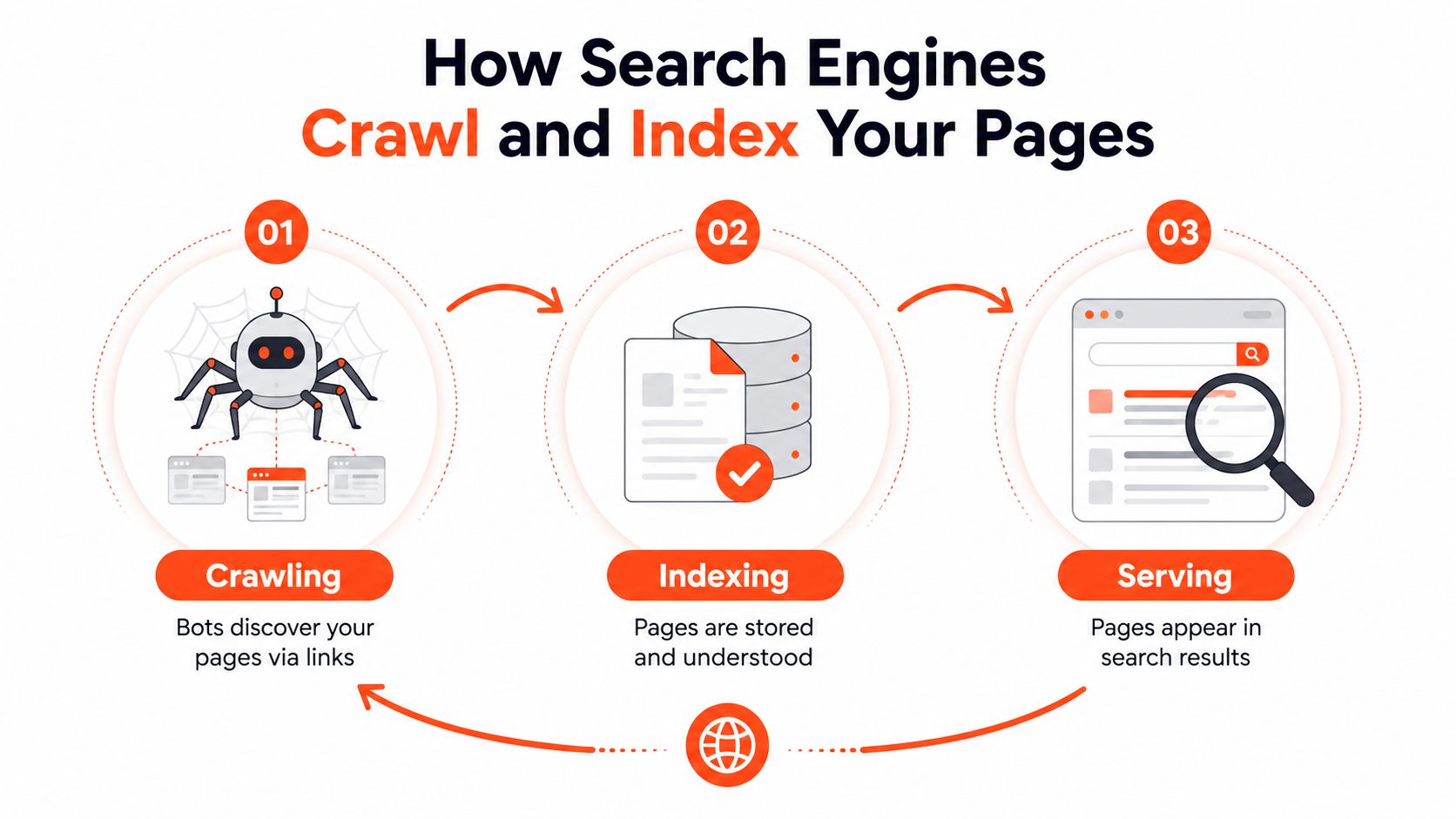
Search engines do not look at a site all at once. They first discover pages, then process what those pages contain, then decide whether those pages belong in search results. Google's starter guidance says discovery and indexation depend on signals like XML sitemaps, internal links, and robots.txt and noindex controls, because crawl time spent on duplicate or low-value URLs can delay the pages you want indexed (SEO Starter Guide).
Crawling is discovery
Crawling is the process where bots discover pages by following links from one URL to the next.
A crawler usually starts with a page it already knows, then moves to the links on that page, then keeps going from there. If a page is buried behind too many clicks, left orphaned without internal links, or wrapped in parameter-heavy URLs, it often gets discovered later than you expect. Search systems have limited discovery capacity, so they spend more time on pages that are easier to reach and more likely to matter.
Indexing is filing
Indexing happens after crawling. The page is analyzed and stored so it can be considered for search results later. Google and other technical SEO guides treat rendering as a separate step after crawling, which matters because content that depends on blocked resources or client-side injection can be seen incompletely or not at all (Google search fundamentals).
If your main text appears only after a script runs, the crawler has to do more work before it can understand the page. That may be fine for a person using the site, but it can create problems for search systems and AI tools that do not reliably execute JavaScript. In practice, the safer setup is the one that lets the important content be read without extra guesswork.
How to check your status fast
Use Google Search Console's URL Inspection tool for a specific page. It shows whether Google knows the page, which canonical it selected, and whether anything is blocking indexing. The Coverage report helps you spot broader issues across the site.
A second check is the meta robots setup, especially when a page seems crawlable but never appears in search. A focused SEO audit for meta robots directives can help you confirm whether important pages are accidentally marked noindex.
If Google cannot crawl the right page, it cannot index the right page. If it cannot index the right page, the page will not earn search visibility no matter how good the copy is.
Building a Site Architecture That Search Engines Love
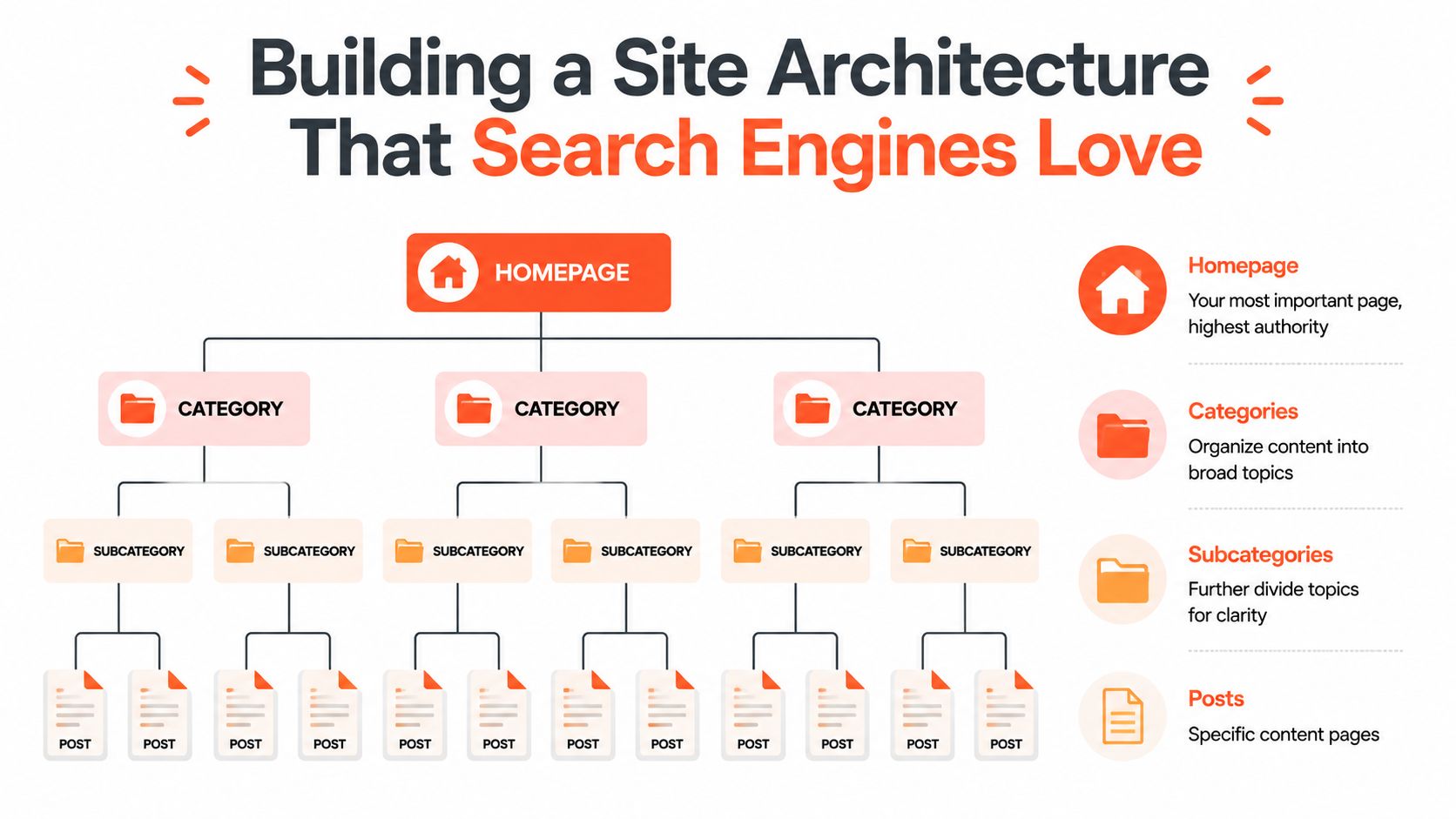
A site with a clean hierarchy feels obvious to a human reader. A site with a bad hierarchy feels like a storage unit where nothing has labels. Search engines feel that difference too, because structure tells them which pages are central, which pages are related, and which pages are just noise.
Flat beats tangled
A strong architecture puts important pages close to the homepage. That doesn't mean every page needs to sit in the main menu, it means the path from the homepage to your highest-priority pages should be short and intentional. When key pages are only a few clicks away, they're easier to discover and easier to revisit.
Bad structures usually look like this, homepage to category to subcategory to another subcategory to page. Good structures are simpler, homepage to category to page, with a few useful branches. The difference isn't just elegance, it's crawl efficiency and clarity.
Internal links are signposts
Internal links do two jobs at once. They help users move through your site, and they help search engines understand which pages matter most. A page that gets linked from several relevant pages usually sends a stronger signal than one that sits alone with no internal references.
Orphan pages are the opposite problem. They have no internal links pointing at them, so even if they're live, they're easy to miss. In practice, those pages often behave like a locked room at the back of the building.
Here's a simple way to think about the difference:
| Structure | What it looks like | Search impact |
|---|---|---|
| Flat | Important pages are linked from main sections | Easier discovery |
| Deep | Pages sit many clicks away | Slower discovery |
| Orphaned | No internal links point to the page | Easy to miss entirely |
URLs should be readable
Keep URLs short, descriptive, and consistent. /blog/technical-seo-basics/ is easier to interpret than a long string of numbers and parameters. Stable URL patterns also make internal linking cleaner, because humans can predict where content lives.
A useful rule is simple. If you can't explain where a page fits in the site structure, search engines probably can't either.
A short example video can help make the structure more concrete.
Sitemaps and Robots.txt and Canonical Tags Explained
A site can have great content and still confuse search engines if these three pieces are mixed up. XML sitemaps, robots.txt, and canonical tags each control a different part of how pages are discovered and interpreted. They control what search engines discover, where they are allowed to go, and which version of a page should count.
XML sitemaps point to the important pages
An XML sitemap is a list of URLs you want search engines to notice. It does not force indexing, but it gives crawlers a clean map of the pages that matter. Google's SEO Starter Guide recommends sitemaps as part of helping search engines discover and manage URLs, especially on larger sites or sites with weaker internal linking.
For a founder, the practical value is simple. A sitemap helps search engines find pages that may not be easy to reach through links alone, such as new pages, deep product pages, or sections that sit a few clicks away from the homepage. You will usually find one at yourdomain.com/sitemap.xml or yourdomain.com/sitemap_index.xml. If your CMS creates it automatically, check that it includes only canonical pages that you want indexed.
Robots.txt keeps bots out of the wrong places
robots.txt sits at the door for crawlers. It is useful for keeping bots away from private areas, internal search results, staging pages, or low-value URL patterns that do not need crawl attention. It does not replace noindex, because blocking a URL from crawling does not always stop it from appearing in search results.
That difference matters in day-to-day SEO work. If you want a page excluded from search, the meta robots tag or a header directive is usually the cleaner tool. If you want a bot to stay out of certain sections entirely, robots.txt is the right file to configure.
Canonical tags settle duplicates
A canonical tag tells search engines which URL should count when several versions of the same page exist. This often comes up on ecommerce sites, where filters, tracking parameters, and sort options can create many URL variants for one underlying product or category page.
A canonical is a signal, not a command. Search engines usually follow it when the pages are similar, but they can ignore it if the setup conflicts with other signals.
Use canonicals when the content is effectively the same, not when you want to merge unrelated pages. That keeps the signal honest and avoids confusion later.
The cleanest setup usually looks like this, one preferred URL in the canonical tag, the same version in the sitemap, and internal links pointing to that same page. If those signals disagree, search engines receive mixed instructions, and the page may not be understood the way you intended.
AI systems create the same pressure in a different form. They pull short passages, entity names, and structured signals from pages that are easy to read and easy to verify, so clean canonicalization helps both traditional search and the machines that summarize web content. A page that has one clear version is easier to index, easier to quote correctly, and easier for search systems to trust.
Page Speed and Mobile-First Indexing Fundamentals
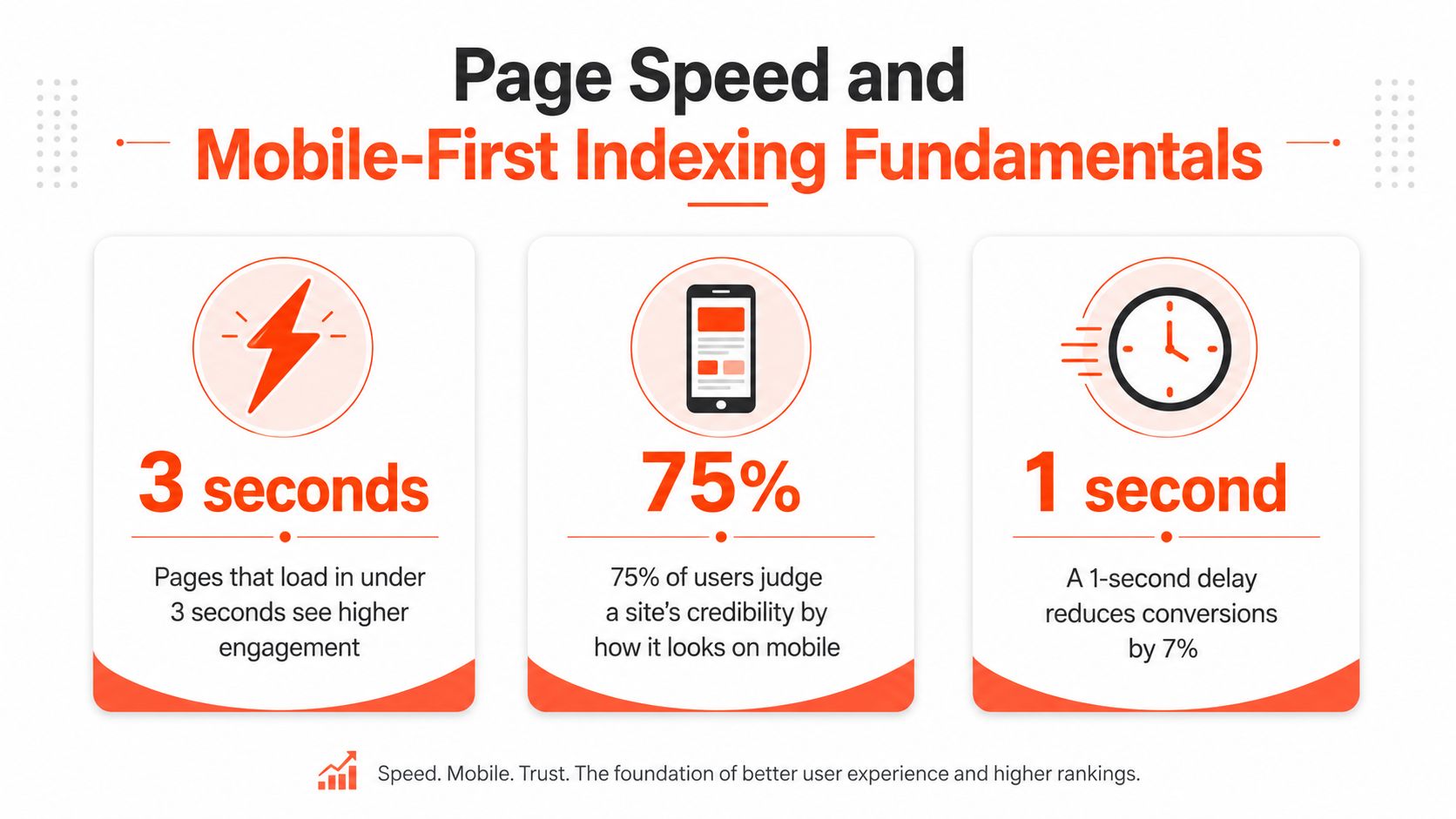
A slow page can feel harmless in a boardroom and painful on a phone. Someone taps, waits, and then leaves before the page finishes loading. Search systems notice that behavior, and so do customers.
Speed and mobile usability now sit inside the basic experience search engines expect, and the quality bar is visible in real data. In the 2025 Web Almanac measurement period, only 48% of mobile sites and 56% of desktop sites passed the full Core Web Vitals threshold, and Google and Deloitte Digital are cited as finding that sites passing all three CWV metrics have 24% lower bounce rates than sites that fail (technical SEO statistics).
Core Web Vitals in plain English
Core Web Vitals measure three aspects of user experience: loading performance, interactivity, and visual stability. One metric looks at how fast the main content appears, one looks at how quickly the page responds when someone taps or clicks, and one looks at whether the layout jumps around while the page loads.
That last point affects more than polish. If a button shifts right as a visitor tries to tap it, the page feels unreliable, and that often turns into abandonment. Analysts at Google and Deloitte Digital found that sites passing all three CWV metrics have lower bounce rates than sites that fail, which is why speed and stability affect both rankings and revenue.
Mobile-first indexing changes the mindset
Google now prioritizes the mobile version of a site for crawling and ranking. The mobile site is not a secondary version, it is the version that matters most for search visibility. Responsive design, content parity, and mobile usability are baseline requirements, not extra polish (technical SEO statistics).
If the mobile page hides important text, removes internal links, or leaves out structured data, Google may treat that version as the primary experience. What the mobile user sees is what the search engine evaluates, so mobile design decisions shape how your pages are understood and indexed.
Tools that make diagnosis easier
PageSpeed Insights gives you a fast read on load performance and basic recommendations. Search Console's Core Web Vitals report helps you find pages with repeated issues across the site.
For a focused reference on the metric set itself, the Core Web Vitals overview is useful when you are comparing reports or explaining the issue to a developer.
Do not start by chasing perfect scores. Start by fixing the pages that matter most to revenue, leads, or publishing velocity.
Preparing Your Site for AI-Era Discoverability
A lot of older technical SEO advice stops at crawl, render, and index. That foundation still matters, but it is no longer the full job. Search systems and AI systems now need pages that can be crawled, rendered, indexed, cited, and reused with very little ambiguity, so the structure has to work for machines as well as people.
Content extractability is the new practical layer
Content extractability means the page's structure makes key information, headings, product names, article dates, main answers, obvious to machines, not just visible to humans. If a system cannot tell which text is the main answer and which text is supporting detail, it is far less likely to reuse the right part in a search feature or AI summary.
Start with semantic HTML. Use proper headings, lists, labels, and tables where they fit. Do not flatten everything into styled divs just because the page looks tidy in the browser. Machines depend on structure to understand what belongs together, what comes first, and what should be treated as a label, a body paragraph, or a supporting note.
Structured data makes meaning explicit
Schema markup gives search engines a clearer description of what the page contains. A product page can state that it is a product page, an article can identify itself as an article, and a local business page can describe the business in machine-readable form. Google's own technical guidance and major SEO references both treat structured data as a way to help systems understand content more accurately and surface richer search features.
That matters for AI-era visibility too, because clearer markup makes it easier for systems to extract and cite the right details. The catch is accuracy. Markup should match what users can see on the page, or it can be ignored.
Put the main answer where machines can find it
Pages that lead with vague copy, bury the answer below animations, or split the main point across too many visual blocks are harder for machines to reuse. That matters most on pages meant to attract citations or AI overviews, because those systems usually look for the clearest, most direct answer first.
Consistency helps here. The content automation workflows discussed in this content creation automation guide are a useful reminder that machine-readable content usually starts with consistent human-readable content, especially when teams publish at scale.
Audit your key pages so the main answer appears within the first two paragraphs and uses proper heading hierarchy.
Your Technical SEO Priority Checklist
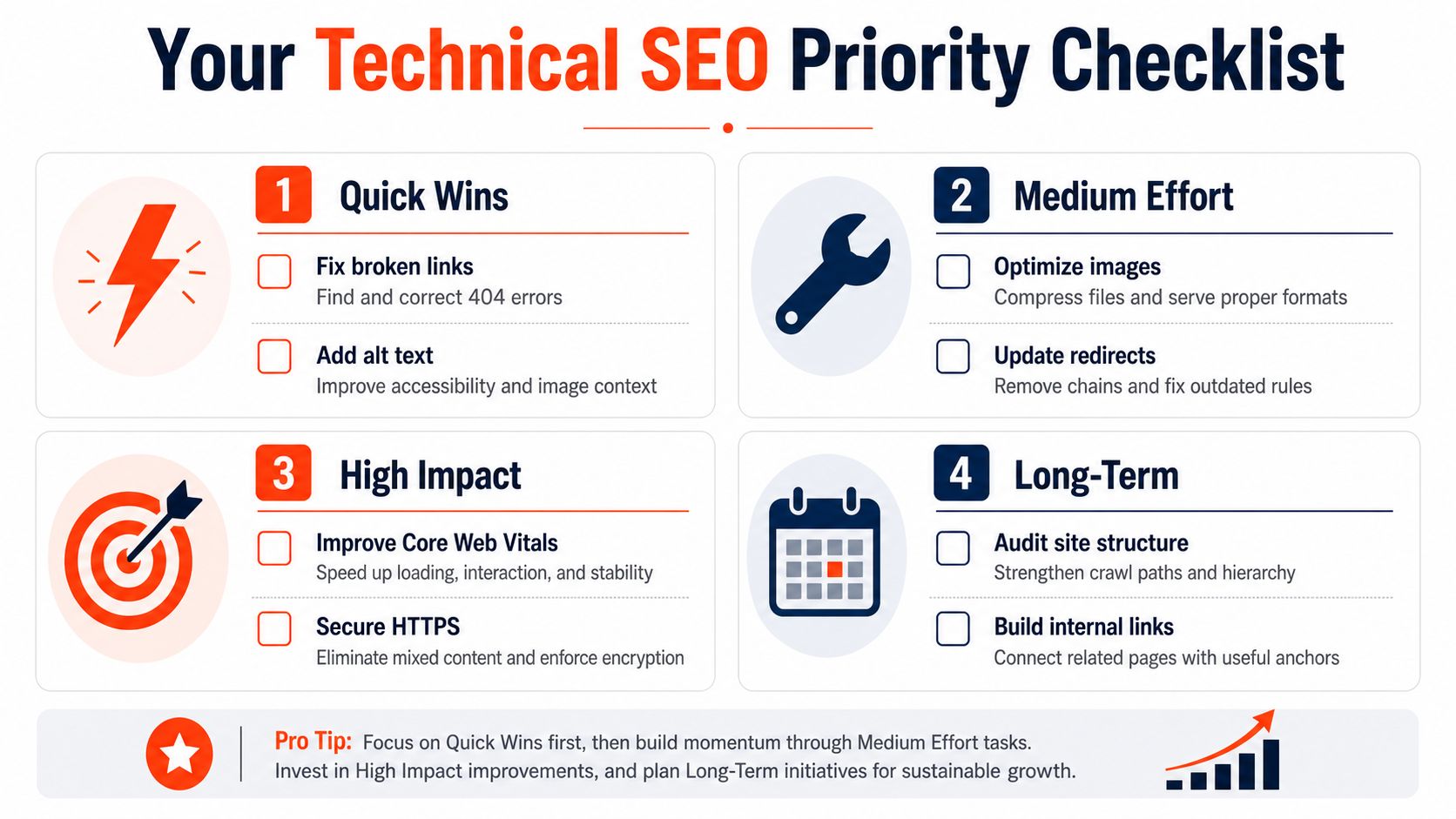
The quickest way to make technical SEO useful is to treat it like triage. Some fixes stop a page from being seen at all, while others improve how clearly search engines and AI systems can read what is already there. Start with the issues that block discovery first, then work toward the ones that shape performance and extractability.
Quick wins
- Rendering visibility check: Open a key page in a headless browser, such as Chrome in render mode, and compare what the browser sees with the page source. If important copy, links, or schema only appear after user interaction, crawlers may miss them.
- Structured data validation: Run your updated templates through Google's Rich Results Test before publishing. Catch missing fields, invalid nesting, or markup that no longer matches the visible page.
- Mobile content parity: Inspect the mobile version of your core pages and confirm it contains the same main text, headings, and navigation cues as desktop.
Medium effort
- Image and file weight: Review oversized assets and compress them before they slow the page down.
- JavaScript dependency audit: List the pages that depend on scripts for key content, then test whether the page still exposes the main information when scripts are delayed or disabled.
- Redirect path check: Trace the most important URLs in a crawl tool and look for extra hops that add delay before users or crawlers reach the final page.
High impact
- Core Web Vitals: Use PageSpeed Insights and Search Console to find pages where speed or stability is hurting experience.
- HTTPS consistency: Make sure the site resolves securely and that all non-secure versions redirect cleanly.
- Snippet clarity: Rework titles and meta descriptions on the pages that matter most so they answer the searcher's intent and support a better click. The guide on how to improve click-through rates can help you tighten that layer.
Long-term
- Structured data coverage: Expand schema across the page types that drive revenue, then keep it aligned with the visible content as templates change.
- AI-era extractability: Rework key pages so headings, summaries, and entity names are easy for machines to parse.
- Ongoing maintenance: Revisit crawlability and indexation regularly, because growth creates new technical problems.
If you want the fastest path, start with the pages that drive revenue, leads, or authority. For a large or fast-changing site, bring in a technical SEO specialist or developer before small issues spread across the template layer.
technical seo basics
seo fundamentals
crawl indexing
site architecture
core web vitals
Turn this kind of writing into a week of social content.
Paste a blog post, newsletter, or rough draft — WaveGen turns it into publish-ready carousels, captions, and slideshows for every channel.
No credit card · First posts in 2min