July 19, 2026
14 min read
Master Brand Asset Management for 2026 Success
Learn how strategic brand asset management drives revenue, saves time, & ensures consistency. Our 2026 guide covers implementation to tools.

You're probably dealing with some version of this right now. A salesperson grabs an old logo from a shared drive. A freelancer downloads a compressed image from a past campaign and drops it into a slide deck. Your social posts look close enough to the brand, but not quite. Nothing is catastrophically wrong, yet the brand starts to feel inconsistent in a way customers notice long before teams do.
This is the fundamental reason brand asset management matters. It isn't about making folders prettier. It's about making the right assets easy to find, hard to misuse, and simple to deploy across every channel, whether you have a global marketing team or you're a solo consultant publishing weekly on LinkedIn.
Table of Contents
- What Is Brand Asset Management
- Why Brand Asset Management Drives Revenue
- The Core Components of a BAM System
- Your Practical Implementation Roadmap
- Connecting BAM to Content Repurposing and Distribution
- Real-World Brand Asset Management Examples
- Your Brand Asset Management Starter Checklist
What Is Brand Asset Management
Brand asset management is the operating system behind your brand's visible identity. It covers how logos, templates, color palettes, typography, approved imagery, and other brand materials are stored, organized, approved, distributed, and retired. When it works, teams stop guessing. When it doesn't, everyone invents their own version of the brand.
It is often first considered storage. That's understandable, but incomplete. A folder structure can hold files. It can't tell a partner which logo version is current, restrict access to editable source files, or make sure outdated campaign assets don't keep circulating months after they should've been retired.
The need for a real system is getting harder to ignore. The global Brand Asset Management software market was valued at approximately USD 3.2 billion to USD 3.5 billion in 2024, with projections of USD 6 billion to USD 9.8 billion by 2033, according to DataHorizzon Research's BAM market analysis. That range varies by market definition, but the direction is clear. Organizations increasingly treat BAM as infrastructure, not a nice-to-have.
Brand inconsistency usually doesn't come from bad intent. It comes from weak access, weak naming, and weak governance.
A practical definition is this. Brand asset management is a single source of truth for brand materials plus the rules that govern their use. That applies to enterprise teams with legal approvals and regional partners, but it also applies to agile operators who need something lighter. A coach, creator, or small consultancy still needs approved assets, naming rules, current versions, and clear usage guidance. The system can be simpler. The principle stays the same.
If you want a useful companion resource that focuses on organizing assets and building a durable foundation, NanoPIM's brand asset guide is a solid reference.
Why Brand Asset Management Drives Revenue
Brand asset management gets dismissed as administrative work until teams connect it to wasted labor, avoidable rework, and inconsistent buyer experience. Then the economics become obvious.
The strongest business case starts with consistency. According to Brandlife's guide to brand asset management for scaling brands, maintaining a consistent brand presentation across all platforms can increase revenue by up to 10–20%. That's the part many leaders underestimate. Brand consistency is not just a design preference. It shapes recognition, trust, and the speed at which buyers understand who they're dealing with.
Efficiency compounds faster than teams expect
The second payoff is operational. The same Brandlife resource notes that effective systems can recover 4–6 hours per week for Head of Brand roles by reducing routine asset requests, while overall asset management activities can see 20–30% time savings.
That matters because brand teams often become accidental help desks. They answer questions like:
- Which logo should I use: Sales, partnerships, and recruiting all ask for files they should be able to self-serve.
- Is this version current: Teams hesitate because they don't trust the library.
- Can I edit this deck: People work around the system when permissions and templates are unclear.
- Do we still use this campaign lockup: Old assets linger because no one owns retirement.
Every one of those interruptions pulls strategic people into low-value admin. It also delays execution across the business.
Revenue doesn't grow from storage alone
A file repository on its own doesn't create value. The value comes from reducing friction between brand standards and day-to-day work. If approved assets are instantly available, teams publish faster. If guidelines are baked into templates, teams make fewer corrections. If old assets are retired properly, customer-facing materials stop drifting.
Here's the practical difference:
| Approach | What happens in practice |
|---|---|
| Shared folders only | Teams hunt for files, duplicate assets, and reuse outdated materials |
| BAM with governance | Teams find approved assets quickly and use them with fewer reviews |
Practical rule: If your brand team is still manually answering basic asset requests, you don't have a bandwidth problem. You have a system problem.
This is why I treat brand asset management as a growth function. It protects revenue in the market and recovers capacity inside the team. The companies that do it well don't just look more polished. They move with less drag.
The Core Components of a BAM System
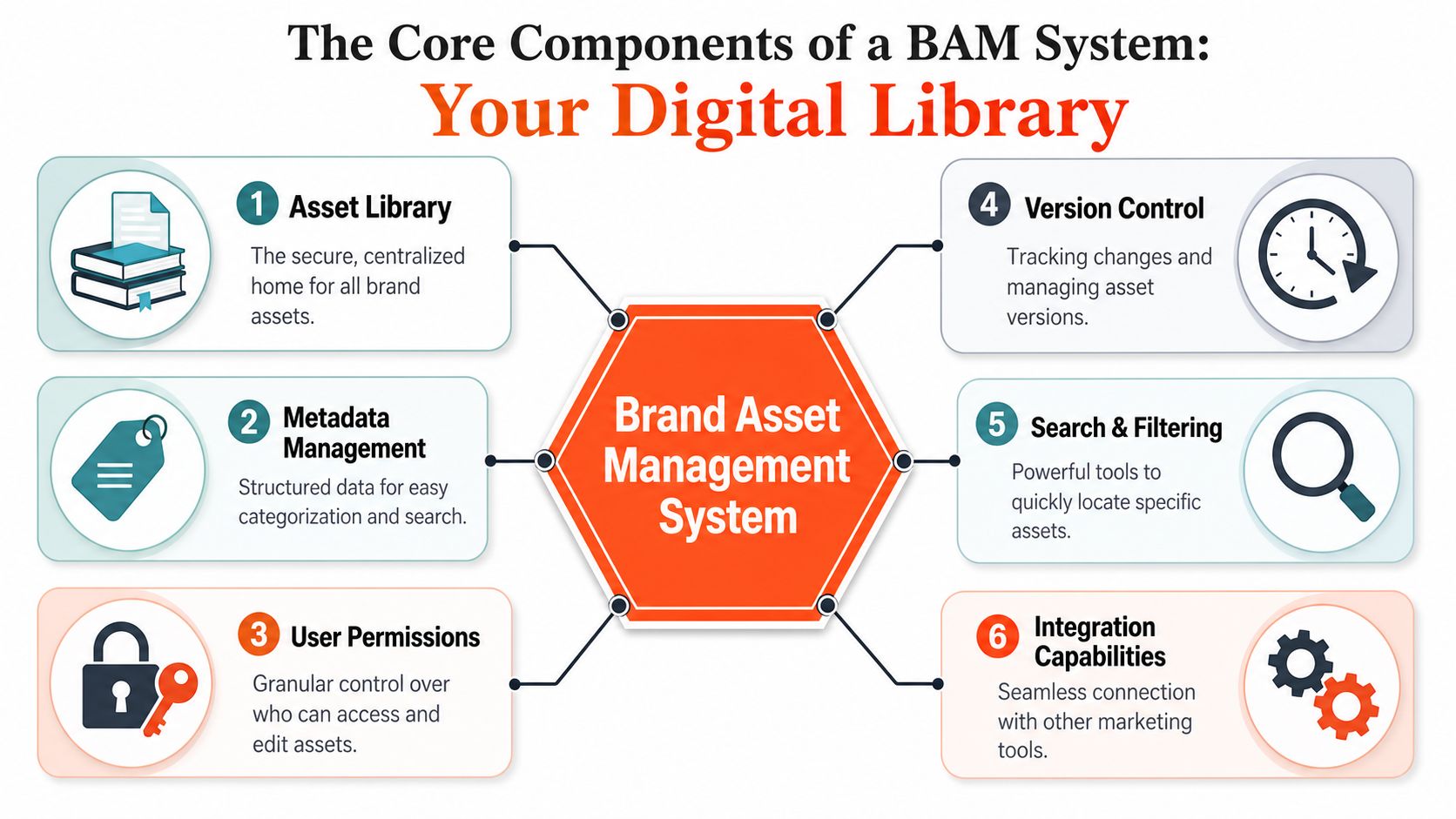
A good BAM system works like a digital library. The library isn't useful because books exist. It's useful because people can find the right book, confirm it's the latest edition, know whether they're allowed to borrow it, and understand where it belongs.
Why a shared drive is not a system
Many teams think they have brand asset management because they have Google Drive, Dropbox, SharePoint, or a DAM. Those tools can be part of the stack, but they don't solve governance by themselves.
The biggest failure point is uncontrolled access. According to Brault's explanation of brand asset management, expert-level systems reduce brand dilution by enforcing access permissions, version control, and distribution lineage. In plain terms, that means the system controls who gets what, which file is current, and how that file travels from the brand team into real use.
That's how you stop a sales rep from downloading a raw design file when they only need a presentation-ready logo. It's also how you prevent external partners from rummaging through half-finished creative.
For teams building or updating a visual identity, Blitzrecorder visual identity guide is a good example of the kind of usage clarity a BAM system should support.
The six components that actually matter
These are the parts that separate a functioning BAM system from a file dump.
Asset library
This is the central home for approved brand materials. It should contain final, usable assets, not every draft ever made. If teams can't tell what's approved, the library fails its first job.Metadata management
Files need context. Not just file names, but structured tags like asset type, market, channel, campaign, and status. Metadata is what makes search work for the people using assets, not just the people who created them.User permissions
Different users need different access. Designers may need source files. Sales may need locked templates. Partners may need downloadable exports only. Permission design is one of the fastest ways to reduce misuse.Version control
A logo update is useless if old files stay easier to find than the new ones. Current versions should be obvious, and retired files should be archived or blocked from normal use.Search and filtering
Most systems either earn trust or lose it through their search and filtering functions. If users can't find assets by the way they think, they'll ask in Slack or reuse local copies. For a deeper look at how search-centered organization supports scale, this piece on a digital asset library is worth reading.Integration capabilities
The asset library should connect to the places where work happens. That can include CMS tools, presentation workflows, document systems, or publishing tools. Governance is stronger when people don't have to leave their workflow to stay on-brand.
The best BAM setups hide complexity from end users. They give the brand team control and everyone else clarity.
Your Practical Implementation Roadmap
Most BAM projects fail for one reason. Teams try to install software before they define the operating rules. The better sequence is simpler. Fix the structure first, then pick the platform that supports it.
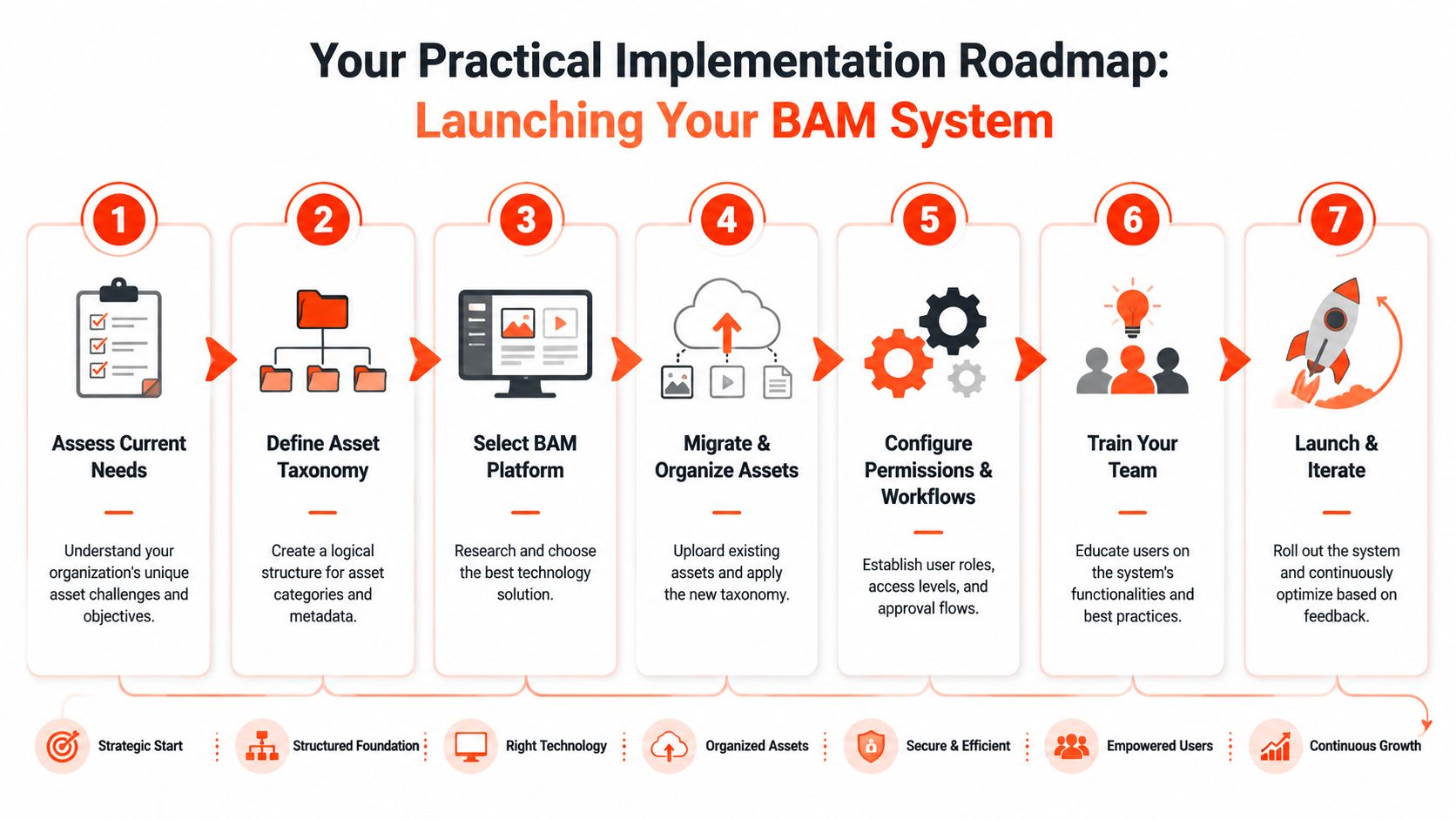
Start with the mess you already have
Begin with an asset audit. Pull files from shared drives, design tools, old campaign folders, agency handoffs, and local desktop collections. Don't overcomplicate this stage. You're trying to answer a few blunt questions:
- What assets are active: Current logos, templates, decks, social graphics, and core visual elements.
- What assets are duplicated: Slightly different exports of the same thing create confusion fast.
- What assets are outdated: These are the files that should be archived or retired.
- Who uses what: Sales, marketing, founders, freelancers, and partners all have different needs.
- Where requests bottleneck: Find the recurring approvals and interruptions.
This is also the moment to define ownership. One person needs to own the system even if multiple teams contribute to it. Without an owner, BAM becomes everyone's side project and nobody's standard.
Build around search behavior
Once you know what you have, design the taxonomy around how users look for assets, not how designers think about files. According to TDS's guidance on brand asset management systems, a taxonomy built around asset type, brand, campaign, channel, and status can reduce retrieval time by 40% compared with traditional folder hierarchies.
That finding matches what I see in practice. Folder trees often reflect internal production logic. Users don't search that way. They search for “LinkedIn keynote slide template,” “black logo png,” or “Q3 webinar promo graphic.” A taxonomy needs to support that behavior.
A practical V1 taxonomy often looks like this:
| Dimension | Example values |
|---|---|
| Asset type | Logo, template, headshot, case study graphic |
| Brand or product | Masterbrand, service line, sub-brand |
| Campaign or project | Webinar series, launch, newsletter |
| Channel | LinkedIn, Instagram, website, sales deck |
| Status | Approved, draft, retired |
If your team also needs day-to-day guidance, a clear set of brand guidelines helps turn taxonomy into actual usage consistency.
Governance has to be lightweight enough to use
Small teams often get nervous. They hear “governance” and imagine bureaucracy. That's the wrong model. Good governance removes friction. It doesn't add ceremony.
A practical workflow usually includes:
Ingestion
New assets enter through a clear path. Someone submits them, and they are tagged before going live.Approval
A designated owner confirms the asset meets current brand standards.Distribution
The system routes the right files to the right audiences. Internal teams may access more than freelancers or partners.Retirement
Expired, replaced, or off-strategy assets leave active circulation.
The same TDS article notes that workflow governance tools can enforce brand rules at the point of creation. That's an important distinction. The strongest systems don't just store approved assets. They shape how content gets made in the first place.
A BAM rollout works when the default path is also the easiest path.
One more step often gets missed. Measure commercial relevance, not just downloads. Some teams accumulate massive libraries and never ask which assets still matter. A practical review process should identify which materials are frequently used, which are obsolete, and which no longer support the business. That keeps the system lean and trusted.
For smaller organizations, this roadmap can be lighter. You may not need enterprise software, layered permissions, or complex integrations on day one. But you still need naming rules, ownership, version control, and an approval path. Lightweight discipline beats elaborate chaos every time.
Connecting BAM to Content Repurposing and Distribution
The storage side of brand asset management is only half the job. The other half is activation. Assets create value when they show up consistently in real content across the channels where people see your brand.
That's where many systems break down. Teams may have clean libraries and decent guidelines, yet their output still drifts once content gets repurposed across social platforms, newsletters, video snippets, and sales collateral.
Storage is only half the job
This problem is especially sharp for lean teams. According to Ansira's discussion of brand asset management, 73% of marketers struggle with consistent branding across channels due to fragmented workflows. The same source points to a Dynamic Brand Kit approach used by 3,000+ businesses via AI-driven tools to automate brand rule application during content repurposing.
That matters because small teams rarely have a dedicated brand operator reviewing every asset before it goes live. They need systems that carry brand rules into execution, not just repositories that store files.
Here's the trade-off in plain language:
Strict enterprise model
Strong control, but often too heavy for solo creators and small consultancies.Loose creator model
Fast publishing, but brand drift shows up quickly when content is repurposed at speed.Dynamic brand kit model
Approved colors, logos, templates, and voice rules stay embedded in the content workflow.
For teams publishing frequently, your asset system should connect directly to your content distribution platform, not sit in a separate tab that people forget to check.
What a dynamic brand kit looks like
A dynamic brand kit is not a PDF that goes stale after a redesign. It's a living ruleset inside the tools that help produce and distribute content. The logo version updates once. Templates reflect the latest palette automatically. Font and layout choices stay constrained enough to protect the brand without forcing manual checks on every post.
That's the practical answer to the consistency versus agility problem.
A lot of content teams also underestimate the distribution side. Repurposing is not just cropping one asset into another format. It requires preserving recognizability while adapting to context. This means a thoughtful effective content distribution strategy becomes part of BAM, not separate from it.
If your brand rules disappear the moment content leaves the design team, your BAM system stops too early.
For consultants, coaches, and solo creators, the right move is usually not to buy the most complex enterprise platform. It's to create a manageable operating layer that keeps visual identity and messaging aligned as content moves between channels. That can be surprisingly lightweight, as long as the system is current, centralized, and tied to execution.
Real-World Brand Asset Management Examples
A large enterprise and a solo operator won't run the same stack, but the principles are identical.
Take Coca-Cola as a familiar enterprise example. The challenge isn't just having iconic assets. The challenge is governing those assets across regions, campaigns, partners, and formats without letting local execution distort a globally recognized identity. That kind of environment depends on tight permissions, current versions, and clear usage rules. The brand team can't rely on everyone remembering the standards from memory.
Now compare that with a small consulting firm run by a founder and one contractor. They may only manage a logo suite, presentation templates, headshots, social post designs, newsletter graphics, and a few lead magnet covers. Still, the same problems appear. The founder has old files in Dropbox. The contractor has exports saved locally. A podcast guest graphic uses the wrong colors because no one checked the current palette.
The lightweight fix is straightforward:
- Centralize approved files in one cloud location
- Use naming conventions that make file purpose obvious
- Separate source files from ready-to-use exports
- Keep a short usage guide for logos, colors, and typography
- Retire old assets instead of leaving them searchable forever
The enterprise version is more complex. The small-team version is more manual. But neither succeeds without ownership and clarity. Brand asset management scales down better than people think, as long as the system is designed for the people using it.
Your Brand Asset Management Starter Checklist
If you're starting from scratch, don't try to solve everything in one sprint. Build a workable first version that removes the most common points of failure.
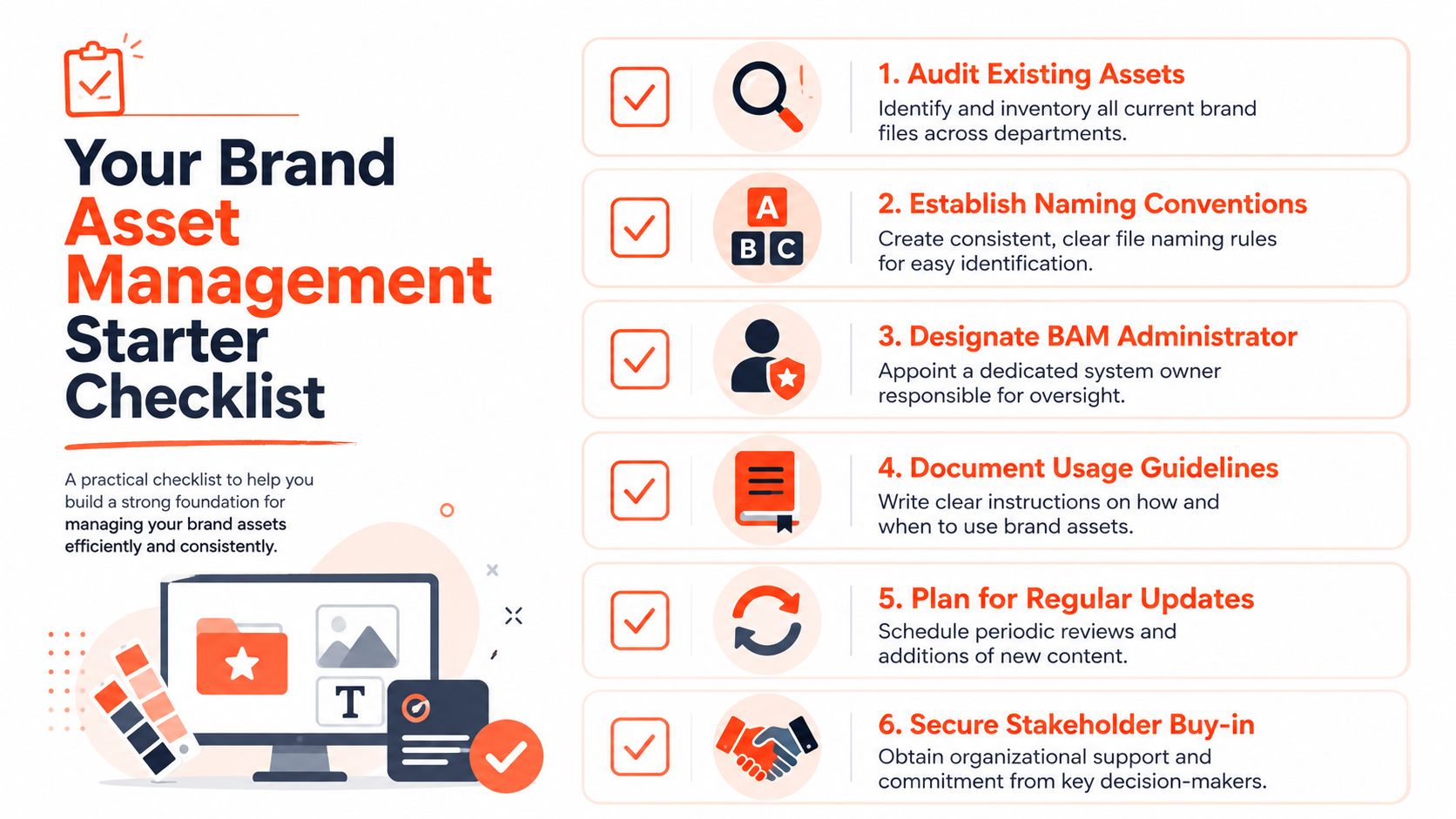
Use this checklist as your minimum viable system:
- Audit existing assets and identify what is current, duplicated, outdated, or missing.
- Establish naming conventions that make files understandable without opening them.
- Designate a BAM owner who approves changes and maintains order.
- Document usage guidelines for logos, color palettes, typography, templates, and partner access.
- Choose a central storage solution that your team will use consistently.
- Define simple permissions so not everyone can edit everything.
- Create an approval path for new assets before they enter the library.
- Set a retirement process for outdated files so they stop circulating.
- Review asset performance so the library doesn't become a warehouse of forgotten files.
The importance of that last point is frequently underestimated. According to Your Marketing Team's discussion of maximizing brand assets, up to 60% of stored files go unused when teams don't know their commercial impact. A performance-first approach helps teams decide which assets to keep, refresh, or retire instead of hoarding everything.
A simple system that people trust beats a complex one that nobody follows.
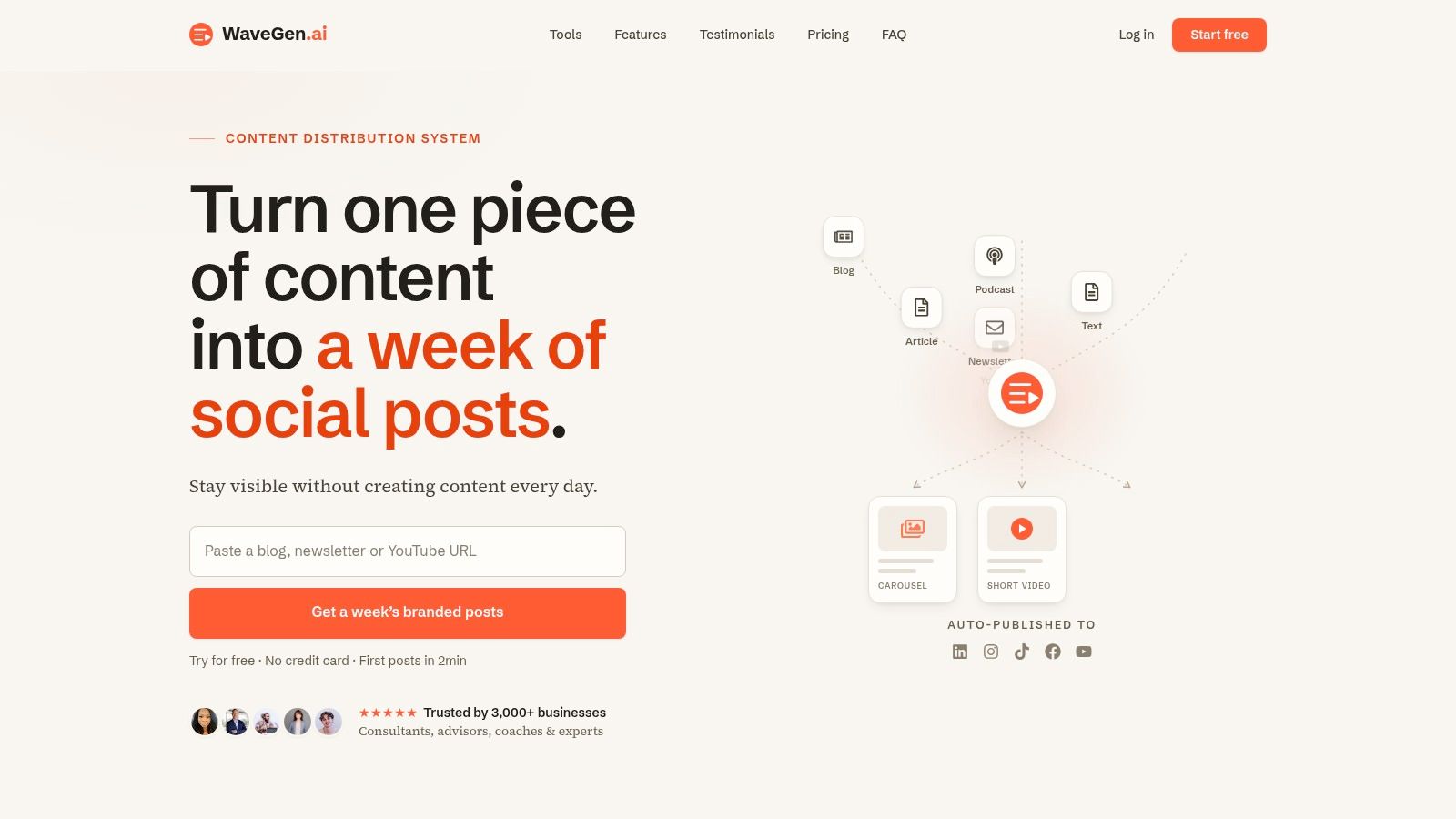
If you publish regularly and want your brand assets to stay consistent while turning one piece of long-form content into platform-ready posts, videos, and visuals, WaveGen.ai is built for that workflow. It lets you set your brand kit once, then apply those rules across repurposed content without rebuilding every asset by hand.
brand asset management
digital asset management
brand consistency
marketing operations
content strategy
Turn this kind of writing into a week of social content.
Paste a blog post, newsletter, or rough draft — WaveGen turns it into publish-ready carousels, captions, and slideshows for every channel.
No credit card · First posts in 2min