July 18, 2026
15 min read
Digital Asset Library: Build Your 2026 Content Hub
Discover what a digital asset library is & how to build one. Explore components, implementation, & workflows for transforming assets into brand content.

You're probably already running a digital asset library. It just doesn't feel like one.
Your logo lives in Google Drive, the latest webinar slides are in someone's desktop folder, product screenshots sit in Dropbox, and approved social graphics get passed around in Slack. A teammate asks for “the newest version,” and three people send three different files. Someone gives up and recreates the asset from scratch.
That's the point where content operations stop being a file problem and start becoming a brand problem.
A digital asset library gives your team one place to store, find, approve, and reuse the files that keep marketing moving. Done well, it reduces confusion, keeps brand materials current, and turns scattered content into a working system. Done poorly, it becomes another folder maze with a nicer interface.
Most guides stop at storage. They explain where files go, how tags work, and why version control matters. Useful, but incomplete. The bigger opportunity is connecting your library to what happens next: repurposing, publishing, and keeping a steady flow of on-brand content across channels without redesigning the same idea over and over.
Table of Contents
- The Hidden Costs of Content Chaos
- What Is a Digital Asset Library Really
- The Four Pillars of a Strong Digital Asset Library
- How to Implement and Govern Your Library
- Workflows That Turn Assets into Audience Growth
- Integrating Your Library with Your Marketing Stack
- From Asset Storage to a Brand-Building Engine
The Hidden Costs of Content Chaos
The first sign of content chaos usually looks small. A designer uploads a revised logo to Slack because it's faster than updating the shared drive. Sales asks marketing for the current deck, then keeps a copy locally “just in case.” A contractor downloads a folder of campaign graphics and renames half the files. None of this feels dramatic in the moment.
Then launch day arrives. The wrong webinar thumbnail goes out. An old headshot appears on a partner page. Someone rebuilds an asset that already existed because nobody could find it quickly enough.
That's why teams outgrow generic storage before they realize they've outgrown it. They don't just need more space. They need order, retrieval, and confidence that the file they're using is the right one.
The shift is happening across the market. The digital asset management market, which powers these libraries, was valued at USD 4.22 billion in 2023 and is projected to reach USD 11.94 billion by 2030 according to Grand View Research coverage summarized by PostNitro. That projection matters because it reflects a broader move from scattered files to structured content systems.
Small daily delays become operational drag
Content chaos rarely announces itself as a crisis. It shows up as repeated friction:
- Search friction: People ask where assets live instead of knowing.
- Version confusion: Teams hesitate before publishing because they aren't sure a file is current.
- Recreation loops: Someone rebuilds a template, social graphic, or presentation that already exists.
- Brand drift: Different channels start using slightly different visuals, copy, or formatting.
If your team handles a lot of images, galleries, and visual archives, reviewing the best photo management tools can help clarify what good organization looks like before you scale a broader content system.
A messy content system doesn't stay messy in one place. It spreads into approvals, publishing, handoffs, and brand consistency.
Why this matters more for growing teams
A solo creator can sometimes work from memory. A growing team can't. Once multiple people create, edit, approve, and publish content, your process needs a dependable home for core assets. Otherwise, every handoff introduces doubt.
A digital asset library is that home. It gives the team a place where approved files live, where naming makes sense, and where nobody has to guess which file should be used in public.
What Is a Digital Asset Library Really
A shared drive is like a crowded attic. Things are technically stored there, but finding the right item depends on memory, luck, and whoever labeled the box.
A digital asset library is closer to a public library. It has shelves, categories, a search system, and rules for what belongs where. Beyond these features, it also provides context. You're not just storing a file. You're making it findable, understandable, and usable.
That distinction matters. Teams often think they need “better folders” when they really need a system of record for brand assets.
A library, not a dumping ground
In a proper library, books aren't tossed into random piles. They're classified so that anyone can locate them without asking the librarian where each title sits. The same principle applies to digital assets.
Your digital asset library should help people answer questions like:
- Is this approved?
- Is this the latest version?
- Who should use it?
- Where is it allowed to appear?
- What campaign or product does it belong to?
Without that structure, people create workarounds. As Scaleflex notes in its digital asset management statistics guide, teams without a proper library create shadow libraries in unofficial Slack channels and messy Google Drive folders because users can't find what they need. The practical test is whether the right person can find the right asset in under 30 seconds, and most companies fail that benchmark.
The single source of truth
A digital asset library becomes your single source of truth for files that matter to the brand. That usually includes logos, brand photos, campaign graphics, videos, slide templates, lead magnets, podcast art, approved headshots, and core documents.
It often helps to think of it alongside your internal documentation. If you're also cleaning up process knowledge, this Markdown Converters' knowledge base guide is useful because strong asset systems and strong knowledge systems usually mature together.
Practical rule: If people ask for assets in chat more often than they retrieve them themselves, the system isn't functioning as a library yet.
What it is not
A digital asset library is not:
- Just cloud storage: Google Drive and Dropbox store files, but storage alone doesn't create reliable retrieval.
- Only for large brands: Small teams feel the pain sooner because fewer people are available to fix confusion manually.
- Only for finished design files: The best libraries support usage, not just archiving.
That last point is where many teams get tripped up. They build a nice repository, then leave the actual repurposing work outside the system. Files are easy to locate, but still hard to turn into content for LinkedIn, Instagram, YouTube, or email. The result is a library that stores assets well but doesn't help your team publish faster.
The Four Pillars of a Strong Digital Asset Library
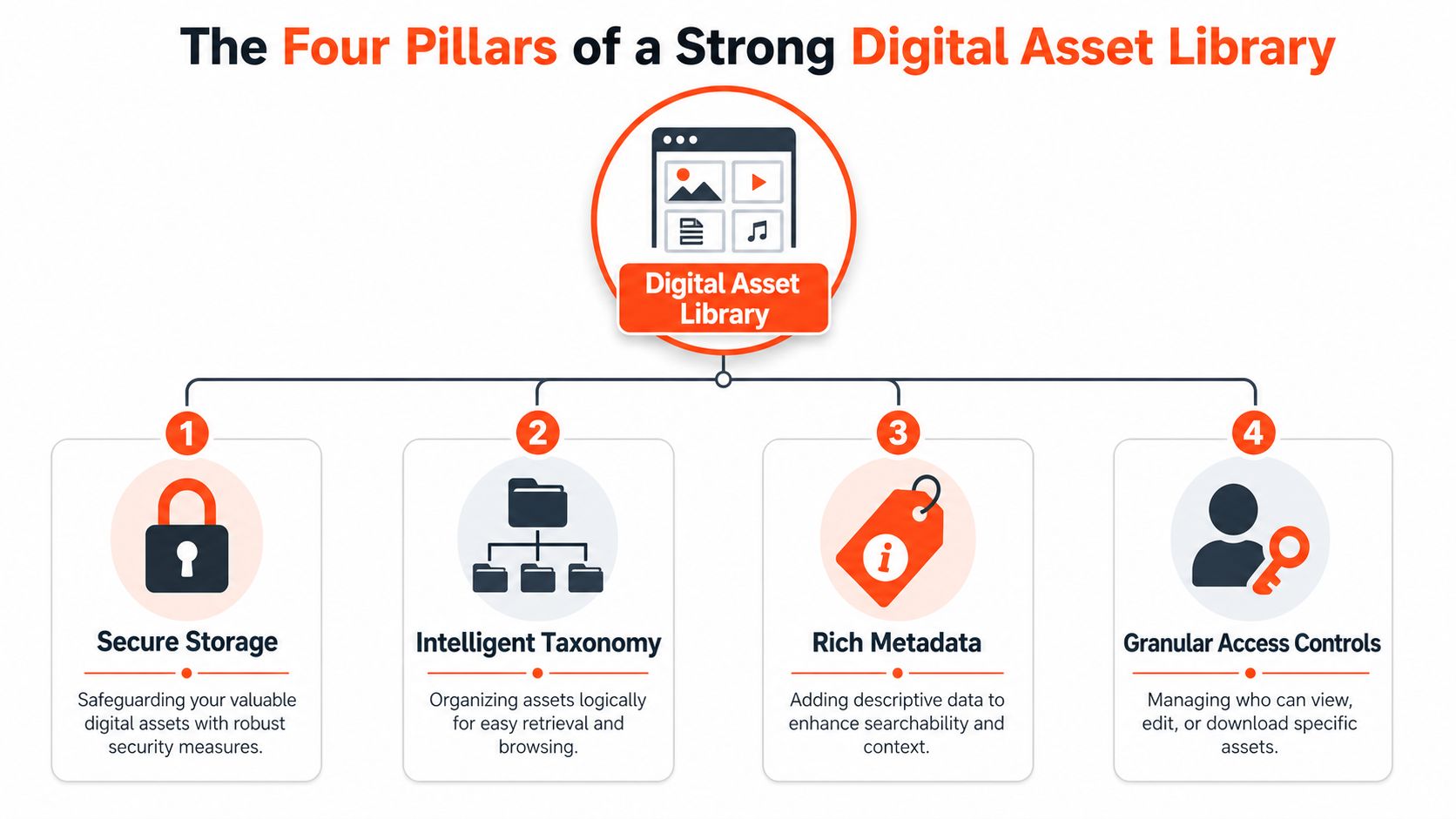
A useful digital asset library rests on four basics. Miss one, and the whole system gets shaky. You might still have files in one place, but you won't have a library people trust.
Secure storage protects the originals
The first pillar is simple. Assets need a dependable home.
That means your approved logos, videos, templates, and campaign files should live in a system where the latest version is preserved and easy to access. If final files are mixed with random exports, personal drafts, and duplicate downloads, the library loses credibility fast.
Think of secure storage as the locked building and climate-controlled archive. The collection stays intact, and staff know the official copy won't disappear when someone leaves the company or reorganizes their laptop.
Taxonomy creates the shelf system
Taxonomy sounds technical, but it's just your organizing logic.
In a physical library, readers browse by section, genre, author, or subject. In a digital asset library, your taxonomy might organize by brand, campaign, content type, audience, funnel stage, product line, or channel. The point isn't to create dozens of nested folders. The point is to choose a structure people can predict.
A coach might sort assets by offer, platform, and asset type. An agency might sort by client, campaign, and status. A small SaaS team might use product area, audience segment, and format.
If your business is also tightening broader strategic systems, this AI-powered growth system offers a helpful way to think about foundational structures that support scaling.
Metadata acts like the catalog card
Metadata is the information attached to the asset. If taxonomy is the shelf system, metadata is the catalog entry that tells you what the item is and why it matters.
Useful metadata often includes:
- Asset type: Logo, headshot, webinar clip, ad creative, case study cover
- Usage context: Social, sales, web, internal
- Status: Draft, approved, archived
- Owner: Marketing, brand, product marketing, agency partner
- Related topic: Product launch, event, service line, campaign theme
A strong metadata model saves your team from guessing. Someone searching “approved square founder photo for LinkedIn” should be able to find it without knowing the exact filename.
For teams formalizing brand usage rules, brand guideline documentation helps define what your library should label and protect.
When metadata is weak, people rely on memory. When memory fails, they rely on chat. When chat becomes search, the library has already broken down.
Access controls keep circulation orderly
Libraries let different people do different things. Some can check out books. Some can reshelve them. Staff can update records. Visitors can browse but not rewrite the catalog.
Your digital asset library needs that same discipline. Interns may need view access. Designers may upload and replace files. Sales may download approved collateral but not edit it. External partners may only see a limited collection.
This isn't about being restrictive for its own sake. It's about preventing accidental overwrites, protecting unfinished work, and keeping approved assets separate from in-progress material.
When these four pillars work together, the library becomes easier to trust. And trust is what makes people stop asking, “Can someone send me the right version?”
How to Implement and Govern Your Library
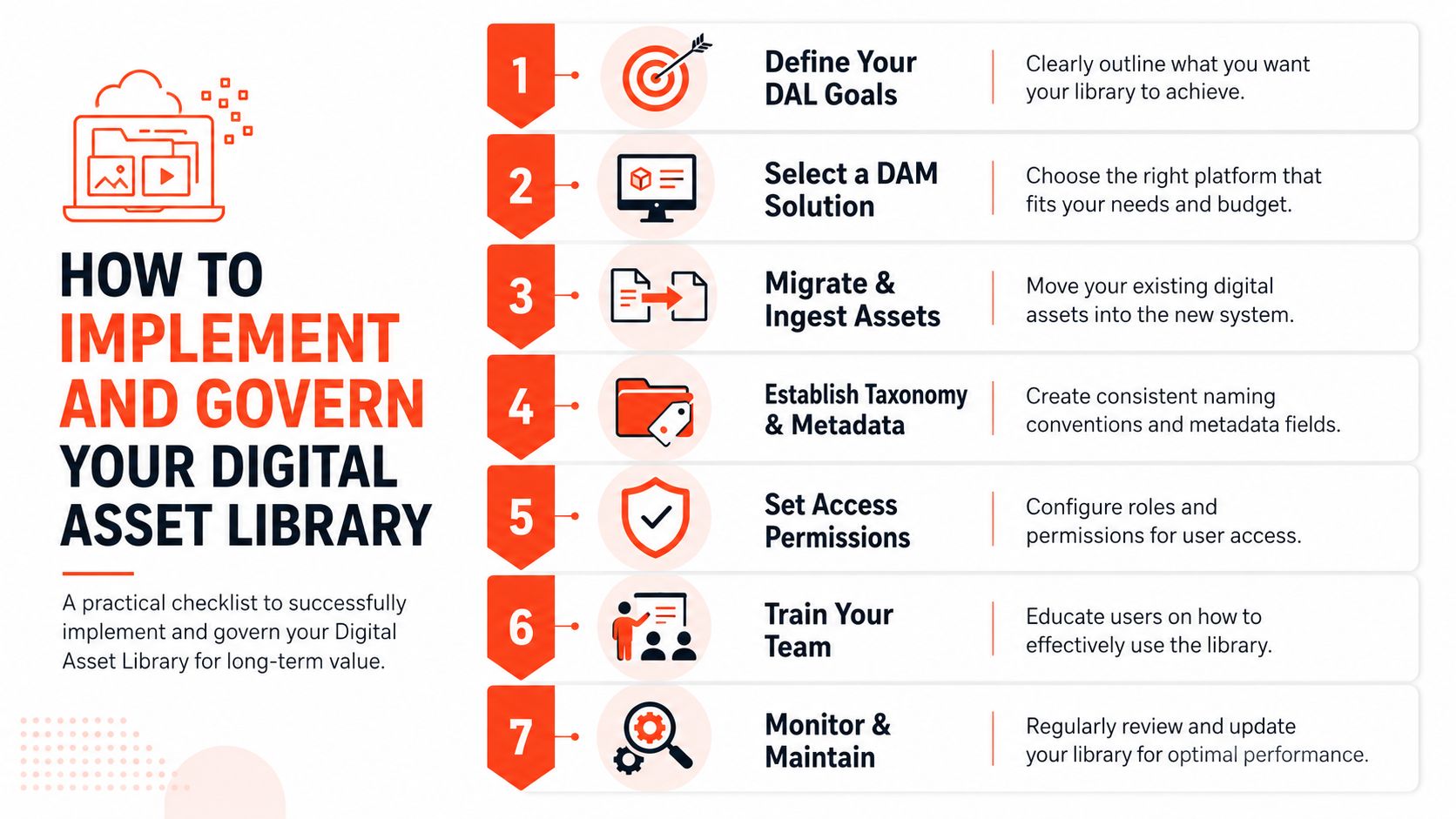
Most digital asset library projects fail in a very ordinary way. The team picks a platform, uploads a pile of files, and assumes structure will emerge later. It won't.
A library only works when someone decides what belongs inside, how things are named, who can add material, and what gets archived. Governance isn't extra admin work. It's the thing that stops your shiny new system from turning into another crowded drive.
Start with what your team actually needs
Don't begin by importing everything. Begin by identifying the files people request repeatedly and the moments when confusion hurts most.
For many teams, that includes:
- Brand essentials: Logos, headshots, color files, templates, boilerplate copy
- Active campaign assets: Current launch materials, approved visuals, promo videos
- Evergreen content: Case study graphics, webinar clips, lead magnet covers, product screenshots
- Sales and partner assets: Decks, one-pagers, bios, event materials
You also need a workflow for approvals. If assets become “official” without a clear review path, the library won't stay clean. A documented content approval workflow helps define when an asset is ready for wider use and who makes that call.
Build intake rules before the library gets crowded
Governance starts at upload.
If people can add anything, using any filename, with any status, the mess returns immediately. That's where many teams hit audit fatigue. According to the UGC Academy insight shared on YouTube, 70% of teams keep orphaned or unfinished files due to a lack of enforced intake checklists, which degrades the library's searchability and speed.
That number explains why “we'll clean it up later” rarely works. Later arrives when the system is already overloaded.
A practical intake checklist should answer:
- Is this file approved for use?
- Who owns it?
- What is its intended distribution purpose?
- What tags must be added before upload?
- Should it expire or be archived after a campaign ends?
Files without a clear use case shouldn't enter the main library. Store them elsewhere or archive them until they're approved.
Digital Asset Library Implementation Checklist
| Phase | Action Item | Key Consideration |
|---|---|---|
| Planning | Define the library's purpose | Focus on retrieval and reuse, not storage alone |
| Audit | Review current assets | Keep what is current, approved, and useful |
| Structure | Create taxonomy | Use categories your team will understand without training |
| Setup | Define metadata fields | Keep fields practical enough that people will complete them |
| Permissions | Assign access levels | Match access to role, not convenience |
| Migration | Upload core assets first | Start with high-demand, high-confidence files |
| Governance | Create intake and archive rules | Decide what never belongs in the library |
| Adoption | Train the team | Show people how to search, not just where to click |
| Maintenance | Review clutter regularly | Retire outdated, duplicate, or unfinished files |
A strong launch is usually narrower than teams expect. Start with the assets that create the most confusion today. Expand only after search, naming, and permissions feel solid.
Workflows That Turn Assets into Audience Growth
Storage solves one problem. Distribution solves the next one.
Many teams finally organize their files, then hit a second bottleneck. They can find the source asset, but they still have to manually turn it into five or six channel-specific pieces. A webinar clip needs captions and crops. A blog post needs quote cards and carousel slides. A newsletter insight needs short video hooks and platform-specific copy.
That's the repurposing gap. As PostSyncer notes in its digital asset library article, most guides focus on storage but don't explain how to systematically turn one source asset into multi-channel content without manual redesign.
One source asset becomes a week of content
Take a simple example. An advisor records a short educational video answering a common client question. The final video file enters the digital asset library with the approved title, topic tags, and thumbnail.
From that one source asset, the team can create:
- A short video cut for LinkedIn or Instagram
- A quote graphic using a key line from the transcript
- A carousel that teaches the same concept in slides
- An email visual for the next newsletter
- A blog header image tied to the same theme
The library's job isn't just to hold the original file. It should make the original easy to locate, confirm it's approved, and connect it to the variations that follow. When the repurposed pieces are also stored with clear relationships, your team stops treating each channel as a fresh design request.
A source asset becomes more valuable when the team can turn it into a family of related assets without starting from zero each time.
Where most teams get stuck
The friction usually appears in three places:
- Format changes: The original asset exists, but nobody has a reliable process for adapting it to different sizes and layouts.
- Brand consistency: Repurposed content drifts because every new variation is built manually.
- Publishing handoff: Finished derivatives sit in folders waiting for someone to upload and schedule them.
A modern workflow closes those gaps by linking asset retrieval to transformation and then to distribution. That could mean a podcast transcript becomes quote cards, short clips, and social captions. It could mean a blog article becomes platform-ready posts. It could mean a product launch deck produces teaser graphics and rollout visuals.
Later in the process, a video walkthrough can help teams see how a more connected publishing flow works in practice:
The key shift is mental. Your digital asset library isn't the end of the workflow. It's the starting point for repeatable content output.
Integrating Your Library with Your Marketing Stack
A digital asset library shouldn't sit off to the side like a storage closet. It should function more like a central station. Assets come in, get organized and approved, then move outward into the places where your team publishes and communicates.
That's where integrations matter. If people have to download a file from the library, rename it again, upload it into the CMS, then repeat the process for email or social scheduling, you haven't really removed friction. You've just centralized one part of it.
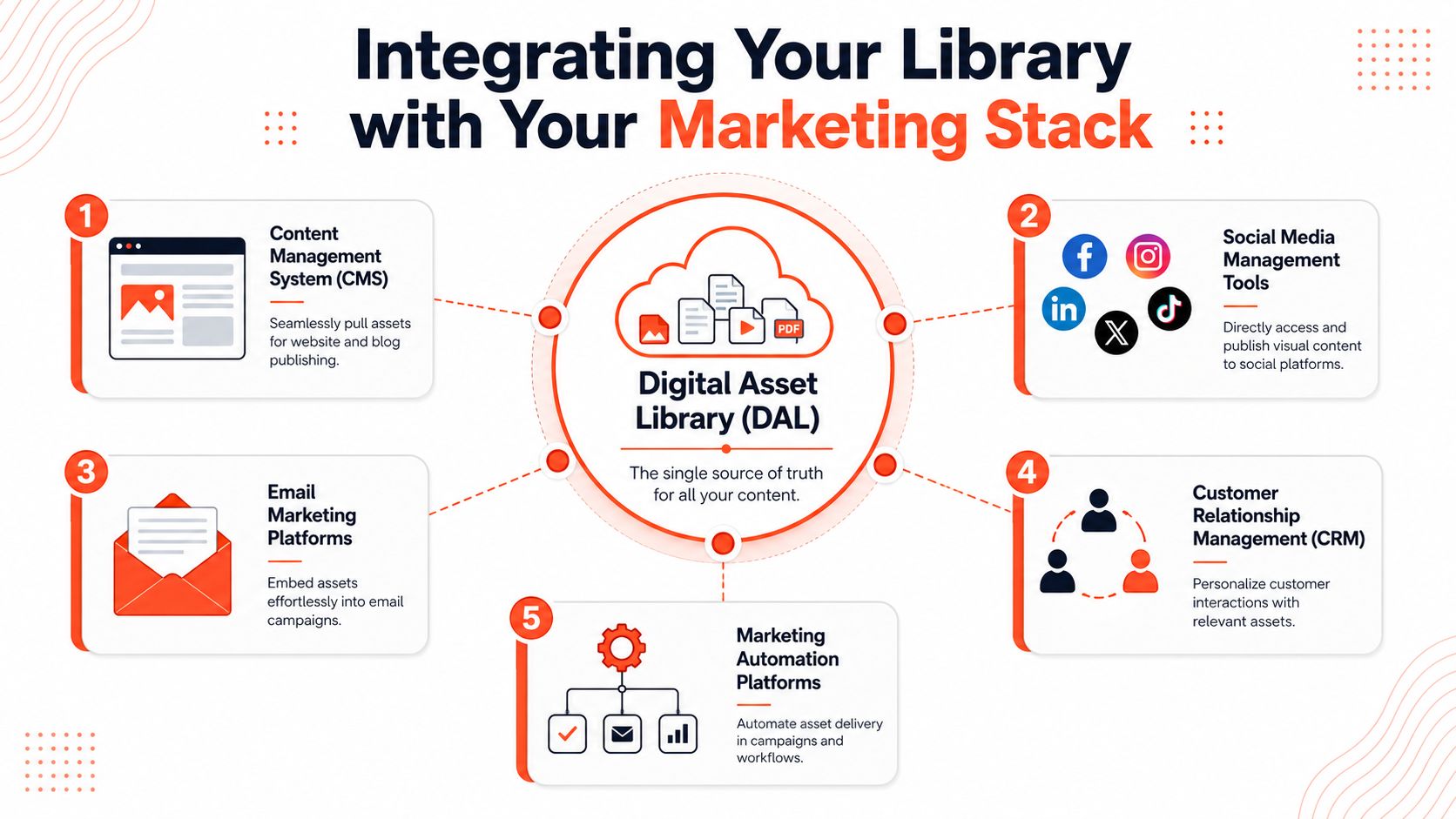
The library should feed the tools your team already uses
For most growing teams, the important connections include:
- CMS platforms: So approved images, videos, and downloads flow into blog posts and landing pages
- Design tools: So designers start from current assets instead of local copies
- Email platforms: So campaign visuals stay aligned with the approved library
- Social publishing systems: So repurposed content can move toward scheduling without another round of file hunting
If your team is mapping that broader publishing ecosystem, a good companion read is this guide to choosing a content distribution platform.
What a connected flow looks like
A healthy stack works like this: a file is approved in the library, tagged properly, and made available to the right teams. Marketing can pull it into a blog post. Sales can access the same approved version in a partner folder. Social can use the derivative versions without rebuilding them from scratch.
That kind of connection changes the role of the library. It becomes operational infrastructure. Not just a cabinet for old files, but the controlled source your publishing system depends on.
When people stop copying assets between tools by hand, you get fewer mismatched files, fewer approval mistakes, and a smoother path from idea to published content.
From Asset Storage to a Brand-Building Engine
A digital asset library starts as an organizational fix. Over time, it becomes a strategic one.
It gives your team a trusted home for approved files. It reduces the daily drag of searching, second-guessing, and recreating. It protects brand consistency by making the right asset easier to use than the wrong one. And when it's governed well, it stays useful instead of collapsing into clutter.
The bigger payoff comes when the library supports action, not just storage. That's the shift many teams miss. A file that's easy to find is helpful. A file that's easy to find, adapt, and distribute across channels is far more valuable.
For consultants, agencies, educators, coaches, and lean marketing teams, that difference matters. You don't need a giant content department to operate like one. You need a system that keeps source assets organized, keeps approvals clear, and makes repurposing repeatable.
Build your library like a real library. Give it shelves, catalog rules, circulation policies, and a clear standard for what belongs on them. Then connect it to the rest of your content workflow so the assets you create keep working long after the first publish date.
If you want that last step handled in one place, WaveGen.ai helps turn a single article, transcript, newsletter, or script into on-brand social content you can edit, schedule, and publish across channels without rebuilding everything by hand.
digital asset library
content management
dam software
content repurposing
brand assets
Turn this kind of writing into a week of social content.
Paste a blog post, newsletter, or rough draft — WaveGen turns it into publish-ready carousels, captions, and slideshows for every channel.
No credit card · First posts in 2min